
Introduction
Thank you for choosing the CRISLEX Portable Neck Fan. This device is designed to provide personal cooling with its hands-free, wearable design, LED display, and multiple speed settings. Please read this manual thoroughly before use to ensure proper operation and maintenance.
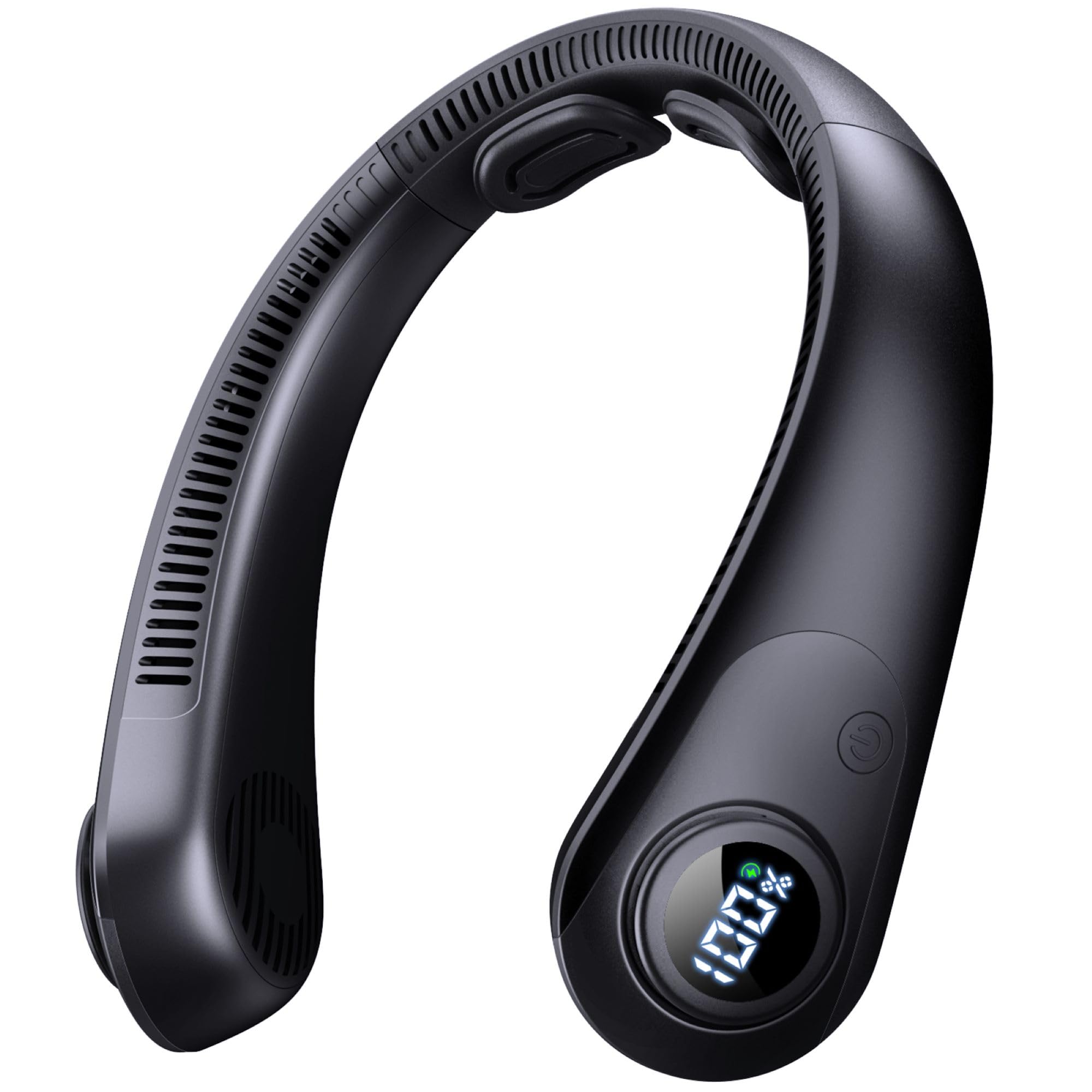
This neck fan features a bladeless design for safety and comfort, a digital LED display for battery and speed indication, and five adjustable wind speeds. It is lightweight and designed for extended wear.
Important Safety Instructions
- Do not insert fingers or foreign objects into the fan outlets.
- Keep the device away from water or other liquids.
- Do not disassemble, repair, or modify the device. Contact customer support if service is required.
- Keep out of reach of children and pets.
- Do not expose to extreme temperatures or direct sunlight for prolonged periods.
- Use only the provided charging cable or a certified equivalent.
Package Contents
Ensure all items are present in the package:
- 1 x CRISLEX Portable Neck Fan
- 1 x USB-C Charging Cable
- 1 x User Manual

Setup
Charging the Device
- Locate the USB-C charging port on the side of the neck fan.
- Connect the provided USB-C cable to the fan's charging port.
- Connect the other end of the USB-C cable to a compatible USB power adapter (not included) or a computer's USB port.
- The LED display will show the battery percentage during charging. A full charge typically takes 2.5-3 hours.
- Once fully charged, the LED display will show 100%. Disconnect the charging cable.

Wearing the Neck Fan
The CRISLEX Portable Neck Fan is designed for comfortable, hands-free use. Simply place it around your neck with the air outlets facing upwards towards your face and neck. The flexible design allows for a comfortable fit.
Operating Instructions
Power On/Off and Speed Adjustment
- Power On: Press and hold the power button (usually located near the LED display) for a few seconds until the fan turns on and the LED display illuminates.
- Adjust Speed: Briefly press the power button to cycle through the 5 available wind speeds. The LED display will show the current speed level (1-5).
- Power Off: Press and hold the power button again for a few seconds until the fan turns off and the LED display goes dark.


LED Display Information
- The LED display shows the current battery percentage when the fan is on or charging.
- When adjusting the speed, the display briefly shows the selected speed level (1-5).
Usage Scenarios
The CRISLEX Portable Neck Fan is suitable for various activities:
- Outdoor activities: hiking, biking, camping, cycling, mountaineering, commuting.
- Indoor use: housework, kitchen, yard work, office, driving.
- Sports & Fitness: gym workouts.
- Leisure: travel, vacations, cruises, beach, music festivals, theme parks.

Maintenance
Cleaning
- Ensure the fan is turned off before cleaning.
- Wipe the exterior of the fan with a soft, dry cloth.
- Do not use abrasive cleaners, solvents, or immerse the device in water.
- Gently clean the air inlets and outlets with a soft brush or cotton swab to remove dust buildup.
Storage
- Store the fan in a cool, dry place away from direct sunlight.
- If storing for an extended period, charge the battery to approximately 50% to prolong its lifespan.
Troubleshooting
| Problem | Possible Cause | Solution |
|---|---|---|
| Fan does not turn on | Battery is depleted. | Charge the fan using the provided USB-C cable. |
| Power button not pressed correctly. | Press and hold the power button for 2-3 seconds to turn on. | |
| Weak airflow | Fan speed is too low. | Briefly press the power button to increase the speed level. |
| Air inlets/outlets are blocked. | Ensure no obstructions are blocking the air inlets or outlets. Clean if necessary. | |
| Fan stops unexpectedly | Battery is low. | Recharge the fan. The LED display will show battery percentage. |
| LED display not working | Device is off or battery is completely drained. | Turn on the device or connect it to a charger. |
Specifications
| Feature | Detail |
|---|---|
| Brand | CRISLEX |
| Model Name | Neck Fan with LED Display |
| Part Number | CR-US-FZX02-BK |
| Color | Black |
| Electric Fan Design | Wearable Fan |
| Power Source | Battery Powered |
| Product Dimensions | 7.7"D x 7.7"W x 2.3"H |
| Number of Speeds | 5 |
| Noise Level | 45 Decibels |
| Wattage | 10 watts |
| Indoor/Outdoor Usage | Outdoor |
| Control Method | Touch |
| Cordless | Yes |
| Material | Plastic or Lightweight Metal Alloy |
Product Videos
CRISLEX Portable Neck Fan Rechargeable with LED Display
Video: An overview of the CRISLEX Portable Neck Fan, demonstrating its features including the LED display and rechargeable functionality. (Duration: 2:11)
CRISLEX Portable Neck Fan that Blow Cold Air Rechargeable
Video: A demonstration of the CRISLEX Portable Neck Fan's cooling capabilities and rechargeable design. (Duration: 0:25)
NECKFAN
Video: A brief visual of the CRISLEX Neck Fan in use. (Duration: 0:18)
Warranty and Support
For warranty information or technical support, please refer to the contact details provided with your purchase or visit the official CRISLEX website. Keep your purchase receipt as proof of purchase for any warranty claims.


