
Introduction to Your Sous Vide Cooker
The Generic Sous Vide Cooker is a precision immersion circulator designed to provide consistent and perfectly cooked results. This manual will guide you through the setup, operation, and maintenance of your new appliance.

Image: The Sous Vide Cooker, a sleek stainless steel and black device, stands upright next to a perfectly cooked steak and a smartphone displaying a cooking application. This illustrates the product's primary function and its smart control capabilities.
Why Choose Sous Vide Cooking?
Sous vide cooking involves precise temperature control to cook food evenly and thoroughly, locking in flavors and nutrients. This method ensures food is never overcooked and always tender. Your Sous Vide Cooker features a 1300W heating element for fast heating and a 360° water circulation system for uniform temperature distribution. It is designed for ease of use with both touch controls and mobile app connectivity.
Key Product Features
- Two Operation Methods: Control your Sous Vide Cooker via the intuitive touch button panel with 4 preset programs (Steak, Fish, Chicken, Vegetables) or remotely through the dedicated mobile application.
- IPX7 Waterproof Certified: The device is designed with IPX7 waterproofing, ensuring safety and durability by preventing steam and water from entering internal components.
- Healthy Cooking: The precise temperature control (0°C - 90°C / 32°F - 194°F) preserves nutrients and vitamins, resulting in fresh, juicier, and healthier meals compared to conventional cooking methods.
- Precision Temperature and Timer: Achieve accurate temperature control to ±0.1°C (0.2°F) and set cooking times up to 99 hours and 59 minutes, ensuring optimal results for any food type.
- 360° Fast Heat Circulation: Equipped with a stainless steel pump, the circulator ensures efficient and uniform heat distribution throughout the water bath, maintaining a constant temperature and preventing hot spots.

Image: An infographic highlighting the key features of the immersion sous vide cooker, including user-friendly smart buttons, WiFi operation, PTC precision temperature control, IPX7 waterproof rating, 360° water circulation, and safe & fast operation.

Image: A collage showcasing different types of food perfectly cooked using the sous vide method, such as steak, chicken, eggs, lamb, salmon, and pork. Each image includes suggested cooking temperatures and times, demonstrating the versatility of the appliance.
Setup Guide
- Choose a Container: Select a pot or large heat-safe container suitable for the amount of food you plan to cook. Ensure it can hold enough water to submerge your food.
- Attach the Cooker: Securely attach the Sous Vide Cooker to the side of your chosen container using the adjustable clamp. Ensure it is firmly in place.
- Fill with Water: Fill the container with water, ensuring the water level is between the "MIN" and "MAX" markings on the Sous Vide Cooker. Do not exceed the "MAX" line.
- Prepare Food: Place your food in a vacuum-sealable bag. Remove as much air as possible from the bag before sealing.
- Submerge Food: Once the water reaches the desired temperature, carefully submerge the sealed food bag into the water bath. Ensure the bag is fully immersed.
- Connect Power: Plug the Sous Vide Cooker into a grounded electrical outlet. The display will illuminate.

Image: The Sous Vide Cooker is shown securely clamped to the side of a stainless steel pot, with its heating element submerged in water. A piece of meat on a cutting board is visible in the background, illustrating the setup for cooking.
Operating Instructions
A. Touch Button Operation
The Sous Vide Cooker features a user-friendly digital control panel for direct operation.
- Power On: Press the Power Button (usually indicated by a power symbol) to turn on the device.
- Set Temperature: Use the "+" and "-" buttons to adjust the desired cooking temperature. The temperature range is 0°C to 90°C (32°F to 194°F).
- Set Timer: Press the Set Button (often a gear or clock icon) to switch to timer setting mode. Use the "+" and "-" buttons to set the cooking time (up to 99 hours and 59 minutes).
- Use Presets: For common foods, select one of the 4 preset programs (Steak, Fish, Chicken, Vegetables) by pressing the corresponding icon on the control panel. This will automatically set recommended temperature and time.
- Start Cooking: Once temperature and time are set, the device will begin heating the water and circulating it. The display will show the current water temperature and remaining time.

Image: A detailed view of the Sous Vide Cooker's digital control panel. Labels point to the Power Button, Set Button, Time & Temperature Setting Keys (+/-), and the preset icons for Steak, Fish, Chicken, and Vegetables, illustrating its simple design and ease of use.
B. Mobile App Operation (WiFi Smart App Control)
For convenient remote control and access to more recipes, you can connect your Sous Vide Cooker to your smartphone via WiFi.
- Download App: Download the official companion app for your Sous Vide Cooker from your device's app store (e.g., Apple App Store or Google Play Store). Refer to the product packaging or quick start guide for the specific app name.
- Register/Login: Open the app and follow the on-screen instructions to register a new account or log in if you already have one.
- Connect to WiFi: Ensure your Sous Vide Cooker is plugged in and powered on. In the app, select "Add Device" or a similar option. Follow the app's instructions to connect the cooker to your home WiFi network. This usually involves putting the cooker into pairing mode (refer to the cooker's display or manual for specific instructions).
- Remote Control: Once connected, you can set temperature, time, start/stop cooking, and monitor progress directly from your smartphone.
- Access Recipes: The app may offer a library of sous vide recipes with pre-programmed settings.

Image: This visual demonstrates the dual control methods for the sous vide cooker. The top panel shows the device connected via WiFi to a smartphone app, enabling remote control. The bottom panel illustrates direct control using the touch buttons on the device itself, highlighting the convenience of both options.
Care and Maintenance
- Cleaning the Circulator: After each use, unplug the device and allow it to cool completely. The stainless steel lower part can be wiped clean with a damp cloth. Due to its IPX7 waterproof rating, the entire lower section can be rinsed under running water, but avoid submerging the top control panel.
- Descaling: Over time, mineral deposits from water may accumulate on the heating element. To descale, fill a pot with water and add 1 cup of white vinegar. Clamp the sous vide cooker into the pot, ensuring the heating element is submerged. Run the device at 60°C (140°F) for 30 minutes. Rinse thoroughly afterward. Perform descaling every few months or as needed based on water hardness.
- Storage: Ensure the device is completely dry before storing. Store in a cool, dry place away from direct sunlight.
- Do Not Disassemble: Do not attempt to disassemble the unit. Refer to qualified service personnel for any repairs.
Troubleshooting
| Problem | Possible Cause | Solution |
|---|---|---|
| Device does not power on. | Not plugged in; power outlet issue; device malfunction. | Ensure the power cord is securely plugged into a working outlet. Test the outlet with another appliance. If problem persists, contact customer support. |
| Water not heating or heating slowly. | Water level too low; heating element calcification; large volume of cold water. | Check water level and add more if necessary (between MIN/MAX). Perform descaling if mineral buildup is visible. Use warmer tap water to reduce heating time for large volumes. |
| Temperature display is inaccurate. | Sensor issue; mineral buildup on sensor. | Ensure the sensor area is clean. Perform descaling. If problem persists, contact customer support. |
| App cannot connect to the device. | Incorrect WiFi password; device not in pairing mode; router issues; app glitch. | Ensure correct WiFi password. Put the device into pairing mode (refer to app instructions). Restart your router and the device. Reinstall the app. Ensure your phone is on a 2.4GHz WiFi network if required by the device. |
| Error code displayed. | Specific internal error. | Note the error code and refer to the manufacturer's online resources or contact customer support for specific guidance. |
Product Specifications
| Model: | SV-9008 |
| Rated Power: | 1300W |
| Rated Voltage: | 220V |
| Temperature Range: | 0°C to 90°C (32°F to 194°F) |
| Temperature Accuracy: | ±0.1°C (0.2°F) |
| Timer Range: | 0 to 99 hours 59 minutes |
| Waterproof Rating: | IPX7 |
| Manufacturer: | FACA |
| Country of Origin: | China |
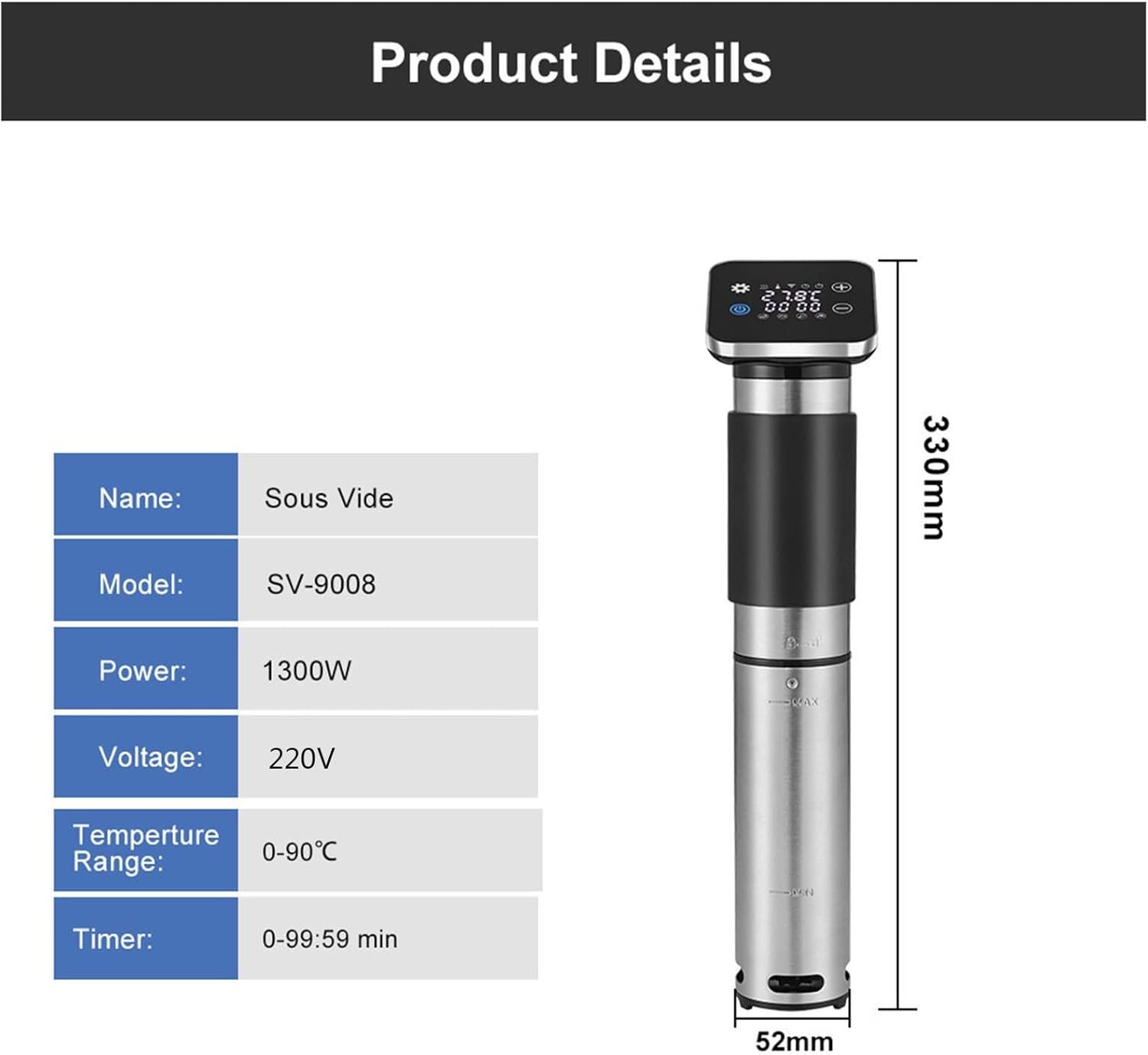
Image: A graphic displaying the product's key specifications, including its name (Sous Vide), model (SV-9008), power (1300W), voltage (220V), temperature range (0-90°C), and timer range (0-99:59 min). The image also shows the physical dimensions of the cooker (330mm height, 52mm width).
Warranty and Support
For information regarding warranty coverage, product registration, or technical support, please refer to the manufacturer's official website or contact their customer service department. Contact details are typically provided on the product packaging or on the manufacturer's website.
If you have any questions or require assistance, please do not hesitate to reach out to the seller or manufacturer.


