Product Overview
The newtopend M01 AI Intelligent Gimbal is designed to provide exceptional stability for mobile photography and videography. This 3-axis gimbal stabilizer features powerful motors capable of supporting smartphones up to 280g, ensuring smooth, shake-free footage even during dynamic activities. Its intelligent AI tracking system keeps subjects in focus and centered, adapting even when temporarily obscured. The ergonomic two-handed grip enhances stability, while the multi-functional control panel offers easy access to power, camera controls, fill light adjustments, and zoom. Seamlessly switch between landscape and portrait modes with a single click. The M01 is equipped with various shooting modes and an integrated fill light for enhanced video quality, making it ideal for vloggers, sports enthusiasts, and content creators.
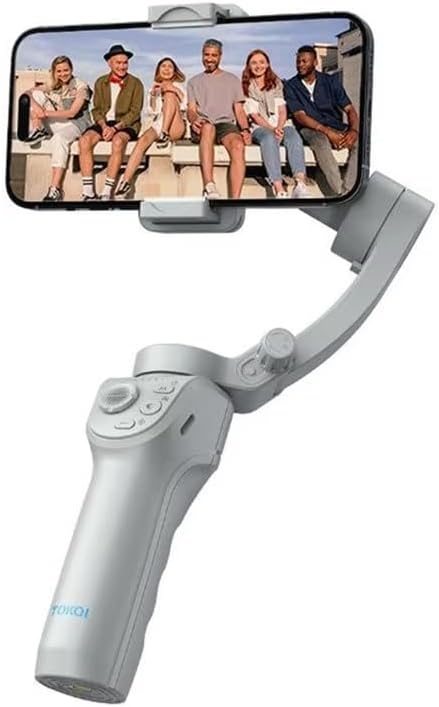
Figure 1: M01 AI Intelligent Gimbal with a smartphone mounted, ready for use.
Setup and Assembly
Unfolding the Gimbal: The M01 features a folding design for portability. Gently unfold the gimbal until it locks into its operational position. Refer to Figure 2 for visual guidance.

Figure 2: Key features including Three-Axis Stabilization, Powerful Motors, and Two-Handed Grip.
Mounting Your Smartphone: Securely place your smartphone into the phone holder. Ensure the phone is balanced as centrally as possible to optimize gimbal performance. The gimbal supports phones up to 280g.
Powering On: Press and hold the power button (M Button) located on the multi-functional keyboard until the indicator lights illuminate. The gimbal will automatically initialize and balance. (See Figure 3 for button location).
Operating Instructions
Controls and Buttons
The M01 gimbal features an intuitive multi-functional keyboard for easy operation:
- M Button/Power Button: Used to power on/off the device, switch gimbal modes (horizontal/vertical shooting), and display remaining power.
- Camera Button: Press to take photos or start/stop video recording. Can also switch between front and rear cameras.
- Fill Light Power Button: Activates and adjusts the brightness of the integrated fill light.
- Rocker: Controls the movement and direction of the gimbal.
- Zoom Key: Adjusts the zoom level of your smartphone camera.
- Trigger Key: Activates various shooting modes such as lock follow, gimbal return, Inception mode, lock mode, and mad dog mode.

Figure 3: Multi-Functional Keyboard Layout.
Key Features and Modes
AI Intelligent Tracking: The M01's advanced AI tracking system ensures your subject remains centered and in focus. It can quickly resume tracking even if the subject is temporarily obscured. This feature is ideal for dynamic shots and vlogging.

Figure 4: AI Intelligent Tracking in action, keeping the subject in frame.
Quick Landscape/Portrait Switching: Easily switch between horizontal (landscape) and vertical (portrait) shooting orientations with a single click, without needing to remount your phone or disrupt its stability.

Figure 5: Seamless switching between landscape and portrait modes.
Enhanced Stability: Experience superior stability with the 3-axis stabilization system. Capture smooth footage even while walking, running, or jumping, eliminating shaky video common with handheld shooting.

Figure 6: Visual comparison of stability with and without the M01 gimbal.
LIFE Mode: Explore a variety of creative templates and intelligent auxiliary lenses to automatically synthesize professional-looking videos. This mode simplifies complex video production, allowing you to create masterpieces with ease.
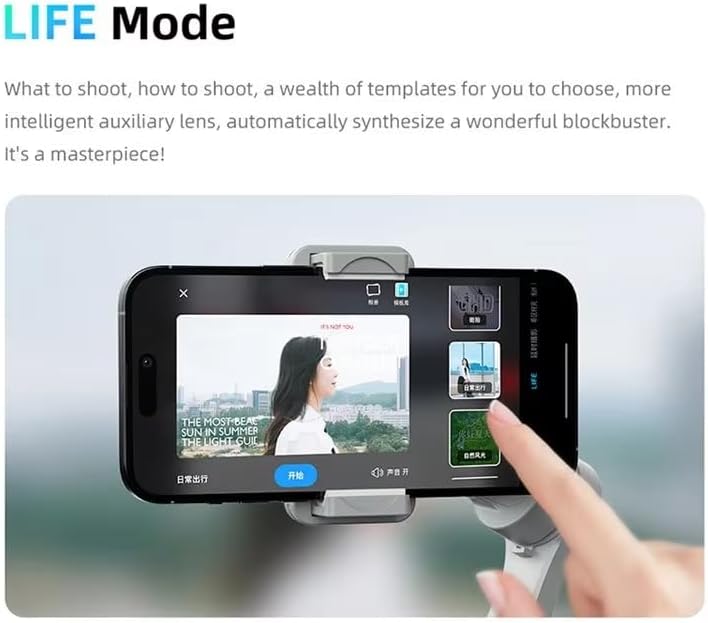
Figure 7: LIFE Mode interface for creative video production.
Live Shooting / Live Streaming: The M01 is an excellent tool for live streaming. Its face tracking capabilities work seamlessly with your phone's native camera, beauty photo software, short video apps, and live streaming platforms, ensuring you always stay in frame and look your best.

Figure 8: M01 gimbal set up for live streaming with face tracking.
Inception Mode: Achieve dynamic, rotating shots that create a powerful visual impact. Simply press the trigger key three times in a row to automatically activate Inception mode and capture cinematic footage.

Figure 9: Inception Mode for dynamic, rotating video effects.
Official Product Video
Video 1: Official product demonstration showcasing the M01 gimbal's features including folding design, power-on, heavy load capacity, horizontal/vertical switching, 3-axis stability, multiple shooting modes, AI tracking, Inception auto shooting, live shooting, and beauty fill light.
Maintenance
- Cleaning: Use a soft, dry cloth to clean the gimbal. Avoid using harsh chemicals or abrasive materials.
- Storage: Store the gimbal in a cool, dry place away from direct sunlight and extreme temperatures.
- Battery Care: For optimal battery life, charge the gimbal regularly and avoid fully discharging it for extended periods.
Troubleshooting
- Gimbal not powering on: Ensure the battery is charged. Connect to a power source and try again.
- Gimbal not balancing correctly: Ensure your smartphone is securely mounted and centered in the phone holder. Restart the gimbal.
- Tracking issues: Ensure the subject is well-lit and clearly visible to the camera. Avoid rapid, erratic movements that might confuse the AI tracking system.
- Connectivity problems: If using a companion app, ensure Bluetooth is enabled on your phone and the app is updated to the latest version.
Specifications
| Feature | Detail |
|---|---|
| Product Dimensions | 3 x 3 x 6 inches (7.62 x 7.62 x 15.24 cm) |
| Item Weight | 6 ounces (170 grams) |
| Maximum Phone Weight Capacity | 280g (approx. 0.6 lbs) |
| Color | Black |
| Compatible Devices | Smartphones |
| Manufacturer | newtopend |
| Model Number | M01 |
| UPC | 748305393556 |
Warranty and Support
For warranty information and technical support, please refer to the documentation included with your purchase or contact newtopend customer service directly. Keep your proof of purchase for warranty claims.


