
Elekirin TFM13-FEIML
User Manual for Elekirin TFM13-FEIML LCD Display
Original LCD Display for Kukirin G3 Pro Electric Scooter
Introduction
This manual provides detailed instructions for the installation, operation, and maintenance of the Elekirin TFM13-FEIML LCD Display. This display is specifically designed for the Kukirin G3 Pro Electric Scooter, serving as a digital dashboard screen to provide essential riding information.

Figure 1: Front view of the Elekirin TFM13-FEIML LCD Display, showing the screen and the 'KuKirin' branding.
Setup and Installation
Proper installation is crucial for the correct functioning and longevity of your LCD display. Follow these steps carefully.
1. Unpacking and Inspection
- Carefully remove the display from its packaging.
- Inspect the display and all included components for any signs of damage during transit.
- Ensure all cables and connectors are intact.

Figure 2: Rear view of the display, highlighting the mounting clamps and the array of electrical connectors.
2. Mounting the Display
- Identify a suitable mounting location on your Kukirin G3 Pro Electric Scooter's handlebars. Ensure it does not obstruct your view or control of the scooter.
- Loosen the screws on the display's mounting clamps.
- Position the display on the handlebar and tighten the screws securely, but do not overtighten to avoid damage.

Figure 3: Angled view demonstrating the display's mounting clamps and the attached wiring harness.
3. Connecting the Cables
The TFM13-FEIML display comes with multiple color-coded connectors. Match these connectors to the corresponding ports on your Kukirin G3 Pro Electric Scooter's wiring harness. Ensure each connection is firm and secure.
- Red Connector: Typically for power input.
- Green Connector: Often for signal transmission (e.g., speed sensor).
- Blue Connector: May be for communication protocols (e.g., UART).
- Black Connector: Usually for ground or additional functions.
Refer to your scooter's specific wiring diagram if you are unsure about any connections.

Figure 4: Detailed view of the display's rear, including the product information label and a magnified inset of the various connectors.
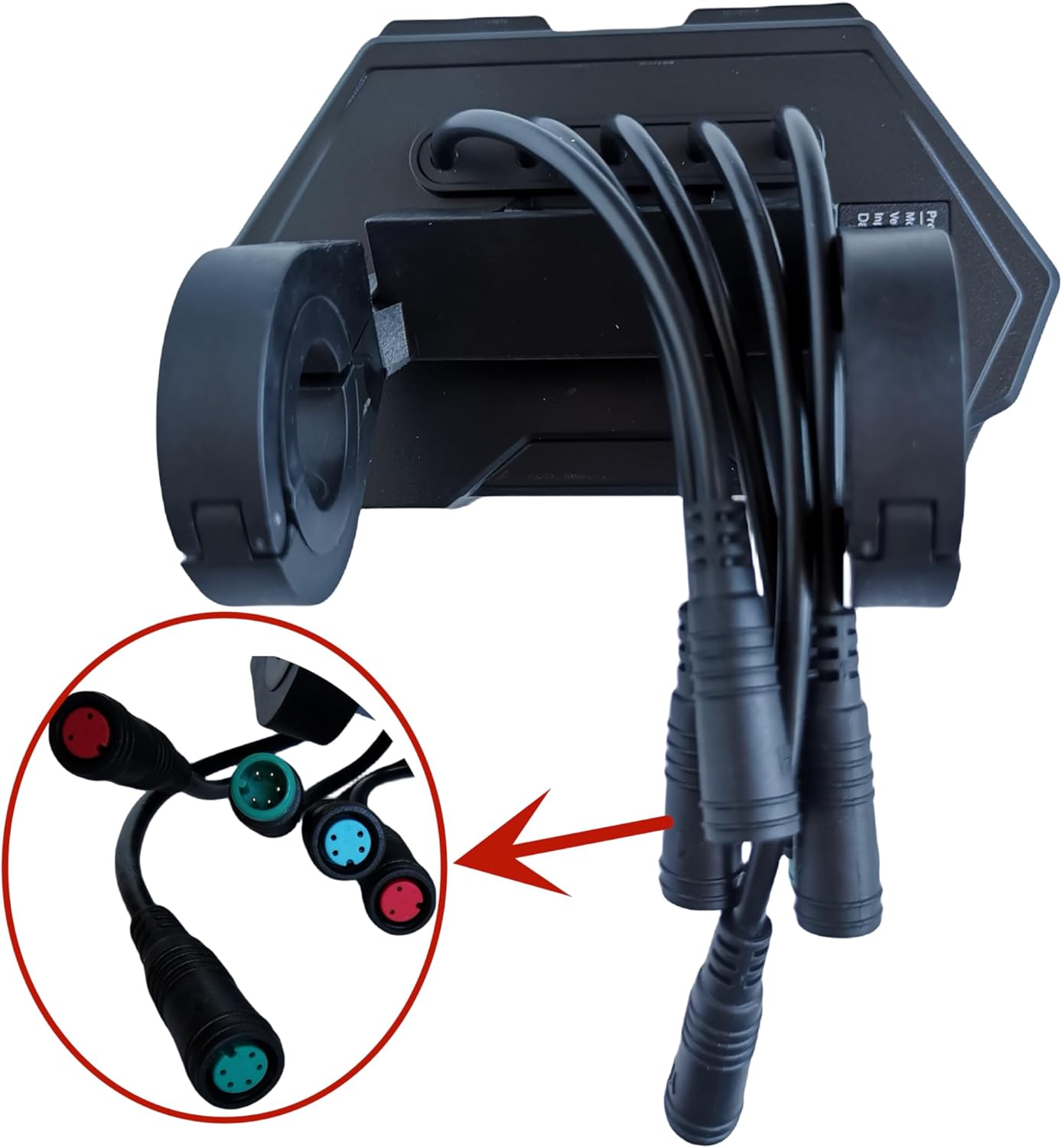
Figure 5: An alternative perspective of the display's wiring, with a focus on the different connector designs for proper matching.
Operating Instructions
Once installed, the TFM13-FEIML display provides real-time information about your scooter's performance.
Powering On/Off
The display typically powers on automatically when the electric scooter is turned on. To power off, turn off your scooter's main power switch.
Display Information
The LCD screen will show various parameters essential for your ride:
- Speed: Current riding speed (km/h or mph).
- Battery Level: Indication of remaining battery charge.
- Riding Mode: Current power or speed mode selected.
- Odometer/Trip Meter: Total distance traveled or distance for the current trip.
- Error Codes: If applicable, display will show error codes for system malfunctions.
Button Functions (if applicable)
If your display unit includes physical buttons, they typically control functions such as:
- Changing riding modes.
- Toggling between odometer and trip meter.
- Accessing settings (e.g., unit conversion, backlight brightness).
Refer to your Kukirin G3 Pro Electric Scooter's main manual for specific button functionalities related to the display.
Maintenance
Regular maintenance ensures the longevity and optimal performance of your LCD display.
- Cleaning: Use a soft, damp cloth to wipe the screen and casing. Avoid abrasive cleaners or solvents that could damage the display surface or plastic.
- Protection: Keep the display away from direct sunlight for prolonged periods when not in use, and protect it from heavy rain or extreme temperatures.
- Cable Inspection: Periodically check all connected cables for wear, fraying, or loose connections. Ensure they are securely fastened.
- Storage: If storing the scooter for an extended period, ensure the display is clean and dry.
Troubleshooting
This section addresses common issues you might encounter with your TFM13-FEIML LCD display.
| Problem | Possible Cause | Solution |
|---|---|---|
| Display does not turn on. | No power from scooter; loose cable connection; damaged display. | Ensure scooter is powered on. Check all cable connections, especially the power cable. If issues persist, consult a technician. |
| Incorrect speed reading. | Loose speed sensor connection; incorrect wheel diameter setting (if adjustable). | Check speed sensor cable connection. Verify wheel diameter setting in scooter's main controller (if applicable). |
| Display shows error code. | System malfunction; sensor error. | Refer to your Kukirin G3 Pro Electric Scooter's main manual for specific error code meanings and troubleshooting steps. |
| Screen is dim or flickering. | Low battery; faulty connection; display damage. | Charge scooter battery. Check cable connections. If problem persists, display may require replacement. |
Specifications
Key technical specifications for the Elekirin TFM13-FEIML LCD Display.
| Feature | Detail |
|---|---|
| Brand | Elekirin |
| Model Name | TFM13-FEIML |
| Compatible Scooter | Kukirin G3 Pro Electric Scooter |
| Material | Plastic |
| Color | Black |
| Included Components | Display TFM13-FEIML |
| ASIN | B0DS9FLQGT |
| UPC | 717504688923 |
Warranty Information
The Elekirin TFM13-FEIML LCD Display comes with a manufacturer's warranty.
- Warranty Period: 6 Months Manufacturer Warranty.
- This warranty covers defects in materials and workmanship under normal use. It does not cover damage caused by misuse, accidents, unauthorized modifications, or improper installation.
- Please retain your proof of purchase for warranty claims.
Customer Support
For further assistance, technical support, or warranty claims, please contact Elekirin customer service through the retailer where you purchased the product or refer to the official Elekirin website for contact details.
When contacting support, please have your product model (TFM13-FEIML) and proof of purchase ready.
no relevant documents