
Introduction
Thank you for choosing the T4TREAM Fluted Makeup Vanity Desk. This modern and elegant vanity desk is designed to enhance your beauty routine with its integrated 36-inch HD lighted mirror, ample storage, and convenient charging station. This manual provides essential information for assembly, operation, maintenance, and troubleshooting to ensure you get the most out of your new vanity desk.

The T4TREAM Fluted Makeup Vanity Desk, showcasing its elegant off-white finish, gold accents, and integrated lighted mirror.
Safety Information
Please read and understand all safety instructions before assembly and use. Keep this manual for future reference.
- Always assemble the product on a soft, clean surface to prevent scratches.
- Ensure all parts are securely fastened before use. Loose connections can cause instability.
- Do not overload drawers or shelves. Refer to specifications for weight limits.
- Keep small parts and packaging materials away from children and pets to prevent choking hazards.
- Use only the provided hardware for assembly. Substituting parts may compromise safety.
- Avoid placing hot items directly on the glass top without protection.
- For electrical components (mirror lights, charging station), ensure proper power supply and avoid contact with water.
- If any parts are missing or damaged, do not proceed with assembly. Contact customer support immediately.
Package Contents
Before beginning assembly, verify that all components listed below are present and undamaged. If any parts are missing or defective, please contact T4TREAM customer service.
- Vanity Desk Frame (Main Tabletop, Side Cabinet)
- 36-inch HD Lighted Mirror
- Drawers with Fluted Waveform Panels (5 total)
- Glass Top Panels
- Adjustable Shelves for Side Cabinet
- Gold Metallic Handles
- Cylindrical Legs
- Hardware Pack (screws, bolts, connectors, tools)
- Installation Instructions

Detailed dimensions and component breakdown of the T4TREAM vanity desk, including drawer sizes and overall height.
Setup and Assembly
Assembly of the T4TREAM Fluted Makeup Vanity Desk requires two people and approximately 2-3 hours. All parts are clearly labeled with numbered stickers for easy identification. Follow the included detailed installation instructions step-by-step.
- Prepare the Area: Clear a spacious, clean, and soft area for assembly to prevent damage to the desk components.
- Unpack and Identify Parts: Carefully unpack all components and lay them out. Match each part to the corresponding number in the instruction manual.
- Assemble the Main Frame: Begin by assembling the primary desk frame and the side cabinet according to the diagrams. Ensure all connections are snug but do not overtighten.
- Attach Legs: Securely attach the cylindrical legs to the main desk and side cabinet.
- Install Drawers: Assemble the drawers and install the gold metallic handles. Slide the drawers into their designated slots.
- Place Glass Top: Carefully place the embedded tempered glass tabletop panels into their respective sections.
- Mount the Mirror: Securely attach the 36-inch HD Lighted Mirror to the desk frame. Ensure it is stable and properly aligned.
- Connect Electrical Components: Plug in the mirror's power cord and the charging station's power cord to a suitable outlet.
- Final Check: Verify that all screws and fasteners are tightened, and the desk is stable before placing items on it.

The fully assembled T4TREAM vanity desk, ready for use in a bedroom environment.
Operating Instructions
36-inch HD Lighted Mirror
The integrated mirror features adjustable brightness and three distinct light settings to optimize your makeup application and grooming experience.

The 36-inch HD lighted mirror with touch controls for adjusting brightness and selecting between Cool Daylight, Neutral Light, and Warm Light modes.
- Power On/Off: Tap the power icon on the mirror surface to turn the lights on or off.
- Adjust Brightness: Press and hold the brightness control icon (sun icon) to gradually increase or decrease the light intensity. Release when desired brightness is achieved.
- Change Light Modes: Tap the mode selection icon (light bulb icon) to cycle through the three available light settings: Cool Daylight, Neutral Light, and Warm Light.
Storage Drawers and Shelves
The vanity desk offers extensive storage solutions, including five drawers and a side storage cabinet with adjustable shelves, designed to keep your cosmetics and accessories organized.
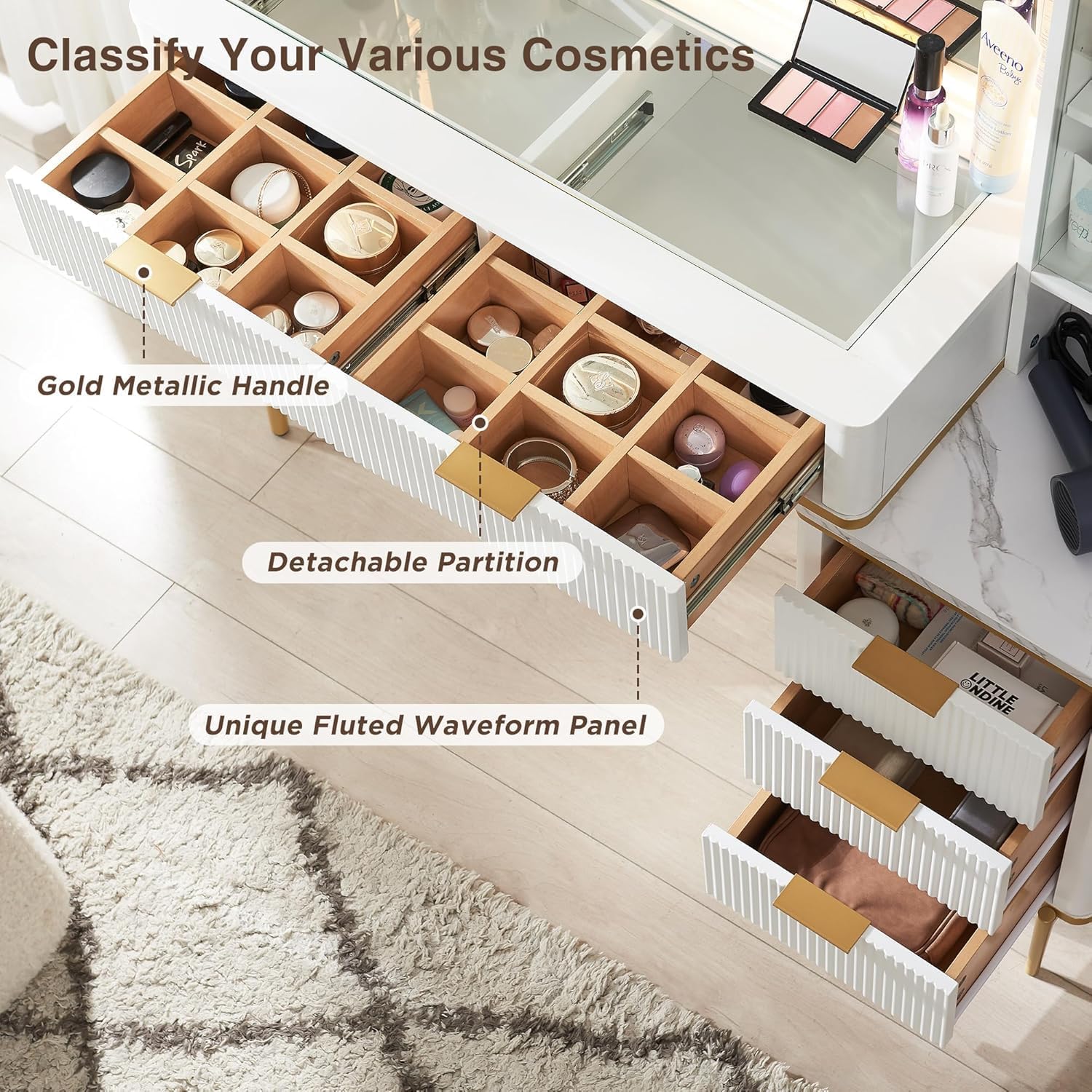
View of the vanity desk's drawers, highlighting the detachable partitions for customizable organization and the unique fluted waveform panel design.

The embedded tempered glass tabletop provides a clear view of stored items, allowing for quick access to cosmetics and small accessories.
- Drawers: Pull the gold metallic handles to open the drawers. The top drawers feature detachable partitions for customizable organization of smaller items.
- Side Storage Cabinet: The cabinet features height-adjustable shelves. Adjust the shelf height by repositioning the shelf pins to accommodate items of various sizes. The dustproof glass door protects contents.
Built-in Charging Station
The vanity desk includes a convenient charging station with AC outlets and USB ports for powering your electronic devices.

The side table features a faux marble texture tabletop and a built-in charging station with two 125V/12A AC outlets and two 5V/2.1A USB ports.
- AC Outlets: Use the 125V/12A AC outlets to plug in hair dryers, curling irons, or other small appliances.
- USB Ports: Use the 5V/2.1A USB ports to charge smartphones, tablets, or other USB-powered devices.
- Ensure the vanity desk is plugged into a functional wall outlet for the charging station to operate.
Maintenance
Proper care and maintenance will extend the life and preserve the appearance of your T4TREAM vanity desk.
- Dusting: Dust regularly with a soft, dry cloth to prevent buildup.
- Glass Top Cleaning: Clean the glass top with a mild glass cleaner and a lint-free cloth. Avoid abrasive cleaners that may scratch the surface.
- Surface Cleaning: For the engineered wood surfaces, wipe with a damp cloth and mild soap if necessary, then dry immediately with a clean cloth.
- Light Bulb Replacement: If the mirror lights dim or fail, consult the manufacturer for replacement options or professional assistance. Do not attempt to replace integrated LED lights yourself unless specified.
- Hardware Check: Periodically check all screws and fasteners to ensure they remain tight. Retighten as needed to maintain stability.
- Avoid Harsh Chemicals: Do not use harsh chemicals, solvents, or abrasive materials on any part of the desk, as they can damage the finish.
Troubleshooting
This section addresses common issues you might encounter with your vanity desk. If the problem persists, please contact customer support.
| Problem | Possible Cause | Solution |
|---|---|---|
| Mirror lights not turning on. | Power cord not plugged in; loose connection; power outlet issue; mirror light malfunction. | Ensure power cord is securely plugged into a working outlet. Check the power switch on the mirror. If still not working, contact customer support. |
| Drawers are stiff or do not slide smoothly. | Improper assembly of drawer slides; debris in tracks; overtightened screws. | Check that drawer slides are correctly installed and aligned. Clear any debris from the tracks. Loosen screws slightly if they are overtightened. |
| Desk feels wobbly or unstable. | Loose fasteners; uneven floor. | Retighten all assembly screws and bolts. Ensure the desk is on a level surface. Use furniture pads if necessary to stabilize. |
| Charging station (outlets/USB) not working. | Desk not plugged in; power strip issue; device not compatible. | Verify the main power cord for the desk is plugged into a live outlet. Test with another device. Ensure your device is compatible with the charging station's specifications. |
Specifications
| Feature | Detail |
|---|---|
| Brand | T4TREAM |
| Model Number | ILSC48VDWM-SWT |
| Product Dimensions | 15.6"D x 48"W x 53.6"H (39.6 x 121.9 x 136.1 cm) |
| Item Weight | 120 pounds (54.4 kg) |
| Color | Off White |
| Frame Material | Engineered Wood |
| Mirror Size | 36 inches (HD Lighted) |
| Light Settings | Adjustable brightness, 3 light modes (Cool Daylight, Neutral Light, Warm Light) |
| Storage | 5 Drawers (with detachable partitions), Side Storage Cabinet with adjustable shelves |
| Charging Station | 2 x 125V/12A AC Outlets, 2 x 5V/2.1A USB Ports |
| Assembly Required | Yes |
Warranty and Support
T4TREAM stands behind the quality of its products. While specific warranty details are not provided in this manual, please retain your proof of purchase for any warranty claims.
For customer support, missing parts, or technical assistance, please refer to the contact information provided with your purchase or visit the official T4TREAM website. Our team is ready to assist you with any questions or concerns.
Contact Information: Please refer to the contact details on your product packaging or the T4TREAM brand store on Amazon.