
1. Introduction
This manual provides essential information for the safe and effective installation, operation, and maintenance of the IBXDTUVJ LW26-25/1 3-Position Rotary Main Switch. Please read this manual thoroughly before using the product and retain it for future reference. This switch is designed for universal transfer control and change-over applications in industrial electrical systems.
2. Safety Information
WARNING: Electrical shock hazard. Installation and maintenance should only be performed by qualified personnel.
- Always disconnect power before installing, servicing, or removing the switch.
- Ensure all wiring connections are secure and comply with local electrical codes.
- Do not exceed the specified rated current and voltage.
- Inspect the switch regularly for any signs of damage or wear.
- Use appropriate personal protective equipment (PPE) when working with electrical systems.
3. Product Overview
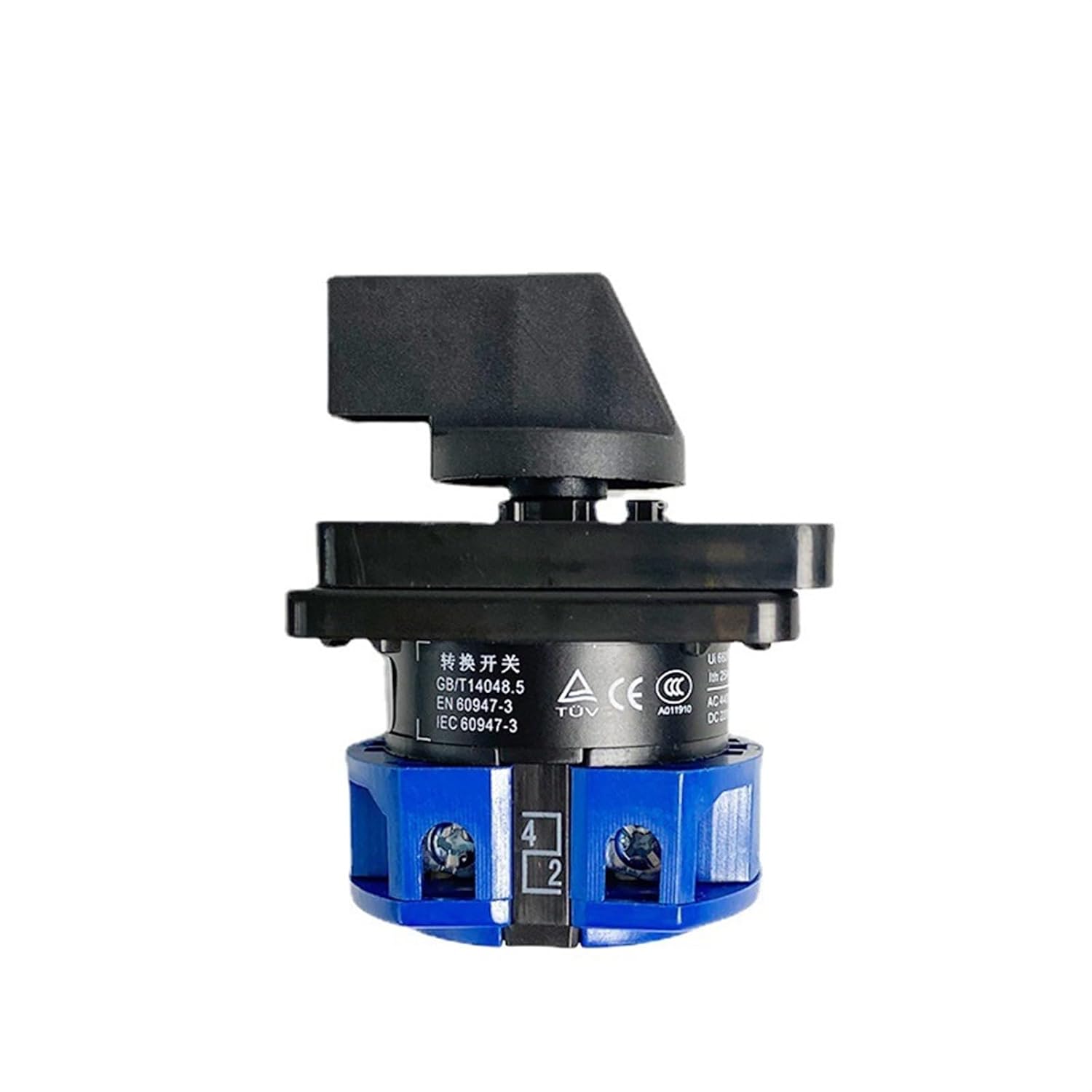
The IBXDTUVJ LW26-25/1 is a robust 3-position rotary main switch designed for reliable control in various electrical applications. It features a durable construction and clear position indicators.
3.1 Key Features
- 3-Position Control: Allows selection between three distinct states (e.g., OFF, ON-1, ON-2).
- High Current Rating: Rated for 25A, suitable for various power control applications.
- High Voltage Rating: Supports up to 690V.
- Durable Construction: Features silver alloy contacts and thickened copper parts for enhanced conductivity and longevity.
- Universal Application: Designed for general industrial transfer and change-over control.
3.2 Components and Views




4. Specifications
| Feature | Specification |
|---|---|
| Model Number | LW26-25/1 |
| Rated Current | 25A |
| Max. Voltage | 690V |
| Pole Number | 1 Pole |
| Positions | 3 (e.g., 1-0-2) |
| Manufacturer | IBXDTUVJ |
| Package Dimensions | 1.18 x 0.79 x 0.39 inches |
| Item Weight | 1.76 ounces |
5. Installation
Follow these steps for proper installation of the rotary switch. Ensure power is disconnected before beginning.
- Mounting: Select a suitable mounting location on a control panel or enclosure. The switch is typically panel-mounted. Secure the switch using appropriate fasteners through the designated mounting holes.
- Wiring:
- Identify the input and output terminals. Refer to the wiring diagram (if provided with the physical product) for specific connections.
- Connect the power supply wires to the input terminals.
- Connect the load wires to the output terminals.
- Ensure all connections are tight and secure to prevent loose contacts and overheating.
- Use wire gauges appropriate for the 25A rated current.
- Verification: After wiring, double-check all connections for correctness and security. Ensure no bare wires are exposed.
- Power On: Once installation is complete and verified, restore power to the circuit.
6. Operation
The LW26-25/1 rotary switch provides three distinct positions for control. The positions are typically marked as '1', '0', and '2' on the faceplate.
- Position '0': This is typically the OFF or neutral position, disconnecting power from both outputs.
- Position '1': Selects the first circuit or power source.
- Position '2': Selects the second circuit or power source.
To operate, simply rotate the black handle to the desired position. The handle will click into place at each position, indicating a secure selection.
7. Maintenance
Regular maintenance ensures the longevity and reliable operation of your rotary switch.
- Cleaning: Keep the switch free from dust, dirt, and moisture. Use a dry, soft cloth for cleaning. Do not use abrasive cleaners or solvents.
- Inspection: Periodically inspect the switch for any signs of physical damage, loose connections, discoloration from overheating, or excessive wear on the contacts.
- Terminal Tightness: Over time, terminal screws can loosen. Periodically check and tighten all terminal connections, ensuring power is disconnected first.
- Contact Wear: While designed for durability, excessive arcing or frequent high-current switching can cause contact wear. If the switch exhibits inconsistent operation or excessive heat, it may require replacement.
8. Troubleshooting
If you encounter issues with your rotary switch, refer to the following common problems and solutions:
| Problem | Possible Cause | Solution |
|---|---|---|
| Switch does not operate (no power to load) | No input power; Loose wiring; Internal damage | Check circuit breaker/fuse; Verify input power; Tighten all connections; Replace switch if damaged. |
| Switch feels stiff or difficult to turn | Accumulated dirt/debris; Internal mechanism issue | Clean the switch exterior; If problem persists, replace the switch. |
| Overheating or burning smell | Overload; Loose connections; Internal short circuit | Immediately disconnect power. Check load current; Tighten connections; Replace switch. |
| Inconsistent contact or flickering power | Worn contacts; Loose internal components | Replace the switch. |
If troubleshooting steps do not resolve the issue, contact a qualified electrician or the manufacturer for assistance.
9. Warranty and Support
For warranty information or technical support regarding your IBXDTUVJ LW26-25/1 Rotary Main Switch, please refer to the documentation provided at the time of purchase or contact your vendor. Keep your purchase receipt as proof of purchase.