
Auto Engineering Smartgen HGM4020 Generator Controller User Manual
Model: HGM4020 Series
1. Introduction
This manual provides comprehensive instructions for the installation, operation, and maintenance of the Auto Engineering Smartgen HGM4020 Generator Controller. The HGM4020 series integrates digitization, intelligentization, and network technology for generator set automation and monitoring. It is designed for single unit control to achieve automatic start/stop, data measurement, and alarm protection functions. The controller features an LCD display with multiple language options, ensuring ease of use and reliability.
2. Product Overview
The Smartgen HGM4020 Generator Controller is a robust control module designed for automatic generator set management. It allows for precise parameter measurement, fixed value adjustment, and time setting. All parameters can be configured via the front panel or a PC using a programmable interface (USB or RS485). Its compact structure, advanced circuitry, and simple connections make it suitable for various automatic generator control systems.
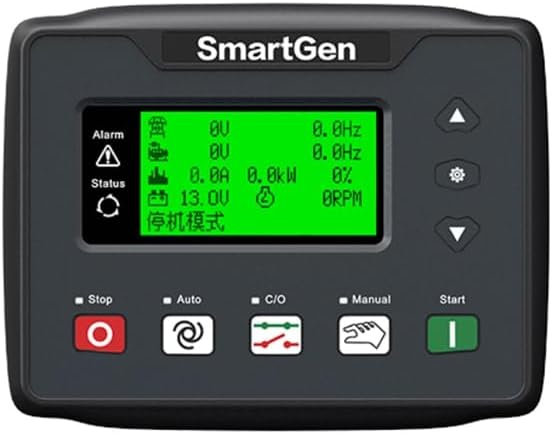
Figure 2.1: Front view of the HGM4020 Controller, showing the display and control buttons.
3. Key Features and Characteristics
- Micro-processor technology for precision parameter measurement and adjustment.
- LCD display with multi-language interface (Chinese, English, Spanish, Russian, Turkish, French, Portuguese, Polish).
- Automatic start/stop control for generator sets.
- Comprehensive data measurement and alarm protection functions.
- Parameters configurable from the front panel or via PC (USB/RS485).
- Compact structure, advanced circuits, simple connections, and high reliability.

Figure 3.1: Angled view of the HGM4020 Controller, highlighting its compact design.
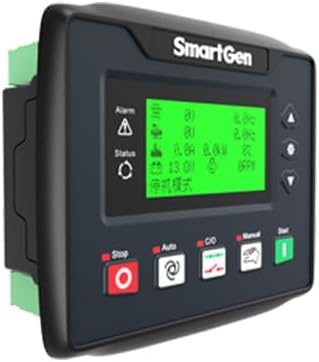
Figure 3.2: Alternative angled view of the HGM4020 Controller.
4. Models and Types
The HGM4000N series controllers are available in several types, each with specific functionalities:
- HGM4010N/HGM4010NC/HGM4010CAN: These are Automatic Start Modules (ASM). They control the generator to start and stop based on a remote signal.
- HGM4020N/HGM4020NC/HGM4020CAN: These models feature Automatic Mains Failure (AMF) functionality. They build upon the HGM4010 series by adding mains electric quantity monitoring and automatic transfer control between mains and generator, ideal for systems involving both generator and utility power.
5. Setup and Installation
Proper installation is crucial for the reliable operation of the HGM4020 controller. Ensure all connections are secure and follow local electrical codes. The controller is designed for panel mounting.
5.1. Mounting
The controller requires an installation dimension of 116mm x 90mm. Secure the unit firmly into the control panel cutout using the provided mounting hardware.
5.2. Wiring Connections
Refer to the wiring diagrams on the back of the unit for correct connections. Ensure the working power range of DC(8-35)V is supplied. Connect all necessary inputs (e.g., mains voltage, generator voltage, current, oil pressure, water temperature) and outputs (e.g., fuel, crank, auxiliary outputs) according to your system's requirements.

Figure 5.1: Rear view of the HGM4020 Controller with wiring terminals and diagram.
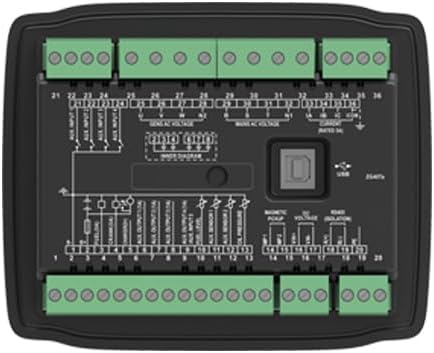
Figure 5.2: Top-down rear view, showing the wiring diagram and USB port for PC connection.

Figure 5.3: Angled rear view, illustrating the depth and terminal layout.
6. Operating Instructions
6.1. Power On/Off
Ensure all wiring is correct before applying power. The controller will perform a self-test upon power-up. To power off, disconnect the DC supply.
6.2. Control Modes
- Stop Mode: The generator is off and will not start automatically.
- Auto Mode: The generator will automatically start and stop based on configured parameters (e.g., mains failure for HGM4020 models, remote start signal for HGM4010 models).
- Manual Mode: Allows for manual starting and stopping of the generator using the front panel buttons.
6.3. Parameter Configuration
Parameters such as start/stop delays, alarm thresholds, and engine protection settings can be adjusted via the front panel buttons and LCD menu, or through a PC connected via USB or RS485 interface using the Smartgen configuration software.
7. Maintenance
Regular maintenance ensures the longevity and optimal performance of the HGM4020 controller. Keep the unit clean and free from dust and moisture. Periodically check all wiring connections for tightness and signs of wear or corrosion. Ensure the operating environment remains within the specified temperature range of -25°C to +70°C.
8. Troubleshooting
If the controller is not functioning as expected, consider the following general troubleshooting steps:
- No Power: Check the DC power supply (8-35V) and all power connections.
- Generator Fails to Start: Verify the control mode (ensure it's in Auto or Manual start mode). Check fuel levels, battery voltage, and engine protection alarms.
- Alarm Indication: Refer to the alarm messages on the LCD display. Consult the detailed alarm codes in the full product manual for specific remedies.
- Incorrect Readings: Check sensor connections and calibration settings.
For complex issues, contact qualified technical support.
9. Specifications
| Feature | Specification |
|---|---|
| Model | HGM4020 Series |
| Working Power Range | DC (8-35)V |
| Overall Dimension | 135mm x 110mm x 44mm |
| Installation Dimension | 116mm x 90mm |
| Working Temperature | -25°C to +70°C |
| Weight | 0.32 kg (0.71 lbs) |
| Item Weight (Shipping) | 2.64 pounds |
| Included Components | 1X controller |
| UPC | 602838311619 |
10. Warranty and Support
For warranty information and technical support, please refer to the documentation provided with your purchase or contact Auto Engineering customer service. Keep your purchase receipt for warranty claims.