
1. Introduction
This manual provides detailed instructions for the installation, operation, maintenance, and troubleshooting of the SmartGen HGM4020N Generator Controller. Designed for genset automation and monitoring, this controller integrates advanced digital, intelligent, and network technologies to ensure reliable performance. Please read this manual thoroughly before using the device to ensure proper function and safety.
2. Product Overview
The SmartGen HGM4020N series genset controllers are micro-processor based units capable of automatic start/stop, data measurement, and alarm protection functions. They feature an LCD display with multiple language options (Chinese, English, Spanish, Russian, Turkish, French, Portuguese, and Polish) for user convenience. The HGM4020N model specifically includes Auto Mains Failure (AMF) functionality, allowing for automatic transfer control between mains and generator power, in addition to Automatic Start Module (ASM) capabilities.
Key features include:
- Automatic Start/Stop control for generators.
- Comprehensive data measurement and display.
- Integrated alarm protection functions.
- LCD display with multi-language support.
- AMF (Auto Mains Failure) for automatic transfer between mains and generator.
- ASM (Automatic Start Module) for remote start/stop control.
- Parameters configurable via front panel or PC (USB/RS485 interface).
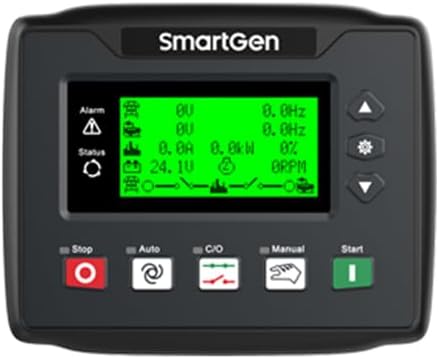
Figure 2.1: Front view of the SmartGen HGM4020N controller, showing the LCD screen and control buttons (Stop, Auto, C/O, Manual, Start).

Figure 2.2: Side view of the controller, highlighting the green terminal blocks for electrical connections.

Figure 2.3: Rear view of the controller, displaying the layout of various input/output terminals and a USB port.
3. Setup and Installation
Proper installation is crucial for the reliable operation of the HGM4020N controller. Ensure all connections are secure and follow local electrical codes.
3.1 Mounting
The controller is designed for panel mounting. The installation dimensions are 116mm x 90mm. Ensure adequate space for ventilation and access to wiring terminals.
3.2 Wiring Connections
Refer to the wiring diagrams provided with your product packaging for specific connection details. The controller requires a DC power supply within the range of 8-35V. Connect all necessary inputs (e.g., generator voltage, current transformers, engine sensors) and outputs (e.g., start/stop relays, fuel solenoid) to the designated green terminal blocks as shown in Figures 2.2 and 2.3.
- Power Supply: Connect DC power (8-35V) to the designated terminals.
- Generator Inputs: Connect generator voltage and current inputs.
- Mains Inputs (for AMF): Connect mains voltage inputs for automatic transfer functionality.
- Engine Sensors: Connect sensors for oil pressure, water temperature, fuel level, etc.
- Control Outputs: Connect to generator start/stop, fuel, and other control relays.
- Communication: Utilize the USB or RS485 interface for PC connection and parameter configuration.
Caution: Ensure power is disconnected before making any wiring connections to prevent electrical shock or damage to the unit.
4. Operating Instructions
The HGM4020N controller offers various operating modes and configuration options.
4.1 Control Panel Functions
The front panel features an LCD display and several buttons for direct control and monitoring:
- Stop Button: Stops the generator.
- Auto Button: Activates automatic mode, allowing the controller to manage generator start/stop based on configured parameters (e.g., remote signal for ASM, mains failure for AMF).
- C/O (Close/Open) Button: Used for manual control of circuit breakers (if configured).
- Manual Button: Allows for manual operation of the generator.
- Start Button: Initiates generator start in manual mode.
- Navigation Buttons (Up, Down, Set): Used to navigate menus and adjust parameters on the LCD display.
4.2 Automatic Start Module (ASM) Operation
In ASM mode, the controller will start and stop the generator based on a remote start signal. This is typically used for applications where an external system dictates when the generator should run.
4.3 Auto Mains Failure (AMF) Operation
In AMF mode, the controller continuously monitors the mains power supply. If a mains failure is detected, the controller will automatically start the generator, transfer the load, and provide power. Once mains power is restored, the controller will transfer the load back to the mains and shut down the generator after a cool-down period.
4.4 Parameter Configuration
All operational parameters, including timings, thresholds, and protection settings, can be configured either directly from the front panel using the navigation buttons or more comprehensively via a PC connected through the USB or RS485 interface. Refer to the software manual for PC-based configuration details.
5. Maintenance
Regular maintenance ensures the longevity and reliable performance of your SmartGen HGM4020N controller.
- Cleaning: Keep the controller clean and free from dust and moisture. Use a soft, dry cloth for cleaning the display and casing. Do not use abrasive cleaners or solvents.
- Connection Checks: Periodically inspect all wiring connections for tightness and signs of corrosion. Loose connections can lead to intermittent operation or damage.
- Environmental Conditions: Ensure the controller operates within its specified working temperature range of -25°C to +70°C. Avoid exposure to extreme temperatures, direct sunlight, or excessive humidity.
- Firmware Updates: Check the manufacturer's website for any available firmware updates that may improve performance or add new features.
6. Troubleshooting
This section provides general guidance for common issues. For complex problems, contact technical support.
- Controller Not Powering On:
- Check the DC power supply voltage (must be 8-35V).
- Verify power connections are secure and correctly wired.
- Check for any blown fuses in the power supply circuit.
- Generator Not Starting in Auto Mode:
- Ensure the controller is in 'Auto' mode.
- For ASM: Verify the remote start signal is active.
- For AMF: Check mains power status and ensure mains failure is detected.
- Check engine fuel level, battery, and other basic generator functions.
- Alarm Displayed:
- Note the specific alarm message on the LCD.
- Consult the full product manual (if available from manufacturer) for detailed alarm code explanations and corrective actions.
- Common alarms include low oil pressure, high engine temperature, overspeed, underspeed, etc.
- Incorrect Readings:
- Verify sensor connections and calibration settings.
- Ensure current transformers (CTs) are correctly installed and configured.
7. Specifications
| Feature | Specification |
|---|---|
| Model | HGM4020N |
| Working Power Range | DC (8-35)V |
| Overall Dimensions | 135mm x 110mm x 44mm |
| Installation Dimensions | 116mm x 90mm |
| Working Temperature | -25°C to +70°C |
| Weight | 0.32 kg (0.71 lbs) |
| Package Dimensions | 8.66 x 5.91 x 3.94 inches |
| Item Weight | 2.64 pounds |
| Manufacturer | Auto Engineering |
| Included Components | 1X controller |
| Color | Black |
| UPC | 602838311596 |
8. Warranty and Support
For warranty information and technical support, please contact the seller or the manufacturer, Auto Engineering. Retain your proof of purchase for warranty claims. Detailed warranty terms and conditions are typically provided with the product packaging or available on the manufacturer's official website.
Manufacturer: Auto Engineering