
1. Important Safety Instructions
Please read all instructions carefully before using this appliance and retain for future reference. Failure to follow these instructions may result in electric shock, fire, or serious personal injury.
- Ensure the power supply voltage matches the rating label on the appliance.
- Do not immerse the appliance, cord, or plug in water or other liquids.
- Unplug from the outlet when not in use, before adding water, and before cleaning.
- Do not operate any appliance with a damaged cord or plug, or after the appliance malfunctions or has been damaged in any manner.
- Keep the appliance out of reach of children and pets.
- This appliance is designed for indoor residential use only.
- Do not block air inlets or outlets.
- Use only clean water in the water tank.
2. Product Overview
The BALIFIR Portable Air Cooler is a versatile 3-in-1 appliance designed to provide cooling, humidification, and fan functions. It utilizes advanced evaporative cooling technology with ice crystals to transform warm, dry air into cool, humid air.
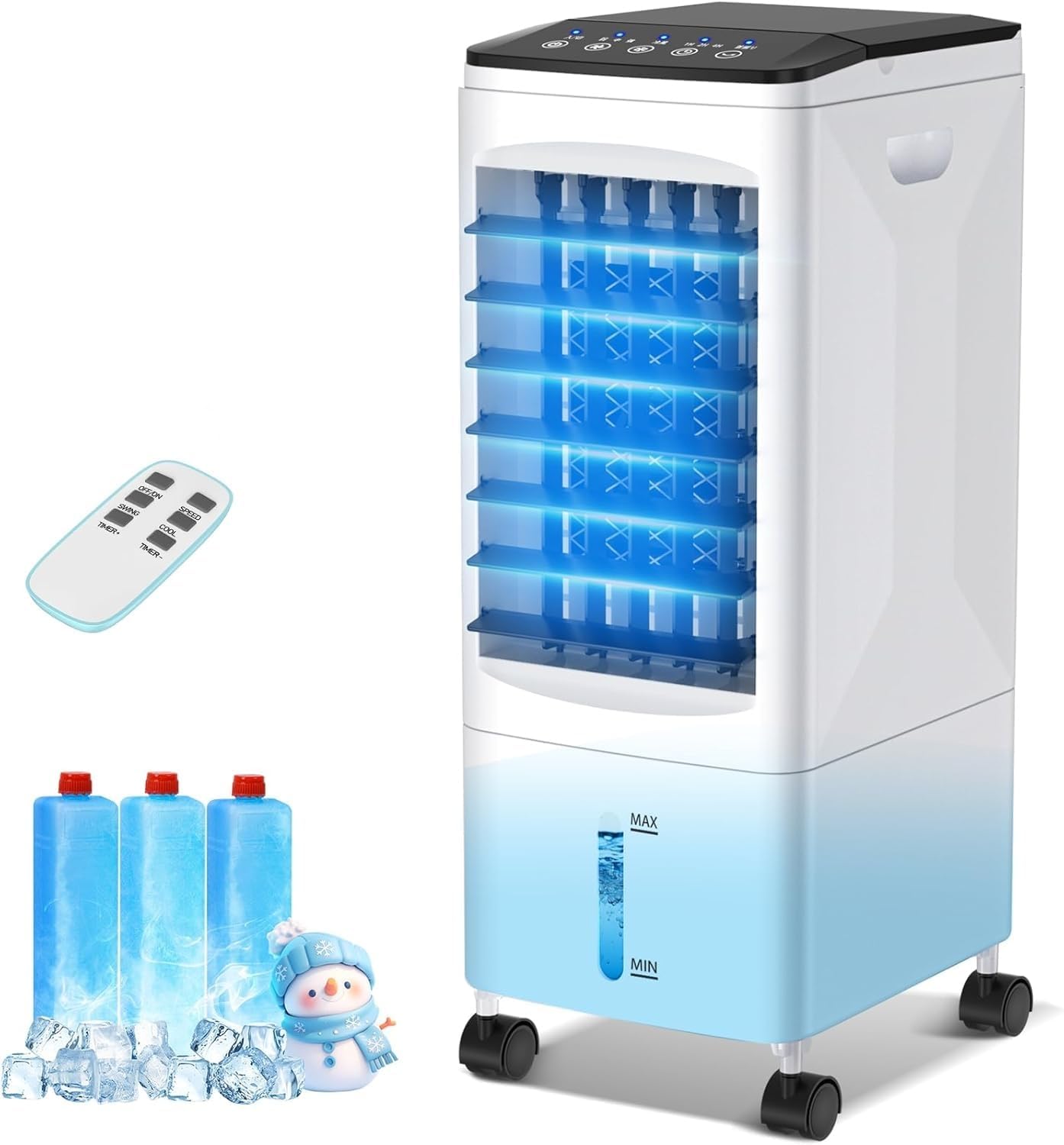
Image: The BALIFIR Portable Air Cooler, remote control, and three ice packs. The unit is white with a black top panel and a clear water level indicator.
Key Features:
- 3-in-1 Functionality: Cooling, Humidification, and Fan modes.
- Double Water Tank: 6L capacity for extended operation.
- 3 Ice Bottles Included: For enhanced cooling performance.
- Easy Operation: Intelligent touch panel and remote control.
- Adjustable Wind Direction: Automatic 60° left/right oscillation and manual 120° up/down adjustment.
- Timer Function: 1-7 hour automatic shutdown timer.
- Portable Design: Equipped with universal wheels and a built-in handle for easy movement.

Image: A woman relaxing outdoors with the portable air cooler, illustrating its portability and lack of installation requirements.
3. Setup
3.1 Unpacking
Carefully remove the air cooler from its packaging. Check for any damage during transit. Retain packaging materials for future storage or transport.
3.2 Placement
Place the air cooler on a flat, stable surface. Ensure there is adequate space around the unit for proper airflow. The unit is designed for freestanding use and does not require window installation or external ducts.
3.3 Adding Water and Ice Packs
For optimal cooling performance, use cold water and the provided ice packs.
- Prepare Ice Packs: For first-time use, fill the included ice bottles with water to the MAX mark. Shake them to activate the cooling gel powder inside. Place them in a freezer until completely frozen.
- Add Water: Open the top water tank cover. Pour clean, cold water into the tank. Observe the water level indicator on the front of the unit to ensure the water level is between the MIN and MAX marks. The 6L capacity allows for extended operation.
- Insert Ice Packs: Once frozen, place the ice packs into the upper water tank. This enhances the cooling effect by lowering the water temperature.

Image: A hand pouring water into the top-fill water tank of the BALIFIR Portable Air Cooler, highlighting the 6L capacity.

Image: A visual guide demonstrating how to add water and frozen ice packs to the air cooler for enhanced cooling.
4. Operating Instructions
The air cooler can be operated using the intelligent touch panel on the top of the unit or the included remote control.
4.1 Control Panel and Remote Control

Image: A detailed view of the touch control panel on the unit and the handheld remote control.
4.2 Power On/Off
- Press the POWER button on the control panel or remote control to turn the unit on or off. The digital display will illuminate when powered on.
4.3 Adjusting Fan Speed
The unit features 3 fan speeds: Low, Medium, and High.
- Press the SPEED button repeatedly to cycle through the fan speed settings.

Image: The air cooler illustrating its three wind speed modes (Low, Medium, High) suitable for various environments.
4.4 Cooling/Humidification Mode
- Press the COOL button to activate the cooling and humidification function. This mode uses the water and ice packs to produce cooler, humidified air. Press again to deactivate.
4.5 Timer Function
Set the unit to automatically turn off after a specified period (1-7 hours).
- Press the TIMER button repeatedly to select the desired operating duration. The selected time will be displayed.

Image: The air cooler operating in a bedroom, demonstrating its quiet operation (minimum 40dB) and 7-hour timer function for undisturbed sleep.
4.6 Wind Direction Adjustment
- Automatic Oscillation: Press the SWING button to activate the automatic 60° left and right oscillation of the internal louvers. Press again to stop.
- Manual Vertical Adjustment: The horizontal louvers can be manually adjusted up or down by 120° to direct airflow as desired.

Image: A diagram illustrating the automatic 60-degree horizontal oscillation and manual 120-degree vertical adjustment capabilities of the air cooler's louvers.
5. Maintenance
Regular cleaning and maintenance will ensure optimal performance and extend the lifespan of your air cooler.
5.1 Cleaning the Water Tank
- Unplug the unit before cleaning.
- Drain any remaining water from the tank.
- Wipe the inside of the water tank with a soft cloth and mild detergent. Rinse thoroughly with clean water.
- Ensure the tank is completely dry before refilling or storing.
5.2 Cleaning the Air Filter
- The air filter should be cleaned regularly, especially if the unit is used frequently.
- Refer to the product diagram to locate and remove the air filter.
- Wash the filter with clean water and a soft brush. Allow it to air dry completely before reinserting.
5.3 Storage
- If storing the unit for an extended period, ensure the water tank is empty and clean, and the air filter is dry.
- Store the unit in a cool, dry place, preferably in its original packaging.
6. Troubleshooting
If you encounter issues with your BALIFIR Portable Air Cooler, please consult the following table before contacting customer service.
| Problem | Possible Cause | Solution |
|---|---|---|
| Unit does not turn on | No power supply; Power cord not properly connected | Check power outlet; Ensure power cord is securely plugged in |
| Weak or no cooling effect | Water tank empty; Ice packs not frozen or not used; Air filter clogged; Room size too large | Refill water tank; Freeze and insert ice packs; Clean air filter; Note: This is an evaporative cooler, not a traditional AC. It is most effective in small rooms. |
| Unusual noise | Unit not on a flat surface; Obstruction in fan blades | Place unit on a stable, flat surface; Unplug and check for obstructions (e.g., dust, debris) |
| Water leakage | Water tank overfilled; Tank not properly seated | Do not exceed MAX fill line; Ensure water tank is correctly positioned |
7. Specifications
Technical Data:
| Feature | Specification |
|---|---|
| Brand | BALIFIR |
| Model Name | Portable Air Conditioners |
| Mounting Type | Freestanding |
| Voltage | 110 Volts |
| Power Consumption | 60 Watts |
| Noise Level | 40 dB |
| Number of Speeds | 3 |
| Product Dimensions (D x W x H) | 8.66" x 10.2" x 22" |
| Item Weight | 8.43 pounds |
| Water Tank Capacity | 6 Liters |
| Timer | 1-7 Hours |
| Included Components | Ice Pack, Remote Control |
8. Warranty and Support
For any questions, concerns, or technical assistance regarding your BALIFIR Portable Air Cooler, please contact our customer support team. Refer to your purchase documentation for specific warranty details and contact information.
You can typically find support contact details on the product packaging or through the retailer where the product was purchased. When contacting support, please have your product model name and purchase date available.