
1. Introduction
This manual provides essential instructions for the safe and effective operation, setup, and maintenance of your HONE CUT50DP 50Amp Non-Touch Pilot Arc Plasma Cutter. Please read this manual thoroughly before using the equipment to ensure proper function and safety.

Figure 1.1: The HONE CUT50DP Plasma Cutter and its complete set of accessories.
2. Safety Instructions
Operating a plasma cutter involves significant risks. Adhere to all safety precautions to prevent injury or damage.
- Electric Shock: Plasma cutters use high voltage. Ensure proper grounding. Never operate in wet conditions. Wear dry gloves.
- Arc Rays: Arc rays can burn eyes and skin. Always wear a welding helmet with appropriate shade, protective clothing, and gloves.
- Fumes and Gases: Cutting metals produces fumes and gases that can be hazardous. Work in a well-ventilated area or use a fume extractor.
- Fire and Explosion: Sparks and hot metal can cause fires. Keep flammable materials away from the cutting area. Have a fire extinguisher readily available.
- Hot Parts: Torch and workpiece become extremely hot. Allow parts to cool before handling.
- Noise: Plasma cutting can be loud. Wear hearing protection.
- Personal Protective Equipment (PPE): Always wear appropriate PPE, including a welding helmet, safety glasses, flame-resistant clothing, heavy-duty gloves, and hearing protection.
3. Product Components
The HONE CUT50DP Plasma Cutter package includes the following items:
- DC Pilot Arc Plasma Cutter Unit
- Cutting Torch 13.1 ft (AG60P)
- Earth Clamp with welding cable and cable joint 9.8 ft
- Air Hose 9.8 ft (Ø10mm, length 3.0 m)
- Hose Clamps (2 pcs)
- Teflon Tape (1 roll)
- Cutting Nozzle .035-inch (1 pc)
- Cutting Nozzle .040-inch (1 pc)
- Electrode (2 pcs)
- Ceramic Nozzle (1 pc)
- Adapter Cord (for 110V/220V conversion)
- Adjustable Shoulder Strap
- User Manuals
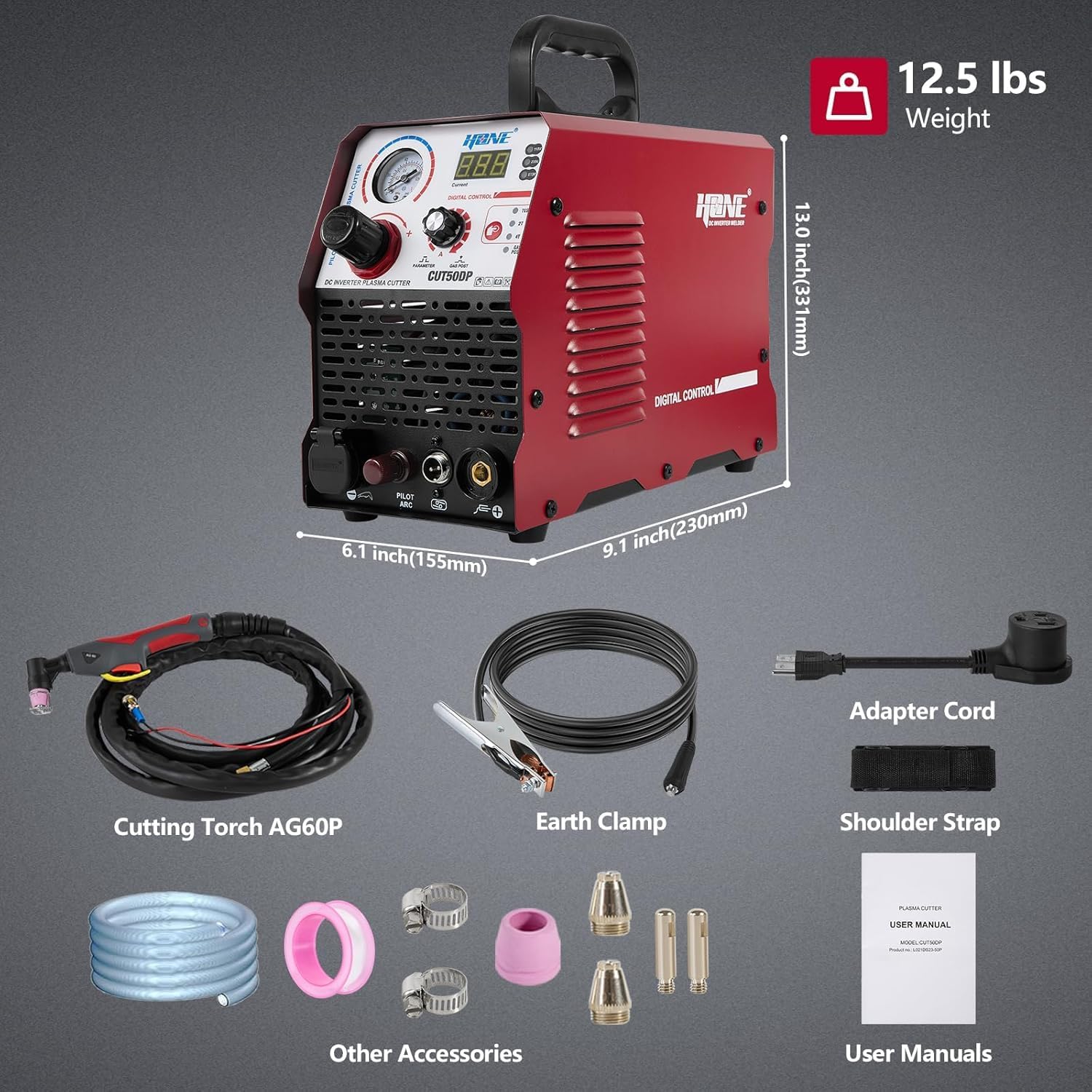
Figure 3.1: Detailed view of all components included with the HONE CUT50DP Plasma Cutter.
4. Setup Instructions
Follow these steps to set up your plasma cutter for operation. The entire setup process can typically be completed within one minute.
- Power Connection: The unit supports dual voltage (110V/220V). Connect the power input cable to the appropriate power source. Use the provided adapter cord if converting between 110V and 220V. Ensure the power source meets the machine's requirements (e.g., 30A for 110V, 50A for 220V).

Figure 4.1: Dual voltage connection options for the plasma cutter.
- Air Hose Connection: Connect the air hose to the quick air connector located at the rear of the plasma cutter. The unit features a built-in air filter for convenience. Secure the hose with the provided hose clamps.
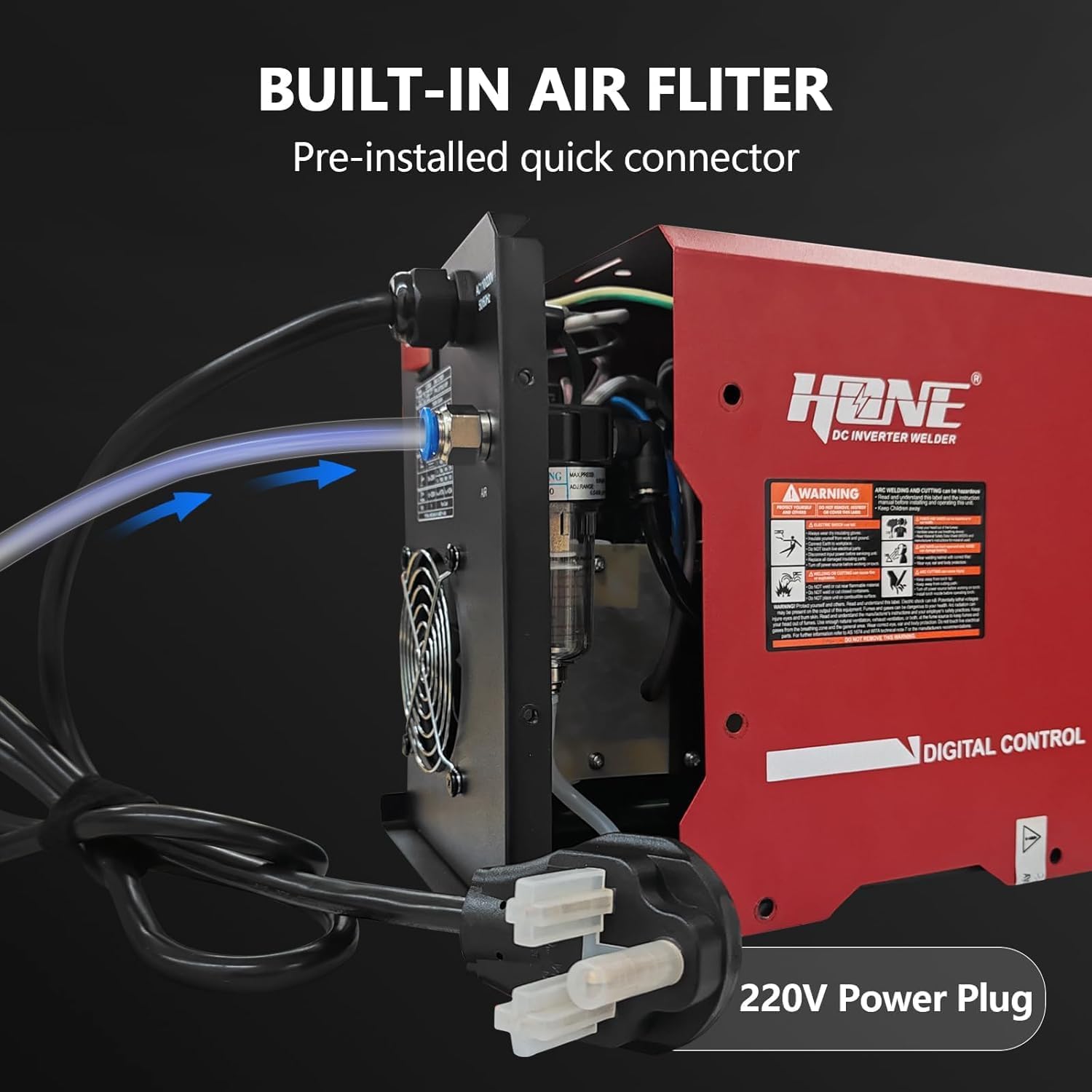
Figure 4.2: Built-in air filter with pre-installed quick connector.
- Torch and Earth Clamp Connection: Connect the cutting torch to the designated interface on the front panel. Connect the earth clamp cable to the earth clamp terminal. Ensure all connections are secure.
- Front Panel Overview: Familiarize yourself with the front panel controls, including the pressure gauge, air pressure adjustable knob, current meter, and 2T/4T function selector.

Figure 4.3: Product details showing front and rear panel components.
5. Operating Instructions
This section details the steps for operating your HONE CUT50DP Plasma Cutter.
- Power On: Turn on the power switch located at the rear of the unit.
- Adjust Air Pressure: Use the air pressure adjustable knob on the front panel to set the desired air pressure. The pressure gauge will display the current setting. You can use the 'Gas Test' function to check air flow without striking an arc.
- Select Cutting Current: Adjust the current knob to the appropriate amperage for your material thickness. The digital display will show the current setting.
- Select 2T/4T Mode:
- 2T (Two-Touch) Mode: Press and hold the torch trigger to start the arc; release to stop.
- 4T (Four-Touch) Mode: Press and release the trigger to start the arc; press and release again to stop. This mode is useful for longer cuts to reduce finger fatigue.
- Pilot Arc Function: The non-touch pilot arc allows cutting through painted, rusty, or rough surfaces without direct contact between the torch tip and the workpiece. This improves cut quality and extends consumable life.

Figure 5.1: The non-touch pilot arc in operation.
- Cutting Procedure:
- Securely attach the earth clamp to the workpiece.
- Position the torch approximately 1/8 inch (3mm) above the starting point of the cut.
- Activate the torch trigger to initiate the pilot arc.
- Slowly move the torch across the material at a consistent speed. Observe the arc and molten metal flow to maintain optimal cutting speed.
- For piercing, start the arc slightly angled, then slowly bring the torch perpendicular to the material as the arc penetrates.
- Post Flow: The machine features an adjustable post-flow function, which continues air flow after the arc stops to cool the torch and extend consumable life.
5.1 Cutting Performance
The HONE CUT50DP offers powerful cutting capabilities for various metals:
- Clean Cut: 3/8'' (10mm) at 110V (35A) and 5/8'' (16mm) at 220V (50A).
- Severance Cut: 19/32'' (15mm) at 110V (35A) and 4/5'' (20mm) at 220V (50A).
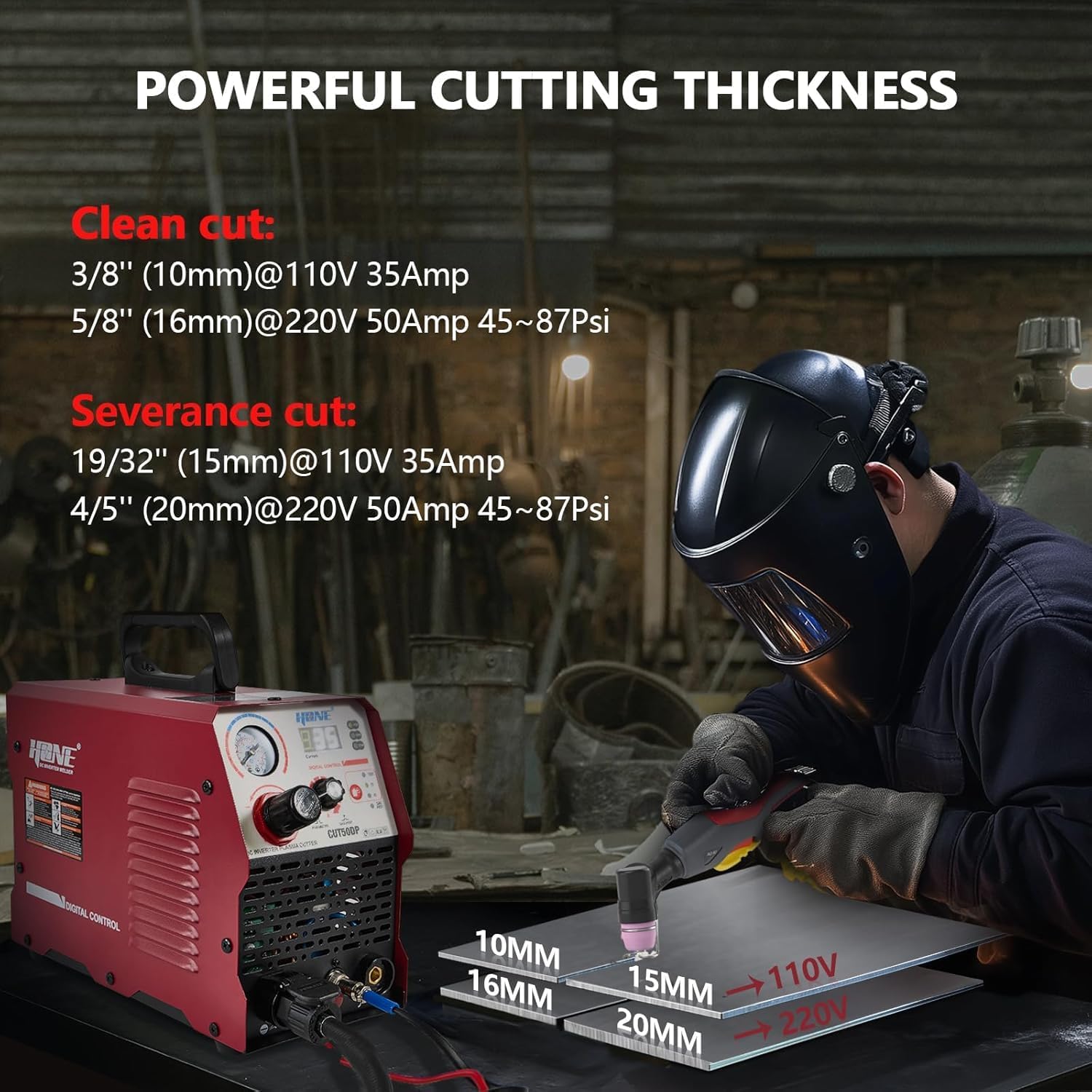
Figure 5.2: Cutting thickness capabilities for clean and severance cuts.
6. Cutting Data Chart
Refer to the following chart for recommended settings based on nozzle size and workpiece thickness:
| Nozzle | Workpiece Thickness (inch) | Workpiece Thickness (mm) | Air Pressure (Mpa) | Air Pressure (Psi) |
|---|---|---|---|---|
| 0.035 inch | 26GA-1/4" | 0.8-6.35 | 0.3-0.6 | 45-87 |
| 0.040 inch | 1/4"-1/2" | 6.35-12 | 0.3-0.6 | 45-87 |
| 0.043 inch | 1/2"-3/4" | 12-20 | 0.3-0.6 | 45-87 |
Recommended Air Compressor Capacity: 100-250 L/min (3.5-9.0 CFM) at 45-87 Psi.
7. Maintenance
Regular maintenance ensures optimal performance and extends the lifespan of your plasma cutter.
- Air Filter: Periodically check and clean or replace the built-in air filter to ensure clean, dry air supply to the torch. A clogged filter can lead to poor cut quality and reduced consumable life.
- Torch Consumables: The ceramic nozzle, cutting nozzle, and electrode are wear parts. Inspect them regularly for signs of wear, such as pitting, discoloration, or damage. Replace them as needed to maintain cut quality and efficiency.

Figure 7.1: Exploded view of plasma torch consumables.
- General Cleaning: Keep the machine clean and free from dust and metal particles. Use compressed air to blow out internal components periodically, ensuring the unit is unplugged first.
- Cable Inspection: Regularly inspect all cables (power, torch, earth clamp) for damage, cuts, or frayed insulation. Replace damaged cables immediately.
8. Troubleshooting
This section provides solutions to common issues you might encounter.
- No Arc:
- Check power connection and ensure the unit is turned on.
- Verify earth clamp is securely attached to the workpiece and has good electrical contact.
- Ensure air pressure is set correctly and air supply is adequate.
- Inspect torch consumables (electrode, nozzle) for wear and replace if necessary.
- Poor Cut Quality / Excessive Slag:
- Adjust cutting speed: Too fast results in incomplete cuts, too slow causes excessive heat and slag.
- Check and adjust air pressure: Incorrect pressure affects arc stability and cut quality.
- Inspect and replace worn torch consumables.
- Ensure proper amperage setting for the material thickness.
- Unit Overheats / Alarm Indicator On:
- Allow the machine to cool down. The alarm indicator will turn off when it's safe to resume operation.
- Ensure adequate ventilation around the unit; clear any obstructions from cooling vents.
- Avoid exceeding the machine's duty cycle.
- 110V Cutting Issues: If experiencing problems cutting on 110V, ensure your circuit has at least 30 amps available. For heavier cutting, 220V is recommended.
9. Specifications
Key technical specifications for the HONE CUT50DP Plasma Cutter:
- Manufacturer: HONE
- Model Number: CUT50DP
- Item Weight: 20.3 pounds
- Package Dimensions: 17.32 x 13.74 x 7.68 inches
- Power Source: AC (110V/220V Dual Voltage)
- Cutting Current (110V): 15-35A
- Cutting Current (220V): 15-50A
- Clean Cut (110V): 3/8" (10mm)
- Clean Cut (220V): 5/8" (16mm)
- Severance Cut (110V): 19/32" (15mm)
- Severance Cut (220V): 4/5" (20mm)
- Technology: IGBT Inverter, Non-Touch Pilot Arc
- Functions: 2T/4T, Gas Test, Post Flow
10. Warranty and Support
HONE provides a one-year warranty for this plasma cutter. Additionally, life-time technical support is available for every customer.
If you have any questions or concerns regarding the use, setup, or maintenance of your HONE CUT50DP Plasma Cutter, please contact HONE customer service via email. Our support team aims to reply within 24 hours.