
Important Safety Information
Always assemble this desk on a stable, level surface. Due to its weight and size, it may tip over if not properly assembled or anchored to the wall. Keep away from heat sources and do not place heavy objects on the desk that could cause it to tip over.
Product Overview
The LayBurst 60" Farmhouse Executive Desk is designed for home and office environments, offering a blend of classic aesthetics and modern functionality. It features a spacious work surface, integrated charging station, and multiple storage options to enhance productivity and organization.

The LayBurst 60-inch Farmhouse Executive Desk, showcasing its white base, wooden top, and multiple storage compartments in a home office setting.
Key Features
- Stylish Vintage Farmhouse Design: Combines an antique finish with white accents and unique decorative patterns on drawer doors for a warm and natural aesthetic.
- Spacious Storage: Includes four drawers, a file cabinet, and a storage cabinet.
- Lockable Main Drawer: The central main drawer provides a secure place for important documents or items.
- Adjustable File Cabinet: Accommodates Letter/A4/Legal size documents.
- Adjustable Shelf Cabinet: The left storage cabinet features an adjustable shelf for customizable storage.
- Convenient Built-in Charging Station: Equipped with two power outlets, one USB port, and one USB-C port for charging electronic devices.
- Premium Materials and Sturdy Construction: Made from high-quality MDF board for durability and stability.
- Easy to Assemble: Designed for a straightforward assembly process with clear instructions.

Visual breakdown of the desk's storage features: a lockable main drawer, two additional drawers, a file cabinet, and a cabinet with an adjustable shelf.

Close-up view of the integrated charging station on the desk surface, featuring two AC outlets, one USB-A port, and one USB-C port.
Specifications
| Feature | Detail |
|---|---|
| Brand | LayBurst |
| Model Number | ywq25020101-LN |
| Product Dimensions (D x W x H) | 22"D x 60"W x 30.1"H |
| Color | White |
| Base Material | Engineered Wood |
| Finish Type | Painted |
| Item Weight | 115 Pounds |
| Number of Drawers | 5 (4 standard, 1 file) |
| Number of Cabinets | 1 |
| Charging Station | 2 AC Outlets, 1 USB-A Port, 1 USB-C Port |
| Required Assembly | Yes |
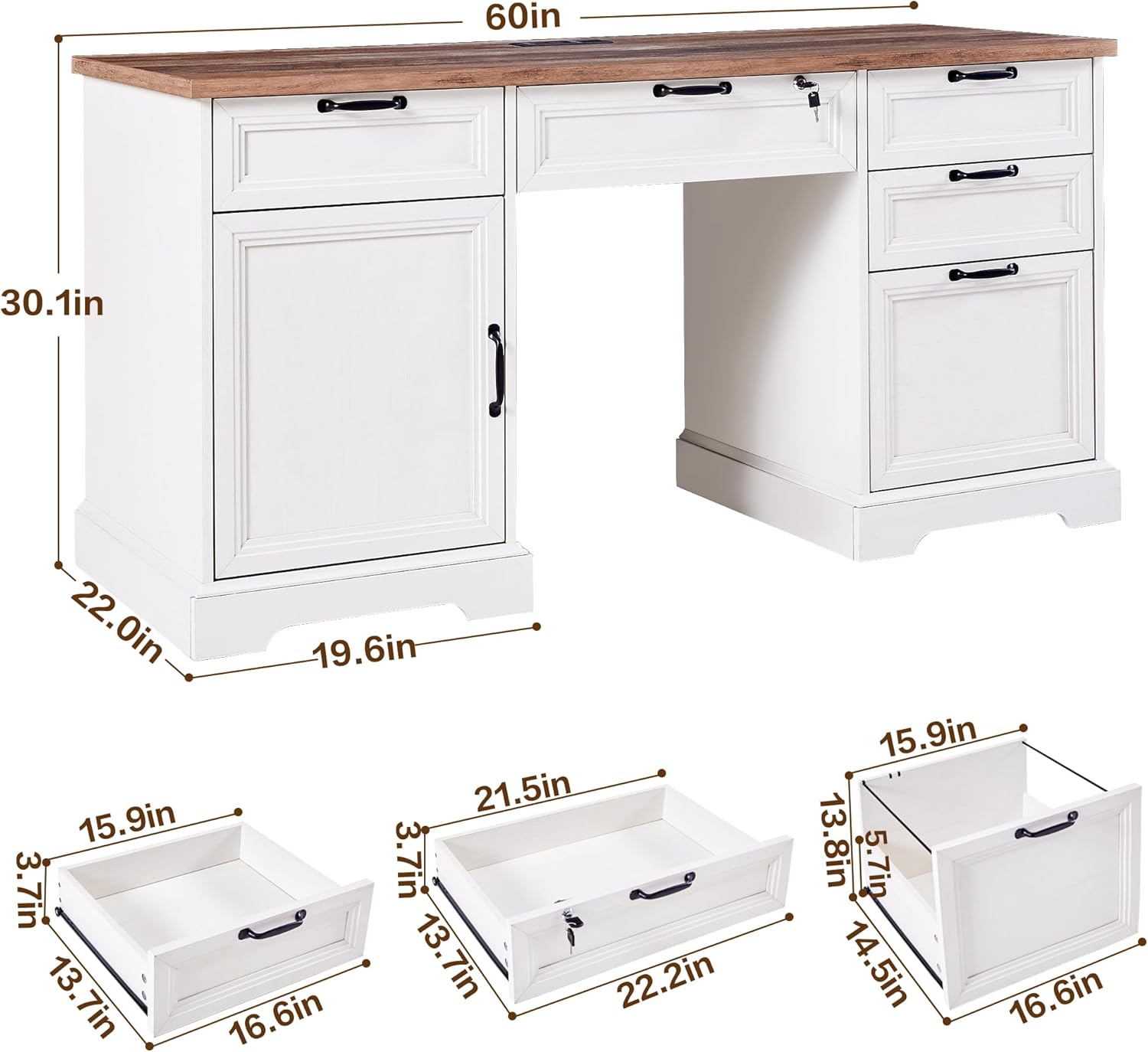
Detailed dimensions of the LayBurst 60-inch Farmhouse Executive Desk, including overall width, depth, height, and individual drawer measurements.
Setup and Assembly
This desk requires assembly. It is recommended to have two people for the assembly process due to the size and weight of the components. Please ensure all parts are present before beginning assembly. Refer to the included installation instructions for detailed, step-by-step guidance.
General Assembly Steps:
- Unpack all components and verify against the parts list in the instruction manual.
- Identify and separate hardware.
- Assemble the main desk frame according to the diagrams.
- Install the drawers and cabinet components.
- Attach the desktop and secure all connections.
- Install the charging station into the designated cutout.
- Perform a final check to ensure all fasteners are tightened and the desk is stable.
For optimal stability, consider anchoring the desk to a wall, especially if it will be placed in an area with potential for tipping.
Operating Instructions
Charging Station
- Connect the desk's power cord to a standard wall outlet.
- Use the two AC outlets for devices requiring standard power.
- Plug USB-compatible devices into the USB-A or USB-C ports for charging.
- Ensure devices are properly seated in the ports for effective charging.
Storage Features
- Lockable Main Drawer: Insert the key into the lock on the central drawer and turn to secure or unlock. Keep the key in a safe place.
- File Cabinet: The bottom right drawer is designed as a file cabinet. Adjust the internal rails to accommodate Letter, A4, or Legal size hanging files.
- Adjustable Shelf Cabinet: The left cabinet contains an adjustable shelf. To reposition, remove the shelf, adjust the shelf pins to the desired height, and reinsert the shelf.
- Ensure drawers and cabinet doors are closed gently to prevent damage.

An aerial view of the LayBurst executive desk with all drawers and the cabinet open, demonstrating the ample storage capacity and organization options.
Maintenance and Care
- Cleaning: Wipe surfaces with a soft, damp cloth. Avoid harsh chemicals or abrasive cleaners that may damage the finish.
- Spills: Clean spills immediately to prevent staining or water damage.
- Heat and Moisture: Avoid placing hot items directly on the desk surface. Use coasters or protective pads. Keep the desk away from excessive moisture or direct sunlight.
- Hardware: Periodically check and tighten all screws and fasteners to ensure the desk remains stable.
- Weight Capacity: Do not overload drawers or the desktop beyond reasonable limits to prevent structural damage.
Troubleshooting
- Desk Wobbles: Ensure all assembly screws are securely tightened. Verify the desk is on a level surface; use shims if necessary.
- Drawers Stick: Check for obstructions in the drawer slides. Ensure the drawer is properly aligned on its runners.
- Charging Station Not Working: Verify the desk's power cord is securely plugged into a functional wall outlet. Check if the wall outlet itself is receiving power.
- Lock Mechanism Issues: Ensure the key is fully inserted and turned correctly. Do not force the lock if it feels stiff.
Warranty and Support
For any questions, concerns, or to report missing or damaged parts, please contact LayBurst customer support. Refer to your purchase documentation for specific warranty details and contact information. Please have your model number (ywq25020101-LN) and purchase date available when contacting support.