
Introduction
This manual provides instructions for the installation, operation, and maintenance of your Mxfdegf 360-Degree Rotating Tablet Case. This case is designed to protect your tablet and enhance its usability with a versatile stand function.
Compatibility
This tablet case is universally compatible with tablets ranging from 10.5 to 11.5 inches. It is specifically designed to fit the Walmart Onn 11-inch Tablet Pro 2024 Model (Model 100146660).
Important Note: This case does not feature a back camera opening and does not support automatic sleep/wake functions for any tablet.
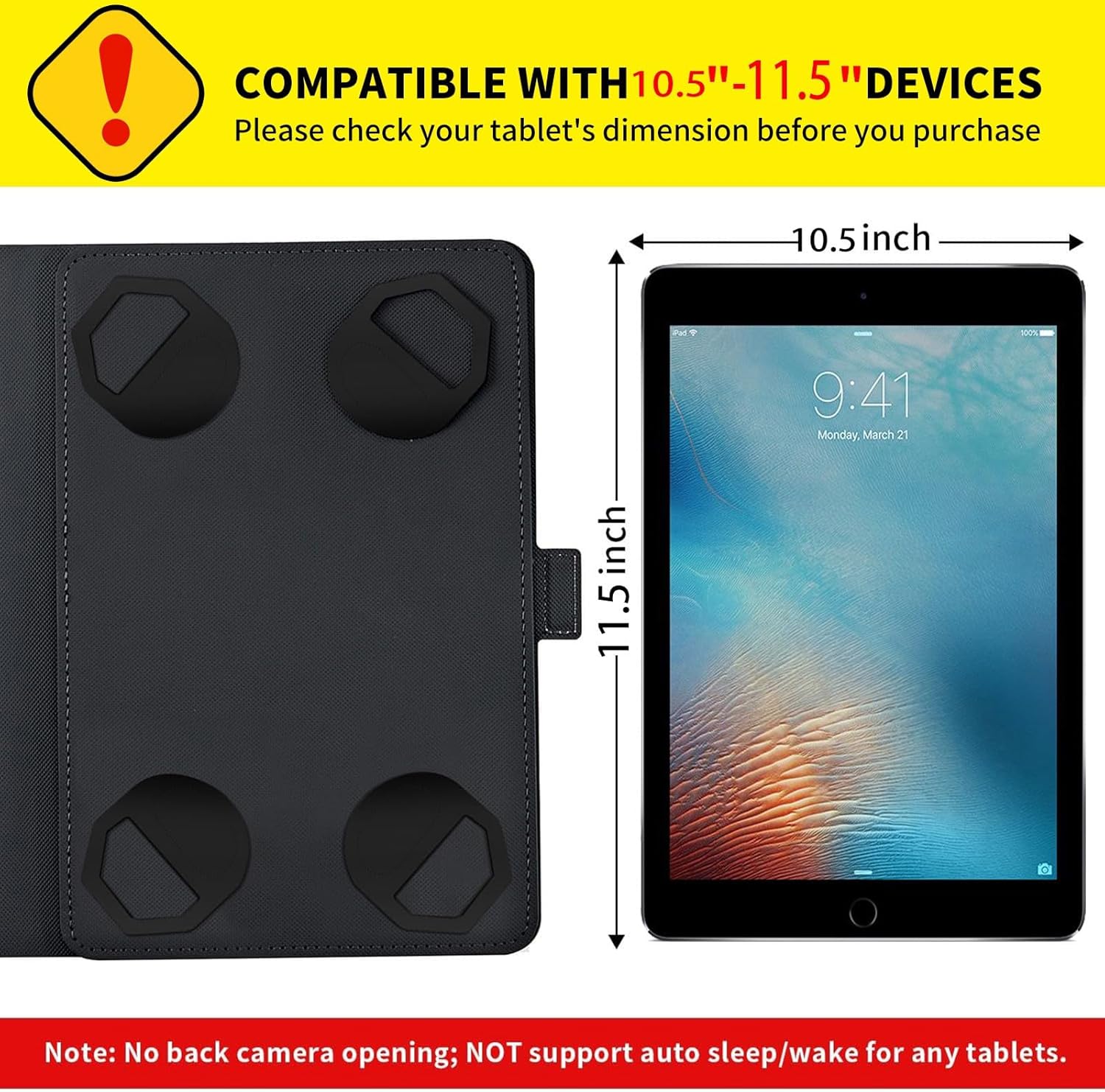
Image 1: Compatibility and Dimensions. This image illustrates the universal fit for 10.5-11.5 inch devices, showing the case's internal dimensions and a tablet for scale. It also highlights that there is no back camera opening and no auto sleep/wake support.
Features
- Universal Fit: Designed for 10.5 to 11.5-inch tablets.
- 360-Degree Rotating Stand: Allows for both landscape and portrait viewing orientations.
- Adjustable Viewing Angles: Provides multiple stable angles for comfortable viewing and typing.
- Magnetic Closure: Secures the case shut, protecting your device from dirt and scratches.
- Secure Tablet Fixation: Equipped with four clasps to firmly hold your tablet in place.
- Durable Material: Constructed from high-quality synthetic leather for full body protection against scratches, shocks, fingerprints, and dust.
- Lightweight and Portable: Designed for easy carrying without adding significant bulk.
- Built-in Elastic Band: Provides additional security or functionality.
- Anti-Slip Grooves: Two integrated grooves ensure a steady stand in various positions.
Setup and Installation
Follow these steps to install your tablet into the Mxfdegf case:
- Open the tablet case completely.
- Carefully position your tablet within the case, ensuring it is centered.
- Adjust the four elastic clasps located at each corner of the case to securely grip your tablet. Ensure all four clasps are firmly holding the tablet's corners.
- Close the case and secure it with the magnetic closure.

Image 2: Easy Installation with Adjustable Snaps. This image demonstrates the process of placing a tablet into the case and securing it with the corner clasps.
Operating Instructions
The Mxfdegf tablet case offers versatile viewing options:
- Using the 360-Degree Rotating Stand: The central swivel mechanism allows you to rotate your tablet 360 degrees while it is in the case. This enables quick switching between landscape and portrait orientations without removing the tablet.
- Adjusting Viewing Angles: The case features multiple grooves on the interior cover. Place the edge of your tablet into one of these grooves to set your desired viewing angle. There are typically three angles for landscape mode and two for portrait mode.
- Magnetic Closure: When not in use, simply close the front cover. The integrated magnetic strip will automatically secure the case, keeping your tablet protected.

Image 3: 360 Degree Rotating Stand. This image shows the tablet case in use, illustrating how the 360-degree rotation works and the different landscape and portrait stand angles available.

Image 4: Key Features in Detail. This image provides a closer look at the built-in elastic band, the 360-degree rotation feature, and how the adjustable stand angle functions.

Image 5: Anti-Slip Grooves. This image shows the tablet positioned in the case's stand, emphasizing the two anti-slip grooves that provide stability.
Maintenance
To keep your Mxfdegf tablet case in optimal condition:
- Wipe the exterior with a soft, damp cloth to remove dust and fingerprints.
- Avoid using harsh chemicals or abrasive cleaners, as these can damage the material.
- Keep the case away from extreme temperatures and direct sunlight to prevent material degradation.
Troubleshooting
- Tablet does not fit: Ensure your tablet's dimensions are between 10.5 and 11.5 inches. Verify it is the correct model (e.g., Onn 11-inch Tablet Pro 2024 Model).
- No back camera opening: This case is designed without a back camera opening. To use the back camera, you will need to remove the tablet from the case.
- Auto sleep/wake function not working: This case does not support the auto sleep/wake feature. You will need to manually lock/unlock your tablet.
- Color discrepancy: Colors shown in product images may slightly differ from the actual product due to lighting and monitor color settings.
Specifications
| Brand | Mxfdegf |
| Item Model Number | Onn 11 Tablet Pro Case |
| Compatible Devices | Walmart Onn 11 Inch Pro Case (and other 10.5-11.5 inch tablets) |
| Form Factor | Case |
| Special Features | Kickstand, 360-degree rotation, Magnetic Closure |
| Color | Gold Sun and Moon |
| Item Weight | 4.3 ounces |
| Package Dimensions | 7 x 5 x 0.6 inches |
Warranty and Support
For warranty information or customer support, please refer to the seller's contact information on your purchase platform or the product packaging. Keep your proof of purchase for any warranty claims.