Introduction
Thank you for choosing the ONBRILL 55" Wine Bar Cabinet. This manual provides detailed instructions for the assembly, operation, and maintenance of your new cabinet. Please read this manual thoroughly before beginning assembly and retain it for future reference.

Image: The ONBRILL 55" Wine Bar Cabinet in walnut finish, showcasing its design with a coffee machine and decorative items on top, and wine glasses hanging inside the illuminated central compartment.
Important Safety Information
Please observe the following safety precautions to ensure safe use and prevent damage to the product or injury.
- Wall Mounting: Always secure the cabinet to the wall using the provided wall-mounting kit. This is crucial to prevent tipping, especially in households with children or pets.
- Weight Capacity: Do not exceed the maximum weight capacity. The total weight placed on the cabinet, including items on shelves and the tabletop, must not exceed 80.9 pounds (36.7 kg).
- Stable Surface: Place the cabinet on a flat, stable, and level surface to ensure stability.
- Electrical Safety: When using the built-in charging ports and AC outlets, ensure that connected devices do not exceed the specified electrical ratings (125V/12A for AC outlets, 5V 2A for USB ports). Avoid overloading the outlets.
- Assembly: Follow all assembly instructions carefully. Ensure all parts are correctly installed and fasteners are tightened securely before use.
Setup and Assembly
The ONBRILL Wine Bar Cabinet is designed for straightforward assembly. All parts are numbered for easy identification. A detailed installation manual is included in the packaging to guide you through each step.
Before You Begin:
- Unpack all components and verify that all parts listed in the included installation manual are present and undamaged.
- Clear a spacious area for assembly.
- Gather necessary tools (e.g., screwdriver, hammer if required by the manual).
Assembly Steps:
- Follow the step-by-step instructions provided in the separate installation manual. Each part is numbered to correspond with the diagrams.
- Assemble the main frame of the cabinet first, ensuring all connections are secure.
- Install the adjustable shelves, wine glass holders, and the 12-slot wine rack as per the instructions. These components offer flexibility in storage configuration.
- Attach the sliding tambour doors. Ensure they glide smoothly along their tracks.
- Install the LED light strip and connect the charging station components according to the electrical safety guidelines.
- Crucial Step: Secure the cabinet to the wall using the provided wall-mounting kit. This prevents accidental tipping and ensures stability.

Image: The fully assembled ONBRILL Wine Bar Cabinet, demonstrating its integration into a modern living space, highlighting its functional and aesthetic appeal.
Operating Instructions
Storage and Organization:
The cabinet offers versatile storage options:
- Wine Glass Holder: Three tiers are designed to hold up to 9 wine glasses securely.
- Wine Rack: A 12-grid wine rack is included for organizing wine bottles. This rack is removable, allowing for flexible storage configurations.
- Adjustable Shelves: The cabinet features adjustable shelves with three height options, perfect for accommodating various items from liquor bottles to dinnerware.
- Large Tabletop: The spacious top surface provides ample space for appliances such as a coffee maker, microwave, or decorative items.

Image: A detailed view of the cabinet's interior, illustrating the adjustable shelf mechanism, the integrated wine glass holder, and the structured wine bottle rack, all designed for optimal organization.
LED Lights and Charging Ports:
Enhance your space with the integrated features:
- RGB LED Light Strip: Use the included remote control to customize the colors and brightness of the LED light strip, creating various ambiances.
- Charging Station: The cabinet includes 2 standard AC outlets (125V/12A) and 2 USB ports (5V 2A) for convenient charging of electronic devices.

Image: This image highlights the multi-function charging station on the cabinet's top surface, featuring AC outlets and USB ports, alongside a demonstration of the customizable RGB LED lighting within the central compartment.
Sliding Tambour Doors:
The cabinet features smoothly sliding tambour doors that allow you to easily access or conceal the contents of the side compartments. Gently slide the doors along their tracks to open or close them.
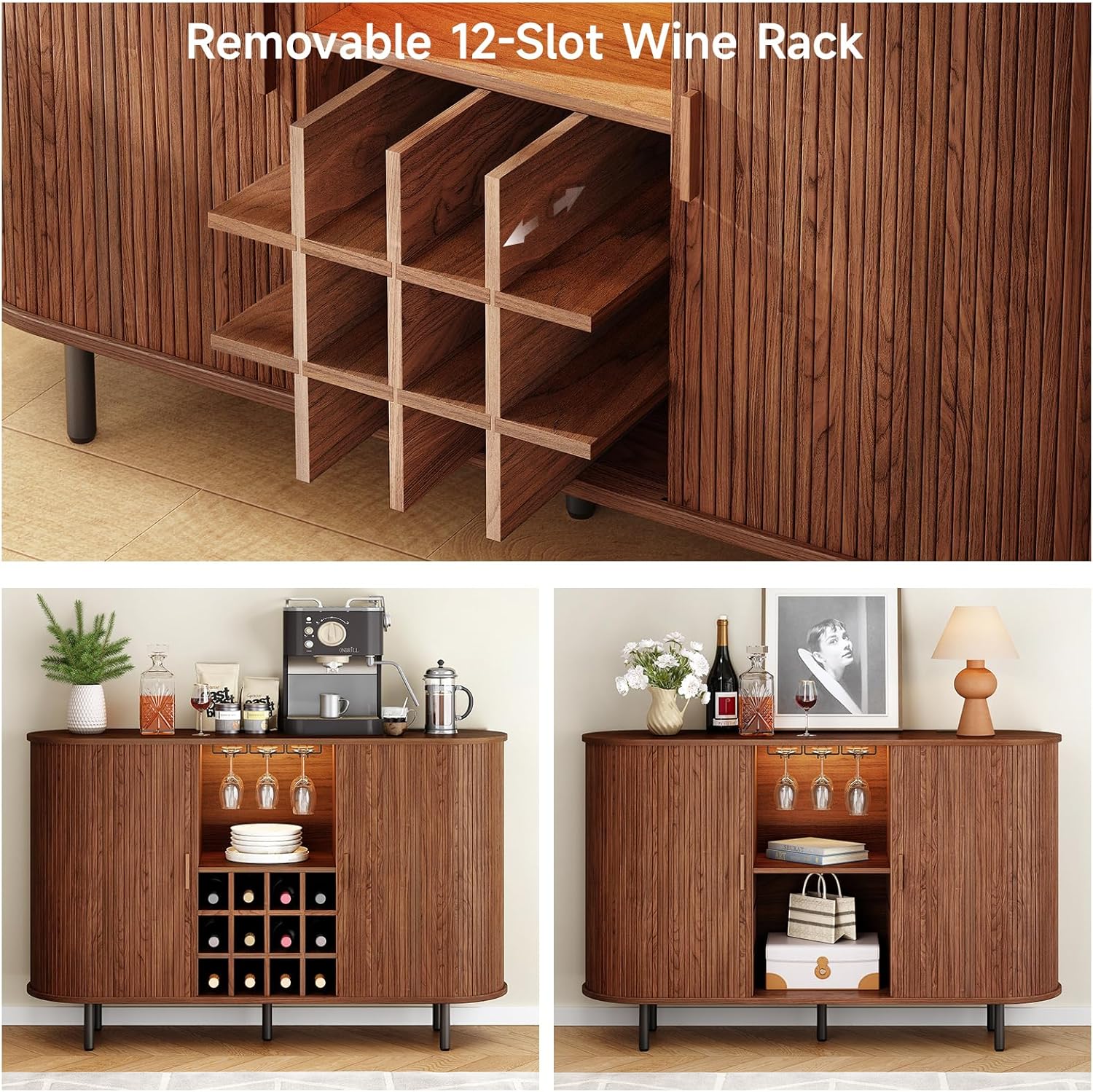
Image: A close-up view of the cabinet's tambour door, illustrating its smooth sliding mechanism, which allows for easy access to the storage compartments while maintaining a sleek appearance.
Care and Maintenance
Proper care will ensure the longevity and appearance of your ONBRILL Wine Bar Cabinet.
- Cleaning: Wipe surfaces with a soft, damp cloth. Avoid using harsh chemicals, abrasive cleaners, or polishes that may damage the woodgrain finish.
- Spills: Immediately wipe up any spills to prevent staining or damage to the engineered wood.
- Dusting: Regularly dust the cabinet with a dry, soft cloth to prevent dust buildup.
- Sunlight Exposure: Avoid prolonged exposure to direct sunlight, which can cause fading or discoloration of the finish.
- Heat and Moisture: Keep the cabinet away from direct heat sources and areas of high humidity to prevent warping or damage.
- Hardware: Periodically check all screws and fasteners to ensure they remain tight. Retighten if necessary.
Troubleshooting
If you encounter any issues with your ONBRILL Wine Bar Cabinet, please refer to the following common solutions. If the problem persists, contact customer support.
| Problem | Possible Cause | Solution |
|---|---|---|
| Cabinet is wobbly or unstable. | Uneven floor; loose fasteners; wall-mounting kit not installed or improperly secured. | Ensure the cabinet is on a level surface. Check and tighten all assembly fasteners. Verify that the wall-mounting kit is correctly installed and secured to a wall stud. |
| LED lights are not working. | Power connection issue; remote control battery low; LED strip damaged. | Check if the LED light strip is properly connected to the power source. Replace the remote control battery. If the issue persists, contact customer support. |
| Charging ports (AC/USB) are not functioning. | Power cord not plugged in; circuit overload; internal wiring issue. | Ensure the cabinet's main power cord is securely plugged into a working wall outlet. Do not exceed the maximum electrical load for the outlets. Try plugging in a different device to confirm the port's functionality. If still not working, contact customer support. |
| Sliding doors are stiff or stuck. | Debris in tracks; misaligned doors; damaged tracks. | Clean the tracks of any dust or debris. Gently check if the doors are properly seated in their tracks. Avoid forcing the doors. |
Specifications
| Feature | Detail |
|---|---|
| Model Name | WC-101-WA-140 |
| Brand | ONBRILL |
| Color | Walnut |
| Product Dimensions (W x D x H) | 55.1" x 15.7" x 35.4" (140 cm x 40 cm x 90 cm) |
| Item Weight | 80.9 Pounds (36.7 kg) |
| Material | Engineered Wood |
| Special Features | Adjustable Shelf, Built-In Charging Station (2 AC outlets, 2 USB ports), Wall Fixer, Sliding Door, RGB LED Light Strip |
| Wine Glass Capacity | Up to 9 glasses (3 tiers) |
| Wine Bottle Capacity | Up to 12 bottles (12-grid removable rack) |
| Assembly Required | Yes |

Image: A technical diagram illustrating the precise dimensions (length, depth, height) and internal compartment measurements of the ONBRILL Wine Bar Cabinet, along with indicated weight capacities for different sections.
Warranty Information
Specific warranty details for the ONBRILL 55" Wine Bar Cabinet are typically provided with your purchase documentation or can be obtained directly from the manufacturer. Please refer to the warranty card included in your product packaging or visit the official ONBRILL website for the most current warranty policy and registration information.
Customer Support
For any questions, concerns, or assistance with your ONBRILL Wine Bar Cabinet, please contact our customer support team. We are committed to providing support within 24 hours.
Contact Information:
- Visit the ONBRILL Store on Amazon for product information and support options.
- Refer to your purchase receipt or packaging for direct contact details, such as email or phone number.