
1. Introduction
The LZDOYY MDJ-300K Gold Purity Tester Machine is a precision instrument designed for accurately determining the purity of gold and other precious metals. Utilizing the Archimedean principle of buoyancy, this densimeter provides rapid and accurate measurements of gold karat, density, and purity percentage. It is an essential tool for professionals in the jewelry industry, banks, pawn shops, and precious metal research laboratories.
This device offers non-destructive testing, ensuring that the tested material remains undamaged. It features a high-precision HBM sensor for consistent and reliable results, along with a clear digital display for easy interpretation of measurements.
2. Safety Information
Please read and understand all safety instructions before operating the device. Failure to follow these instructions may result in injury or damage to the instrument.
- Ensure the device is placed on a stable, level surface to prevent inaccurate readings or tipping.
- Use only the specified power supply (AC100V~240V 50HZ/60HZ) to avoid electrical hazards.
- Keep the device away from strong electromagnetic fields, direct sunlight, and extreme temperatures.
- Do not immerse the main unit in water or other liquids. Only the water tank and testing accessories are designed for liquid contact.
- Handle precious metal samples carefully to avoid scratches or damage.
- Keep out of reach of children.
3. Product Overview
The MDJ-300K is an electronic solid density meter capable of testing various precious metals and gemstones. It provides measurements for weight, density, volume, purity, and karat number.
3.1 Measurable Items
The instrument can measure the following:
- Gold: Weight, density, purity, karat number (including gold-copper-silver, gold-silver, gold-copper alloys).
- Platinum: Weight, density, volume, PT value.
- Silver: Weight, density, volume, purity.
- Palladium: Weight, density, volume, purity.
- Gemstone/Jade/Emerald/Brick Stone: Weight, density (specific gravity).

Figure 3.1: Examples of items measurable by the MDJ-300K, including gold, platinum, silver, palladium, and various gemstones.
3.2 Key Features
- High-Precision HBM Sensor: Integrated weighing unit with low temperature drift for consistent and reliable results.
- Non-Destructive Testing: Analyzes purity without damaging the sample.
- Digital Display: Provides precise and instant readings of density, purity, and karat.
- Wide Karat Range: Supports 9K to 24K, with adjustable HI and LO limits for batch testing.
- Large Water Tank Design: Minimizes inaccuracy from supporting wire buoyancy.
- Easy to Use: Simple operation with pure or distilled water as the testing medium.
- Built-in Rechargeable Battery: Enhances portability and provides backup during power outages.
- Automatic Alarm: Alerts when measurements are out of pre-set tolerance limits.
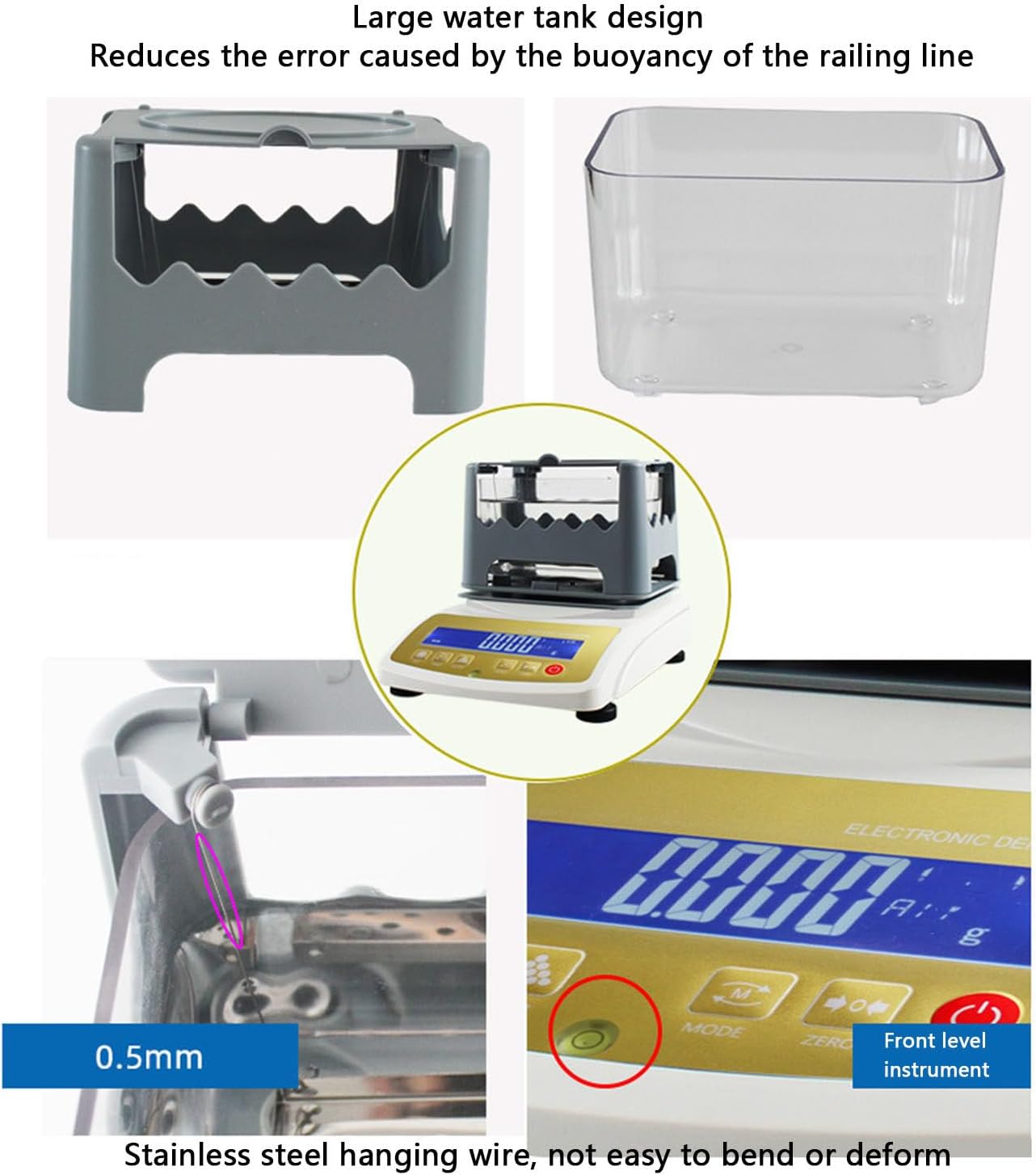
Figure 3.2: Detailed view of the MDJ-300K's large water tank, stainless steel hanging wire, and front level indicator for precise measurements.
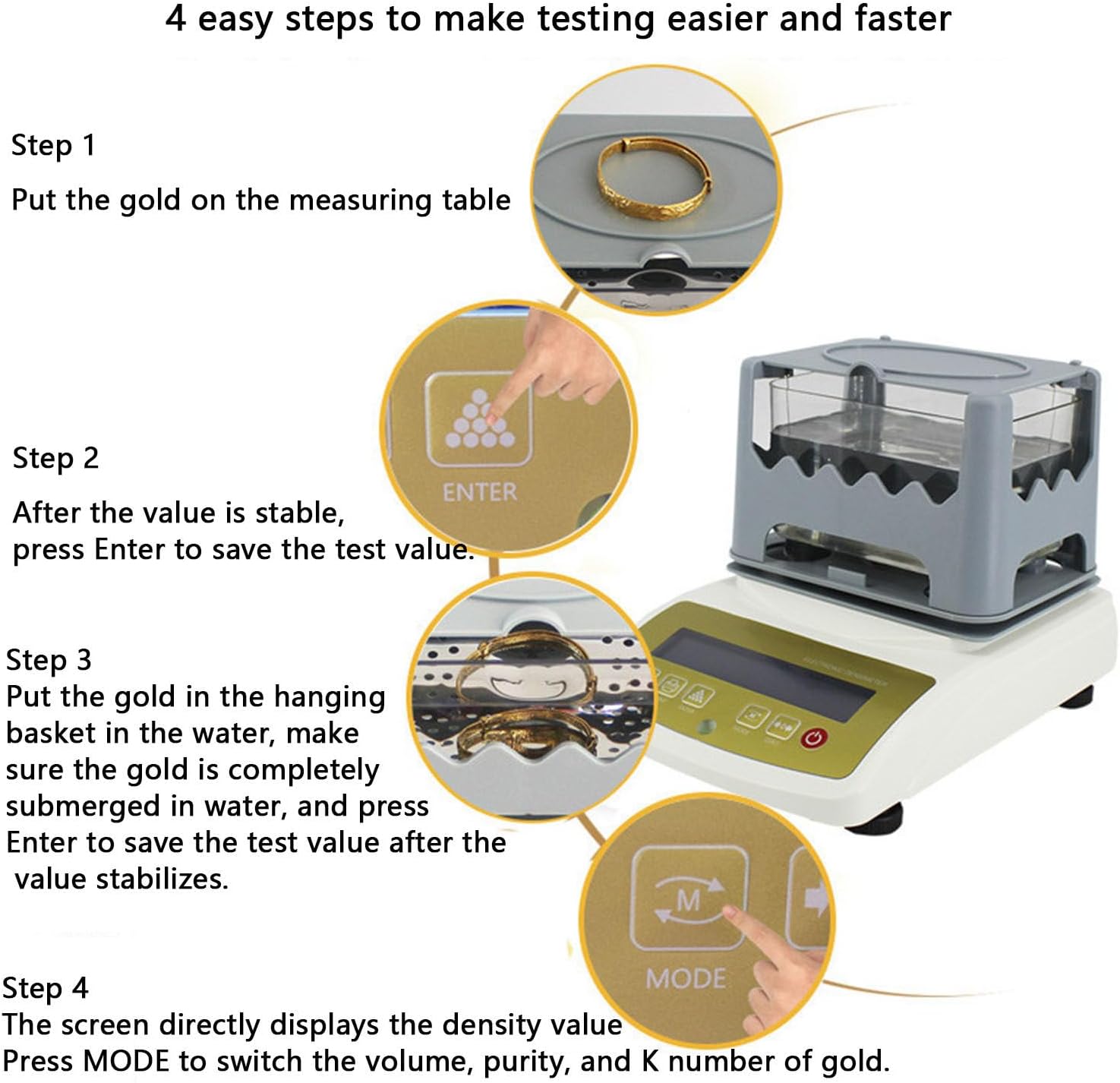
Figure 3.3: The MDJ-300K's compact design and built-in rechargeable battery for enhanced portability.

Figure 3.4: The MDJ-300K features an automatic alarm for out-of-range measurements, facilitating batch testing.
4. Setup
Before operating the MDJ-300K, ensure proper setup for accurate and reliable measurements.
- Unpacking: Carefully remove all components from the packaging. Verify that all parts are present: the main unit, water tank, testing platform, power adapter, and user manual.
- Placement: Place the main unit on a flat, stable, and vibration-free surface. Ensure it is away from direct sunlight, drafts, and heat sources.
- Leveling: Use the adjustable feet at the bottom of the unit to level the instrument. Check the bubble level indicator (Figure 3.2) to ensure it is perfectly centered.
- Assemble Testing Platform: Place the gray testing platform onto the main unit. Then, insert the transparent water tank into the designated area on the platform.
- Power Connection: Connect the power adapter to the instrument and plug it into a suitable AC power outlet (AC100V~240V 50HZ/60HZ).
- Initial Power On: Press the power button to turn on the device. Allow a few minutes for the instrument to warm up and stabilize before calibration or testing.
5. Operating Instructions
The MDJ-300K offers a straightforward process for testing precious metals. Ensure the device is properly set up and leveled before beginning any measurements.
5.1 General Testing Procedure (4 Easy Steps)
This procedure is suitable for most solid samples.
- Step 1: Measure Weight in Air
Place the gold sample (or other precious metal) on the measuring table of the instrument. Wait for the value on the digital display to stabilize. - Step 2: Save Air Weight
Once the value is stable, press the 'Enter' button to save the test value for the weight in air. - Step 3: Measure Weight in Water
Open the lid of the water tank. Carefully place the gold sample into the hanging basket, ensuring it is completely submerged in pure or distilled water. Close the lid. Wait for the value on the digital display to stabilize. - Step 4: Display Results
After the value in water stabilizes, press the 'Enter' button to save this value. The screen will then directly display the density value. Press the 'MODE' button to switch between displaying volume, purity, and K number of the gold.

Figure 5.1: Visual guide for the 4-step gold purity testing process.
5.2 Simplified Testing Procedure (2 Easy Steps with Printer)
This procedure is for models equipped with a printer (printer is an optional accessory).
- Step 1: Measure Weight in Air
Place the gold sample on the measuring table. Press 'Enter' once the value is stable. - Step 2: Measure Weight in Water & Print
Open the lid and place the gold sample in the stainless steel hanging basket, ensuring it is fully submerged in water. Press 'Enter' once the value is stable. The screen will directly display the purity of gold. Press 'Mode' to cycle through K number, density, and volume. Press 'Print' to print out the test value.

Figure 5.2: Simplified 2-step testing process, including an optional printer for result output.
5.3 Important Considerations
- Only solid samples can be tested. Hollow samples and samples inlaid with precious stones cannot be accurately measured by this method.
- Pure water or distilled water should be used as the testing medium.
- The device can be used as a general balance when not performing density measurements.
- The HI and LO limit function allows setting a wide karat range (9K to 24K) for batch testing, with an automatic alarm if values fall outside this range.
Video 5.1: An official demonstration of the Electronic Gold Purity Tester Machine in operation, showing the steps for measuring a gold sample and printing results.
6. Maintenance
Proper maintenance ensures the longevity and accuracy of your LZDOYY MDJ-300K Gold Purity Tester Machine.
- Cleaning: Regularly clean the exterior of the instrument with a soft, dry cloth. For the water tank and testing platform, use mild soap and water, then rinse thoroughly and dry completely before reassembly.
- Water Quality: Always use pure or distilled water for testing. Replace the water in the tank frequently to prevent residue buildup.
- Storage: When not in use, store the instrument in a clean, dry, and dust-free environment. Avoid areas with extreme temperature fluctuations or high humidity.
- Calibration: Periodically check the calibration of the instrument according to the instructions provided in the full technical manual (if available) or by a qualified service technician.
- Battery Care: If the unit has a built-in rechargeable battery, ensure it is charged regularly to maintain battery health, even during periods of non-use.
- Avoid Harsh Chemicals: Do not use abrasive cleaners, solvents, or strong chemicals on any part of the instrument.
7. Troubleshooting
If you encounter issues with your MDJ-300K, refer to the following common problems and solutions:
| Problem | Possible Cause | Solution |
|---|---|---|
| Inaccurate readings | Instrument not level; unstable surface; air bubbles in water; incorrect water type; sample touching tank sides. | Ensure instrument is level; place on stable surface; remove air bubbles from sample/water; use pure/distilled water; ensure sample hangs freely. |
| Display shows "Err" or no reading | Overload; sensor malfunction; power issue. | Remove sample if overloaded; restart device; check power connection. If problem persists, contact support. |
| Printer not working (if applicable) | No paper; paper jam; connection issue. | Check paper supply; clear any paper jams; ensure printer is correctly connected to the main unit. |
| Battery not charging | Faulty adapter; battery issue. | Check power adapter and cable. If battery still doesn't charge, contact support. |
If the problem persists after attempting these solutions, please contact LZDOYY customer support for further assistance.
8. Specifications
The following table outlines the technical specifications for the MDJ-300K and related models:
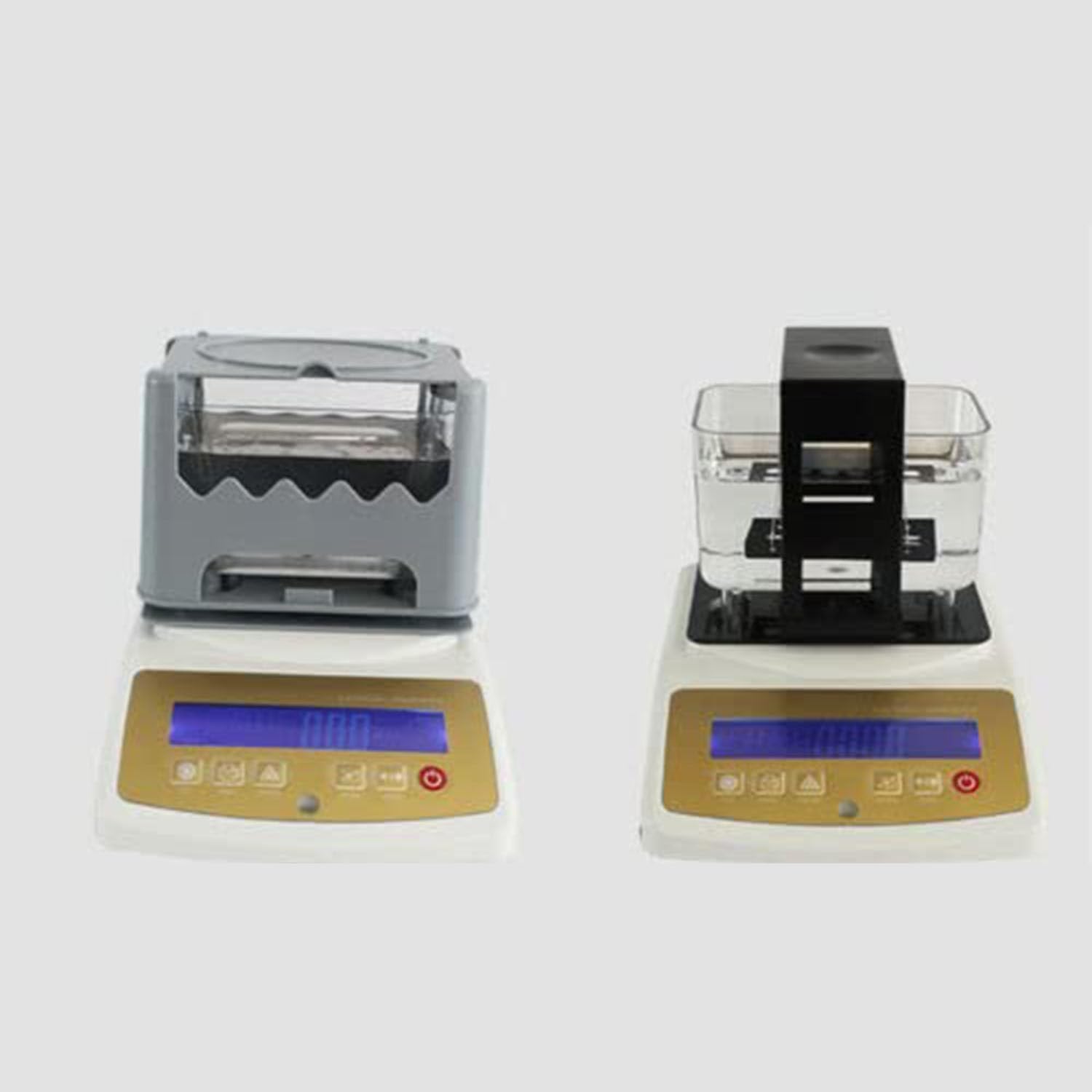
Figure 8.1: Technical specifications for various models of the LZDOYY Gold Purity Tester Machine.
| Specification | Detail |
|---|---|
| Model | MDJ-300K |
| Power Supply Voltage | AC100V~240V 50HZ/60HZ |
| Weighing Range | 0.001g - 300g (for MDJ-300K) |
| Weighing Precision | 0.001g |
| Density Precision | 0.001g/cm³ |
| Standard Water Tank Size | 150 x 100 x 90mm |
| Display Parameters | Gold: density/volume/purity/karat number Platinum: density/volume/PT value Silver/Palladium/other precious metals: density/volume/purity |
| Non-Destructive Testing | Yes |
| Applicable Samples | Solid samples only (cannot test hollow samples or samples with precious stones) |
| Item Weight | 11 pounds (approx. 5 kg) |
| Package Dimensions | 3.94 x 3.94 x 3.94 inches (approx. 10 x 10 x 10 cm) |
9. Warranty and Support
LZDOYY is committed to providing high-quality products and customer satisfaction. For specific warranty details, please refer to the warranty card included with your product or visit the official LZDOYY website.
For technical support, troubleshooting assistance, or inquiries regarding parts and service, please contact our customer support team:
- Email: [Insert Customer Support Email Here]
- Phone: [Insert Customer Support Phone Number Here]
- Website: [Insert Official Website Link Here]
Please have your model number (MDJ-300K) and purchase date available when contacting support.