
1. Introduction
Thank you for choosing the ZonQoonz RGB-12LEDs Rechargeable Mini Par Lights. This manual provides essential information for the safe and efficient operation of your new lighting system. These wireless, battery-powered stage lights are designed for various events, offering vibrant RGB lighting with sound activation and remote control capabilities.
2. Safety Information
- Read all instructions carefully before use.
- Do not expose the lights to rain or moisture to prevent electric shock or fire.
- Ensure proper ventilation around the units to prevent overheating.
- Do not look directly into the light source when operating, as it may cause eye strain.
- Keep out of reach of children.
- Use only the specified charging voltage (DC5V2A).
- Do not attempt to disassemble or repair the unit yourself. Contact qualified service personnel.
3. Package Contents
The package includes:
- 8 x ZonQoonz RGB-12LEDs Rechargeable Mini Par Lights
- 8 x Remote Controls
- 8 x USB Charging Cables
- 1 x Instruction Manual
4. Product Features
- Rechargeable Battery: Built-in 2200mAh battery provides over 6 hours of continuous use.
- High Brightness LEDs: Equipped with 1.5W RGB lamp beads for vibrant lighting.
- Multiple Lighting Effects: Jump, fade, strobe, sound activation, and automatic modes.
- Wireless Control: Operate lights remotely for brightness and color adjustments.
- Sound-Activated Mode: Lights change colors in response to music rhythms.
- Easy Installation: Small, lightweight design with a 360° adjustable bracket for versatile mounting (wall, floor, hanging).

Figure 4.1: Overview of the ZonQoonz RGB-12LEDs Rechargeable Mini Par Lights and included remote controls.

Figure 4.2: Illustration of the built-in battery charging process for the par light.
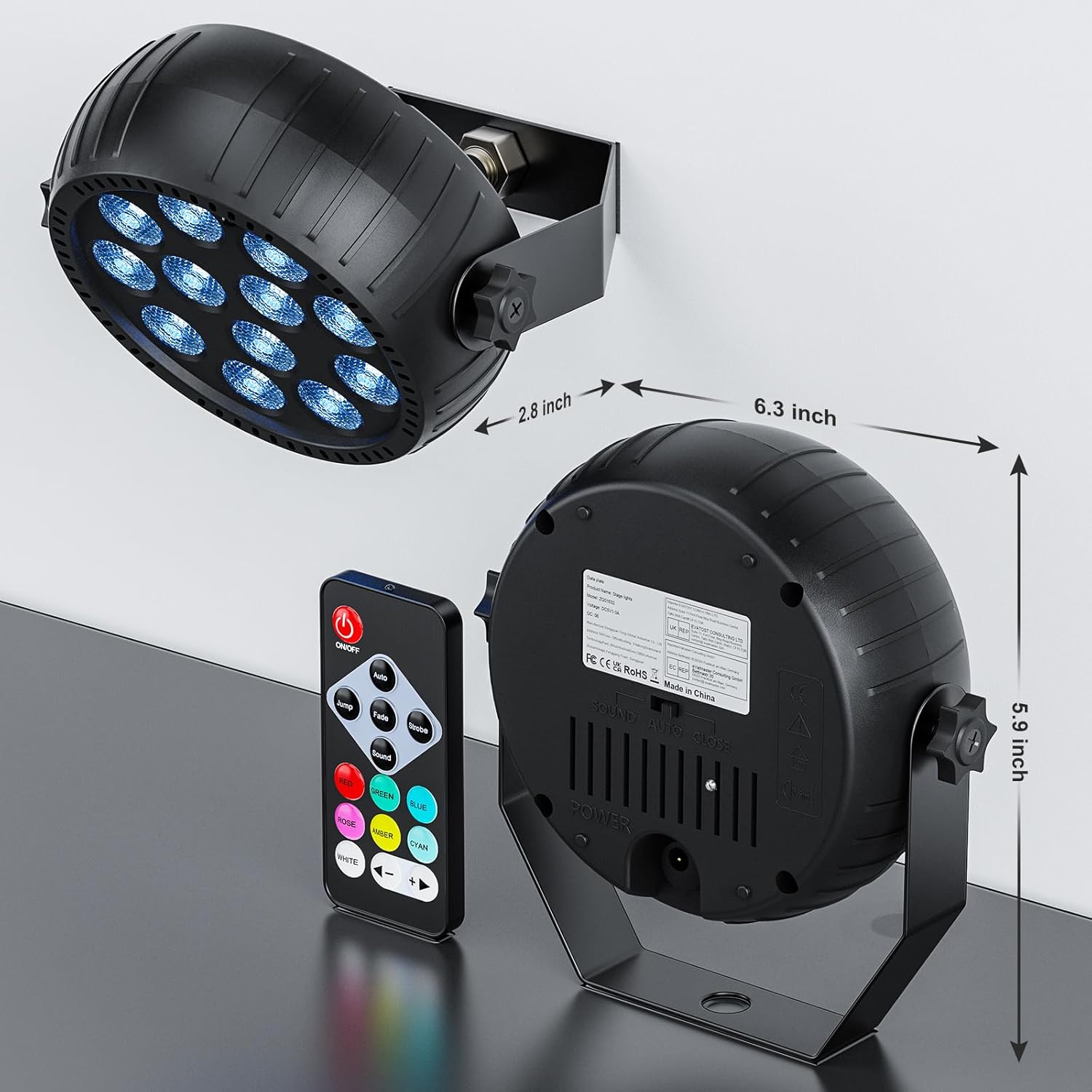
Figure 4.3: Physical dimensions of the Mini Par Light, highlighting its compact size.
5. Setup
- Unpack: Carefully remove all components from the packaging.
- Charge Battery: Before first use, fully charge the lights using the provided USB cable and a DC5V2A power adapter (not included). A full charge typically takes 2-4 hours and provides up to 6 hours of continuous use at full brightness, or 12 hours on its own (lower brightness/intermittent use).
- Positioning: Use the 360° adjustable bracket to position the light as desired. It can be floor-mounted, wall-mounted, or hung.
- Power On: Locate the power switch on the back of the unit and switch it to the 'ON' position.
6. Operating Instructions
6.1 Remote Control Functions
The included remote control allows for easy adjustment of the light's settings. Ensure the remote is pointed towards the light's infrared receiver for optimal response.
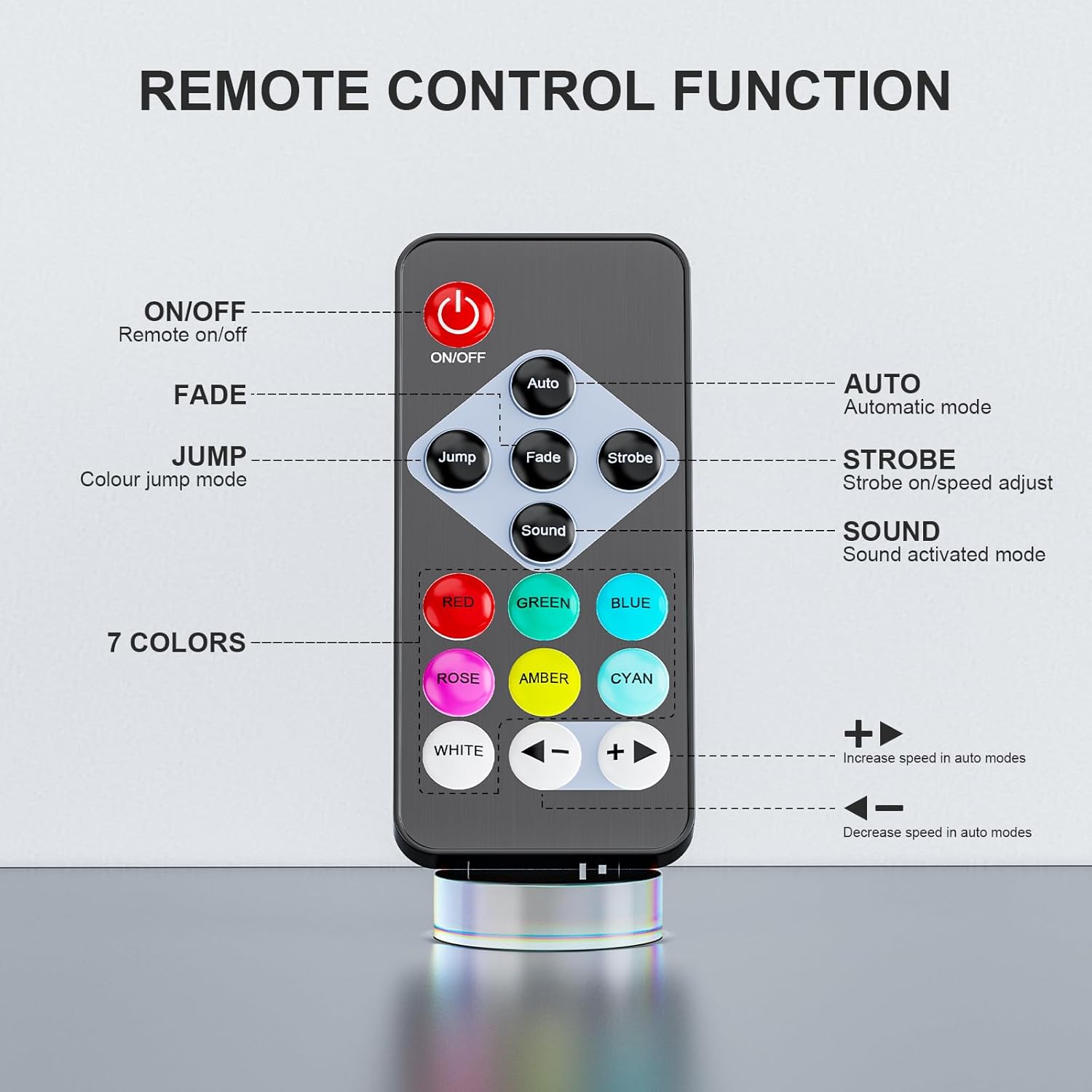
Figure 6.1: Remote control layout and button functions.
- ON/OFF: Powers the light on or off.
- AUTO: Activates automatic mode, cycling through various effects.
- JUMP: Activates color jump mode, changing colors abruptly.
- FADE: Activates color fade mode, smoothly transitioning between colors.
- STROBE: Activates strobe mode, flashing colors rapidly. Use +/- buttons to adjust speed.
- SOUND: Activates sound-activated mode, where lights react to music or ambient sound.
- Color Buttons (Red, Green, Blue, Rose, Amber, Cyan, White): Selects a static color.
- +/- Buttons: Adjusts speed in auto and strobe modes.
6.2 Operating Modes Overview
The lights offer several dynamic modes to suit different environments:
- Automatic Mode: The light cycles through pre-programmed color changes and effects.
- Sound-Activated Mode: The light's colors and patterns respond to detected sound, ideal for music-driven events.
- Jump Mode: Colors change instantly from one to another.
- Fade Mode: Colors transition smoothly, creating a gradual change.
- Strobe Mode: Rapid flashing of colors for a dynamic effect.
Video 6.1: Demonstration of various stage lighting effects including single-color, RGB mixing, jump, fade, pulse, strobe, halo ring effects, brightness adjustment, and remote control operation.
Video 6.2: Overview of the Rechargeable Mini Par Lights showcasing automatic mode, jump, strobe, fade, remote control, and applications for parties, weddings, and bars.
7. Maintenance
- Cleaning: Use a soft, dry cloth to clean the exterior of the lights. Do not use abrasive cleaners or solvents.
- Storage: When not in use for extended periods, store the lights in a cool, dry place. Ensure batteries are partially charged before storage and recharged every few months to maintain battery health.
- Battery Care: Avoid fully discharging the battery frequently to prolong its lifespan.
8. Troubleshooting
| Problem | Possible Cause | Solution |
|---|---|---|
| Light does not turn on. | Battery is depleted or power switch is off. | Charge the light fully. Ensure the power switch is in the 'ON' position. |
| Remote control not working. | Remote battery is dead, or remote is not pointed at the sensor. | Replace the remote control battery. Ensure direct line of sight to the light's infrared sensor. |
| Short battery life. | Operating at full brightness or in dynamic modes consumes more power. | Reduce brightness or use less power-intensive modes to extend battery life. Ensure the light is fully charged before use. |
| Sound-activated mode not responding. | Insufficient sound level or incorrect mode selected. | Increase music volume or ensure the light is in a noisy environment. Verify 'SOUND' mode is selected on the remote. |
9. Specifications
| Feature | Detail |
|---|---|
| Model Number | ZQ01632 |
| Color | RGB-12LEDs |
| Material | Acrylonitrile Butadiene Styrene (ABS), Aluminum |
| Light Source Type | LED |
| Light Source Wattage | 1.5 Watts per LED |
| Brightness | 900 Lumen (Maximum Light Output) |
| Power Source | Battery Powered |
| Input Voltage | DC5V2A |
| Battery Capacity | 2200mAh |
| Battery Life | 4H at full brightness; 12H on its own |
| Charging Time | 4H |
| Effective Control Distance | About 5m (Remote Control) |
| Light Output Angle | 25° |
| Average LED Life | 50,000H |
| Flash Frequency | 1-25Hz |
| Operation Modes | Auto, Voice Control, Remote Control |
| Protection Level | IP20 |
| Working Environment | -20°C to 40°C |
| Product Dimensions | 12"L x 12"W x 12"H (approximate, based on product data) |
10. Warranty and Support
ZonQoonz products are manufactured with quality and performance in mind. For warranty information or technical support, please refer to the contact details provided with your purchase or visit the official ZonQoonz website. Please retain your proof of purchase for any warranty claims.