Introduction
Thank you for choosing the Nillkin Super Frosted Shield Pro Magnetic Phone Case. This manual provides detailed instructions for the proper use, installation, and maintenance of your new phone case. Designed specifically for the Samsung Galaxy S25 Ultra, this case offers robust protection, magnetic wireless charging compatibility, and a comfortable, anti-slip grip.
Setup and Compatibility
Compatibility
This phone case is exclusively designed for the Samsung Galaxy S25 Ultra 6.8 inch model. Please ensure your phone model matches before installation. It is not compatible with Galaxy S25 or Galaxy S25+ models.

Image: Compatibility chart for Nillkin Super Frosted Shield Pro Magnetic case, clearly indicating compatibility only with Samsung Galaxy S25 Ultra.
Installation
To install the case, gently align your Samsung Galaxy S25 Ultra with the case, ensuring the camera cutouts and ports match. Press the phone firmly into the case, starting from one corner and working your way around until the phone is securely seated. The flexible TPU frame allows for easy installation and removal without scratching your device.
Video: Demonstrates the installation of the Nillkin Super Frosted Shield Pro case on a Samsung Galaxy S25 Ultra, highlighting its snug fit, precise cutouts, and the integrated magnetic ring. The video also shows the case's durability through a drop test and its compatibility with various MagSafe accessories.
Operating Features
Magnetic Wireless Charging
The Nillkin Super Frosted Shield Pro case features a built-in strong magnetic ring structure, enabling seamless magnetic wireless charging. Simply place your MagSafe-compatible wireless charger onto the back of the case for efficient power transfer. This design ensures that wireless charging speed is not affected.

Image: The phone case with a magnetic wireless charger attached, illustrating the strong magnetic connection for efficient charging.
MagSafe Accessory Compatibility
Beyond charging, the integrated magnetic ring provides excellent magnetic suction for a variety of MagSafe accessories, such as magnetic car mounts, wallets, and stands. This enhances the versatility and convenience of your device.

Image: Various usage scenarios demonstrating the convenience of the magnetic feature, including holding the phone with the case and using a magnetic charger.
Protection and Design Features
Enhanced Protection
- Lens and Screen Protection: The case features raised edges around both the camera module and the screen. This design effectively prevents direct contact and scratches to the lens or screen when the phone is placed on flat surfaces. The micro-arc wrapped edges ensure perfect compatibility with screen protectors.
- Four Corner Drop Airbag: Constructed with a hard PC back panel and a soft TPU frame, the case incorporates 4-corner anti-drop airbags. These airbags, combined with the curved edge fit, effectively cushion impacts and protect your phone from damage during accidental drops.
Ergonomic Design
- Just Right Grip, Anti-drop: The surface of the phone case is treated with rubberized oil, providing a comfortable and secure grip. Non-slip stripe designs on both sides further enhance stability, effectively preventing the phone from slipping from your hand.
- Friction Resistant, Sweat Proof, Non-stick Fingerprint: The salient point design on the surface offers excellent friction resistance and prevents sticky fingerprints, keeping your case looking clean.
- 3D Buttons and Lanyard Hole: The case is designed with striped 3D buttons for easy and responsive pressing. An anti-lost lanyard hole is also included for added security and convenience.
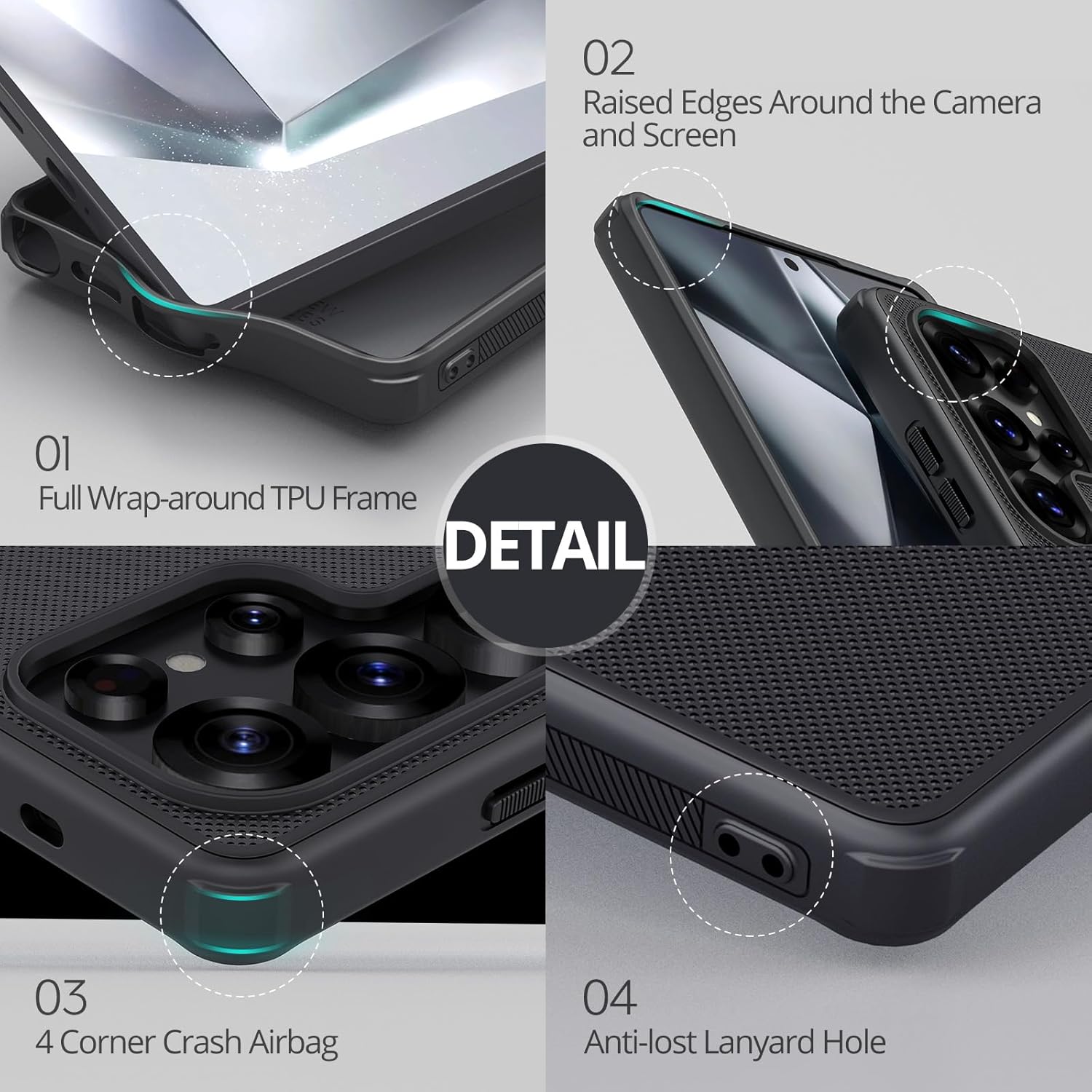
Image: Close-up details of the case highlighting the full wrap-around TPU frame, raised edges for camera and screen protection, four-corner crash airbags, and the anti-lost lanyard hole.

Image: Illustrates the anti-slip texture and raised texture design on the case surface, contributing to a better grip and feel.
Specifications
| Feature | Detail |
|---|---|
| Brand | Nillkin |
| Model Number | S25U-88485-6 |
| Compatible Phone Models | Samsung Galaxy S25 Ultra |
| Material | Polycarbonate, Thermoplastic Polyurethane (TPU) |
| Color | Black |
| Product Dimensions | 3.94 x 4.33 x 1.97 inches |
| Item Weight | 7.1 ounces |
| Special Features | Anti-Fingerprint, Anti-Slip, Magnetic Wireless Charging Compatible, Lens & Screen Protection, 4-Corner Drop Airbag |

Image: Visual representation of the case's dimensions and net weight.
Maintenance
To keep your Nillkin phone case in optimal condition, regularly wipe it with a soft, damp cloth to remove dust and smudges. Avoid using harsh chemicals or abrasive materials, as these may damage the case's surface or finish. Ensure the case is completely dry before re-installing your phone.
Troubleshooting
Common Issues and Solutions
- Magnetic Charging Not Working:
- Ensure your wireless charger is MagSafe compatible and properly aligned with the magnetic ring on the case.
- Check if there are any foreign objects between the phone and the charger or between the phone and the case.
- Verify that your phone's wireless charging feature is enabled.
- Case Feels Loose or Doesn't Fit:
- Confirm that your phone is indeed a Samsung Galaxy S25 Ultra (6.8 inch). This case is specifically designed for this model.
- Ensure the phone is fully seated within the case, pressing firmly around all edges.
- Buttons Are Stiff:
- The buttons are designed for a tactile feel. With initial use, they may feel slightly stiff but will become more responsive over time.
Warranty and Support
Nillkin products are manufactured with high-quality materials and undergo strict quality control. For information regarding warranty coverage or technical support, please refer to the warranty card included with your purchase or visit the official Nillkin website. You may also contact the seller directly for assistance.


