
1. Introduction
This manual provides detailed instructions for the installation, operation, and maintenance of your ODEKTOOY S200HS 2.1 Channel Audio Power Amplifier Board. The S200HS is designed to deliver high-quality audio output with versatile input options, including Bluetooth, AUX, and USB. Please read this manual thoroughly before using the product to ensure proper function and safety.
2. Product Features
- Dual TPA3221 Chip: Equipped with two TPA3221 chips for stereo 2.1 channel output, providing up to 100W+100W+200W power.
- Wide Voltage Input: Supports DC 12-30V input for flexible power supply options.
- Multiple Input Methods: Seamlessly switch between Bluetooth 5.2, 3.5mm AUX, and USB drive inputs.
- Multifunction Knob: Intuitive control for playback, mode switching, and factory reset.
- Input Mode Indicator: Clear visual indication of the active input mode.
- Robust Protection: Features short-circuit, over-current, over-heat, and anti-reverse protection mechanisms.
- Efficient Cooling: Large heat sink ensures continuous and efficient operation.
3. Safety Information
- Ensure the power supply voltage is within the specified DC 12-30V range.
- Do not expose the amplifier board to moisture or extreme temperatures.
- Avoid short-circuiting the output terminals.
- Disconnect power before making any connections or adjustments.
- Keep out of reach of children.
- Do not attempt to disassemble or modify the unit, as this may void the warranty and pose a safety risk.
4. Setup
4.1 Component Identification
Familiarize yourself with the various components and connection points on the amplifier board.

Figure 1: Internal layout and connection points of the S200HS amplifier board, highlighting the dual TPA3221 chips, large heat sink, and various input/output terminals.
4.2 Connecting Power
- Ensure the amplifier is switched off.
- Connect a DC 12-30V power adapter (5A or above recommended) to the DC socket (5.5*2.5mm) on the board.
4.3 Connecting Speakers
The S200HS supports 2.1 channel audio. Connect your passive speakers and subwoofer to the appropriate terminals.
- Connect your left and right passive speakers to the 'L&R Speakers' terminals. Ensure correct polarity (+/-).
- Connect your passive subwoofer to the 'Subwoofer' terminals. Ensure correct polarity (+/-).
4.4 Connecting Audio Inputs
The amplifier supports Bluetooth, AUX, and USB inputs.
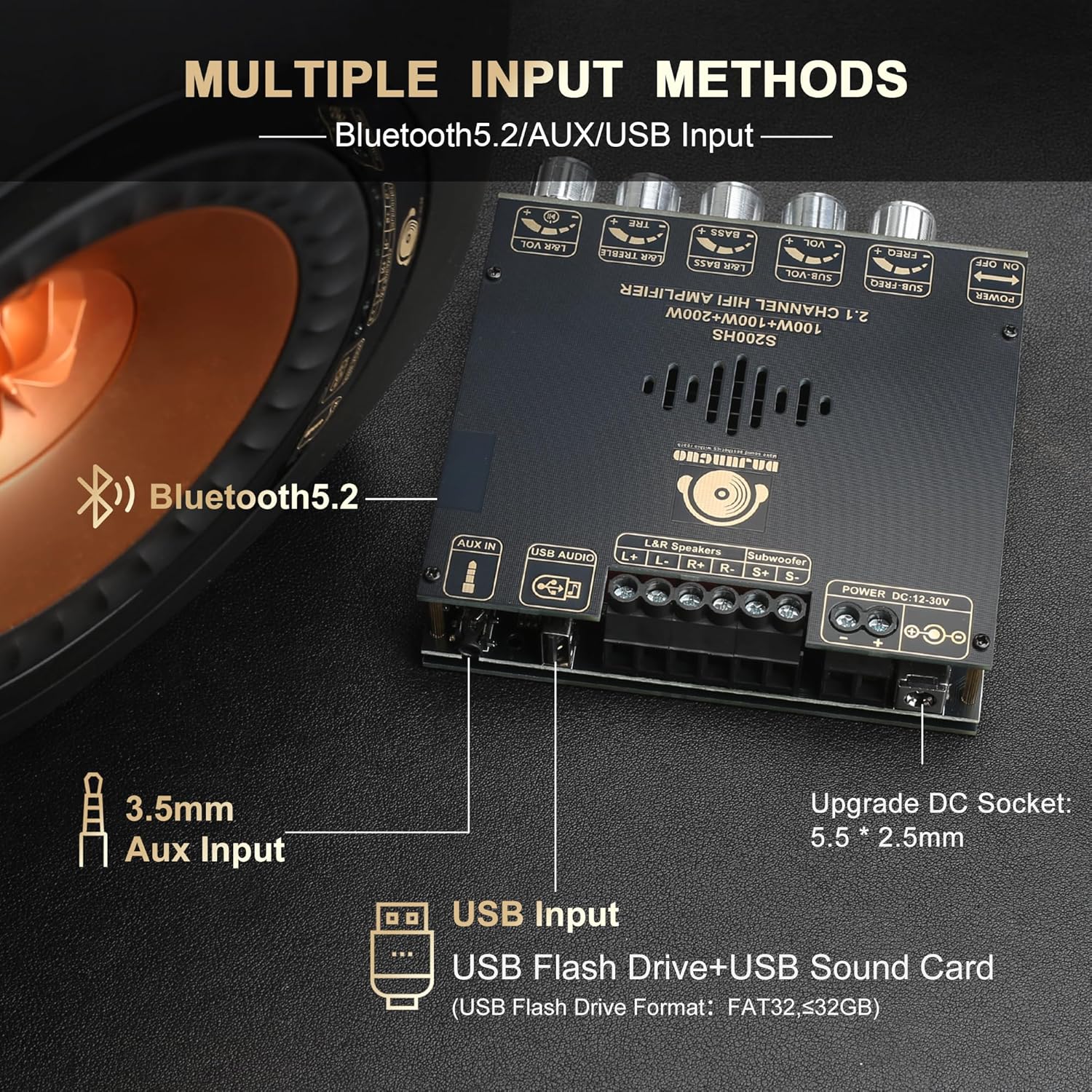
Figure 2: The S200HS amplifier board displaying its multiple input options: Bluetooth, 3.5mm Aux Input, and USB Input.
- AUX Input: Connect your audio source (e.g., smartphone, TV, laptop) using a 3.5mm audio cable to the 'AUX IN' port.
- USB Input: Insert a USB flash drive (FAT32, ≤32GB) into the 'USB Audio' port for direct playback. This port also functions as a USB sound card when connected to a computer.
- Bluetooth Input: For wireless connection, ensure no AUX or USB device is connected, then pair your device via Bluetooth.

Figure 3: The S200HS amplifier board in use, connected to speakers and streaming audio via Bluetooth 5.2 from a mobile device.
5. Operating Instructions
5.1 Power On/Off
Use the 'ON/OFF' switch located on the front panel to power the amplifier board on or off.

Figure 4: Front view of the ODEKTOOY S200HS amplifier board, showing the power switch and various control knobs.
5.2 Input Mode Selection
The S200HS features an input mode indicator light (USB: green, AUX: red, Bluetooth: blue) and a multifunction knob for mode switching.

Figure 5: Detailed functions of the multifunction knob and input mode indicator lights (USB, AUX, Bluetooth).
- Switching Modes: Press the multifunction knob four times to cycle through input modes (Bluetooth, AUX, USB).
- Input Priority: AUX and USB inputs take priority over Bluetooth. To use Bluetooth, ensure no AUX or USB device is connected.
5.3 Multifunction Knob Operations
- Click: Pause/Play (in Bluetooth/USB mode).
- Double Click: Next track (in Bluetooth/USB mode).
- Triple Click: Previous track (in Bluetooth/USB mode).
- Four Clicks: Switch input modes.
- Five Clicks: Restore factory settings.
- Long Press: Switch the amplifier on/off.
5.4 Volume and Tone Controls
Adjust the audio output using the dedicated knobs:
- L&R VOL: Adjusts the master volume for the left and right channels.
- L&R TREBLE: Adjusts the treble for the left and right channels.
- L&R BASS: Adjusts the bass for the left and right channels.
- SUB VOL: Adjusts the volume of the subwoofer.
- SUB FREQ: Adjusts the crossover frequency for the subwoofer.
6. Maintenance
- Cleaning: Use a soft, dry cloth to clean the surface of the amplifier board. Do not use liquid cleaners or solvents.
- Storage: Store the amplifier in a cool, dry place away from direct sunlight and excessive dust when not in use for extended periods.
- Ventilation: Ensure adequate ventilation around the amplifier board to prevent overheating.
7. Troubleshooting
| Problem | Possible Cause | Solution |
|---|---|---|
| No power | Incorrect power supply; loose connection; power switch off. | Check power adapter (12-30V DC, 5A+); ensure connections are secure; turn power switch on. |
| No sound output | Incorrect input mode; loose speaker connections; low volume; faulty audio source. | Verify input mode (Bluetooth, AUX, USB); check speaker wiring polarity; increase volume knobs; test with a different audio source. |
| Bluetooth not connecting | AUX/USB connected; amplifier not in Bluetooth mode; device not paired. | Disconnect AUX/USB; switch to Bluetooth mode (four clicks on multifunction knob); ensure device Bluetooth is on and pair with S200HS. |
| Distorted sound | Volume too high; impedance mismatch; poor audio source quality. | Reduce volume; ensure speakers are within 4-8Ω impedance; use a high-quality audio source. |
| USB drive not playing | Incorrect format; drive capacity too large; amplifier not in USB mode. | Ensure USB drive is FAT32 format and ≤32GB; check supported audio formats (WAV, FLAC, APE, MP3); switch to USB mode. |
8. Specifications

Figure 6: Key product specifications for the ODEKTOOY S200HS amplifier board.
| Specification | Detail |
|---|---|
| Product Model | S200HS |
| Audio Input | Bluetooth + AUX + USB |
| Input Voltage | DC 12-30V / 5A or Above |
| Chip | TPA3221 * 2 |
| Bluetooth Version | 5.2 |
| USB Decoding Format | WAV FLAC APE MP3 |
| Adapted Speaker Impedance | 2Ω-100Ω, 4-8Ω |
| Output Power | L&R channels ≤ 100W; Subwoofer ≤ 200W |
| Product Size | 4.4 x 4.0 x 1.1 inches (112 x 102 x 28 mm) |
| Product Weight | 288g |
| Bluetooth Audio Decoding | AAC, SBC |
8.1 Power Output Comparison
The actual power output varies depending on the input voltage and speaker impedance.

Figure 7: Power Output Comparison Table (@1kHz) showing performance across various DC voltages and speaker impedances.
9. Warranty and Support
ODEKTOOY provides customer support for its products. If you encounter any issues or have questions regarding the use of your S200HS amplifier board, please refer to the seller's contact information or the platform where the product was purchased for assistance. Specific warranty details may vary; please consult your purchase documentation for more information.