
1. Introduction
This manual provides detailed instructions for the installation, operation, and maintenance of your ODEKTOOY S200HS-W 2.1 Channel Audio Power Amplifier Board. This amplifier board is designed to deliver high-quality audio output for 2.1 channel speaker systems, featuring multiple input options and robust protection mechanisms. Please read this manual thoroughly before use to ensure proper functionality and safety.
2. Safety Instructions
- Ensure the power supply voltage is within the specified range (DC 12-30V). Using an incorrect voltage can damage the device.
- Always disconnect power before making any connections or disconnections to prevent electrical shock or damage.
- Avoid exposing the amplifier board to moisture, water, or extreme temperatures.
- Do not attempt to disassemble or modify the amplifier board. Refer all servicing to qualified personnel.
- Ensure proper ventilation around the amplifier board to prevent overheating. The large heat sink is designed for efficient heat dissipation, but airflow is still important.
- Keep out of reach of children.
3. Package Contents
Verify that all items are present in your package:
- ODEKTOOY S200HS-W Amplifier Board
- Control Panel with Knobs
- Connection Cables for Control Panel
- 3.5mm AUX Extension Cable
- Screwdriver (for terminal connections)
- Knob Caps and Washers

Image 3.1: All components included in the package.
4. Product Features
- Dual TPA3221 Chip: High power output with low loss and low heat generation.
- 2.1 Channel Audio: Provides stereo (Left/Right) and subwoofer output.
- Multiple Audio Inputs: Supports Bluetooth 5.2, 3.5mm AUX, and USB Audio Input (USB Flash Drive/USB Sound Card, FAT32 format).
- High-Quality Components: Features digital amplifier-specific inductors, metal film capacitors, high-quality original TI NE5532 op-amp for ultra-low noise, and six large capacity black gold capacitors for enhanced power delivery and stability.
- Integrated Control Panel: External panel with dedicated knobs for R&L Volume, R&L Channels Treble, R&L Channels Bass, Subwoofer Volume, and Subwoofer Frequency.
- Multifunctional Knob: Provides control over playback (Pause/Play, Next/Previous Song), input mode switching, and power on/off.
- Upgraded Terminal Post: Designed to support thicker audio cables for improved connectivity.
- Comprehensive Protection: Includes overvoltage, undervoltage, clipping, short circuit, and overheating protections.
- IPEX Interface: First-generation IPEX interface for external 2.4G antenna connection (antenna not included).

Image 4.1: Key components and features of the amplifier board.
5. Component Identification
Familiarize yourself with the various connection points and controls on the amplifier board and control panel.

Image 5.1: Amplifier board layout with labeled connections and controls.
- DC Socket (5.5*2.5mm): Power input (DC 12-30V).
- 3.5mm AUX Input: Analog audio input.
- USB Audio Input: Digital audio input from USB flash drive or as a USB sound card.
- Left Speaker Output: Connects to the left passive speaker.
- Right Speaker Output: Connects to the right passive speaker.
- Subwoofer Output: Connects to the passive subwoofer.
- Multifunctional Knob: Controls power, playback, and input modes.
- R&L Volume Knob: Adjusts the volume of the left and right channels.
- R&L Channels Treble Knob: Adjusts the high frequencies of the left and right channels.
- R&L Channels Bass Knob: Adjusts the low frequencies of the left and right channels.
- Subwoofer Volume Knob: Adjusts the volume of the subwoofer.
- Subwoofer Frequency Knob: Adjusts the crossover frequency for the subwoofer.
- Bluetooth Chip: Integrated Bluetooth 5.2 module.
- IPEX Interface: For optional external 2.4G antenna.
6. Setup and Connections
Follow these steps to set up your amplifier board:
- Connect Speakers: Connect your passive left, right, and subwoofer speakers to the corresponding output terminals on the amplifier board. Ensure correct polarity (+ to + and - to -). The upgraded terminal posts can accommodate thicker audio cables.
- Connect Control Panel: Use the provided cables to connect the external control panel to the amplifier board. Match the connectors carefully.
- Ground the Control Panel (Optional but Recommended): If experiencing noise or for optimal performance, ground the control panel. Refer to Image 6.1 for instructions.
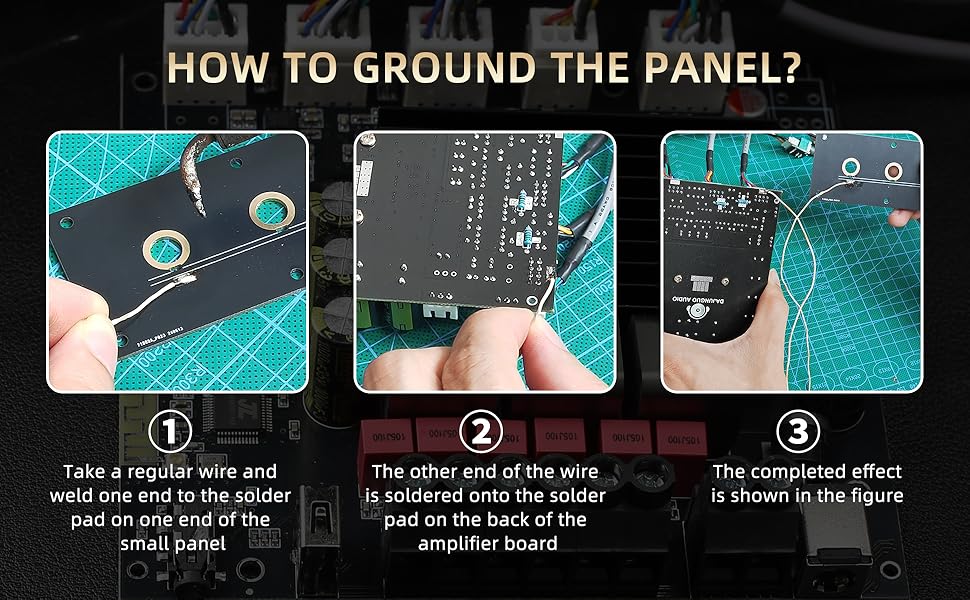
Image 6.1: Panel grounding instructions.
- Connect Audio Input: Choose one of the following input methods:
- Bluetooth: Power on the amplifier, and it will automatically enter Bluetooth pairing mode. Search for the device on your smartphone or other Bluetooth-enabled device and connect.
- AUX: Connect your audio source (e.g., smartphone, MP3 player) to the 3.5mm AUX input using the provided cable.
- USB: Insert a USB flash drive (FAT32 format) with audio files into the USB port, or connect a device to use the amplifier as a USB sound card.
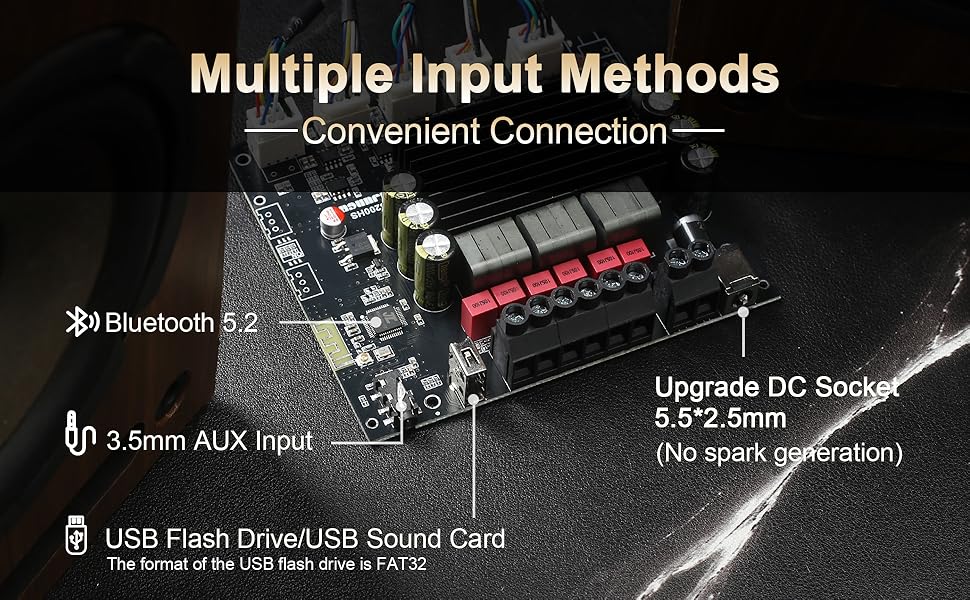
Image 6.2: Multiple input methods.
- Connect Power: Connect a DC 12-30V power supply (5A or above recommended) to the DC socket. The amplifier board will power on automatically.

Image 6.3: Example setup with speakers and AUX input.
7. Operation
Once connected, you can operate the amplifier using the control panel knobs and the multifunctional knob.
7.1 Multifunctional Knob Controls
- Long Press: Power On/Off.
- Single Click: Pause/Play audio.
- Double Click: Next Song.
- Triple Clicks: Previous Song.
- Four Clicks: Switch Input Modes (Bluetooth, AUX, USB).
- Five Clicks: Restore Factory Settings.
7.2 Audio Adjustment Knobs
- R&L Volume: Rotate to increase or decrease the overall volume of the left and right channels.
- R&L Channels Treble: Rotate to adjust the high-frequency response of the left and right channels.
- R&L Channels Bass: Rotate to adjust the low-frequency response of the left and right channels.
- Subwoofer Volume: Rotate to adjust the volume level of the subwoofer independently.
- Subwoofer Frequency: Rotate to adjust the crossover frequency for the subwoofer, allowing you to fine-tune the blend between the subwoofer and main speakers.
8. Specifications
| Feature | Specification |
|---|---|
| Bluetooth Version | 5.2 |
| Chip | Dual TPA3221 |
| Channel Configuration | 2.1 Channel |
| Power Supply | DC 12-30V / 5A or above |
| Audio Input | Bluetooth, AUX (3.5mm), USB |
| Frequency Range | 20Hz - 20KHz |
| Decoding Format | WAV, FLAC, APE, MP3 |
| Protection Mechanisms | Overvoltage, Undervoltage, Clipping, Short Circuit, Overheating |
| Bluetooth Audio Decoding | AAC/SBC |
| Motherboard Dimensions | 4.4 x 4.0 x 0.9 inches (11.18 x 10.16 x 2.29 cm) |
| Lead Wire Length | 7.87 inches (20 cm) |

Image 8.1: Technical specifications table.
8.1 Power Output Comparison Table (@1kHz)
| DC Voltage | Channel | Speaker Impedance | Power Output |
|---|---|---|---|
| 12V | R & L | 8Ω | 2*10W |
| 4Ω | 2*20W | ||
| Subwoofer | 8Ω | 10W | |
| 4Ω | 20W | ||
| 2Ω | 35W | ||
| 24V | R & L | 8Ω | 2*30W |
| 4Ω | 2*70W | ||
| Subwoofer | 8Ω | 30W | |
| 4Ω | 70W | ||
| 2Ω | 150W | ||
| 30V | R & L | 8Ω | 2*60W |
| 4Ω | 2*100W | ||
| Subwoofer | 8Ω | 60W | |
| 4Ω | 100W | ||
| 2Ω | 200W |
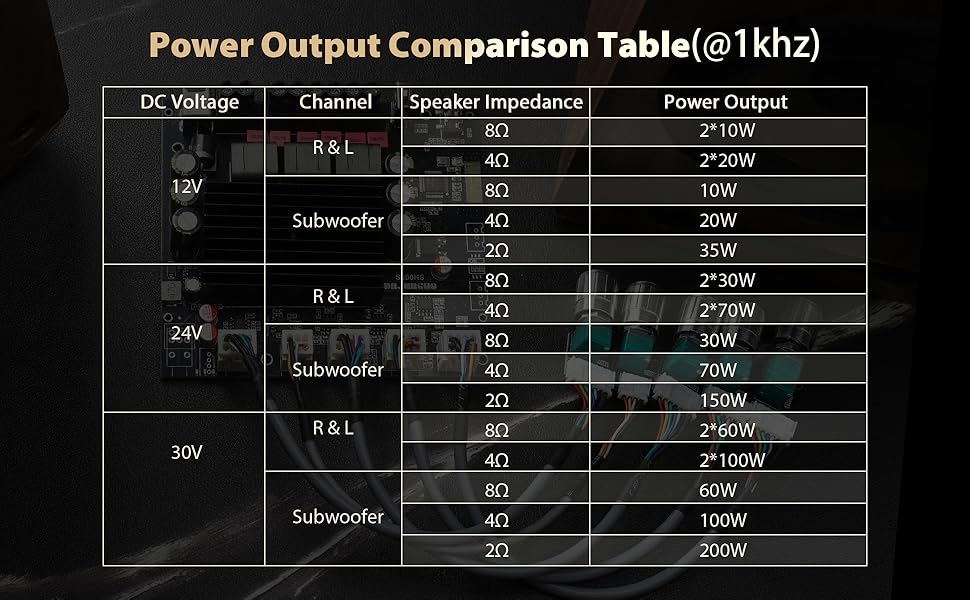
Image 8.2: Power output table at 1kHz.
9. Troubleshooting
- No Sound:
- Check all cable connections, especially power and speaker wires.
- Ensure the power supply is providing the correct voltage (DC 12-30V) and sufficient current (5A or above).
- Verify the correct input mode is selected (Bluetooth, AUX, or USB).
- Increase the volume on both the amplifier and the audio source.
- Test with a different audio source or speakers to isolate the problem.
- Distorted Sound:
- Reduce the volume on both the amplifier and the audio source.
- Ensure speaker impedance matches the amplifier's capabilities (refer to specifications).
- Check for loose or damaged speaker wires.
- Ensure the power supply is stable and provides enough current.
- Bluetooth Connection Issues:
- Ensure the amplifier is in Bluetooth pairing mode (indicated by a flashing light, if present).
- Delete the amplifier from your device's Bluetooth history and try pairing again.
- Move your device closer to the amplifier to reduce interference.
- Ensure no other devices are connected to the amplifier via Bluetooth.
- Overheating:
- Ensure adequate ventilation around the amplifier board.
- Reduce the volume or check if speaker impedance is too low.
10. Warranty and Support
For warranty information or technical support, please refer to the product packaging or contact your retailer. Keep your purchase receipt as proof of purchase.