
1. Introduction
This manual provides comprehensive instructions for the installation, operation, and maintenance of your mGYDY DZ41 Bafang E-Bike LCD Display. Please read this manual carefully before using the product to ensure proper function and safety. Keep this manual for future reference.
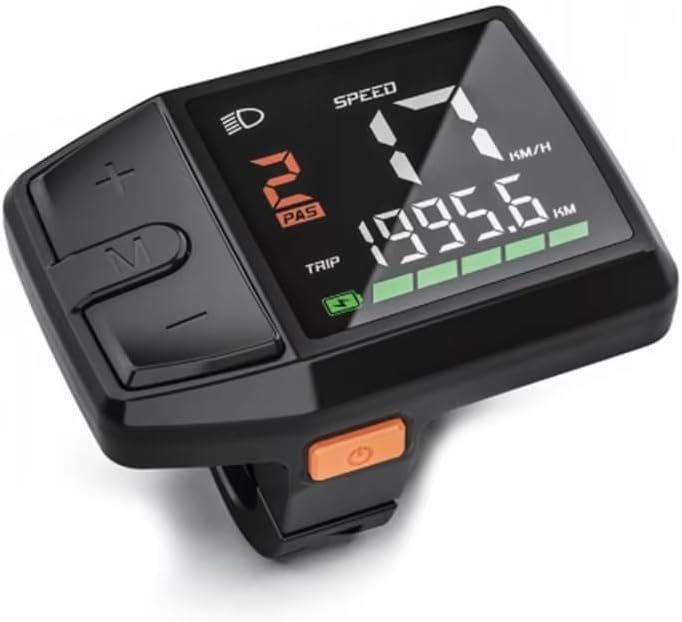
Image 1.1: The mGYDY DZ41 Bafang E-Bike LCD Display, showing its compact design and clear digital interface.
2. Safety Information
- Always ensure the display is securely mounted before riding.
- Do not attempt to disassemble or modify the display, as this may void the warranty and cause damage.
- Keep the display clean and free from excessive dirt or debris.
- Avoid exposing the display to extreme temperatures outside its operating range (-20°C to 60°C).
- Ensure the waterproof connector is properly seated to maintain water resistance.
3. Product Overview and Features
The mGYDY DZ41 is a compact and intelligent LCD display designed for Bafang E-Bike motors utilizing the CAN protocol. It provides essential riding data in a clear, easy-to-read format.
Key Features:
- Compatibility: Specifically designed for Bafang electric bike motors with CAN protocol (24V/36V/48V systems). Compatible with M200, M300, M400, M420, M500, M510, M600, M620, G330, G510, G521, G522, and G332 motors.
- Display Type: LED screen for clear visibility.
- Data Display: Shows PAS level, current speed, trip distance, ODO (total distance), light status, battery indicator, and error alarms.
- Waterproof: IP65/IPX6 rated for resistance against rain and splashing water.
- Easy Installation: Designed for left-side handlebar mounting with a ⌀22.2mm handlebar size.

Image 3.1: Overview of the DZ41 display interface, highlighting indicators for headlights, speed, PAS level, cycling mileage, and battery.
4. Installation
4.1 Mounting the Display
- Identify a suitable position on the left side of your handlebar, ensuring it does not obstruct braking or shifting controls.
- The display clamp is designed for handlebars with a diameter of ⌀22.2mm.
- Loosen the mounting screw on the display clamp.
- Position the display on the handlebar and tighten the screw until the display is secure and does not rotate freely. Do not overtighten.

Image 4.1: Dimensions of the DZ41 display and its handlebar mounting mechanism, indicating a ⌀22.2mm handlebar adaptation.
4.2 Connecting to the Motor
The DZ41 display uses a 5-pin waterproof CAN protocol connector. Ensure your E-Bike motor system is compatible with this connector type.
- Locate the corresponding CAN protocol connector on your Bafang motor wiring harness. This is typically a green triangular plug.
- Align the pins of the display connector with the motor connector.
- Push the connectors firmly together until they click into place, ensuring a secure and waterproof seal.
- Route the cable neatly along the handlebar and frame, securing it with cable ties if necessary, to prevent snagging.

Image 4.2: Illustration of the 5-pin male triangular CAN protocol connector and examples of compatible Bafang motors (M200, M300, M400, M420, M500, M510, M600, M620, G330, G510, G521, G522, G332).
5. Operating Instructions
The DZ41 display features intuitive buttons for easy control and data access.

Image 5.1: Detailed view of the DZ41 display buttons and their primary functions.
5.1 Power On/Off
- Power On: Press and hold the Power button (orange button) for approximately 2 seconds.
- Power Off: Press and hold the Power button for approximately 2 seconds.
5.2 Display Functions and Buttons
| Button/Indicator | Function |
|---|---|
| Power Button (Orange) | Long press to power on/off the display. |
| "+" Button | Short press to increase PAS (Pedal Assist System) level. Long press to activate/deactivate headlights. |
| "-" Button | Short press to decrease PAS level. |
| "M" Button | Short press to cycle through display information (e.g., Trip, ODO). Long press after startup to enter settings menu. |
| Headlight Icon | Indicates headlight status (on/off). |
| Speed Display | Shows current riding speed (KM/H or MPH). |
| PAS Level | Indicates the current pedal assist level (0-5 or 0-9, depending on motor configuration). |
| Trip/ODO | Displays current trip distance or total odometer reading. |
| Battery Indicator | Shows remaining battery charge level. |

Image 5.2: The display offers adjustable backlight brightness for optimal visibility in both day and night conditions.
6. Maintenance
- Cleaning: Wipe the display screen and body with a soft, damp cloth. Do not use abrasive cleaners or solvents.
- Connection Check: Periodically inspect the 5-pin connector for any signs of damage or corrosion. Ensure it remains securely connected.
- Mounting Check: Verify that the display is still firmly mounted to the handlebar. Tighten the screw if necessary.
- Storage: If storing the E-Bike for an extended period, ensure the display is clean and stored in a dry environment within its operating temperature range.

Image 6.1: The DZ41 display is rated IP65, indicating strong resistance to rain and splashing water, suitable for various weather conditions.
7. Troubleshooting
| Problem | Possible Cause | Solution |
|---|---|---|
| Display does not power on. | Low E-Bike battery, loose connection, incompatible motor. | Check E-Bike battery charge. Ensure the 5-pin connector is securely attached. Verify motor compatibility (CAN protocol). |
| No speed reading. | Speed sensor issue, loose motor connection. | Check the speed sensor on your motor. Ensure all motor connections are secure. |
| PAS levels not changing. | Motor communication issue. | Verify motor connection. Restart the E-Bike system. |
| Error code displayed. | Specific system fault. | Refer to your Bafang motor manual for specific error code meanings and solutions. Ensure all connections are secure. |
8. Specifications
| Feature | Detail |
|---|---|
| Model | DZ41 |
| Brand | mGYDY |
| Dimensions (L x W x H) | 67mm x 49mm x 49mm (approx. 2.6in x 1.9in x 1.9in) |
| Material | PC/ABS/PA |
| Operating Temperature | -20°C to 60°C |
| Display Type | LED |
| Nominal Voltage | DC 24V/36V/48V |
| Communication Protocol | CAN |
| Waterproof Rating | IP65/IPX6 |
| Handlebar Adaptation | ⌀22.2mm |
| Connector Type | 5-Pin Waterproof (Green Triangular Plug) |
9. Warranty and Support
The mGYDY DZ41 Bafang E-Bike LCD Display comes with a 1-Year Manufacturer Warranty.
For technical support, warranty claims, or further inquiries, please contact your retailer or the manufacturer, mGYDY. Please have your product model (DZ41) and purchase information ready when contacting support.