
1. Introduction
The KKKMart SKZ1050E is a portable gas detector designed for accurate measurement of C8H10 gas. This instrument provides reliable readings with a quick response time, making it suitable for various applications in home and RV environments. This manual provides essential information for the safe and effective operation, maintenance, and troubleshooting of your device.
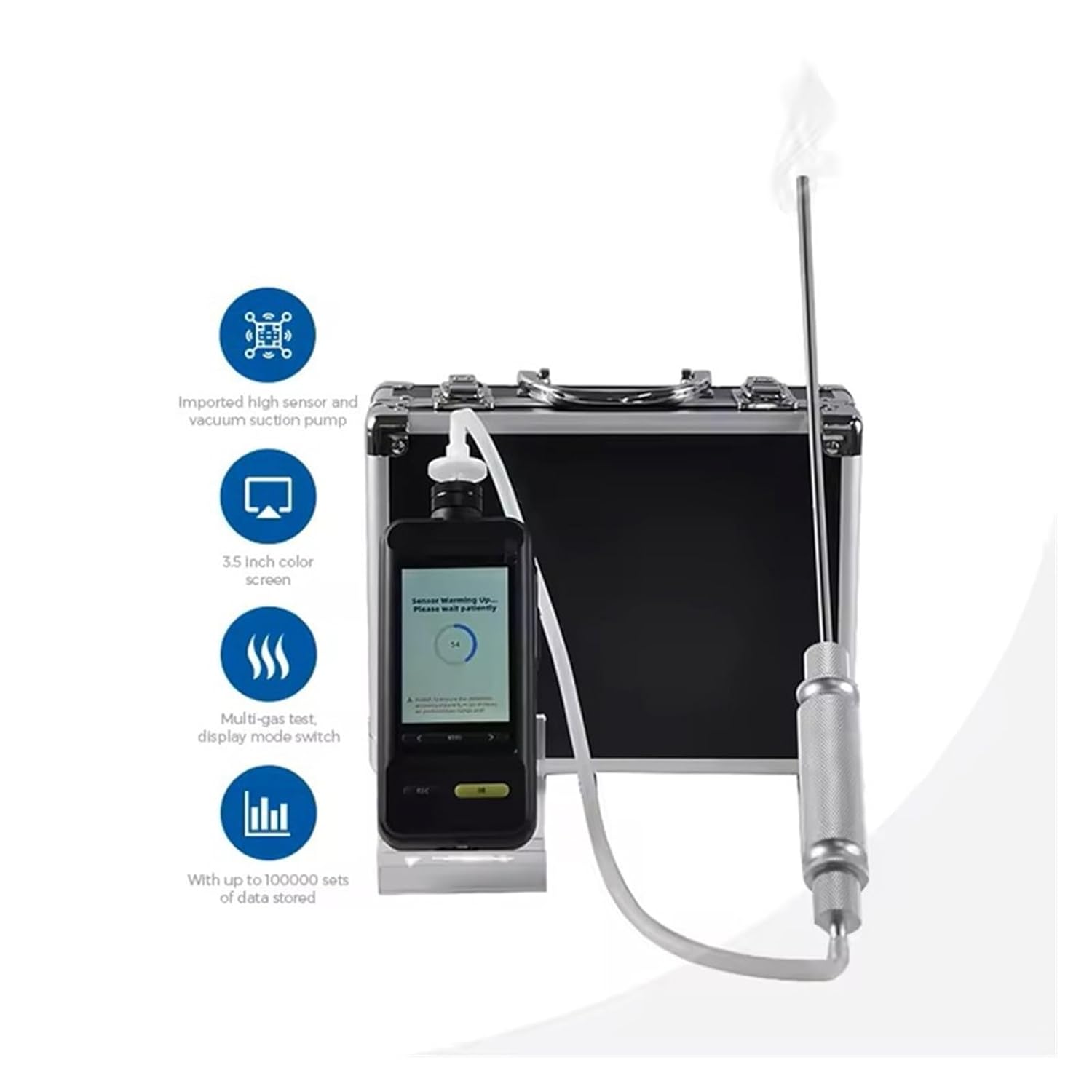
Figure 1.1: KKKMart SKZ1050E Portable Gas Detector with accessories.
2. Safety Information
Read all safety warnings and instructions carefully before using this product. Failure to follow these instructions may result in electric shock, fire, serious injury, or property damage.
- Always operate the device in well-ventilated areas to ensure accurate readings and user safety.
- Do not expose the device to temperatures outside its specified operating range (-20°C to 50°C) unless using an appropriate high-temperature probe.
- Ensure the device is properly calibrated according to manufacturer guidelines to maintain measurement accuracy.
- This device has an Explosion-Proof rating of ExiaII CT4. Adhere to all safety protocols when operating in potentially hazardous environments.
- Do not attempt to repair or modify the device. Refer all servicing to qualified personnel.
- Keep the device dry. Its IP66 rating provides protection against dust and water jets, but it is not designed for submersion.
3. Product Overview and Features
The SKZ1050E Portable Gas Detector is equipped with advanced features for reliable gas detection and data management.
Key Features:
- Accurate Measurement: Measures C8H10 gas with a range of 0-50,100 ppm, 2% FS precision, and a rapid response time of 8 seconds.
- Wide Operating Temperature: Functions efficiently from -20°C to 50°C. Optional flue gas sampling probes extend capability up to 1200°C.
- Data Storage & Connectivity: Features a 16M capacity, storing up to 100,000 data sets. Data can be downloaded via USB to a computer, with optional PC software for analysis, and supports Bluetooth printing.
- User-Friendly Design: Equipped with a clear LCD screen, intuitive interface, buzzer, and LED indicators for various alarms (fault, low battery, pump abnormal).
- Robust and Durable: Boasts an IP66 protection degree, making it resistant to dust and water exposure. Lightweight at 400g for portability.
- Multi-layer Filter: Designed to be waterproof, oil-proof, and dustproof.

Figure 3.1: Functional characteristics of the SKZ1050E detector.
4. Device Components
Familiarize yourself with the various parts of your SKZ1050E Portable Gas Detector:

Figure 4.1: Labeled components of the SKZ1050E detector.
- Air Inlet: Where gas samples are drawn into the sensor.
- Illumination Lamp/Lighting Area: Provides light for operation in dark conditions.
- Reset Key: Used to reset device settings or clear alarms.
- Buzzer Port: Emits audible alarms.
- USB Interface: For charging and data transfer.
- Exhaust Port: Where sampled gas is expelled.
- Display Screen: Shows gas concentrations, device status, and menu options.
- Dorsal Clamp: For attaching the device to clothing or belts.
- Flashlight: Integrated light source.
- Power Supply: Power input port.
- Menu Key: Accesses the device menu.
- < Key / > Keys: Navigation buttons for menu selection.
- ESC Key: Exits current menu or cancels an action.
- OK Key: Confirms selection or action.
5. Setup
5.1 Unpacking and Inspection
- Carefully unpack the SKZ1050E detector and all accessories from the carrying case.
- Verify that all standard accessories are present: manual, warranty card, power charger, carrying case, water and oil filter, and data cable.
- Inspect the device for any visible damage. If damage is found, do not use the device and contact customer support.
5.2 Initial Charging
- Connect the provided power charger to the device's power supply port.
- Plug the charger into a suitable power outlet.
- Allow the device to charge fully before first use. The charging indicator on the display will show the charging status. A full charge typically provides over 10 hours of continuous operation.
5.3 Powering On/Off
- To Power On: Press and hold the power button (usually combined with the OK key or a dedicated button) until the display illuminates. The device will perform a self-test and warm-up sequence.
- To Power Off: Press and hold the power button until the shutdown prompt appears on the screen. Confirm shutdown by pressing the OK key.
6. Operating Instructions
6.1 Gas Detection
- Ensure the device is powered on and has completed its warm-up phase.
- Position the air inlet in the area where gas detection is required. For specific applications, attach the appropriate sampling probe.
- The display will show real-time gas concentration readings (in ppm).
- If gas concentration exceeds preset alarm thresholds, the device will activate audible (buzzer) and visual (LED, display prompt) alarms. Respond according to your safety protocols.
6.2 Data Storage and Transfer
The SKZ1050E automatically stores up to 100,000 groups of data in its 16M capacity.
- Viewing Stored Data: Navigate through the device menu using the Menu, <, >, and OK keys to access the data log.
- Data Download (USB): Connect the device to a computer using the provided USB data cable. The device will appear as a removable storage device, allowing direct download of stored data in TXT format.
- Data Analysis (Optional PC Software): For advanced analysis and EXCEL format conversion, use the optional PC software (may require separate purchase).
6.3 Wireless Connectivity (Optional)
The device supports optional wireless communication methods such as Bluetooth, LORA, 4G, and WiFi for real-time viewing on a computer or mobile phone.
- Bluetooth Printer: Pair the device with an optional Bluetooth printer to print data directly from the unit. Refer to the printer's manual for pairing instructions.
- Remote Monitoring: If equipped with LORA, 4G, or WiFi modules, follow the specific instructions provided with those modules for connecting to remote monitoring systems or applications.

Figure 6.1: Wireless interconnection capabilities of the SKZ1050E detector.
7. Maintenance
Regular maintenance ensures the longevity and accuracy of your gas detector.
- Cleaning: Wipe the exterior of the device with a soft, damp cloth. Do not use abrasive cleaners or solvents. Ensure the air inlet and exhaust ports are clear of obstructions.
- Filter Replacement: Periodically check the water and oil filter. Replace it if it appears dirty or clogged to maintain proper sampling. Refer to the filter's specific instructions for replacement.
- Calibration: Regular calibration is crucial for maintaining accuracy. Follow recommended calibration schedules and procedures, or consult a qualified service technician.
- Storage: When not in use, store the device in its carrying case in a cool, dry place, away from direct sunlight and extreme temperatures.
8. Troubleshooting
This section addresses common issues you might encounter with your SKZ1050E detector.
| Problem | Possible Cause | Solution |
|---|---|---|
| Device does not power on | Low battery; Faulty charger/cable; Device malfunction | Charge the device fully; Check charger and cable; Contact support if issue persists. |
| Inaccurate or fluctuating readings | Sensor contamination; Out of calibration; Environmental interference | Clean sensor area; Perform calibration; Ensure stable environment. |
| Alarm triggers unexpectedly | Presence of target gas; Sensor fault; Incorrect alarm threshold settings | Verify gas presence; Check sensor status; Adjust alarm settings in menu. |
| Cannot transfer data to PC | Faulty USB cable; Driver issues; Incorrect software usage | Try a different USB cable; Install necessary drivers; Refer to PC software manual. |
| Pump abnormal alarm | Blocked air inlet/filter; Pump malfunction | Check and clear air inlet/filter; Contact support for pump issues. |
9. Specifications
| Parameter | Value |
|---|---|
| Gas Type Detected | C8H10 |
| Measurement Range | 0-50,100 ppm |
| Precision | 2% FS |
| Resolution | 0.01 ppm |
| Response Time | 8 seconds |
| Recovery Time | 10 seconds |
| Repeatability | ± 1% |
| Zero Shift | ± 1% (F.S / Year) |
| Linearity Error | ± 1% |
| Operating Temperature | -20°C to 50°C |
| Working Humidity | 0-95% RH (non-condensing) |
| Explosion-Proof Rating | ExiaII CT4 |
| Degree of Protection | IP66 |
| Alarm Mode | Buzzer, LED, Display Status Prompt |
| Data Storage | 16M capacity, up to 100,000 groups |
| Dimensions | 270 x 75 x 41 mm |
| Weight | 400g |
| Detection Principle | Semiconductor principle |
10. Warranty and Support
Your KKKMart SKZ1050E Portable Gas Detector comes with a standard warranty. Please refer to the included warranty card for specific terms and conditions.
For technical support, service, or inquiries regarding optional accessories, please contact KKKMart customer service. Keep your purchase receipt and product serial number handy when contacting support.