
Introduction
This instruction manual provides essential information for the assembly, operation, and care of your LEGO Super Mario: Mario Kart Interactive Mario & Standard Kart Building Toy, Model 72043. This set allows users to construct a Mario Kart racetrack and engage in interactive play with the included LEGO Mario figure, bringing the excitement of Mario Kart to life through brick-building and digital interaction.
Product Overview
Key Features
- Interactive LEGO Mario figure for dynamic gameplay.
- Buildable Standard Kart with drifting action and a shell-launching function.
- Includes Bob-omb and Thwomp figures for interactive challenges.
- Constructible racetrack elements: start area, connectible track barriers, traffic cones, and a winner's circle.
- Triggers Mario Kart sounds and visual effects.
- Allows for earning digital rewards from the Item Box.
- Expandable with other LEGO Super Mario: Mario Kart toy playsets (sold separately).
Components
The set contains 278 pieces, including:
- Interactive LEGO Mario figure
- Standard Kart build
- Bob-omb figure
- Thwomp figure
- Banana element with face decoration
- Item Box
- Track barriers
- Traffic cones
- Start area and winner's circle elements
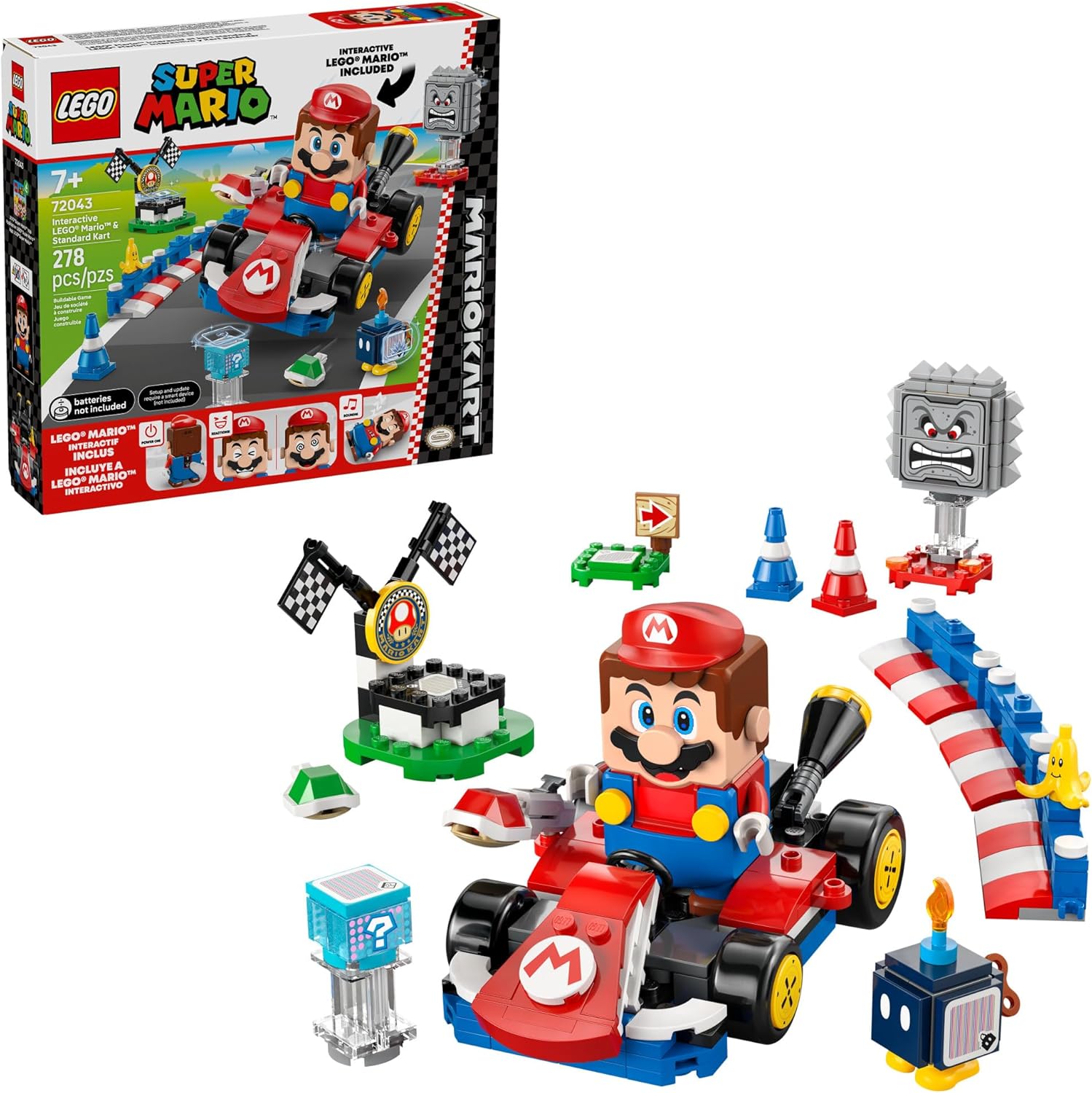
Figure 1: Complete LEGO Super Mario Mario Kart set with all components.
Setup
Assembly
Detailed building instructions are provided within the product packaging and are also accessible via the official LEGO Super Mario app. Follow the step-by-step visual guides to assemble the Standard Kart, track elements, and figures.

Figure 2: Building instructions can be found in the LEGO Super Mario app.
Powering the Interactive Mario Figure
The interactive LEGO Mario figure requires 2 AAAA batteries (not included). Ensure batteries are inserted correctly according to polarity markings. A smart device (not included) is required for initial setup and updates of the LEGO Mario figure.
Track Configuration
The track barriers, traffic cones, and start/winner's circle elements can be connected and arranged to create various racetrack layouts. Experiment with different configurations to enhance the racing experience.

Figure 3: A child interacting with the Mario Kart playset.
Operating Instructions
Interactive Play with LEGO Mario
Place the interactive LEGO Mario figure into the Standard Kart. As Mario drives the kart, it will trigger authentic Mario Kart sounds and visual effects. The figure reacts to specific colored LEGO plates (green and red) and interacts with the Bob-omb and Thwomp figures, allowing users to defeat them for in-game rewards.

Figure 4: Drive the Standard Kart with LEGO Mario.

Figure 5: LEGO Mario triggers sounds and visual effects.
Kart Functions
The Standard Kart features a drifting action, allowing for dynamic turns and maneuvers during play. It also includes a shell-launching function, adding an element of strategy to races.
Item Box Interaction
Drive LEGO Mario over the Item Box to earn digital rewards, mimicking the power-up system from the Mario Kart video games.
Expanding Your Playset
This set is designed to be compatible with other LEGO Super Mario: Mario Kart toy playsets (sold separately), allowing for the creation of larger and more complex racetracks and the integration of additional vehicles and characters.
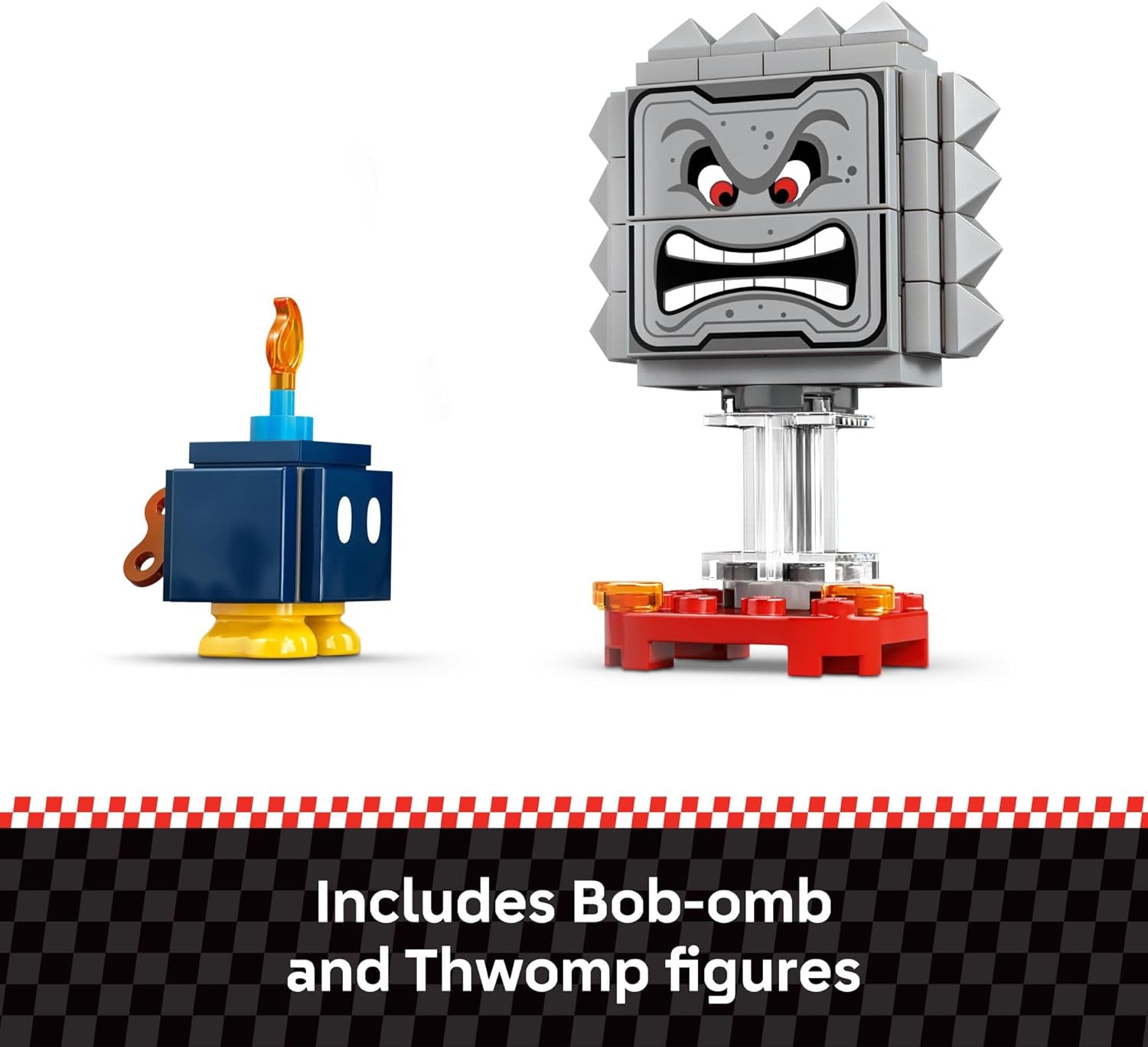
Figure 6: Bob-omb and Thwomp figures.
Product Video Overview
Video 1: A 360-degree spin showing the assembled LEGO Super Mario Mario Kart Interactive Mario & Standard Kart set, highlighting its various components and overall design.
Maintenance
Cleaning
To clean LEGO bricks and figures, wipe them gently with a damp cloth. For stubborn dirt, use a mild soap solution and rinse thoroughly. Avoid harsh chemicals or abrasive materials, as these can damage the plastic. Do not submerge the interactive LEGO Mario figure in water.
Storage
Store the LEGO set in a cool, dry place away from direct sunlight to prevent discoloration and warping of the bricks. Keep small pieces in a container to avoid loss.
Troubleshooting
LEGO Mario Not Responding
- Check if the 2 AAAA batteries are correctly inserted and have sufficient charge. Replace if necessary.
- Ensure the LEGO Mario figure's firmware is up to date via the LEGO Super Mario app.
- Verify that the figure is properly placed in the Standard Kart or on interactive elements.
Missing Pieces
If you find any pieces missing from your set, please contact LEGO Customer Service for assistance. Refer to the part list in your building instructions.
Assembly Difficulties
Refer to the detailed building instructions provided in the box or through the LEGO Super Mario app. Ensure all steps are followed precisely. If issues persist, consult online LEGO building communities or customer support.
Specifications
| Attribute | Detail |
|---|---|
| Product Dimensions | 11.1 x 10.32 x 2.32 inches |
| Item Weight | 1.08 pounds |
| ASIN | B0DS2TSWP1 |
| Item Model Number | 6526970 (also referred to as 72043) |
| Manufacturer Recommended Age | 7 years and up |
| Batteries Required | 2 AAAA batteries (not included) |
| Number of Pieces | 278 |
| Release Date | July 31, 2025 |
| Manufacturer | LEGO |
Safety Information
No specific safety warnings are applicable beyond general toy safety guidelines. Always supervise children during play, especially with small parts that could pose a choking hazard for younger children. This product is recommended for ages 7 and up.
Warranty and Support
For information regarding product warranty, replacement parts, or additional support, please visit the official LEGO website or contact LEGO Customer Service directly. Keep your proof of purchase for any warranty claims.


