
1. Introduction
Thank you for choosing the NANU SHOP ALPHA-801 Smart RGB LED Wi-Fi Bulb. This intelligent bulb offers a wide range of colors, adjustable brightness, and convenient control options through a mobile application and voice assistants. This manual provides detailed instructions for installation, operation, maintenance, and troubleshooting to ensure you get the most out of your smart lighting experience.
2. Product Features
- 16 Million Colors: Personalize your environment's lighting with a vast range of colors and adjust intensity to create the perfect atmosphere for any occasion.
- Remote Control via App: Manage your home's lighting from your smartphone with Wi-Fi connectivity and easy control through the Aitek Home application.
- Virtual Assistant Integration: Control the bulb with voice commands using Alexa or Google Assistant, making your home smarter and more practical.
- Energy Efficiency: With LED technology, the bulb offers great durability and low energy consumption, helping to save on your electricity bill.
- Simple and Compatible Installation: Featuring an E27 base, it is easy to install in various types of light fixtures and requires no additional accessories.
3. Setup Guide
3.1 Physical Installation
- Ensure the power to the light fixture is turned off before installation.
- Carefully screw the NANU SHOP ALPHA-801 Smart RGB LED Wi-Fi Bulb into a standard E27 socket.
- Turn on the power to the light fixture. The bulb should flash, indicating it is in pairing mode.

Image: The NANU SHOP ALPHA-801 Smart RGB LED Wi-Fi Bulb, ready for installation into an E27 socket.
3.2 App Download and Pairing
- Download the Aitek Home application from your smartphone's app store (available on iOS and Android).
- Register or log in to your Aitek Home account.
- In the app, tap the '+' icon to add a new device. Select 'Lighting' or 'Smart Bulb'.
- Follow the on-screen instructions to connect the bulb to your 2.4 GHz Wi-Fi network. You may need to turn the bulb on and off a few times to put it into pairing mode if it's not already flashing.
- Once successfully paired, you can rename the bulb for easier control.
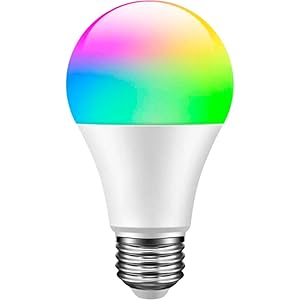
Image: The smart bulb displayed alongside a smartphone showing the Aitek Home application interface, illustrating app control capabilities.
4. Operating Instructions
4.1 Using the Aitek Home App
- Color Selection: Tap on the color wheel in the app to choose from 16 million colors.
- Brightness Adjustment: Use the slider to increase or decrease the light intensity.
- Scene Modes: Explore pre-set scenes (e.g., Reading, Party, Relax) or create custom scenes to match your mood.
- Timer and Schedule: Set schedules for the bulb to turn on/off or change settings at specific times.
- Group Control: If you have multiple smart bulbs, group them in the app for simultaneous control.
4.2 Voice Control (Alexa & Google Assistant)
To enable voice control, link your Aitek Home account with Amazon Alexa or Google Assistant through their respective apps. Once linked, you can use commands such as:
- "Alexa, turn on [Bulb Name]."
- "Hey Google, set [Bulb Name] to blue."
- "Alexa, dim [Bulb Name] to 50%."
- "Hey Google, turn off [Bulb Name]."
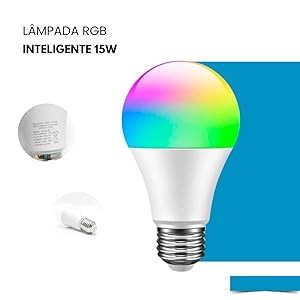
Image: A smart bulb illuminating a modern living room, with a smartphone displaying the control app, demonstrating remote operation.
5. Maintenance
The NANU SHOP ALPHA-801 Smart RGB LED Wi-Fi Bulb requires minimal maintenance. Follow these guidelines to ensure optimal performance and longevity:
- Cleaning: Disconnect power before cleaning. Use a soft, dry cloth to wipe the bulb. Do not use liquid cleaners or abrasive materials.
- Environment: Avoid installing the bulb in excessively humid or high-temperature environments, as this may affect its lifespan.
- Safety: Do not disassemble or modify the bulb. This may void the warranty and pose a safety risk.
6. Troubleshooting
Common Issues and Solutions:
| Issue | Possible Cause | Solution |
|---|---|---|
| Bulb not turning on | No power, loose connection, faulty bulb. | Check power supply. Ensure bulb is screwed in tightly. Test bulb in another fixture. |
| Bulb not connecting to Wi-Fi | Incorrect Wi-Fi password, 5GHz network, bulb too far from router, pairing mode not active. | Ensure you are using a 2.4 GHz Wi-Fi network. Re-enter password. Move bulb closer to router. Cycle power (on/off 3-5 times) to activate pairing mode. |
| Voice control not working | Account not linked, incorrect device name, internet connectivity issues. | Verify Aitek Home account is linked to Alexa/Google Assistant. Check device name in app. Ensure stable internet connection. |
| Bulb unresponsive | Temporary glitch, network issue. | Turn the bulb off and on at the switch. Restart your Wi-Fi router. |
Factory Reset:
If the bulb is unresponsive or you need to pair it with a new network, perform a factory reset:
- Turn the bulb on.
- Turn it off and on quickly (within 2 seconds) for 3-5 times.
- The bulb will flash rapidly, indicating it has been reset and is in pairing mode.
7. Specifications
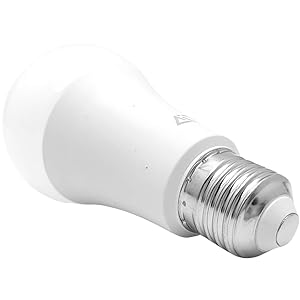
Image: A detailed view of the smart bulb's base, showing printed technical specifications including model number and voltage.
| Specification | Value |
|---|---|
| Model Number | ALPHA-801 |
| Brand | NANU SHOP |
| Wattage | 15 Watts |
| Luminous Flux | 800 lm |
| Incandescent Equivalent | 100 Watts |
| Voltage | 100-240 Volts (Bivolt) |
| Lamp Base | E27 |
| Color Temperature | 6500 Kelvin (White) |
| Light Type | LED (RGB Multicolor) |
| Average Lifespan | 25000 Hours |
| Material | ABS Plastic |
| Product Dimensions (L x W x H) | 6 x 6 x 11 cm |
| Product Weight | 260 g |
| Special Features | RGB Multicolor, Voice Control, Timer Function, Energy Saving |
| Included Components | 1 Smart RGB LED Bulb, 1 User Manual |
8. Warranty and Support
This product is covered by a standard return policy. For specific warranty details or technical support, please refer to the purchase platform or contact NANU SHOP customer service directly. Keep your proof of purchase for any warranty claims.