
1. Important Safety Instructions
Please read and save these safety instructions before using this tower fan. Failure to follow these instructions may result in electric shock, fire, or serious injury.
- Always unplug the fan before cleaning, servicing, or moving it.
- Do not operate the fan with a damaged cord or plug. If the cord or plug is damaged, contact customer service for assistance.
- Keep children and pets away from the fan, especially when it is operating. The enclosed grille design enhances safety around children and pets.
- Place the fan on a stable, level surface to prevent it from tipping over. This fan includes built-in tip-over protection, which automatically shuts off the unit if it is knocked over.
- Do not insert fingers or foreign objects into any openings on the fan.
- Do not use the fan near water or in high-humidity environments.
- Ensure the power supply matches the voltage specified on the fan's rating label.
2. Product Overview
The Avamia NDTFT17RH-S is a 43-inch oscillating bladeless tower fan designed for efficient cooling in various indoor environments. It features a touch LED display, remote control, multiple speed and mode settings, and a 12-hour timer.

Image 2.1: Avamia NDTFT17RH-S Tower Fan and Remote Control.
Key Features:
- Powerful Airflow: High-efficiency brushless motor delivers airflow up to 26 ft/s and 1476 CFM.
- Wide Oscillation: 85° wide-angle oscillation for broad air distribution.
- Quiet Operation: Operates at a low noise level of 26 dB, suitable for bedrooms.
- Multiple Settings: 3 fan speeds and 3 breeze modes (Normal, Natural, Sleep).
- Convenient Control: Intuitive LED touch panel and included remote control.
- Timer Function: Programmable 1-12 hour timer.
- Safety Features: Bladeless design with enclosed grille and tip-over protection.
- Space-Saving Design: Slim profile with a built-in handle for portability.
3. Package Contents
Verify that all components are present in the package:
- Avamia NDTFT17RH-S Tower Fan Unit
- Fan Base (two halves)
- Remote Control (with battery included)
- User Manual
- Screws for Base Assembly
4. Assembly Instructions
Follow these steps to assemble the fan base:
- Align Base Halves: Take the two halves of the fan base. Align them and connect them securely.
- Attach Base to Fan: Align the base holes with the fan's protrusions. Ensure a firm connection.
- Secure with Screws: Insert and tighten the provided screws with a screwdriver to firmly attach the base to the fan unit.

Image 4.1: Step-by-step guide for base assembly.
5. Operating Instructions
The Avamia NDTFT17RH-S fan can be operated using the touch control panel on top of the unit or the included remote control.
5.1 Control Panel and Remote Control

Image 5.1: Control panel icons for various functions.
- ON/OFF Button: Powers the fan on or off.
- Speed Button: Cycles through 3 fan speeds (Low, Medium, High).
- Mode Button: Selects between Normal, Natural, and Sleep modes.
- OSC (Oscillation) Button: Activates or deactivates the 85° oscillation function.
- Timer Button: Sets the auto-off timer from 1 to 12 hours.
- Light Button (Remote Only): Turns the LED display on or off for undisturbed sleep.
5.2 Functions
- Power On/Off: Press the ON/OFF button on the control panel or remote to turn the fan on or off.
- Adjust Fan Speed: Press the Speed button repeatedly to cycle through Low, Medium, and High-speed settings. The LED display will show the current speed.
- Select Mode: Press the Mode button to choose between Normal, Natural, and Sleep modes. Each mode offers a different airflow pattern for varied comfort.
- Activate Oscillation: Press the OSC button to start the fan oscillating 85 degrees, distributing air across a wider area. Press again to stop oscillation.
- Set Timer: Press the Timer button to set the fan to automatically turn off after a set period, from 1 to 12 hours. Each press increases the timer by one hour.
- LED Display Control: Use the Light button on the remote control to turn the LED display on or off, which is particularly useful during nighttime operation to ensure a dark sleeping environment.
Video 5.2: Demonstration of the Avamia Tower Fan's powerful airflow and features.
6. Maintenance and Cleaning
Regular cleaning helps maintain the fan's performance and extends its lifespan.
- Always unplug the fan from the power outlet before cleaning.
- Wipe the exterior surfaces of the fan with a soft, damp cloth. Do not use abrasive cleaners or solvents.
- Do not immerse the fan in water or allow water to drip into the motor housing.
- For dust accumulation in the air inlet/outlet, use a vacuum cleaner with a brush attachment to gently remove dust.
- Store the fan in a cool, dry place when not in use, preferably in its original packaging.
7. Troubleshooting
If you encounter issues with your Avamia NDTFT17RH-S Tower Fan, refer to the following common problems and solutions:
| Problem | Possible Cause | Solution |
|---|---|---|
| Fan does not turn on. | No power supply; Power cord not securely plugged in; Tip-over switch activated. | Ensure the fan is plugged into a working outlet; Check the power cord connection; Place the fan upright on a flat surface. |
| Weak or no airflow. | Air inlet/outlet blocked; Fan speed set too low. | Clean any obstructions from the air inlet/outlet; Increase the fan speed setting. |
| Oscillation not working. | Oscillation function not activated. | Press the OSC button on the control panel or remote control. |
| Remote control not working. | Battery depleted; Obstruction between remote and fan. | Replace the remote control battery; Ensure a clear line of sight between the remote and the fan. |
If the problem persists after trying these solutions, please contact Avamia customer support.
8. Specifications
Detailed technical specifications for the Avamia NDTFT17RH-S Tower Fan:
| Feature | Specification |
|---|---|
| Brand | Avamia |
| Model Name | NDTFT17RH-S |
| Color | Black |
| Electric Fan Design | Floor Fan |
| Power Source | Wired power supply |
| Product Dimensions (D x W x H) | 11.81"D x 11.81"W x 43.3"H |
| Room Type | Bedroom |
| Special Feature | LED Light |
| Noise Level | 26 Decibels |
| Wattage | 50 watts |
| Air Flow Capacity | 1476 Cubic Feet Per Minute (CFM) |
| Voltage | 220 Volts (compatible with 120V/60Hz power supply via generic North American plug) |
| Switch Type | Touch |
| Item Weight | 7.7 pounds (3.5 Kilograms) |
| Included Components | Remote |
| Indoor/Outdoor Usage | Indoor |
| Control Method | Remote, Touch |
| Number of Power Levels | 3 |
| Motor Type | Brushless |
| Batteries | Nonstandard Battery (included for remote) |
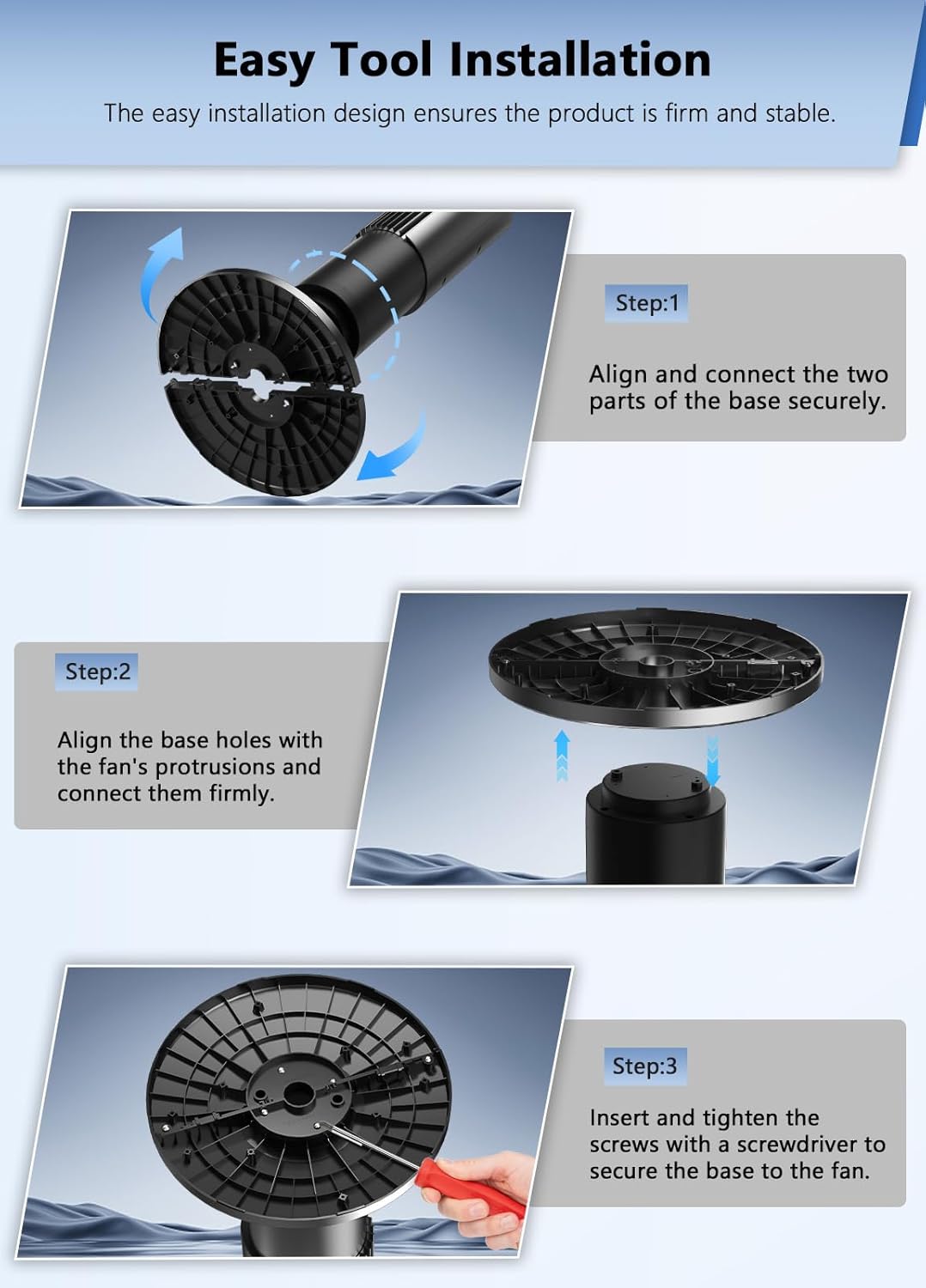
Image 8.1: Avamia NDTFT17RH-S Tower Fan Dimensions.
9. Warranty and Support
Avamia products are manufactured to high-quality standards. For warranty information, technical support, or any questions regarding your product, please refer to the warranty card included in your package or contact Avamia customer service through the retailer where the product was purchased.