
Introduction
This manual provides detailed instructions for the operation and maintenance of your Mrisata XL013 Multifunction Electronic Sports Stopwatch. Designed for athletes, coaches, and referees, this device offers precise time measurement, date display, and alarm functions in a compact, water-resistant design. Please read this manual thoroughly to ensure proper use and longevity of your stopwatch.
Product Overview

Figure 1: Front view of the Mrisata XL013 Multifunction Electronic Sports Stopwatch, showing the digital display, control buttons (MODE, START/STOP, SPLIT/RESET), and lanyard attachment.
The Mrisata XL013 stopwatch is a versatile timing device featuring a clear digital display and intuitive controls. It is equipped with a durable plastic casing and a convenient lanyard for portability.
Key Features:
- Three Display Modes: Easily switch between time, date, and alarm settings.
- Compact and Portable: Lightweight design with an included lanyard for easy carrying.
- Durable Construction: Made from robust plastic material for long-term use.
- Water-Resistant Design: Suitable for use in various weather conditions.
- Ideal for Sports: Perfect for timing runners, athletes, and referees.
Setup
1. Battery Installation (If Required)
The stopwatch typically comes with a battery pre-installed. If the display is blank or dim, battery replacement may be necessary.
- Locate the battery compartment on the back of the stopwatch.
- Carefully open the compartment using a small screwdriver if necessary.
- Insert a new button cell battery (e.g., AG13 or equivalent) with the positive (+) side facing up.
- Securely close the battery compartment.

Figure 2: Back view of the Mrisata XL013 Stopwatch, showing the battery compartment cover and the "ABS" marking.
2. Initial Power-On and Time/Date Setting
Upon battery installation or first use, the stopwatch may display a default time.
- Press the MODE button repeatedly until the time display (hours, minutes, seconds) is shown.
- Press and hold the MODE button for a few seconds until the hour digits begin to flash.
- Use the START/STOP button to adjust the hour.
- Press the SPLIT/RESET button to move to the next setting (minutes, then date, month, day).
- Use the START/STOP button to adjust each value.
- Once all settings are correct, press the MODE button to exit the setting mode.
Operating Instructions
The XL013 stopwatch features three primary modes: Time/Date, Stopwatch, and Alarm. Use the MODE button to cycle through these functions.
1. Time and Date Display Mode
This is the default display mode, showing the current time (hours, minutes, seconds) and date (month, day, day of the week).
- Press MODE until the time and date are visible.
- To adjust time/date, refer to the "Initial Power-On and Time/Date Setting" section above.
2. Stopwatch Mode
This mode is used for precise timing of events.
- Press MODE until "STOP W" or a similar indicator for stopwatch mode appears on the display. The display should show "0:00:00".
- Press START/STOP to begin timing. The stopwatch will start counting.
- To record a split time (lap time), press SPLIT/RESET while the stopwatch is running. The display will momentarily show the split time, while the internal timer continues to run. Press SPLIT/RESET again to return to the running time.
- To pause the stopwatch, press START/STOP. The time will freeze.
- To resume timing from the paused state, press START/STOP again.
- To stop the stopwatch completely, press START/STOP.
- To reset the stopwatch to "0:00:00" after it has been stopped, press SPLIT/RESET.
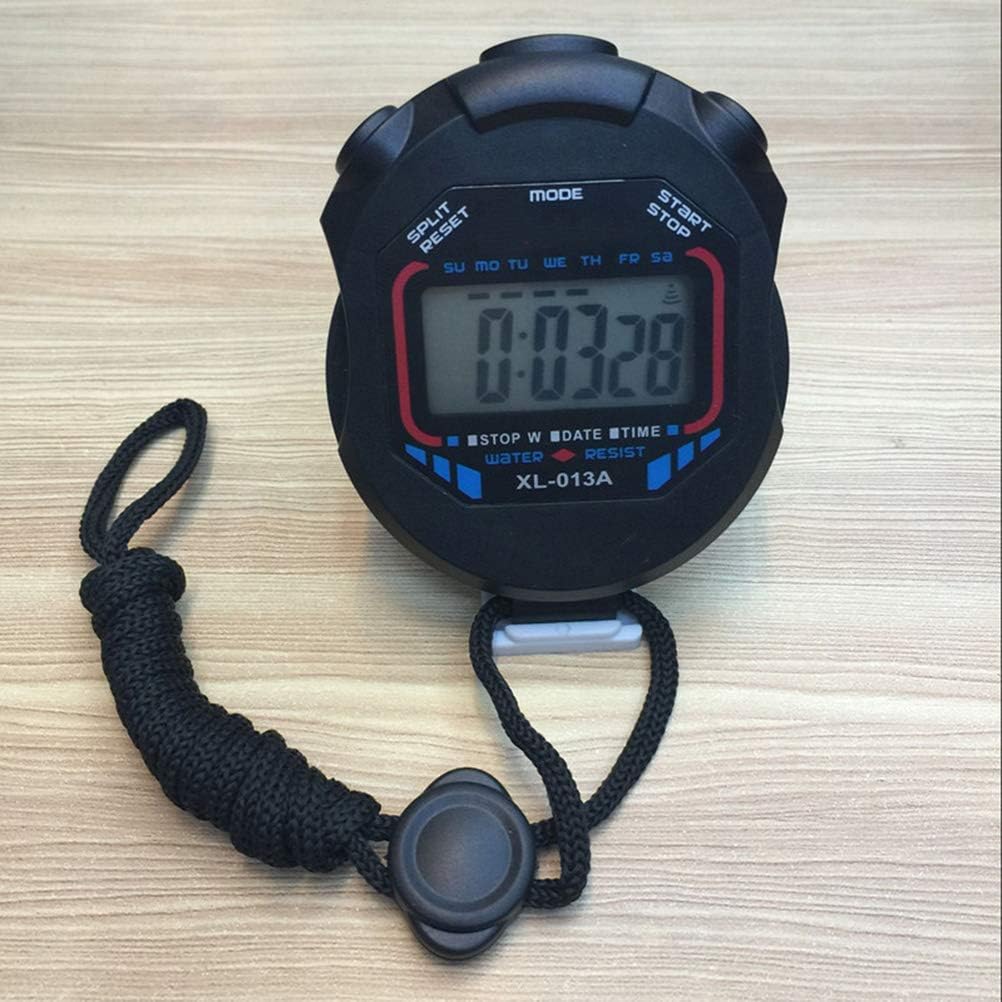
Figure 3: The Mrisata XL013 Stopwatch displaying a time, indicating its use in stopwatch mode.
3. Alarm Mode
The stopwatch includes an alarm function.
- Press MODE until the alarm time display appears (often indicated by "AL" or a bell icon).
- Press and hold the MODE button until the hour digits of the alarm time begin to flash.
- Use the START/STOP button to adjust the hour.
- Press the SPLIT/RESET button to move to the minute setting.
- Use the START/STOP button to adjust the minutes.
- Press MODE to exit the alarm setting mode.
- To turn the alarm on or off, in alarm display mode, press START/STOP. A bell icon or similar indicator will appear/disappear to show alarm status.
Maintenance
Cleaning
To clean your stopwatch, wipe it with a soft, damp cloth. Do not use abrasive cleaners or solvents, as these can damage the casing or display.
Water Resistance
The XL013 stopwatch is designed to be water-resistant, making it suitable for use in light rain or splashes. It is not intended for submersion in water. Avoid pressing buttons while the stopwatch is wet to prevent water ingress.
Battery Replacement
When the display becomes dim or unresponsive, it is time to replace the battery. Refer to the "Battery Installation" section under Setup for instructions. Dispose of old batteries responsibly according to local regulations.
Troubleshooting
| Problem | Possible Cause | Solution |
|---|---|---|
| Display is blank or dim. | Low or dead battery. | Replace the battery (refer to "Battery Installation"). |
| Incorrect time or date. | Time/date not set correctly. | Adjust the time and date (refer to "Time/Date Setting"). |
| Stopwatch does not start/stop. | Not in stopwatch mode; button malfunction. | Ensure you are in stopwatch mode. If buttons are unresponsive, try battery replacement. |
| Alarm does not sound. | Alarm is turned off or set incorrectly. | Verify alarm is enabled and set to the correct time (refer to "Alarm Mode"). |
Specifications
- Model: XL013
- Brand: Mrisata
- Material: Plastic
- Color: Black
- Product Dimensions: 3.93 x 2.75 x 1.18 inches (10 x 7 x 3 cm)
- Item Weight: 1.8 ounces (51 grams)
- Functions: Stopwatch, Time, Date, Alarm
- Water Resistance: Yes (splash-proof, not for submersion)
Contact and Support
For further assistance or inquiries regarding your Mrisata XL013 stopwatch, please refer to the retailer where the product was purchased.