
1. Introduction
This manual provides essential information for the safe and effective use and maintenance of your MaxLLTo Replacement Edger Blade 2059HD. This blade is designed as a direct replacement for McLane Oregon 40-502 edger models. Please read these instructions thoroughly before installation and operation to ensure proper function and safety.
The MaxLLTo 2059HD edger blade is constructed from reliable material, ensuring durability and a long service life. It is engineered for precise edging performance.
2. Safety Information
WARNING: Always prioritize safety when working with power tools and sharp objects. Failure to follow safety instructions can result in serious injury.
- Always wear appropriate personal protective equipment (PPE), including safety glasses, gloves, and sturdy footwear, when handling or replacing edger blades.
- Ensure the edger's engine is turned off and the spark plug wire is disconnected (for gasoline models) or the power cord is unplugged (for electric models) before attempting any maintenance or blade replacement.
- Never touch the blade while the edger is running or connected to a power source.
- Keep hands and feet clear of the blade area at all times.
- Inspect the blade for damage before each use. Do not use a bent, cracked, or excessively worn blade.
- Store replacement blades in a safe place, away from children and pets.
3. Product Specifications
| Part Number | 40-502 |
| Length | 9 3/4 inches |
| Width | 2 inches |
| Center Hole Diameter | 1/2 inch |
| Thickness | 0.125 inches |
| Model Number | MH22285 |
| Manufacturer | MaxLLTo |
4. Compatibility
This MaxLLTo 2059HD replacement edger blade is specifically designed to be compatible with McLane Oregon edger models that utilize the 40-502 blade part number. Please verify your edger's existing blade part number or consult your edger's manual to confirm compatibility before purchase and installation.
5. Installation and Setup
Replacing an edger blade requires careful attention to safety. Follow these general steps. Refer to your specific edger's owner's manual for detailed instructions, as procedures may vary by model.
- Prepare the Edger:
- Ensure the edger is turned off.
- For gasoline edgers, disconnect the spark plug wire to prevent accidental starting.
- For electric edgers, unplug the power cord from the outlet.
- Position the edger on a stable, flat surface.
- Remove the Old Blade:
- Locate the blade retention bolt, typically in the center of the blade.
- Use a wrench or appropriate tool to loosen and remove the bolt. You may need to hold the blade steady to prevent it from spinning.
- Carefully remove the old blade, noting the orientation of any washers or spacers.
- Install the New Blade:
- Clean any debris from the blade mounting area.
- Position the new MaxLLTo 2059HD blade onto the shaft, ensuring it is correctly seated and oriented. The cutting edge should face the direction of rotation.
- Reinstall any washers or spacers in their original order.
- Insert and tighten the blade retention bolt securely. Ensure the blade is firmly attached but can still rotate freely without wobble.
- Final Check:
- Verify that all fasteners are tight.
- Ensure the blade guard is properly in place.
- Reconnect the spark plug wire or plug in the power cord.
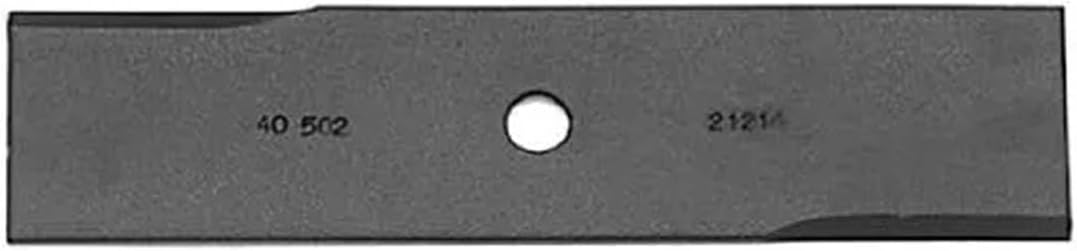
Image 1: Front view of the MaxLLTo 2059HD replacement edger blade, showing the center hole and part number markings.

Image 2: Angled view of the MaxLLTo 2059HD replacement edger blade, highlighting the blade's profile and cutting edges.
6. Operation
This section provides general guidance for operating an edger with the MaxLLTo 2059HD blade. Always refer to your edger's specific owner's manual for detailed operating instructions.
- Pre-Operation Check: Before each use, inspect the blade for any signs of damage, cracks, or excessive wear. Ensure the blade is securely fastened.
- Proper Edging Technique: Guide the edger along the desired line, allowing the blade to cut cleanly. Avoid forcing the edger, as this can strain the motor and damage the blade.
- Obstacle Avoidance: Be mindful of rocks, roots, and other hard objects that can damage the blade. If contact occurs, stop the edger and inspect the blade for damage.
- Blade Depth: Adjust the edger's blade depth according to your specific needs and the type of edging being performed.
7. Maintenance
Proper maintenance extends the life of your edger blade and ensures optimal performance.
- Cleaning: After each use, clean the blade and surrounding area of grass clippings and debris. Disconnect power before cleaning.
- Inspection: Regularly inspect the blade for wear, nicks, or bends. A dull or damaged blade can reduce cutting efficiency and put undue stress on the edger.
- Sharpening: Edger blades can be sharpened to maintain their cutting edge. Use a file or grinding wheel, maintaining the original blade angle. Ensure the blade remains balanced after sharpening. If you are unsure, consult a professional or replace the blade.
- Replacement: Replace the blade when it becomes excessively worn, bent, or damaged beyond repair. The frequency of replacement depends on usage and the type of material being edged.
- Storage: Store the edger and its blade in a dry, protected area to prevent rust and corrosion.
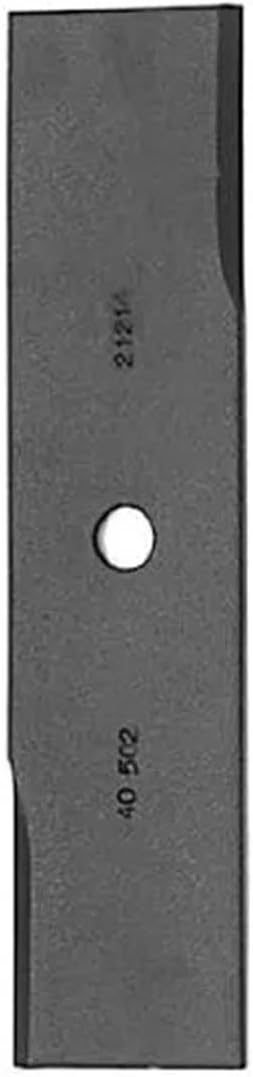
Image 3: Side view of the MaxLLTo 2059HD replacement edger blade, showing its thickness and sharpened edge.

Image 4: Top-down view of the MaxLLTo 2059HD replacement edger blade, illustrating its overall shape and dimensions.
8. Troubleshooting
This section addresses common issues related to edger blade performance. If you encounter problems not listed here, consult your edger's owner's manual or contact customer support.
- Poor Cutting Performance:
- Cause: Dull or damaged blade.
- Solution: Inspect the blade. Sharpen if dull, or replace if damaged or excessively worn.
- Excessive Vibration:
- Cause: Unbalanced blade, bent blade, or loose blade bolt.
- Solution: Check if the blade bolt is securely tightened. Inspect the blade for bends or damage. Replace a bent or unbalanced blade.
- Blade Not Spinning Freely:
- Cause: Debris buildup around the blade shaft, incorrect installation, or damaged components.
- Solution: Disconnect power and clear any debris. Re-check blade installation to ensure it's correctly seated.
9. Warranty and Support
Every product from MaxLLTo includes a 30-day money-back guarantee and an 18-month worry-free warranty. This warranty covers manufacturing defects and ensures product reliability.
If you have any questions regarding compatibility, installation, or performance, or if you need to claim warranty support, please contact MaxLLTo customer service. When contacting support, please provide your product model number (MH22285) and, if applicable, your edger's model and serial number to assist with accurate troubleshooting.
For further assistance, please refer to the contact information provided with your purchase or visit the official MaxLLTo website.