
1. Introduction
Thank you for choosing the newtopend Electric Portable Cordless Tire Inflator. This advanced device is designed for convenient and efficient inflation of various items, including car tires, motorcycle tires, bicycle tires, and sports equipment. Its compact size, powerful battery, and smart features make it an essential tool for everyday maintenance and roadside emergencies.
Key Features:
- Powerful 17# cylinder with 18L/min airflow for fast inflation.
- Dual-screen LCD display for real-time pressure readings.
- Integrated LED light with Normal, SOS, and Warning modes.
- Pre-set pressure function with automatic shut-off.
- Built-in cooling fan to prevent overheating.
- USB output and Type-C charging ports.
What's Included:
- 1 x Tire Inflator
- Various Adapters (for different inflation needs)
- 1 x Air Hose
- 1 x USB Cable

Image 1.1: The newtopend Portable Tire Inflator shown with its complete set of accessories, including the main unit, air hose, USB cable, and various nozzle adapters.
2. Safety Information
Please read all safety instructions carefully before using the device to prevent injury or damage.
- Do not leave the inflator unattended during operation.
- Keep out of reach of children.
- Do not overinflate items; always refer to the recommended pressure for the item being inflated.
- Avoid exposing the device to extreme temperatures, direct sunlight, or moisture.
- Use only the provided or recommended charging cable and adapters.
- If the device becomes excessively hot during use, turn it off and allow it to cool down before continuing.
3. Product Overview
The newtopend tire inflator features a user-friendly design with a clear dual digital display and intuitive controls.

Image 3.1: Overview of the inflator's key features, including the LED light, USB output port, built-in cooling fan, and digital display.

Image 3.2: Demonstrates the compact and portable design, highlighting the Type-C charging port, USB output, air hole, LED light, and operation buttons. Dimensions are 66x50x134mm and net weight is 0.45kg.
4. Setup
4.1 Charging the Device
Before first use, fully charge the tire inflator. Connect the provided USB-C cable to the Type-C charging port on the device and plug the other end into a compatible USB power source (e.g., wall adapter, car charger, power bank). The battery indicator on the display will show charging status.
4.2 Attaching the Air Hose and Nozzle
- Screw the air hose securely into the air outlet port on the top of the inflator.
- Select the appropriate nozzle attachment for the item you wish to inflate.
- Screw the selected nozzle onto the end of the air hose.
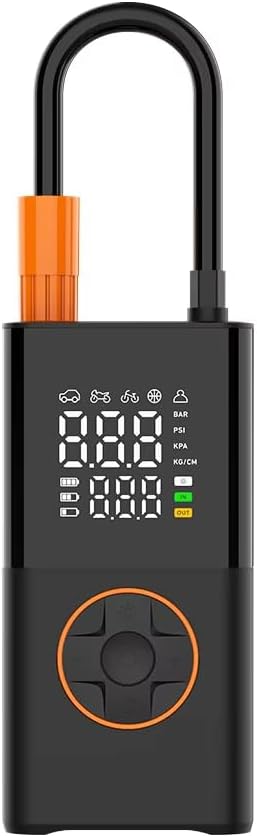
Image 4.1: Front view of the inflator, showing the display and control buttons.
5. Operating Instructions
5.1 Powering On/Off
Press and hold the Power button (usually the central button on the control panel) to turn the device on or off. The dual digital display will illuminate upon activation.
5.2 Selecting Inflation Mode and Unit
The inflator offers multiple pre-set modes for different applications:
- Car Mode: Recommended pressure range 30-50 PSI.
- Motorcycle Mode: Recommended pressure range 35-65 PSI.
- Bicycle Mode: Recommended pressure range 25-45 PSI.
- Sport Ball Mode: Recommended pressure range 4-16 PSI.
- Custom Mode: Allows manual setting of desired pressure.
Press the 'M' button (Mode/Unit switch) to cycle through the different inflation modes. The icon on the display will change to indicate the selected mode. To switch pressure units (PSI, BAR, KPA, KG/CM²), press and hold the 'M' button.

Image 5.1: Illustrates the 2000*2 mAh battery capacity and approximate inflation times for car, motorcycle, road bike, and sports balls.
5.3 Setting Target Pressure
Once a mode is selected, use the '+' and '-' buttons to adjust the target pressure. The upper display shows the real-time pressure, while the lower display shows the target pressure. The device will automatically stop when the target pressure is reached.
5.4 Starting Inflation
Connect the nozzle securely to the valve of the item to be inflated. Press the Power button to start the inflation. The pump will begin to operate, and the real-time pressure will be displayed. The built-in cooling fan will activate as needed to maintain optimal operating temperature.
5.5 Using the LED Light
The integrated LED light can be activated by pressing the light bulb icon button. Cycle through different light modes: Normal illumination, SOS flashing, and Warning (red) flashing for emergency situations.
Video 5.2: This video demonstrates the basic operation of the newtopend Electric Portable Cordless Tire Inflator, including powering on, switching modes and units, setting target pressure, attaching the hose, using the LED light, and inflating various items like basketballs, bicycle tires, motorcycle tires, and car tires.
6. Applications
The newtopend tire inflator is versatile and comes with multiple nozzle attachments to suit various inflation needs:
- Car Tires: Easily inflate car tires to their recommended pressure.
- Motorcycle Tires: Suitable for various motorcycle tire types.
- Bicycle Tires: Compatible with different bicycle valve types using the appropriate adapter.
- Sports Equipment: Inflate basketballs, footballs, volleyballs, and other sports balls.
- Other Inflatables: Can be used for air cushions, swimming rings, and other small inflatables with suitable adapters.

Image 6.1: Demonstrates the versatile applications of the inflator for cars, air cushions, bicycles, swimming rings, and sports balls, along with the corresponding nozzle types.

Image 6.2: Highlights the inflator's performance with a 17# cylinder diameter and 18L/min air flow, showing faster inflation times compared to older models.
7. Maintenance
7.1 Cleaning
Wipe the exterior of the inflator with a soft, dry cloth. Do not use harsh chemicals or abrasive cleaners. Ensure no water enters the device.
7.2 Storage
Store the device in a cool, dry place away from direct sunlight and extreme temperatures. Keep all accessories organized to prevent loss.
7.3 Battery Care
To prolong battery life, charge the device regularly, even if not in frequent use. Avoid completely draining the battery before recharging. If storing for an extended period, charge the battery to approximately 50% capacity.
8. Troubleshooting
If you encounter issues with your tire inflator, please refer to the following common problems and solutions:
| Problem | Possible Cause | Solution |
|---|---|---|
| Device does not turn on. | Low battery or no charge. | Charge the device fully. |
| Inflator not inflating. | Air hose not securely attached or nozzle not properly connected. | Ensure all connections are tight. |
| Inaccurate pressure reading. | Incorrect pressure unit selected. | Press and hold the 'M' button to switch pressure units. |
| Device overheats and shuts off. | Continuous long-term operation. | Allow the device to cool down before resuming use. The built-in cooling fan helps manage temperature during operation. |
9. Specifications
| Specification | Detail |
|---|---|
| Brand | newtopend |
| Model Name | CZK-5641 |
| Item Weight | 1.99 pounds (0.45kg) |
| Product Dimensions | 2.6"L x 1.97"W x 5.28"H (66x50x134mm) |
| Power Source | Battery Powered |
| Voltage | 5 Volts |
| Air Flow Capacity | 18 LPM (18000 ml/min) |
| Cylinder Diameter | 17# |
| Noise Level | 1 dB |
| Material | Plastic, Metal |
| Color | Black/Orange |
| Included Components | Tire Inflator, Adapters, Air Hose, USB Cable |
| UPC | 748305393464 |
10. Warranty and Support
This product comes with a standard manufacturer's warranty. For specific details regarding warranty coverage, claims, or technical support, please refer to the warranty card included in your product packaging or contact newtopend customer service directly.
For further assistance, please visit the official newtopend website or contact their customer support team.