
KALEVOL EM3388
KALEVOL Weather Station User Manual
Model: EM3388
Introduction
The KALEVOL Weather Station is a multi-functional device designed to provide comprehensive indoor and outdoor environmental data. Featuring a large, colorful display, it monitors temperature, humidity, atmospheric pressure, and offers weather forecasting, an atomic clock with alarm, and moon phase information. Its wireless sensor ensures accurate readings from various locations.

Image: The KALEVOL Weather Station main display unit and its accompanying wireless outdoor sensor.
What's in the Box
- Weather Station Main Unit
- Remote Sensor
- DC Adapter
Setup
Powering the Device
The weather station main unit supports two power modes:
- AC/DC Adapter: For continuous power and full backlight functionality.
- 2x AA Batteries (Not included): For portable use. The screen will light up for 15 seconds after touch to conserve power.
The wireless remote sensor requires 2x AA Batteries (Not included).

Image: Illustration of the power modes for the main unit (DC adapter or AA batteries) and the remote sensor (AA batteries).
Sensor Placement and Pairing
Place the remote sensor in your desired outdoor location, ensuring it is protected from direct sunlight and heavy rain for accurate readings. The wireless transmission range is up to 200 feet (60 meters) in open areas. The weather station supports up to 3 channels for multiple sensors.

Image: Depicts the wireless transmission between the main weather station unit indoors and the remote sensor placed outdoors.
Initial Synchronization
Upon plugging in or inserting batteries, the device will automatically search for the WWVB atomic clock signal to set the time. This process may take several hours to stabilize. The screen may turn dark for approximately 7 minutes during this initial search or after a reset. If the screen does not stay on after searching, press the brightness adjustment button on the side of the main unit.
Operating Instructions
Display Features
The 7.5-inch color display provides a wealth of information:
- Indoor/Outdoor Temperature and Humidity: Clearly displayed for both the main unit and remote sensor.
- Weather Forecast: Icons indicating future weather conditions (sunny, cloudy, rainy, snowy, etc.).
- Atmospheric Pressure Index: Shows current pressure and historical trends.
- Moon Phase: Displays the current lunar phase.
- Time and Date: Atomic clock synchronized for accuracy.
- Comfort Indicator: A visual representation of indoor comfort levels.
- Temperature Alarms: Alerts for high/low temperature thresholds.

Image: An overview of the weather station's colorful digital display, highlighting its multi-functional capabilities including wireless remote sensor, calendar, moon phase, air pressure, radio-controlled time, temperature and humidity, weather forecasting, and USB port.
Adjustable Backlight
When powered by the DC adapter, the screen offers 4 adjustable brightness options (100%, 75%, 50%, 25%). In battery-powered mode, the backlight activates for 15 seconds upon touch to conserve energy.

Image: Visual representation of the four adjustable brightness levels for the display when using AC power, and the touch-activated backlight for battery mode.
Weather Forecasting
The weather station analyzes temperature and humidity data from the outdoor sensor to predict weather changes for the next 12 hours. This feature helps in planning daily activities.
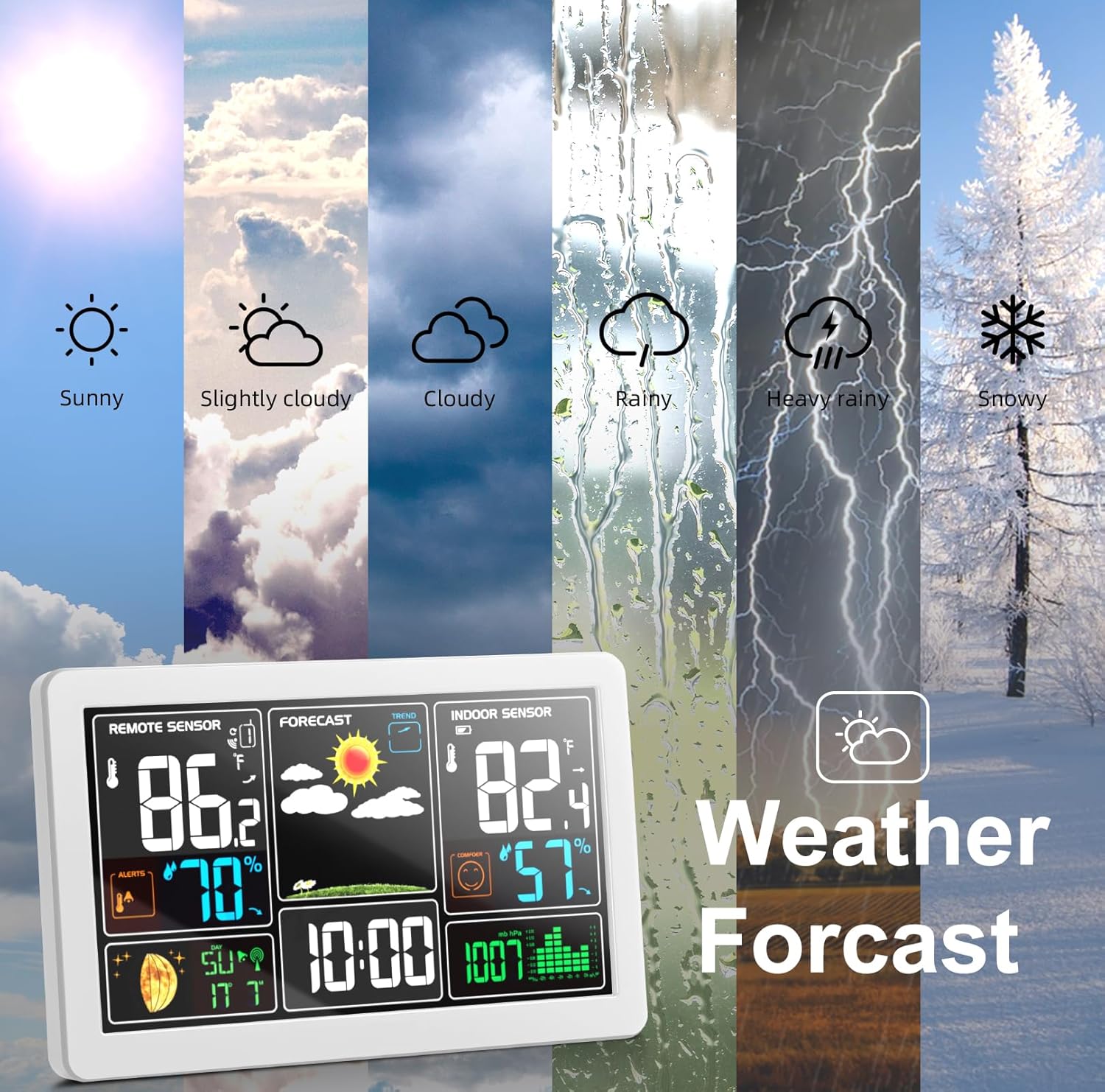
Image: The weather station display with icons representing different weather conditions such as sunny, slightly cloudy, cloudy, rainy, heavy rainy, and snowy.
Atomic Clock and Alarm Function
Beyond weather monitoring, the device functions as an atomic clock, ensuring precise timekeeping. It also includes an alarm function to assist with daily routines.

Image: The weather station on a bedside table, illustrating its alarm function for waking up and its use for checking time before sleeping.
USB Charging Port
The main unit is equipped with a USB socket, allowing you to charge mobile devices directly from the weather station when it is powered by the DC adapter.

Image: Close-up of the USB socket on the weather station, demonstrating its use for charging a smartphone.
Maintenance
To ensure optimal performance and longevity of your KALEVOL Weather Station:
- Clean the display and unit with a soft, dry cloth. Avoid abrasive cleaners or solvents.
- Ensure the remote sensor is placed in a location that minimizes direct exposure to extreme weather conditions (e.g., heavy rain, direct sunlight, snow accumulation).
- Replace batteries in both the main unit (if used) and the remote sensor when the low battery indicator appears on the display.
- If storing the device for an extended period, remove all batteries to prevent leakage.
Troubleshooting
| Problem | Possible Cause | Solution |
|---|---|---|
| Screen does not stay on (when plugged in). | Initial atomic clock signal search or recent reset. | The screen may turn dark for about 7 minutes during WWVB signal search. If it doesn't turn on after this period, press the brightness adjustment button on the side of the host. |
| Inaccurate temperature/humidity readings. | Sensor placement, interference, or initial stabilization. | Ensure the remote sensor is placed in a shaded, well-ventilated area away from direct heat sources or moisture. Allow several hours for data to stabilize after initial setup. Check for obstructions between the main unit and sensor. |
| No outdoor sensor data. | Sensor not paired, out of range, or low battery. | Check batteries in the remote sensor. Ensure the sensor is within the 200ft (60m) transmission range. Re-pair the sensor if necessary (refer to specific pairing instructions in the full manual, if available). |
| Atomic clock not setting correctly. | Weak WWVB signal or interference. | Place the main unit near a window or in an area with better signal reception. Avoid placing it near electronic devices that may cause interference. Allow sufficient time for synchronization (up to 24 hours). |
Specifications
- Model Number: EM3388
- Brand: KALEVOL
- Color: White
- Material: Acrylonitrile Butadiene Styrene (ABS)
- Power Source: AC/DC Adapter, 2x AA Batteries (Main Unit); 2x AA Batteries (Remote Sensor)
- Special Features: Color Large Display, Adjustable Brightness, Alarm, Clock, USB Charging Port
- Connectivity Technology: RF (Radio Frequency)
- Recommended Uses: Office, Garden, Backyard, Home
- Specific Uses: Temperature, Humidity, Time, Date
- Manufacturer: KALEVOL
- Country of Origin: China
Warranty and Support
For warranty information and technical support, please refer to the contact details provided with your purchase or visit the official KALEVOL website. Keep your purchase receipt for warranty claims.
Ask a question about this manual
Ask about setup, troubleshooting, compatibility, parts, safety, or missing instructions. Manuals+ will review the question and use this page’s manual context to help answer it.