
1. Introduction and Overview
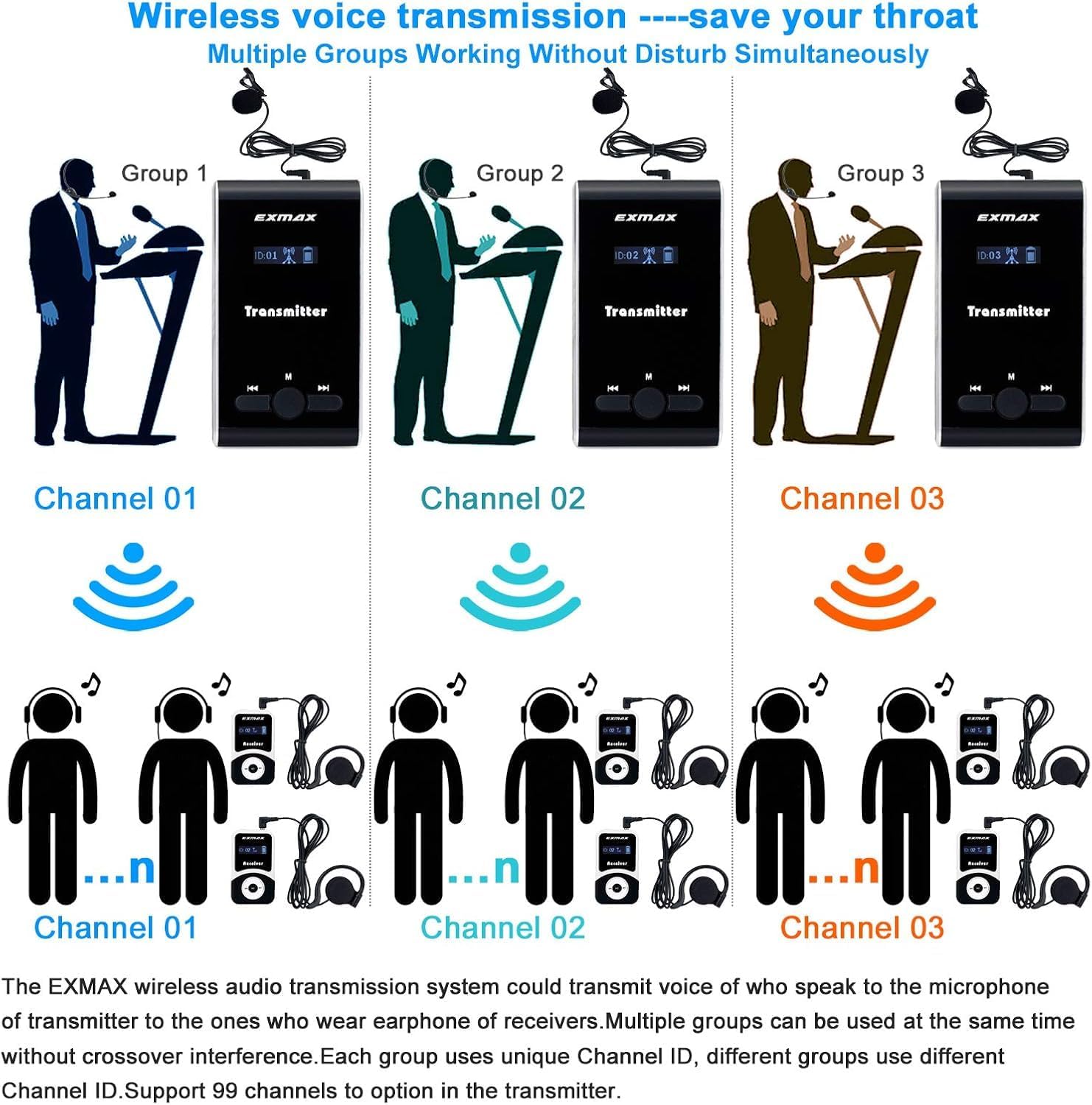
The EXMAX ATG-100T Wireless Tour Guide System is designed for clear voice transmission in various settings such as field trips, guided tours, exhibitions, conferences, and more. Operating on 195MHz-230MHz UHF frequencies, it supports 99 channels and 99 IDs, allowing multiple groups to operate simultaneously without interference. The system utilizes PLL technology for stable, clear sound, optimized for human voice clarity.
Both the transmitter and receiver units are lightweight and compact, featuring built-in rechargeable lithium batteries for extended operation (transmitter up to 20 hours, receiver up to 25 hours). The system includes a 32-slot aluminum charging case for efficient recharging. Receivers are designed with comfortable single-sided ear-hooks, and transmitters come with lavalier or clip-on microphones for hands-free use. The system is user-friendly, offering one-click channel synchronization, mute function, volume adjustment, and both manual and automatic pairing options.


Product Video: Appearance Overview
Video 1: This video provides a detailed look at the physical appearance and design of the EXMAX ATG-100T Wireless Tour Guide System components.
2. Setup Instructions
2.1 Connecting Microphones and Earphones
Ensure all components are connected correctly before operation. The microphone and earphone wires also function as antennas, so keep them unfolded to enhance signal transmission.
- Transmitter: Insert the lavalier or head-worn microphone into the 3.5mm MIC port on the transmitter.
- Receiver: Insert the single-sided ear-hook earphone into the 3.5mm earphone jack on the receiver.

2.2 Channel ID Setting and Synchronization
For the system to function correctly, the transmitter and all receivers in a group must be set to the same frequency Channel ID. Different groups should use different Channel IDs to avoid interference.
Manual Channel ID Setting:
- Ensure the microphone is plugged into the transmitter and the earphone into the receiver.
- Turn off both the transmitter and receiver.
- On the transmitter, keep pressing the right button and then click the middle button to enter manual ID setting mode.
- Use the left or right buttons to select the desired Channel ID.
- Restart the transmitter to return to normal speaking mode.
- Repeat steps 3-5 for each receiver, ensuring they are set to the same Channel ID as the transmitter.
Automatic Channel ID Setting (Sync Mode):
- Ensure the microphone is plugged into the transmitter and the earphone into the receiver.
- Turn off both the transmitter and receiver.
- On the transmitter, keep pressing the right button and then click the middle button to enter manual ID setting mode.
- Use the left or right buttons to select the desired Channel ID.
- Click the middle button again. The Channel ID will flash, indicating it has entered auto-setting ID mode.
- On the receiver, keep pressing the left button and click the middle button until "00" appears on the screen.
- Place the receiver very close to the transmitter. The receiver's Channel ID will be synced by the transmitter automatically.
- Repeat steps 6-7 for all other receivers.
- Restart all transmitters and receivers to return to normal working mode.
Product Video: How to Use ATG-100T Wireless Tour Guide System?
Video 2: This comprehensive video demonstrates the setup and basic usage of the ATG-100T Wireless Tour Guide System.
Product Video: Manual Channel Adjustment
Video 3: A guide on how to manually adjust the channel settings for the EXMAX ATG-100T Wireless System.
Product Video: Automatic Channel Adjustment
Video 4: This video demonstrates the automatic channel adjustment feature of the EXMAX ATG-100T Wireless System.
3. Operating Instructions
3.1 Power On/Off
- To turn on or off the transmitter or receiver, press and hold the power button (middle button) for 2 seconds.
3.2 Volume Adjustment
- After successful connection, use the "+" or "-" buttons on the receiver to adjust the volume. There are 10 adjustable settings.
3.3 Mute Function
- On the transmitter, click the right button to mute all connected receivers. Click the right button again to unmute.
3.4 Shutting Down All Receivers
- To shut down all synced receivers simultaneously, click the left button on the transmitter for 5 seconds. The receiver displays will flash.
- Click the M button on the transmitter again to exit the shutdown process.
Product Video: Easy Operations (Power, Mute, Volume, Shutdown)
Video 5: This video demonstrates the easy operations of the EXMAX ATG-100T system, including turning on/off, muting, adjusting volume, and shutting down receivers.
4. Maintenance
To ensure the longevity and optimal performance of your EXMAX ATG-100T system, follow these maintenance guidelines:
- Cleaning: The single-sided ear-hook receivers feature soft, breathable sponge pads that are easy to keep clean. Regularly wipe down all units with a soft, dry cloth.
- Storage: When not in use, store all transmitters and receivers in the provided 32-slot aluminum charging case. This protects the devices and keeps them organized.
- Charging: Always use the provided charging case and adapter to charge the units. Ensure units are fully charged before extended use to maximize battery life.
Product Video: Charging the ATG-100T System
Video 6: This video demonstrates the proper procedure for charging the EXMAX ATG-100T wireless tour guide system using the included charging case.
5. Troubleshooting
If you encounter issues with your EXMAX ATG-100T system, consider the following common troubleshooting steps:
- Poor Signal/Range: Ensure the microphone and earphone wires are fully unfolded. These wires act as antennas and need to be extended for optimal signal transmission.
- Interference: Verify that the transmitter and all receivers within a single group are set to the exact same Channel ID. If multiple groups are operating simultaneously, ensure each group uses a different Channel ID to prevent cross-talk.
- Unclear Sound: Check all connections (microphone, earphone) are secure. Ensure the units are within the specified operating range (50-100 meters line-of-sight). The system uses PLL technology for clear sound, so persistent unclear audio might indicate a connection or range issue.
- Units Not Pairing: Re-attempt the manual or automatic channel ID setting process as described in the Setup section. Ensure the receiver is placed very close to the transmitter during automatic synchronization.

6. Specifications
| Feature | Specification |
|---|---|
| Brand | EXMAX |
| Model | ATG-100T |
| Material | Plastic |
| Item Weight | 3.2 ounces |
| Product Dimensions | 2.83 x 1.65 x 0.47 inches |
| Batteries | 32 Lithium Polymer batteries required. (included) |
| Connectivity Technology | AUX |
| Compatible Devices | Smartphone, MP3 Player, Headphones |
| Mounting Type | Pole Mount, Tabletop |
| Frequency Channels | 99 (195MHz-230MHz) |
| Transmission Distance | 50-100 meters (164-328ft) line-of-sight |
| Transmitter Battery Life | Up to 20 hours |
| Receiver Battery Life | Up to 25 hours |


7. Warranty and Support
7.1 Warranty Information
EXMAX offers a 2-year warranty on this product. Your purchase is protected with a 24-month replacement warranty, ensuring 100% satisfaction.
7.2 Customer Support
For any questions or suggestions regarding your EXMAX wireless tour guide equipment, please contact customer support. You can typically find a "Sold by EXMAX" link and an "Ask a question" option on the product's purchase page. EXMAX provides 24/7 online services to assist you.