
1. Safety Instructions
Always prioritize safety when operating welding equipment. Failure to follow safety guidelines can result in serious injury or death.
- Eye Protection: Always wear a welding helmet with appropriate shade filter to protect eyes from intense light and UV/IR radiation.
- Body Protection: Wear flame-resistant clothing, welding gloves, and sturdy footwear to protect against sparks, heat, and electrical shock.
- Ventilation: Ensure adequate ventilation to remove welding fumes, which can be hazardous to health. Work in a well-ventilated area or use a fume extractor.
- Electrical Safety:
- Ensure the welding machine is properly grounded.
- Do not operate in wet conditions or with wet hands.
- Inspect power cords and welding cables for damage before each use. Replace damaged cables immediately.
- Never touch live electrical parts.
- Fire Prevention:
- Keep flammable materials away from the welding area.
- Have a fire extinguisher readily available.
- Be aware of hot metal and sparks that can ignite materials.
- Work Area: Keep the work area clean and free of clutter. Ensure stable footing.
- Children and Bystanders: Keep children and unauthorized persons away from the welding area.
- Read Manual: Read and understand the entire instruction manual before operating the machine.
2. Package Contents
The "110V Full Kit" typically includes the following components. Please verify all items upon unboxing.
- BAWAZINA ZX7 250A / MMA-250 Inverter Welding Machine (110V version)
- Electrode Holder with Cable
- Ground Clamp with Cable
- Welding Mask (basic)
- Wire Brush / Hammer
- Power Cord
- User Manual
Note: Contents may vary slightly depending on the specific kit purchased.
3. Product Overview
The BAWAZINA ZX7 250A / MMA-250 is a portable inverter arc welding machine designed for various welding tasks. It features a compact design and adjustable current output.
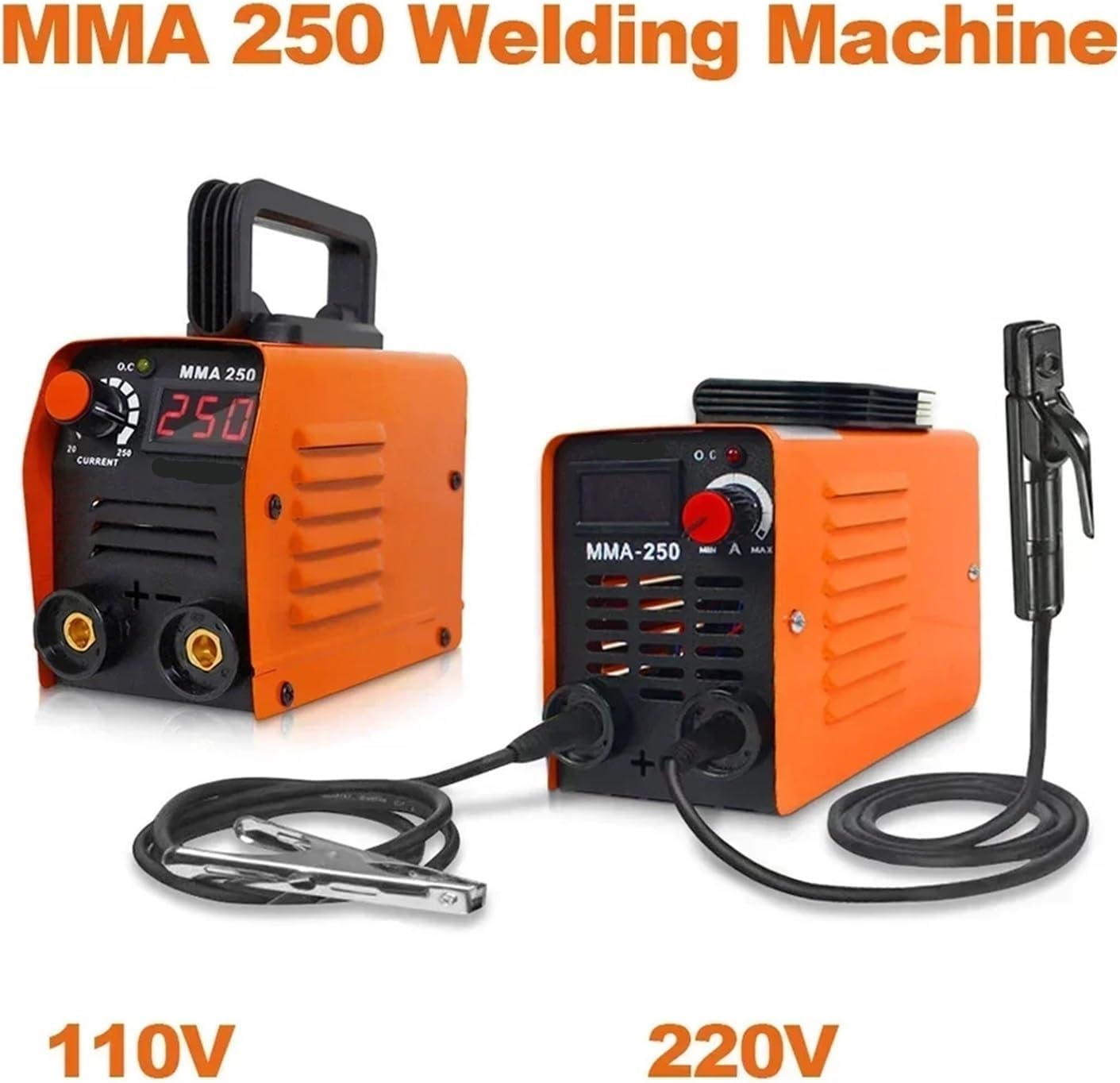
Image 3.1: Front view of the MMA 250 welding machine, showing both 110V and 220V versions. The machines are orange with black handles and control panels. The 110V version is on the left, and the 220V version is on the right, connected to an electrode holder and ground clamp.
3.1. Front Panel Controls and Connections
- Current Display: Digital display showing the welding current (Amperes).
- Current Adjustment Knob: Used to set the desired welding current.
- Output Terminals (+ and -): Connect the electrode holder and ground clamp cables here. Ensure correct polarity.
- Indicator Lights (OC): Overcurrent/Overheat indicator. Illuminates if the machine is overloaded or overheats.
3.2. Rear Panel
- Power Switch: Turns the machine ON/OFF.
- Power Input Socket: Connects the power cord to the electrical supply.
- Cooling Fan: Provides necessary cooling for the internal components. Ensure it is not obstructed.
4. Specifications
The BAWAZINA ZX7 250A / MMA-250 welding machine is available in 110V and 220V versions. Please refer to the specifications for your specific model.

Image 4.1: Detailed product parameters for the 110V MMA-250 welding machine, including dimensions and electrical specifications.
4.1. 110V Model Specifications
| Parameter | Value |
|---|---|
| Model | MMA-250 |
| Rated Power | 3000W |
| Input Voltage | AC 110V |
| Frequency | 50/60Hz |
| Load Duration | 60% |
| Welding Thickness | 2-5mm |
| Welding Rod Diameter | 2.5 Welding Rods |
| Applicable Welding Rod | Ordinary J422 |
| Dimensions (L x W x H) | Approx. 200mm x 96mm x 135mm |

Image 4.2: Detailed product parameters for the 220V MMA-250 welding machine, including dimensions and electrical specifications.
4.2. 220V Model Specifications
| Parameter | Value |
|---|---|
| Rated Input Power | 4KW |
| Rated Input Voltage | AC 220V |
| Frequency | 50/60Hz |
| Current Regulation Range | 20-250A |
| Load Duration | 60% |
| Welding Material Thickness | 2-5mm |
| Welding Rod Diameter | 2.5 Welding Rods |
| Capacitance | National Standard Capacitor |
| Applicable Types Of Welding Rods | Ordinary J422/ DC: 506 / 507 / Pig Iron Z208 |
| Machine Weight | 1.5Kg |
| Product Size (L x W x H) | Approx. 210mm x 100mm x 130mm |
Note: Specifications are approximate and subject to change without notice.
5. Setup
Before starting any welding operation, ensure the machine is set up correctly and safely.
- Placement: Place the welding machine on a stable, level surface in a well-ventilated area, away from flammable materials. Ensure the cooling fan is unobstructed.
- Power Connection:
- Ensure the power switch on the machine is in the OFF position.
- Connect the power cord to the machine's power input socket.
- Plug the power cord into a suitable electrical outlet (110V or 220V, depending on your machine model). Ensure the outlet is properly grounded and can handle the machine's rated input power.
- Ground Clamp Connection:
- Connect the ground clamp cable to the negative (-) output terminal on the front panel.
- Securely attach the ground clamp to the workpiece or a clean, bare metal part of the welding table. A good ground connection is crucial for stable arc and safe operation.
- Electrode Holder Connection:
- Connect the electrode holder cable to the positive (+) output terminal on the front panel.
- Insert a suitable welding electrode into the electrode holder. Ensure the electrode is firmly gripped.
- Initial Check: Double-check all connections for tightness and correct polarity. Ensure no cables are damaged.
6. Operating Instructions
Follow these steps for safe and effective welding.
- Power On: Turn the power switch to the ON position. The digital display should illuminate.
- Set Current: Adjust the current adjustment knob to the desired amperage based on the electrode type, diameter, and material thickness. Refer to electrode manufacturer recommendations.
- Prepare Workpiece: Clean the workpiece thoroughly to remove rust, paint, oil, or other contaminants that can affect weld quality.
- Wear PPE: Put on all necessary Personal Protective Equipment (PPE), including welding helmet, gloves, and protective clothing.
- Start Welding:
- Bring the electrode into contact with the workpiece at an angle (typically 10-20 degrees from vertical).
- Strike an arc by lightly scratching or tapping the electrode on the workpiece.
- Once the arc is established, maintain a consistent arc length and travel speed to create a uniform weld bead.
- Monitor Machine: Pay attention to the indicator lights. If the OC (Overcurrent/Overheat) light illuminates, stop welding and allow the machine to cool down.
- Finish Welding: When finished, lift the electrode from the workpiece to break the arc.
- Power Off: Turn the power switch to the OFF position and unplug the machine from the power outlet.
- Cool Down: Allow the workpiece to cool before handling. Use a chipping hammer and wire brush to remove slag.
For detailed welding techniques, consult specialized welding guides or training resources.
7. Maintenance
Regular maintenance ensures the longevity and safe operation of your welding machine.
- Cleaning:
- Periodically clean the machine's exterior with a dry cloth.
- Use compressed air to blow out dust and debris from the cooling vents and internal components. Ensure the machine is unplugged before cleaning.
- Cable Inspection: Regularly inspect welding cables, electrode holder, and ground clamp for cuts, cracks, or loose connections. Replace damaged components immediately.
- Storage: Store the welding machine in a clean, dry, and dust-free environment when not in use. Protect it from moisture and extreme temperatures.
- Fan Check: Ensure the cooling fan operates freely and is not obstructed.
8. Troubleshooting
This section addresses common issues you might encounter.
| Problem | Possible Cause | Solution |
|---|---|---|
| Machine does not power on. |
|
|
| No arc or weak arc. |
|
|
| Overheat/Overcurrent (OC) light on. |
|
|
9. Warranty and Support
For warranty information, technical support, or service inquiries, please contact BAWAZINA customer service through your original point of purchase or refer to the warranty card included with your product.
Keep your purchase receipt as proof of purchase for warranty claims.