
1. Introduction
Thank you for choosing the Diveblues Portable Handheld Turbo Fan N607D. This compact and powerful fan is designed to provide an ultimate cooling experience with its advanced 6-blade design and high-speed three-phase brushless motor. It offers versatile usage for various activities, ensuring comfort wherever you go.

Figure 1: Diveblues Portable Handheld Turbo Fan N607D.
Key features include:
- Ultimate Cooling Experience: Advanced 6-blade design with a high-speed three-phase brushless motor, reaching up to 10m/s wind speed and 13,500 RPM.
- 5 Gear Turbo Wind: Adjustable wind speed settings from light breezes to strong winds to meet diverse cooling needs.
- Extra Long Battery Life: Up to 12 hours of battery life with a 4000mAh capacity, rechargeable via USB-C.
- Unique Appearance & Portability: Ultra-small foldable body (2.3"D x 2"W x 6.7"H) and ultra-lightweight (7 ounces), easily fitting into pockets or bags. Includes an anti-lost lanyard.
- 3-in-1 Usage: Functions as a handheld fan, neck fan, or desk fan.
2. Setup
2.1 Charging the Fan
Before first use, fully charge your Diveblues Turbo Fan. The fan is equipped with a USB-C charging port for convenience.
- Locate the USB-C charging port on the side of the fan's handle.
- Connect the provided USB-C cable to the fan and plug the other end into a compatible USB power source (e.g., wall adapter, laptop, power bank).
- The LED display will indicate charging status. A full charge typically takes a few hours.

Figure 2: USB-C charging port.
2.2 Attaching the Lanyard
The fan comes with an anti-lost lanyard for easy carrying.
- Locate the small loop on the fan's handle.
- Thread the thin string of the lanyard through the loop.
- Pass the larger part of the lanyard through the string loop and pull to secure.
3. Operating Instructions
3.1 Power On/Off and Speed Adjustment
The fan features a simple touch control button for operation.
- Power On: Press the power button once to turn on the fan at the lowest speed setting (Gear 1).
- Adjust Speed: Each subsequent press of the power button will cycle through the 5 available speed gears (1-5).
- Power Off: After Gear 5, pressing the button again will turn off the fan.

Figure 3: LED Display showing current speed setting.

Figure 4: Gear switch button for easy operation.
3.2 Usage Modes
The Diveblues Turbo Fan offers three convenient usage modes:
- Handheld Fan: Hold the fan comfortably in your hand for direct cooling.
- Neck Fan: Attach the lanyard and wear the fan around your neck, adjusting the head to direct airflow upwards.
- Desk Fan: Fold the handle to create a stable base, allowing the fan to stand on a flat surface for hands-free cooling.
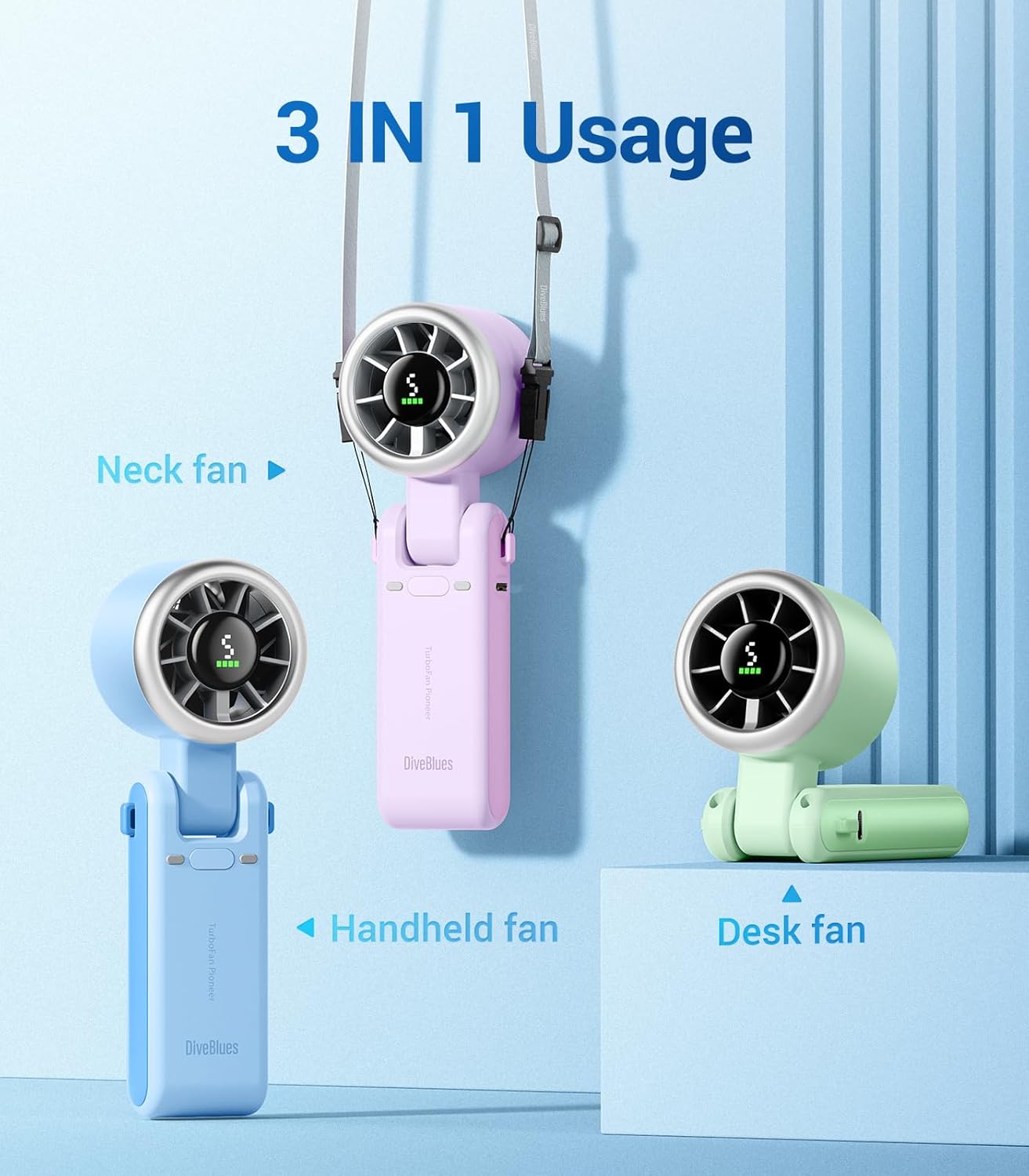
Figure 5: Three-in-one usage: Neck fan, Handheld fan, Desk fan.
3.3 Portability
Its compact and lightweight design makes it ideal for travel and outdoor activities.

Figure 6: Portable and compact design for easy transport.
4. Maintenance
4.1 Cleaning
To ensure optimal performance and longevity, keep your fan clean.
- Ensure the fan is turned off and unplugged before cleaning.
- Use a soft, dry cloth to wipe the exterior of the fan.
- For the fan blades and grille, use a soft brush or compressed air to gently remove dust and debris. Avoid using water or harsh chemicals.

Figure 7: Safety net design.
4.2 Storage
When not in use, store the fan in a cool, dry place away from direct sunlight and extreme temperatures.
5. Troubleshooting
If you encounter any issues with your Diveblues Turbo Fan, please refer to the following common solutions:
- Fan not turning on: Ensure the battery is charged. Connect the fan to a power source and try again.
- Weak airflow: Check the speed setting on the LED display and increase it if necessary. Ensure the fan grille is not obstructed by dust or debris.
- Unusual noise: Turn off the fan and inspect the blades for any foreign objects. Ensure the fan is placed on a stable surface if used as a desk fan.
- Hair entanglement: Be cautious when using the fan with long hair. Tie back long hair to prevent it from getting caught in the fan blades.
If the problem persists, please contact Diveblues customer support for assistance.
6. Specifications
| Feature | Specification |
|---|---|
| Brand | Diveblues |
| Model Name | N607D |
| Color | Mint Mambo |
| Electric Fan Design | Wearable Fan |
| Power Source | Battery Powered (1 Lithium Ion battery required) |
| Product Dimensions | 2.3"D x 2"W x 6.7"H |
| Item Weight | 7 ounces (0.2 Kilograms) |
| Speed | Up to 13500 RPM |
| Number of Power Levels | 5 |
| Control Method | Touch |
| Included Components | Anti-lost Lanyard |
| Wattage | 20 watts |
| Voltage | 5 Volts (DC) |

Figure 8: Airflow Turbojet Innovation for powerful cooling.

Figure 9: High-performance brushless DC motor.

Figure 10: Efficient 5-blade fan design.
7. Official Product Videos
Video 1: Diveblues High-speed Handheld Turbo Fan. This video demonstrates the fan's powerful airflow and various speed settings, showcasing its effectiveness in different scenarios.
Video 2: Divesblues Handheld turbo fan. This video highlights the fan's compact design and its adaptability for use as a handheld, neck, or desk fan, perfect for on-the-go cooling.
8. Warranty and Support
For warranty information or technical support, please refer to the product packaging or contact Diveblues customer service directly. Keep your purchase receipt for any warranty claims.
You can visit the official Diveblues Store on Amazon for more information: Diveblues Store

