
1. Introduction
This manual provides essential instructions for the installation, operation, and maintenance of your UAZNJFZ F3 GPS RC Drone Rear Arm CCW Motor. This component is a crucial spare part designed to ensure the continued performance and stability of your F3 GPS RC Drone. Please read this manual thoroughly before attempting any installation or repair.
2. Product Overview
The Rear Arm CCW Motor is a replacement part specifically engineered for the F3 GPS RC Drone. It is designed to provide reliable power to the drone's propeller, ensuring stable flight and maneuverability. This motor is a Counter-Clockwise (CCW) rotating motor, typically used on specific arms of the drone to achieve balanced thrust.
Key Features:
- Durability: Crafted from robust materials for use in various environments.
- Compatibility: Designed specifically for the F3 GPS RC Drone, ensuring a precise fit.
- Enhanced Control: Contributes to improved control and stability for an optimal flying experience.
- Functionality: Essential spare part for quick repairs and maintenance.
- Performance: Optimizes flight time and maneuverability.
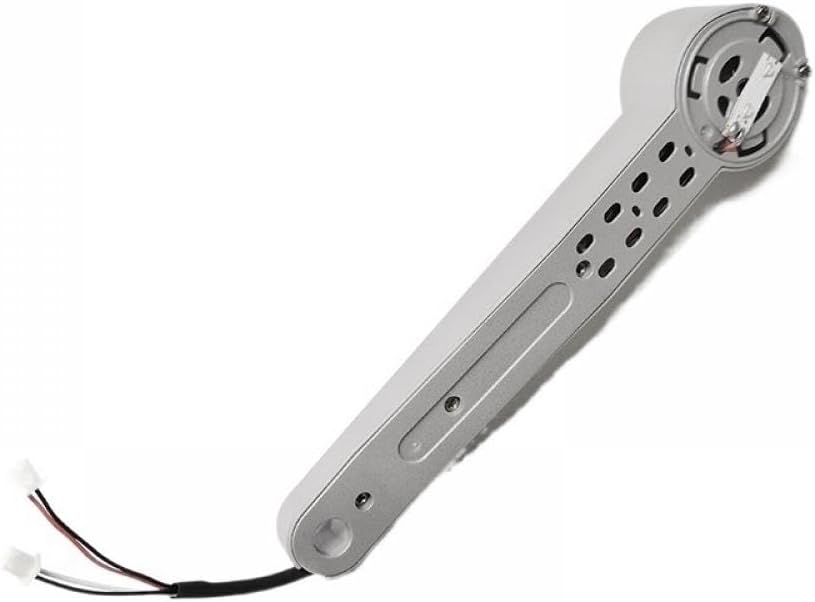
Image 1: UAZNJFZ F3 GPS RC Drone Rear Arm CCW Motor. This image shows the compact motor unit with its wiring, ready for installation into the drone's arm.
3. Safety Information
- Always disconnect the drone's battery before performing any maintenance or part replacement.
- Handle electronic components with care to avoid static discharge.
- Ensure all connections are secure and correctly oriented before reassembling the drone.
- Keep small parts away from children to prevent choking hazards.
- If you are unsure about any step, seek professional assistance or refer to the drone's main instruction manual.
4. Installation (Setup)
Follow these steps carefully to replace the Rear Arm CCW Motor on your F3 GPS RC Drone.
- Power Off and Disconnect: Ensure the drone is powered off and the battery is disconnected.
- Identify the Damaged Arm: Locate the rear arm requiring the CCW motor replacement.
- Remove Propeller: Carefully remove the propeller from the motor shaft. Note its orientation.
- Access Motor Compartment: Depending on your drone model, you may need to remove screws or open a cover to access the motor wiring.
- Disconnect Old Motor: Gently disconnect the wires of the old motor from the drone's flight controller or ESC (Electronic Speed Controller). Note the color coding and connection points.
- Remove Old Motor: Unscrew and remove the faulty motor from the arm.
- Install New Motor: Place the new UAZNJFZ Rear Arm CCW Motor into position and secure it with the appropriate screws.
- Connect Wiring: Connect the new motor's wires to the corresponding points on the flight controller/ESC. Ensure correct polarity and connection order (typically red to red, black to black, or as indicated by the drone's wiring diagram).
- Reattach Propeller: Securely reattach the propeller to the new motor shaft, ensuring it is oriented correctly for CCW rotation.
- Reassemble Drone: Close any covers and reinsert all screws removed during disassembly.
- Test Flight: Reconnect the battery and perform a brief, low-altitude test flight in a safe area to confirm proper function.
5. Operating (Usage)
Once installed, the Rear Arm CCW Motor operates as an integral part of your F3 GPS RC Drone's propulsion system. Its function is automatically managed by the drone's flight controller to provide the necessary thrust for stable flight, hovering, and maneuvering. No direct user operation of the motor itself is required beyond ensuring proper installation.
Always refer to your F3 GPS RC Drone's main user manual for instructions on flight control, calibration, and general drone operation.
6. Maintenance
Regular maintenance helps prolong the lifespan of your motor and ensures optimal drone performance.
- Inspection: Periodically inspect the motor for any signs of damage, such as bent shafts, loose wires, or debris accumulation.
- Cleaning: Gently clean the motor and surrounding area with a soft brush or compressed air to remove dust, dirt, or small particles that could impede rotation.
- Propeller Check: Ensure propellers are securely attached and free from damage. Damaged propellers can cause excessive vibration and stress on the motor.
- Bearing Health: Listen for unusual noises during motor operation, which could indicate worn bearings. If bearings are worn, replacement of the motor may be necessary.
- Avoid Overheating: Do not operate the drone continuously for extended periods without allowing the motors to cool down, especially in hot environments.
7. Troubleshooting
If you encounter issues after installing the new motor, consider the following:
| Problem | Possible Cause | Solution |
|---|---|---|
| Motor not spinning | Loose wiring, incorrect wiring, faulty ESC, motor damage. | Check all wire connections. Ensure correct polarity. Test with a known good ESC if possible. Inspect motor for physical damage. |
| Motor spinning in wrong direction | Incorrect wiring (for brushless motors, two of the three wires might need to be swapped). | For brushless motors, swap any two of the three motor wires connected to the ESC. For brushed motors, check polarity. |
| Excessive vibration or noise | Damaged propeller, bent motor shaft, loose motor mounting screws, worn bearings. | Replace damaged propeller. Check motor shaft for straightness. Tighten motor mounting screws. If bearings are worn, replace the motor. |
| Motor overheating | Overloaded motor, short circuit, prolonged heavy use, incorrect propeller size. | Ensure correct propeller size for the drone. Reduce flight intensity. Check for any short circuits in wiring. Allow motor to cool between flights. |
8. Specifications
| Feature | Detail |
|---|---|
| Model Number | UAZNJFZ888 (General part model) |
| Part Type | Rear Arm CCW Motor |
| Compatibility | F3 GPS RC Drone, 4D-F3 Drone |
| Package Dimensions | 1.18 x 0.79 x 0.39 inches |
| Item Weight | 14.1 ounces |
| Manufacturer | UAZNJFZ |
| Recommended Age | 36 months - 18 years |
9. Warranty and Support
For warranty information and technical support regarding your UAZNJFZ F3 GPS RC Drone Rear Arm CCW Motor, please refer to the original purchase documentation or contact UAZNJFZ customer service directly. Contact details are typically available on the manufacturer's official website or through your retailer.
When contacting support, please have your product model number (UAZNJFZ888) and purchase details readily available.