
1. Product Overview
The Hiluckey Solar Power Bank (Model T11X) is a versatile and robust portable charging solution designed for both daily use and outdoor adventures. With a substantial 27000mAh lithium-polymer battery, it ensures your devices remain powered on the go. This power bank features multiple charging options, including built-in cables and solar recharging capabilities, making it an ideal companion for various scenarios.

Figure 1.1: Hiluckey Solar Power Bank (Model T11X) showing its solar panel and integrated cables.
Key Features:
- 27000mAh Massive Power: Provides multiple charges for smartphones, tablets, and other USB-powered devices.
- Built-in Multi-Purpose Cables: Includes a USB-C cable, a Lightning cable, and a USB-A input cable for convenient charging without extra accessories.
- Charge Up to 5 Devices Simultaneously: Equipped with 2 USB-A output ports, a USB-C input/output port, and the built-in cables.
- Blazing Fast 15W PD QC 3.0 Charging: Delivers power quickly, charging an iPhone 16 from 0% to 60% in approximately 30 minutes.
- Dual-Function USB-C Port: Supports both input and output, allowing for fast recharging of the power bank and efficient device charging.
- Solar Panel Charging: Offers an emergency recharging option when conventional power sources are unavailable.
- Dual LED Flashlight: Features three modes (Standard, SOS, Strobe) for illumination in various situations.
- Rugged Design: Rubberized protection on all four corners enhances shock resistance against drops and impacts.
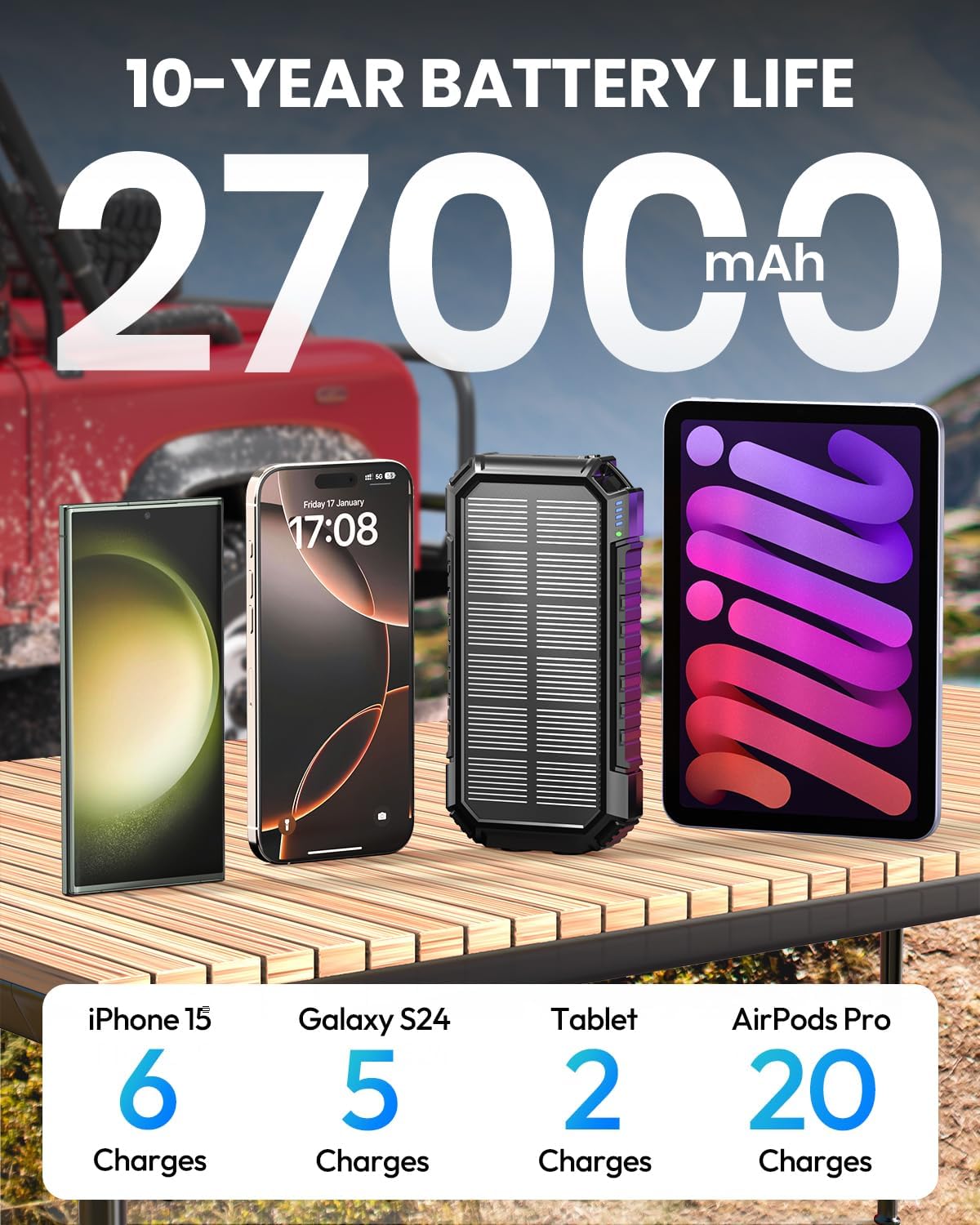
Figure 1.2: The 27000mAh capacity of the power bank can provide multiple charges for various devices, including smartphones and tablets.
2. Setup and Initial Use
2.1 Unpacking and Inspection
Upon receiving your Hiluckey Solar Power Bank, carefully unpack all components. Verify that the package contains the power bank and the user manual. Inspect the device for any visible damage. If any damage is found, contact customer support immediately.
2.2 Initial Charging
For optimal performance, it is recommended to fully charge the power bank using a wall adapter before its first use. This ensures the internal battery is calibrated and ready for maximum capacity.
- Connect the built-in USB-A input cable or a USB-C cable (not included) to a compatible wall adapter (5V/3A fast-charging adapter recommended).
- Plug the adapter into a power outlet.
- The LED indicator lights on the power bank will illuminate, indicating the charging progress. All four lights will be solid when fully charged.
A full charge via a fast-charging adapter typically takes approximately 6 hours.

Figure 2.1: Various methods for recharging the power bank, including wall charging and solar charging.
3. Operating Instructions
3.1 Charging Your Devices
The Hiluckey Solar Power Bank offers multiple ways to charge your electronic devices.
- Using Built-in Cables:
- Pull out the integrated USB-C or Lightning cable.
- Connect the appropriate cable to your device's charging port.
- The power bank will automatically begin charging your device.
- Using USB-A Output Ports:
- Connect your device's USB charging cable to one of the two USB-A output ports on the power bank.
- Connect the other end of the cable to your device.
- Charging will commence automatically.
- Using USB-C Input/Output Port:
- Connect your device's USB-C charging cable to the USB-C port on the power bank.
- Connect the other end of the cable to your device.
- Charging will commence automatically.
You can charge up to 5 devices simultaneously using a combination of the built-in cables and external ports.

Figure 3.1: The power bank features three built-in charging cables for various devices.

Figure 3.2: The power bank can charge up to five devices concurrently, ideal for group use.
3.2 Recharging the Power Bank
The power bank can be recharged via wall outlet or solar energy.
- Wall Charging:
- Use the built-in USB-A input cable or a USB-C cable connected to a wall adapter.
- The LED indicators will show charging status.
- This is the fastest method for recharging.
- Solar Charging:
- Place the power bank in direct sunlight with the solar panel facing upwards.
- The green solar charging indicator light will illuminate when solar charging is active.
- Solar charging is primarily for emergency use and supplemental power, as it is slower than wall charging.
- Ensure the solar panel is clean and unobstructed for efficient charging.
3.3 Using the Dual LED Flashlight
The power bank includes a powerful dual LED flashlight with multiple modes.
- To Turn On/Off: Press and hold the power button for approximately 3 seconds.
- To Cycle Modes: Once the flashlight is on, short press the power button to switch between modes:
- Standard (constant light)
- SOS (Morse code for distress)
- Strobe (rapid flashing)

Figure 3.3: The dual LED flashlight offers Standard, SOS, and Strobe modes for various lighting needs.
4. Maintenance and Care
Proper maintenance ensures the longevity and optimal performance of your Hiluckey Solar Power Bank.
- Cleaning: Use a soft, dry cloth to clean the power bank. For the solar panel, a slightly damp cloth can be used to remove dust and debris. Avoid harsh chemicals or abrasive materials.
- Storage: Store the power bank in a cool, dry place away from direct sunlight and extreme temperatures. If storing for extended periods, charge the power bank to about 50-75% every 3 months to preserve battery health.
- Environmental Conditions: While designed for outdoor use with rubberized protection, avoid prolonged exposure to extreme heat, cold, or water. The device is shock-resistant but not indestructible.
- Solar Panel Efficiency: For best solar charging results, ensure the solar panel is clean and positioned directly towards the sun. Note that solar charging is a supplementary feature and not intended as the primary charging method due to varying sunlight intensity.

Figure 4.1: The power bank's rugged design provides protection against water, dust, and shocks.
5. Troubleshooting
If you encounter issues with your Hiluckey Solar Power Bank, refer to the following common problems and solutions.
| Problem | Possible Cause | Solution |
|---|---|---|
| Power bank not charging devices. | Low battery; incorrect cable; device incompatibility. | Recharge the power bank. Ensure cables are securely connected and compatible with your device. Try a different cable or device. |
| Power bank not recharging. | Faulty adapter/cable; insufficient sunlight (for solar); port issue. | Try a different wall adapter and cable. For solar, ensure direct, strong sunlight and clean panel. Check if the charging port is clear of debris. |
| Slow charging. | Using a standard adapter; multiple devices charging; cable quality. | Use a 15W PD QC 3.0 fast-charging adapter. Disconnect other devices. Use high-quality charging cables. |
| Flashlight not working. | Low battery; incorrect operation. | Recharge the power bank. Ensure you are pressing and holding the power button for 3 seconds to activate/deactivate the flashlight. |
If the problem persists after trying these solutions, please contact Hiluckey customer support.
6. Specifications
| Feature | Detail |
|---|---|
| Brand | Hiluckey |
| Model Number | T11X |
| Battery Capacity | 27000 Milliamp Hours (mAh) |
| Product Dimensions | 6.89 x 3.5 x 1.13 inches |
| Item Weight | 1.08 pounds |
| Connector Type | USB Type C, USB Type A, Built-in Lightning, Built-in USB-C |
| Special Features | Built-in Cables, Dual LED Flashlight, Fast Charging (15W PD QC 3.0), Over Charging Protection, USB-C IN/OUT Port, Solar Panel |
| Batteries Required | 2 Lithium Polymer batteries (included) |
| Manufacturer | Yuwei Technology (Dongguan) Co., Ltd. |
Note on Air Travel: This device contains a lithium battery. When traveling by commercial airline, the power bank should be carried in your carry-on luggage or on your person. It should not be placed in checked luggage. Always check with your airline for specific regulations regarding portable power banks.

Figure 6.1: The Hiluckey Solar Power Bank is approved for airline travel when carried in hand luggage.
7. Warranty and Support
7.1 Product Care and Warranty
Hiluckey offers a 10-year product care commitment for the Solar Power Bank, ensuring long-term reliability and customer satisfaction. This commitment covers manufacturing defects and significant performance issues under normal use conditions.

Figure 7.1: Hiluckey provides a 10-year product care commitment for this power bank.
7.2 Customer Support
For any questions, technical assistance, or warranty claims, please contact Hiluckey customer service. Our dedicated support team is available to assist you.
- Contact Information: Refer to the contact details provided on the product packaging or the official Hiluckey website.
- Availability: 24-hour customer service is available to address your inquiries promptly.

Figure 7.2: Hiluckey offers 24-hour customer service for all inquiries.