
1. Introduction
This manual provides detailed instructions for the assembly, operation, and maintenance of your Arulvmrn Vanity Desk with HD Lighted Mirror and Charging Station. Please read this manual thoroughly before assembly and use to ensure proper function and safety. Keep this manual for future reference.

Image 1.1: Arulvmrn Vanity Desk, showcasing its overall design and features.
2. Safety Information
WARNING: Always unplug the vanity before assembly, cleaning, or maintenance. Keep electrical components dry. Be cautious of sharp edges and pinch points during assembly. Always follow the assembly instructions carefully.
- Ensure all electrical connections are secure and away from water.
- Do not overload the charging station.
- Keep small children and pets away during assembly.
- Place the vanity on a stable, level surface to prevent tipping.
3. Product Overview and Features
The Arulvmrn Vanity Desk is designed for convenience and organization, featuring a large HD lighted mirror, ample storage, and an integrated charging station.
- HD Lighted Mirror: A 29.53" HD mirror with 3-color LED lighting (natural, warm, cool) to optimize makeup application in various lighting conditions.
- Integrated Charging Station: Equipped with 2 standard plug sockets and 2 USB ports for convenient charging of electronic devices and powering styling tools.
- Ample Storage: Includes 5 drawers, 3 open shelves, and 2-layer hidden storage shelves with a glass door to organize cosmetics and tools.
- Durable Construction: Made from scratch-resistant, moisture-resistant MDF boards with smooth-gliding metal slides for drawers.
- Tempered Glass Tabletop: Provides clear visibility of stored items, is durable, easy to clean, and enhances the modern aesthetic.

Image 3.1: Overview of the vanity desk highlighting storage compartments and the charging station.
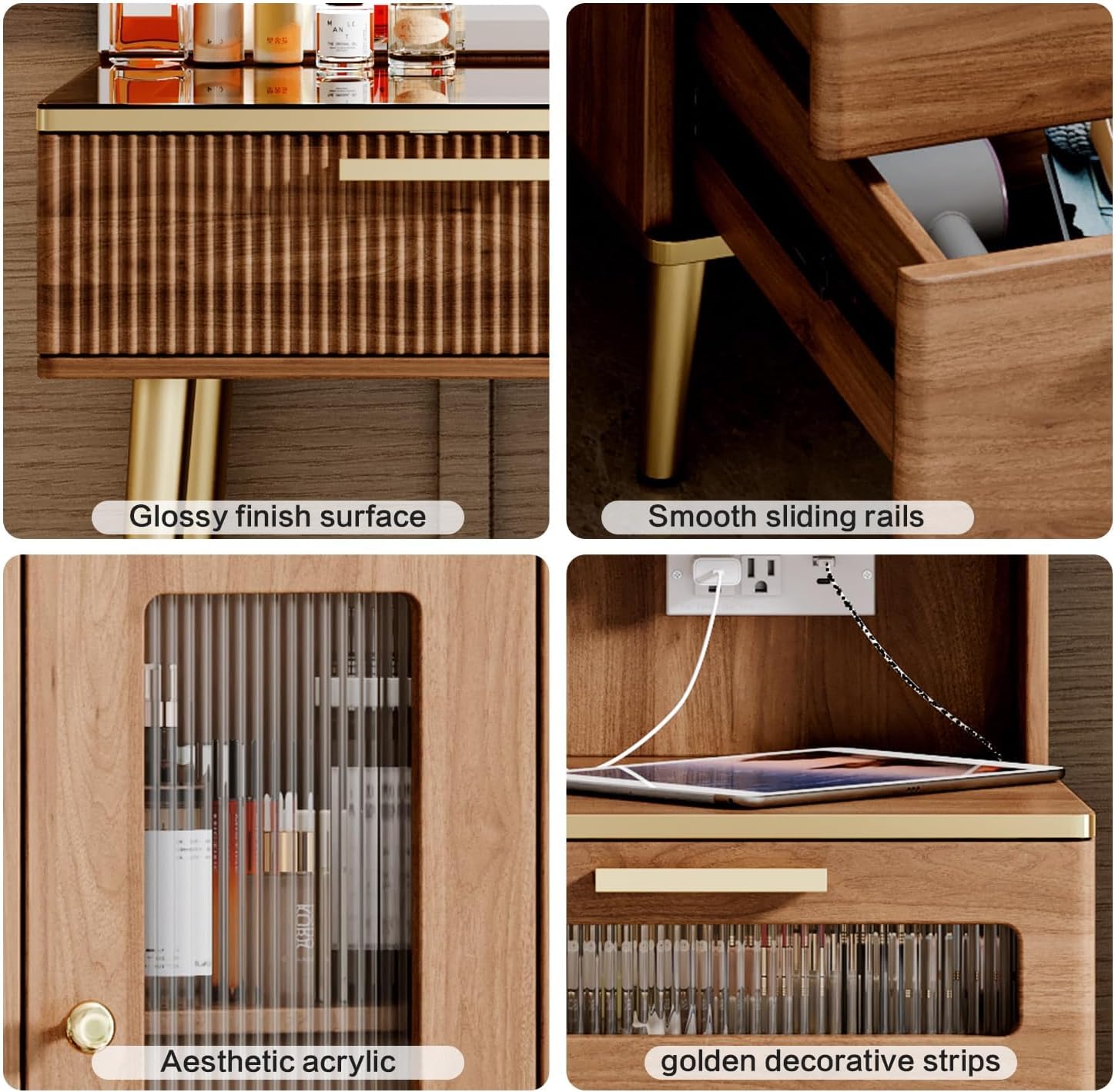
Image 3.2: Detailed view of the vanity's construction, including drawer slides and cabinet door.
Product Video Overview
Video 3.1: A brief overview demonstrating the features and functionality of the Arulvmrn Vanity Desk, including the lighted mirror and storage options.
4. Setup and Assembly
The Arulvmrn Vanity Desk requires self-assembly. A detailed instruction manual is included in the product packaging. Please follow the step-by-step instructions provided to ensure correct and safe assembly.
- Unpack all components and verify against the parts list in the included manual.
- Ensure you have all necessary tools as specified in the assembly guide.
- Assemble on a soft, clean surface to prevent scratches.
- Tighten all fasteners securely, but do not overtighten.
- For any missing parts or assembly difficulties, refer to the "Warranty & Support" section.
5. Operating Instructions
5.1. HD Lighted Mirror Operation
The vanity mirror features dimmable LED lighting with three color modes. The controls are touch-sensitive, located directly on the mirror surface.
- Power On/Off: Touch the power icon on the mirror to turn the lights on or off.
- Adjust Light Color: Short press the "M" icon to cycle through the three light colors: natural light, warm light, and cool light.
- Adjust Brightness: Long press the "P" icon to adjust the brightness level of the selected light color. Release when desired brightness is achieved.
- Power Indicator Light: In the off mode, long press the switch button to turn off the power indicator light.
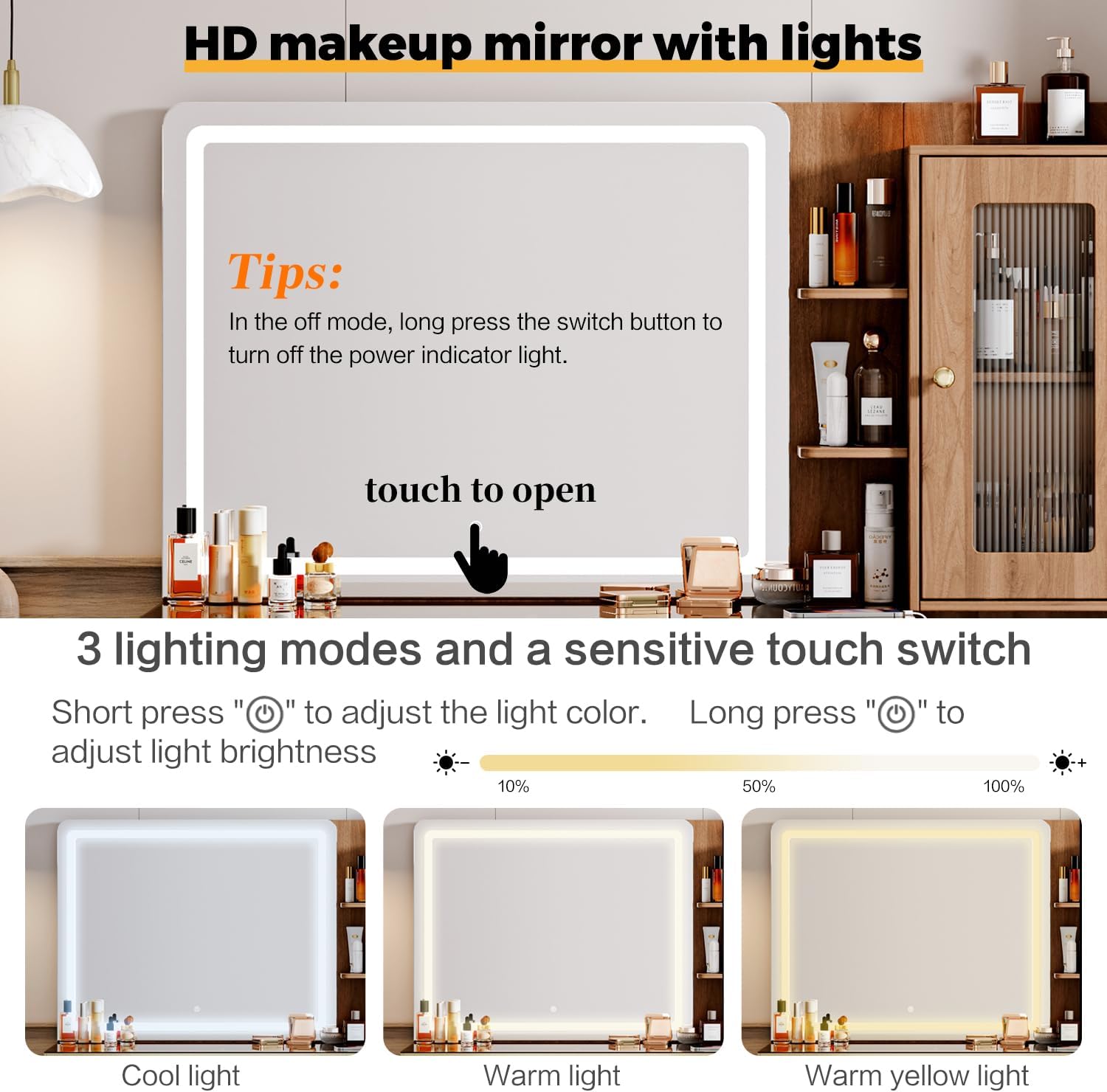
Image 5.1: Illustration of the mirror's touch controls and different lighting modes.
5.2. Charging Station Usage
The integrated charging station provides convenient power access for your electronic devices and styling tools.
- The charging station includes 2 standard AC outlets (125V/12A), 1 USB-A port (5V/2A), and 1 USB-C port (5V/20W).
- Plug the vanity's main power cord into a wall outlet.
- Connect your devices to the appropriate ports on the charging station.
- Ensure devices are compatible with the provided power specifications.

Image 5.2: Close-up of the embedded charging station, showing the AC outlets and USB ports.
6. Maintenance
Proper care will extend the life and appearance of your vanity desk.
- Cleaning: Wipe the surfaces with a damp cloth. Avoid harsh chemicals or abrasive cleaners that may damage the finish.
- Mirror Care: Use a soft, lint-free cloth and a glass cleaner specifically designed for mirrors. Do not spray cleaner directly onto the mirror; apply to the cloth first.
- Electrical Components: Ensure all electrical components remain dry. Do not immerse any part of the vanity in water.
- Drawer Slides: Periodically check and clean the drawer slides to ensure smooth operation.
7. Troubleshooting
If you encounter issues with your vanity desk, refer to the following common solutions:
- Mirror Lights Not Working:
- Ensure the vanity is properly plugged into a functional power outlet.
- Check if the power indicator light is on. If not, long press the switch button to activate it.
- Verify that the touch controls are clean and unobstructed.
- Charging Station Not Providing Power:
- Confirm the vanity's main power cord is securely plugged into a live outlet.
- Test the outlet with another device to ensure it is working.
- Ensure your device's charging cable is fully inserted into the port.
- Drawers Sticking or Not Sliding Smoothly:
- Check for any obstructions in the drawer slides.
- Ensure the vanity is on a level surface. Uneven surfaces can affect drawer alignment.
- Verify that the drawer slides were correctly installed during assembly.
For issues not covered here, please contact customer support as detailed in the "Warranty & Support" section.
8. Specifications
| Feature | Detail |
|---|---|
| Model Number | Vanity |
| Brand | Arulvmrn |
| Product Dimensions | 15.75"D x 47.24"W x 53.35"H |
| Item Weight | 52 pounds |
| Material | Engineered Wood |
| Frame Material | Engineered Wood |
| Color | Brown |
| Mirror Size | 29.53" HD Lighted Mirror |
| Light Modes | 3 (Natural, Warm, Cool) |
| Charging Station | 2 AC Outlets (125V/12A), 1 USB-A (5V/2A), 1 USB-C (5V/20W) |
| Power Cord Length | 6.56 feet |
| Storage | 5 Drawers, 3 Open Shelves, 2-layer Hidden Shelves with Glass Door |
| Assembly Required | Yes (Instructions Included) |
| Product Care | Wipe with Damp Cloth |
| UPC | 199874845425 |

Image 8.1: Detailed product dimensions for the vanity desk and its components.

Image 8.2: Illustration of the thick backboard design, contributing to stability and durability.
9. Warranty and Support
Arulvmrn is committed to providing quality products and excellent customer service. Our products require self-assembly, and clear, concise instructions are provided to facilitate this process. We also offer comprehensive after-sales support for any product-related issues.
- After-Sales Service: If you encounter any problems with your product, please do not hesitate to contact us. We are dedicated to resolving any concerns you may have.
- Returns: This product is eligible for 30-day easy returns. Please refer to your purchase platform's return policy for detailed information.
- Protection Plans: Extended protection plans may be available for purchase. Check your retailer for options such as 2-Year or 3-Year Protection Plans.
For direct assistance, please refer to the contact information provided with your purchase or on the official Arulvmrn website.