
Introduction
This manual provides comprehensive instructions for the setup, operation, and maintenance of your umoven Minimalist Aluminum Wallet. Designed for efficiency and security, this wallet offers a compact solution for carrying your essential cards and cash.
Product Features
- Slim and Lightweight Design: Measuring approximately 3.94 x 2.76 x 0.3 inches and weighing 2.20 ounces, this wallet is designed for minimal bulk, fitting comfortably in front pockets.
- Pop-Up Card Access: A convenient mechanism allows for quick and easy access to your stored cards.
- Secure Locking Clasp: Features a unique locking clasp to secure cards within the wallet, preventing accidental ejection.
- Integrated ID Window: A dedicated transparent slot on the front allows for easy display of your driver's license or ID card.
- RFID Blocking Protection: Equipped with NFC/RFID blocking technology to safeguard your debit and credit card information from unauthorized scanning.
- Versatile Card Capacity: Holds up to 10 flat cards (9 in the main compartment, 1 in the external slot) or 7 embossed cards (6 in the main compartment, 1 in the external slot).
- Detachable Money Clip: A stainless steel money clip is included for securing cash.
Setup Instructions
- Inserting Cards:
Gently slide your cards into the main compartment. The wallet is designed to hold up to 9 flat cards or 6 embossed cards. An additional flat card can be placed in the external slot on the front.
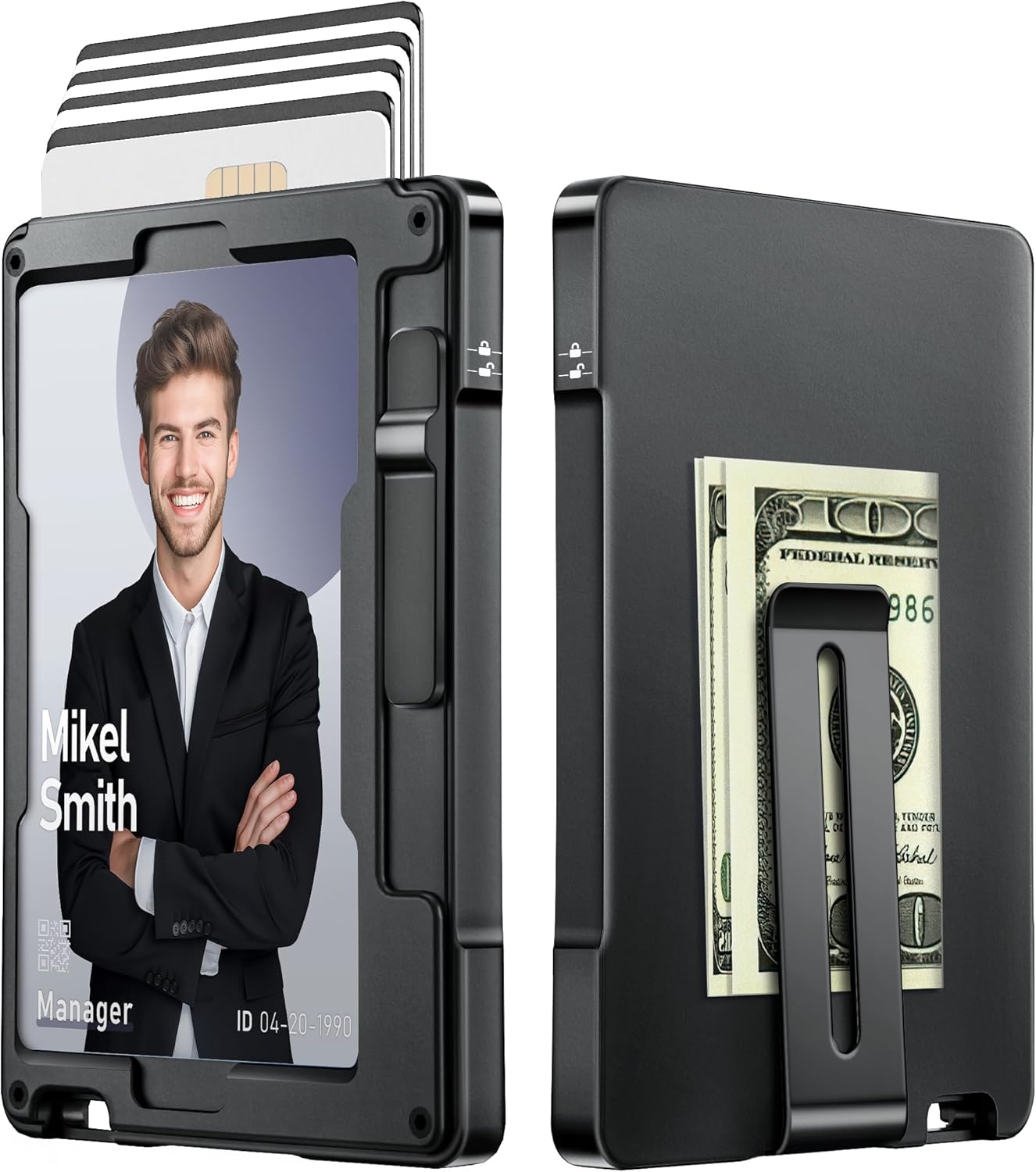
Image: Front and back view of the umoven Minimalist Wallet, showing cards partially ejected from the top and a money clip with cash on the back.
- Attaching the Money Clip (Optional):
The money clip is detachable. If not already attached, use the provided small screwdriver and screws to secure the money clip to the designated area on the back of the wallet. Ensure screws are tightened securely.

Image: A close-up view of the wallet's money clip, holding folded currency.
Operating Instructions
- Ejecting Cards:
To access your cards, locate the slide mechanism on the side of the wallet. Press down on this mechanism. Your cards will pop up, allowing you to easily select the desired card.

Image: A hand holding the umoven Minimalist Wallet, demonstrating the pop-up card access and the locking mechanism on the side.
- Locking Cards:
After inserting cards, ensure they are securely locked. Push the side buckle upward until you hear a 'da' sound. This engages the locking clasp, preventing cards from accidentally sliding out. To unlock, press the buckle down until you hear a 'click'.

Image: A visual comparison highlighting the wallet's locking buckle feature, showing how it secures cards.
- Using the ID Window:
Place your primary ID or driver's license in the transparent slot on the front of the wallet for quick visibility without needing to remove it.

Image: A person holding the umoven Minimalist Wallet, showcasing the transparent ID window with a driver's license visible.
RFID Blocking Information
Your umoven Minimalist Aluminum Wallet incorporates advanced RFID (Radio-Frequency Identification) blocking technology. This feature is designed to protect your credit cards, debit cards, and other RFID-enabled cards from unauthorized scanning and electronic theft, ensuring your personal information remains secure.

Image: An illustration depicting the wallet in a pocket, with a scanner being blocked from reading its contents, symbolizing RFID protection.
Maintenance
- Cleaning: Wipe the wallet with a soft, damp cloth to remove dirt or smudges. Avoid harsh chemicals or abrasive materials.
- Storage: Store the wallet in a dry place away from extreme temperatures or direct sunlight to preserve its material integrity.
- Avoid Overfilling: While durable, avoid exceeding the recommended card capacity to prevent strain on the mechanism and material.
Troubleshooting
- Cards not ejecting smoothly: Ensure the wallet is not overfilled. Remove a card or two and try again. Check for any debris obstructing the mechanism.
- Cards feeling loose: Verify that the locking clasp is engaged by pushing it upward until it clicks. If using fewer cards than capacity, the fit might naturally be slightly looser, but the lock should still secure them.
Specifications
| Attribute | Detail |
|---|---|
| Model Number | KB031 |
| Dimensions (L x W x H) | 3.94 x 2.76 x 0.3 inches |
| Item Weight | 2.2 ounces |
| Material | Aluminum |
| Color | Black |
| Card Capacity | Up to 10 flat cards (9 internal, 1 external) or 7 embossed cards (6 internal, 1 external) |
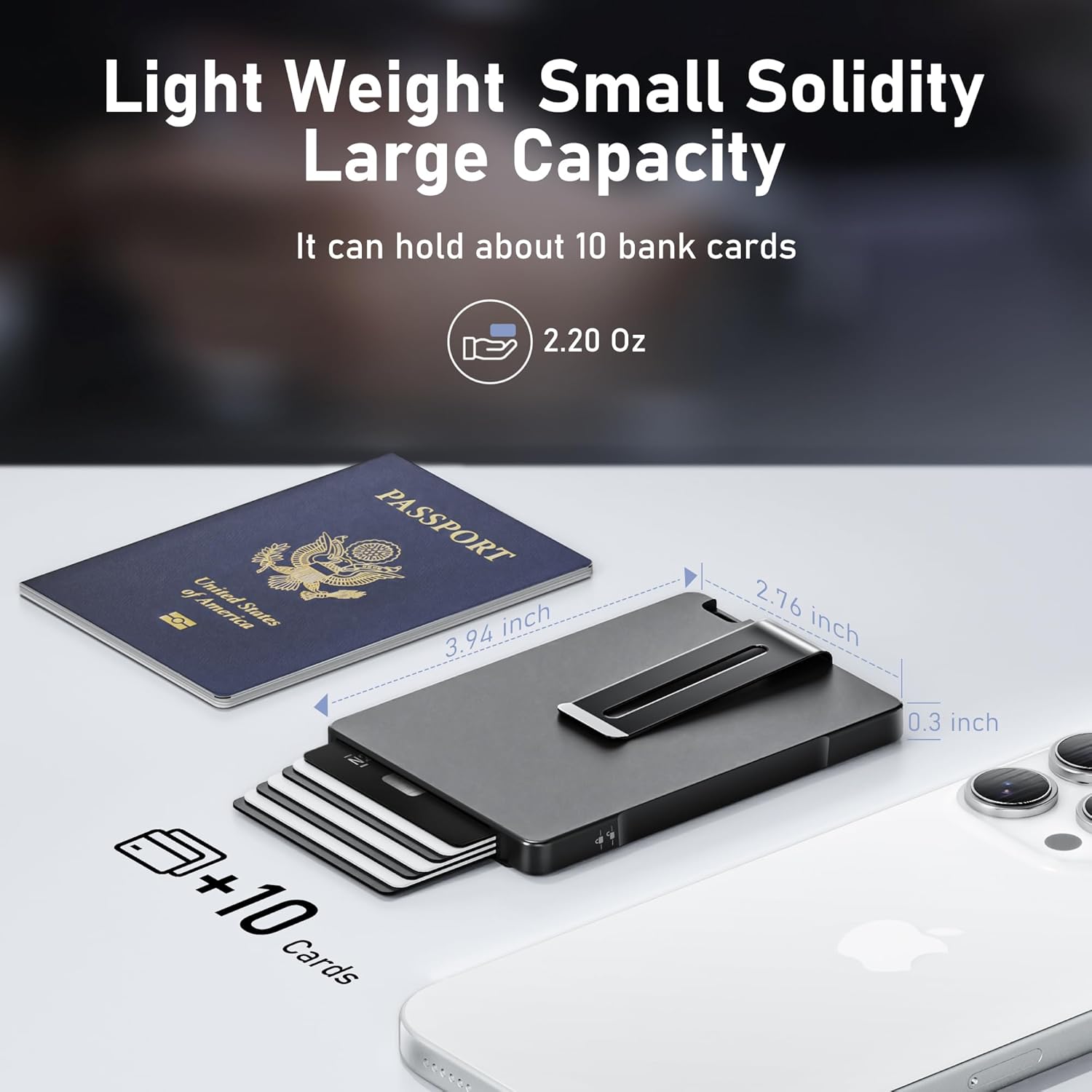
Image: The umoven Minimalist Wallet displayed with its dimensions and card capacity, alongside a passport and smartphone for scale.
Official Product Videos
umoven Wallet for Men Overview
Video: A detailed overview of the umoven Minimalist Wallet for Men, demonstrating its features, design, and functionality.
umoven Minimalist Wallet for Men Demonstration
Video: A demonstration of the umoven Minimalist Wallet, showcasing how to insert and eject cards, use the money clip, and engage the locking mechanism.
Warranty and Support
Your umoven Minimalist Aluminum Wallet comes with a Lifetime Warranty, ensuring long-term reliability and customer satisfaction.
For any questions, support, or warranty claims, please contact umoven customer service at: umoven@yeah.com