
Introduction
The LASELION MS03 Moisture Meter is a versatile, non-destructive device designed for accurately measuring moisture content in various materials. It features both pin and pinless measurement modes, a large LCD display, and four material-specific modes to ensure precise readings for wood, building materials, and more. This manual provides essential information for the proper setup, operation, maintenance, and troubleshooting of your MS03 moisture meter.
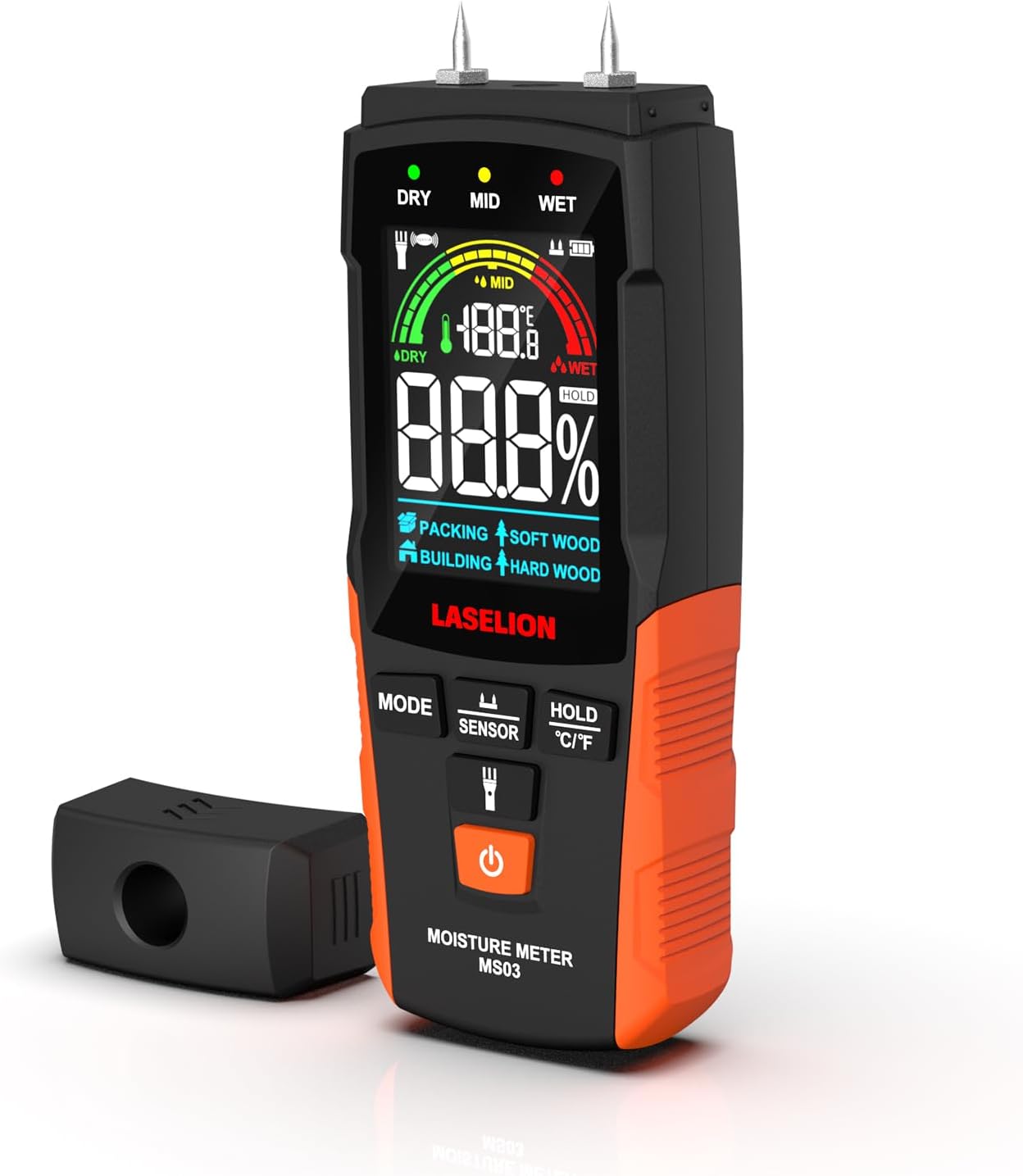
Image: The LASELION MS03 Moisture Meter, showing its front display and pin probes. This device is designed for accurate moisture detection.
Package Contents
Before proceeding with setup, please verify that all items are present in your package:
- LASELION MS03 Moisture Meter
- User Manual
- AAA Batteries (3 included)
- Replacement Pins (2)
- Mini Wrench for pin replacement
- Storage Pouch

Image: Contents of the LASELION MS03 package, including the meter, user manual, batteries, replacement pins, mini wrench, and storage pouch.
Setup
1. Battery Installation
- Locate the battery compartment on the back of the device.
- Open the battery compartment cover.
- Insert three AAA alkaline batteries, ensuring correct polarity (+/-).
- Close the battery compartment cover securely.
2. Pin Installation (for Pin Mode)
The moisture meter comes with pre-installed pins. If replacement is needed:
- Use the provided mini wrench to carefully unscrew the existing pins.
- Insert the new replacement pins and tighten them with the mini wrench.
- Ensure pins are securely fastened before use.

Image: The LASELION MS03 moisture meter with its replaceable pins and the mini wrench used for installation and removal.
Operating Instructions
Device Overview

Image: A detailed diagram of the LASELION MS03 moisture meter, labeling its various components such as measurement pins, LCD display, control buttons (MODE, SENSOR, HOLD, Power), flashlight, pinless sensor area, and battery compartment.
- Power On/Off Button: Press to turn the device on or off.
- MODE Button: Cycles through material modes (Soft Wood, Hard Wood, Building, Packing).
- SENSOR Button: Toggles between Pin Measurement Mode and Pinless Measurement Mode.
- HOLD / °C/°F Button: Press to hold the current reading. Long press to switch temperature units between Celsius and Fahrenheit.
- Flashlight On/Off Button: Activates or deactivates the built-in flashlight.
Measurement Modes
The MS03 offers two primary measurement methods:
- Pin Mode: Provides accurate and deep detection by inserting the pins into the material. Ideal for thicker materials like lumber and wood panels.
- Pinless Mode: Offers fast and non-damaging measurement by placing the sensor area against the surface. Suitable for delicate surfaces such as furniture and antique wood.

Image: The LASELION MS03 moisture meter demonstrating both Pin Mode (left, inserted into wood logs) for accurate, deep detection, and Pinless Mode (right, against a wall) for fast, non-damaging surface detection.
Material Selection
Press the MODE button to select the appropriate material setting for your measurement:
- Soft Wood: For materials like Lauan, Fir, Pine, Cork, Cedar, Beech.
- Hard Wood: For materials like Teak, Walnut, Afromosia, Rubber Tree, Imbuia, Kokrodua, Niove, Bilinga, Keruing, White Poplar, Tola, Ash, Elm, Maple, Padauk, Oak, Cherry, Birch, Larch.
- Building Mode: For materials such as lime wall, soil wall, cement wall, roof, brick wall, stone wall, floor, gypsum board, drywall, putty walls.
- Packing Mode: For materials like cardboard, carton paper, coated paperboard, corrugated cardboard.

Image: The LASELION MS03 moisture meter displaying its four testing modes: Soft Wood, Hard Wood, Building Mode, and Packing Mode, with examples of materials for each category.
Taking a Measurement
- Turn on the device using the Power On/Off button.
- Select the desired measurement mode (Pin or Pinless) using the SENSOR button.
- Select the appropriate material type using the MODE button.
- For Pin Mode: Carefully insert the pins into the material.
- For Pinless Mode: Place the back of the device (sensor area) flat against the material surface.
- Read the moisture content percentage and temperature on the LCD display.
Hold Function
Press the HOLD button to freeze the current measurement on the screen. This allows for easier recording and analysis of readings, especially in difficult-to-view positions. Press HOLD again to release the reading.

Image: The LASELION MS03 moisture meter displaying the 'HOLD' function active, freezing the measurement on the screen for convenient reading.
Temperature Unit Switching
The device displays ambient temperature. To switch between Celsius (°C) and Fahrenheit (°F), long press the HOLD / °C/°F button.

Image: The LASELION MS03 moisture meter showing how to switch between Celsius and Fahrenheit temperature units by long-pressing the HOLD button.
Built-in Flashlight
Press the dedicated flashlight button to illuminate dark areas, enhancing visibility during measurements in low-light conditions.

Image: The LASELION MS03 moisture meter with its built-in flashlight activated, illuminating a piece of wood in a dark environment.
Automatic Power Off
To conserve battery life, the device will automatically power off after 2 minutes of inactivity.

Image: A clock showing 2 minutes, next to the LASELION MS03 moisture meter, illustrating its automatic power-off feature after 2 minutes of inactivity.
Maintenance
- Cleaning: Regularly clean the measurement pins and the pinless sensing area with a dry, soft cloth. Avoid using abrasive cleaners or solvents.
- Pin Replacement: If the measurement pins become dull or damaged, replace them using the provided mini wrench and spare pins as described in the Setup section.
- Battery Replacement: Replace batteries when the low battery indicator appears on the display to ensure accurate readings and proper device function.
- Storage: Store the device in a cool, dry place, away from direct sunlight and extreme temperatures. If storing for extended periods, remove the batteries.
Troubleshooting
Q: Why do readings differ between Pin Mode and Pinless Mode on the same material?
A: The difference arises from the distinct measurement methods:
- Pin Mode: Measures moisture content directly at the depth where the pins are inserted, providing a localized reading.
- Pinless Mode: Uses a sensor to detect moisture within a broader area, including surface and subsurface levels.
Factors influencing the difference include:
- Material Thickness: Pinless Mode requires a minimum thickness of 20mm for accurate readings.
- Surface Moisture: Pin Mode may bypass surface water, while Pinless Mode includes it in the measurement.
- Non-uniform Moisture Distribution: Pin Mode reflects localized moisture, whereas Pinless Mode provides an averaged result. For precise measurements, choose the mode that best suits your testing needs based on material type and moisture distribution.

Image: An explanation of why moisture readings may differ between Pin Mode and Pinless Mode on the same material, detailing their distinct measurement approaches and influencing factors.
Q: Why does my MS03 moisture meter show a 0 reading when I insert the probes into the material under pin mode?
A: If you're seeing a "0" reading when using the pin mode, it's likely because the sharpest part of the probe is not fully inserted into the material. For accurate readings, make sure the sharpest part of the probe is completely inserted. Shallow insertion may not allow the probe to make proper contact with the material, resulting in an inaccurate or "0" reading. Ensure that the probe is inserted deeply enough so the sharp tip penetrates fully into the material for an accurate moisture measurement.

Image: An explanation for why the LASELION MS03 might show a zero reading in Pin Mode, emphasizing the need for full probe insertion into the material.
Q: How do I ensure the accuracy of my measurements?
A: Regularly clean the measurement pins and the sensing area. Avoid measuring on uneven or thin materials, as this may lead to inaccurate results. For thin materials, stack additional layers to improve measurement accuracy or use Pin Mode for more precise results.

Image: Tips for ensuring accurate measurements with the LASELION MS03, including cleaning and proper material preparation.
Q: Why does the reading fluctuate during measurement?
A: Fluctuations may occur due to:
- Interference from nearby conductive materials (e.g., wires, metal bars).
- Insufficient contact between the device and the surface.
- The presence of your hand or body near the sensing area during pinless mode measurements, which can affect the electromagnetic field.
To minimize fluctuations, ensure proper calibration, press the sensor flat against the material, and keep your hand or body away from the sensing area for accurate readings.

Image: An explanation of why moisture readings might fluctuate with the LASELION MS03, listing potential causes like interference and improper contact, and offering solutions.
Q: How can I verify the accuracy of my measurement results?
A: To verify the accuracy of your measurement results, you can start by taking multiple measurements at the same location and ensuring the readings are consistent each time. If the results are similar, this usually indicates accurate measurements. Additionally, you can test the meter on standard materials with known moisture content to validate its performance. If the moisture meter provides accurate readings under known conditions, it suggests that it is functioning properly. It's also helpful to crosscheck measurements at different locations and on various materials to ensure consistency and reliability of the readings. This approach will give you more confidence in the accuracy of your moisture meter.

Image: Advice on how to verify the accuracy of measurements taken with the LASELION MS03, suggesting consistent multiple readings and testing on known materials.
Q: What is the difference between relative readings and absolute readings?
A: Relative Readings: Relative readings indicate the moisture level in relation to the surrounding environment or material. They are typically expressed in terms of a scale or index, which doesn't directly translate to a percentage of moisture content. The unit for relative readings can vary depending on the device, but they are often shown as a number or percentage of the material's moisture compared to the surrounding area. This type of reading is useful for detecting moisture presence but doesn't provide exact moisture content.
Absolute Readings: Absolute readings provide the precise moisture content of a material, typically expressed as a percentage (%) of moisture in the material. This measurement is used for detailed analysis and is necessary for assessing material conditions, such as determining whether it is too wet or dry for specific purposes. The unit for absolute readings is typically percentage moisture content (%).
Our MS03 moisture meter uses absolute readings for most modes, providing accurate moisture content measurements in percentage form for reliable analysis, except in the building mode, where it uses relative readings to assess moisture presence.

Image: An explanation differentiating between relative and absolute moisture readings, clarifying their applications and how the LASELION MS03 utilizes them.
Specifications
| Model Number | MS03 |
| Measurement Modes | Pin and Pinless |
| Material Modes | Soft Wood, Hard Wood, Building, Packing |
| Wood Moisture Range | 0-75% |
| Building Material Moisture Range | 0-25% |
| Accuracy | ±4%RH |
| Power Source | 3 x AAA Alkaline Batteries |
| Automatic Power Off | After 2 minutes of inactivity |
| Product Dimensions | 5 x 3 x 10 cm |
| Item Weight | 210 g |
| Manufacturer | Shenzhen Baisitu Technology Co., Ltd. |
| Country of Origin | China |
Warranty and Support
For specific warranty information, please refer to the documentation included with your product at the time of purchase or contact LASELION customer support directly. Warranty terms and conditions may vary by region and retailer.
If you encounter any issues or have questions regarding your LASELION MS03 Moisture Meter, please contact LASELION customer support through their official website or the contact information provided in your product packaging.