
1. Introduction
This manual provides essential information for the safe and efficient operation of your QIWO 110V-1000W 3000RPM Brushless DC (BLDC) Motor and its accompanying driver. Please read this manual thoroughly before installation and operation to ensure proper usage and to prevent damage to the equipment or injury to personnel.
2. Safety Information
WARNING: Failure to follow these safety instructions may result in electric shock, fire, or serious injury.
- Ensure all power connections are made by a qualified electrician and comply with local electrical codes.
- Always disconnect power before performing any installation, maintenance, or troubleshooting.
- The motor and driver can generate heat during operation. Avoid touching them directly without proper insulation or allowing them to come into contact with flammable materials.
- Protect the motor from foreign matter such as water, liquids, or metal particles. Ingress of such materials can cause severe damage to the motor, especially for semi-open type motors (e.g., 1000W 12000 RPM models).
- For specific motor variants, such as the 1000W 12000 RPM model operating in Hall-free mode, ensure the motor is started under a light load to prevent damage.
- Do not operate the motor or driver if any part is damaged.
3. Product Overview
The QIWO Brushless Motor system includes a high-torque BLDC motor and a dedicated driver for precise control. This package typically contains:
- 1 x QIWO Brushless Motor
- 1 x BLDC Motor Driver
The motor features an 80mm square flange and a 14mm output shaft, designed for various industrial and scientific applications requiring high speed and low noise.
4. Specifications
Motor Parameters (Model: 110V-1000W 3000RPM)
- Rated Power: 1000W
- Input Voltage: 110-130VDC
- Rated Speed: 3000 RPM
- Holding Torque: 3.18 N.m
- Flange: 80mm
- Output Shaft Diameter: 14mm
- Number of Poles: 6
- Motor Length: 165mm
- Material: Aluminum
- Item Weight: Approximately 5.2 kg (11.44 lbs)
General Motor and Driver Specifications
| Parameter | Unit | Value |
|---|---|---|
| Brand | - | QIWO |
| Model Name | - | QW80BL007-1000 |
| Voltage (Driver Input) | Volts | 220 (AC) |
| Horsepower | Watts | 1000 |
| Material | - | Aluminum |
| Manufacturer | - | QIWO |
Motor Parameter Tables (Various Models)
The following tables provide detailed specifications for various QIWO brushless motor models, including rated power, speed, torque, and physical dimensions. Please refer to these tables for specific model characteristics.

Detailed specifications for various QIWO motor models, including rated power, speed, torque, and physical dimensions.
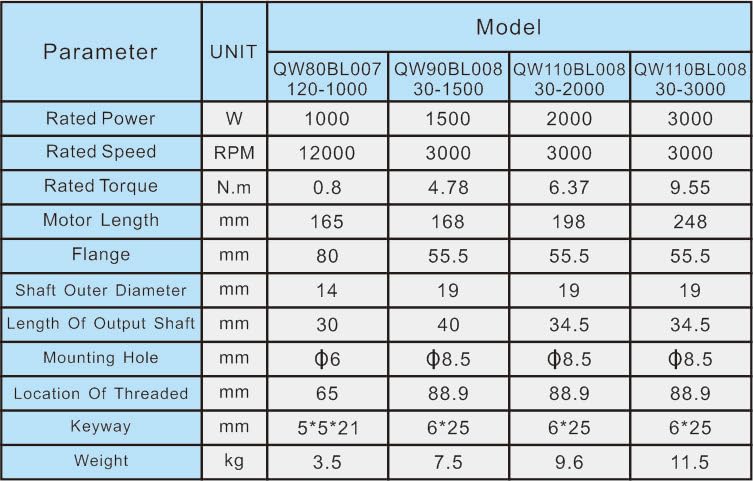
Further motor specifications including rated power, speed, torque, and physical dimensions for a broader range of QIWO motor models.
5. Setup
5.1 Mechanical Installation
Mount the motor securely using appropriate fasteners. Ensure proper alignment with the driven load to prevent excessive vibration or wear. Refer to the dimension diagrams for mounting hole patterns and overall motor size.

Detailed technical drawing showing the motor's length (165mm), flange diameter (80mm), shaft diameter (14mm), and mounting hole specifications.
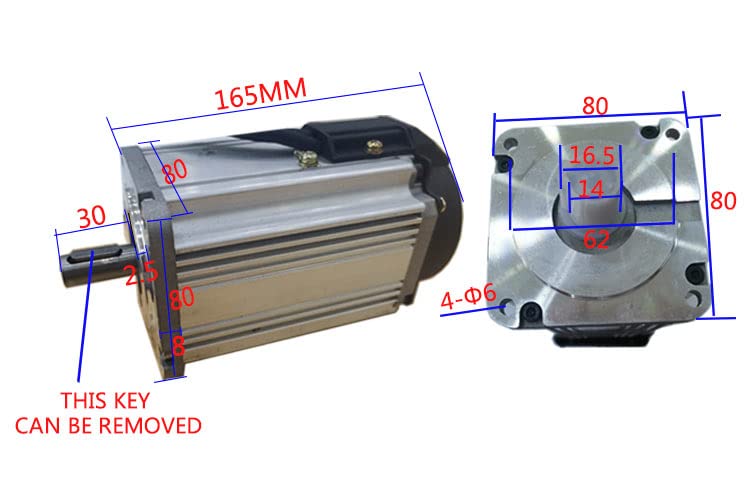
An angled view of the motor highlighting the 165mm length, 80mm square flange, and the removable keyway on the 14mm output shaft.
The motor driver should also be mounted in a stable location, away from excessive heat, moisture, and vibration. Ensure adequate ventilation around the driver.

Measurements for the motor driver unit, including its length (200mm), width (130mm), and mounting hole positions.
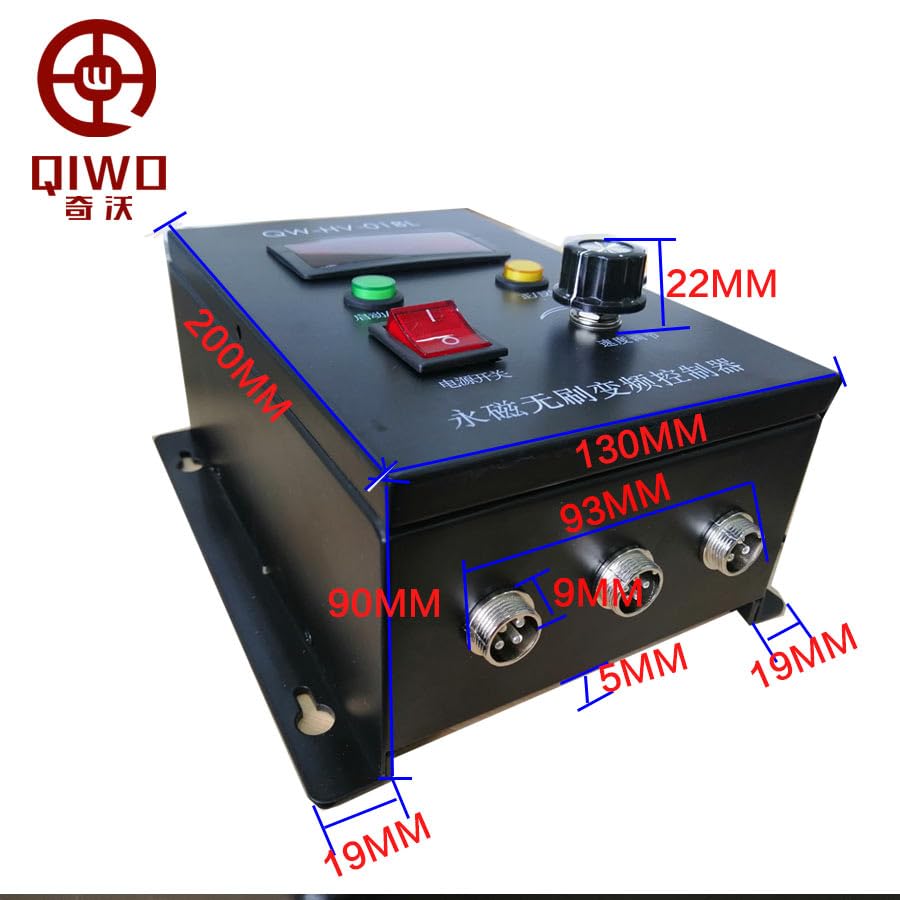
An overview of the motor driver unit, displaying its dimensions and the QIWO brand logo, providing context for mounting.
5.2 Electrical Connections
Connect the motor and power supply to the driver as shown in the diagram below. Ensure all connections are secure and correctly polarized.
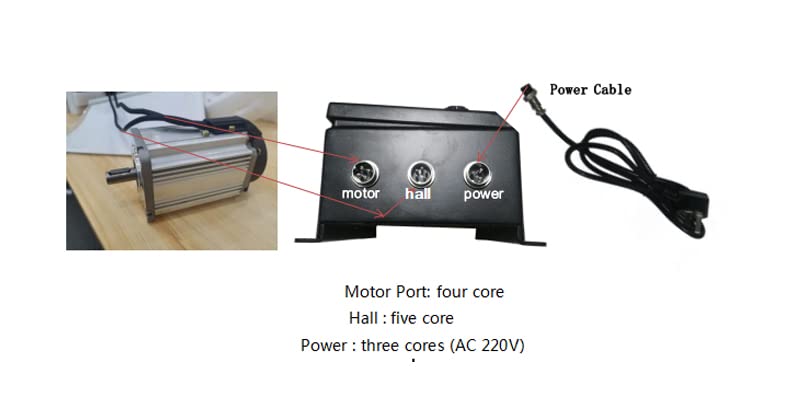
Illustration of the motor driver's connection ports: Motor Port (four core), Hall Port (five core), and Power Port (three core, AC 220V). Ensure correct wiring for your specific voltage (110V or 220V).
- Motor Port: Connect the motor cable (four core) to this port.
- Hall Port: Connect the Hall sensor cable (five core) from the motor to this port.
- Power Port: Connect the AC power cable (three core) to this port. Ensure the input voltage matches your motor driver's rating (e.g., AC 220V or AC 110V).
6. Operating Instructions
The motor driver provides intuitive controls for motor operation. Familiarize yourself with the control panel components:

Front view of the motor driver showing the five-digit speed display, Run/Stop button, FWD/REV switch, and speed regulator knob.
- Power Switch: Toggles the main power to the driver.
- Run/Stop Button: Initiates or halts motor rotation.
- FWD/REV Switch: Selects the direction of motor rotation (Forward/Reverse).
- Speed Regulator Knob: Adjusts the motor's rotational speed. Turn clockwise to increase speed, counter-clockwise to decrease.
- Five-digit Display: Shows the current operating speed of the motor.
Starting the Motor:
- Ensure all electrical connections are correct and secure.
- Turn on the main Power Switch.
- Set the FWD/REV switch to the desired direction.
- Press the Run/Stop button to start the motor.
- Adjust the Speed Regulator knob to achieve the desired RPM.
Stopping the Motor:
- Press the Run/Stop button to halt motor rotation.
- Turn off the main Power Switch when operation is complete.
7. Maintenance
Regular maintenance ensures the longevity and optimal performance of your QIWO brushless motor and driver.
- Cleaning: Keep the motor and driver free from dust, dirt, and debris. Use a soft, dry cloth for cleaning. Do not use solvents or abrasive cleaners.
- Inspection: Periodically inspect all electrical connections for tightness and signs of wear or damage. Check the motor for any unusual noises or vibrations during operation.
- Ventilation: Ensure that the motor and driver have adequate airflow to prevent overheating. Clear any obstructions from ventilation openings.
- Environmental Protection: Protect the unit from moisture, corrosive environments, and extreme temperatures.
Brushless motors generally require less maintenance than brushed motors due to the absence of brushes and commutators, but regular checks are still recommended.
8. Troubleshooting
If you encounter issues with your QIWO brushless motor system, refer to the following common troubleshooting steps:
| Problem | Possible Cause | Solution |
|---|---|---|
| Motor does not start | No power supply Incorrect wiring Run/Stop button not pressed | Check power connections and source Verify motor, Hall, and power wiring Press the Run/Stop button |
| Motor runs erratically or vibrates excessively | Loose connections Motor or load imbalance Damaged Hall sensors | Check all electrical and mechanical connections Inspect motor and load for balance Contact support if Hall sensors are suspected |
| Motor overheats | Overload Insufficient ventilation High ambient temperature | Reduce load on the motor Ensure clear airflow around motor and driver Operate within specified temperature ranges |
| Speed cannot be adjusted | Speed regulator knob malfunction Driver fault | Check the knob for physical damage Contact support for driver inspection |
If the problem persists after attempting these solutions, please contact QIWO customer support for further assistance.
9. Warranty and Support
QIWO products are manufactured to high-quality standards. For information regarding warranty coverage, terms, and conditions, please refer to the documentation provided at the time of purchase or contact your vendor. For technical support, inquiries, or service, please reach out to QIWO customer service through the official channels provided by your retailer or on the QIWO website.