
1. Product Overview
The SKMEI Sports Watch Model 2223AG is a versatile timepiece designed for active individuals. It features an analog-digital display, offering both traditional timekeeping and advanced digital functions. Key features include a 3-time display, chronograph, countdown timer, and an EL backlight for visibility in low light conditions. The watch is also water-resistant up to 50 meters.

Image 1.1: Front view of the SKMEI Sports Watch 2223AG, highlighting its analog-digital display and various functions.
2. Initial Setup
2.1 Button Functions
- LIGHT Button (Top Left): Activates the EL backlight.
- MODE Button (Bottom Left): Cycles through different modes (Time, Alarm, Chronograph, Countdown Timer, Second Time Zone).
- START Button (Top Right): Starts/stops the chronograph, adjusts settings in setting mode.
- RESET Button (Bottom Right): Resets the chronograph, cycles through setting options.
2.2 Setting Time and Date
- In Timekeeping Mode, press the MODE button until the digital time display starts flashing, indicating setting mode.
- Press the RESET button to cycle through the settings: seconds, hour, minute, month, date, day of the week.
- Use the START button to adjust the flashing value.
- Once all settings are correct, press the MODE button to exit setting mode.
- To set the analog hands, pull out the crown (middle right button) and rotate it to adjust the hands. Push the crown back in to finalize.
2.3 Setting 12/24 Hour Format
In Timekeeping Mode, with the digital time displayed, press the START button to toggle between 12-hour (A/P indicator) and 24-hour formats.
3. Operating Instructions
3.1 Using the EL Backlight
Press the LIGHT button (top left) to illuminate the digital display for a few seconds. This feature enhances visibility in dark environments.
3.2 Chronograph (Stopwatch) Function
- Press the MODE button repeatedly until 'CHRONO' or 'STW' appears on the digital display.
- Press the START button to begin timing.
- Press the START button again to pause timing.
- Press the RESET button to reset the chronograph to zero.
- To resume timing after pausing, press START.
3.3 Alarm Function
- Press the MODE button repeatedly until 'ALARM' or 'AL' appears on the digital display.
- Press the RESET button to select the hour or minute to set. The selected value will flash.
- Use the START button to adjust the flashing value.
- Press the MODE button to confirm and exit alarm setting.
- To turn the alarm ON/OFF, in Alarm Mode, press the START button. An alarm icon will appear/disappear.
3.4 Countdown Timer Function
- Press the MODE button repeatedly until 'TIMER' or 'TMR' appears on the digital display.
- Press the RESET button to select the hour or minute to set. The selected value will flash.
- Use the START button to adjust the flashing value.
- Press the MODE button to confirm and exit timer setting.
- To start the countdown, press the START button. Press START again to pause. Press RESET to reset.
3.5 3-Time Display (Dual Time / World Time)
This watch supports displaying up to three different time zones. In Timekeeping Mode, you can cycle through the different time displays by pressing the START button after setting the primary time. To set additional time zones, navigate to the 'Dual Time' or 'World Time' mode (if available, typically accessed via the MODE button) and follow similar setting procedures as the main time.

Image 3.1: Detailed view of the watch face, illustrating the analog and digital time displays, and various indicators.
4. Maintenance
4.1 Water Resistance (50m)
The SKMEI 2223AG watch is water-resistant up to 50 meters (5 ATM). This means it is suitable for daily use, showering, and shallow swimming. Do not press any buttons while the watch is submerged in water. Avoid exposing the watch to hot water or steam, as this can compromise the water seals.
4.2 General Care
- Clean the watch regularly with a soft, dry cloth. For stubborn dirt, use a slightly damp cloth and mild soap, then wipe dry.
- Avoid exposing the watch to extreme temperatures, direct sunlight for prolonged periods, or strong magnetic fields.
- The watch uses a C battery. When the display dims or functions become erratic, it may be time for a battery replacement. It is recommended to have battery replacement performed by a qualified technician to ensure water resistance is maintained.
- Avoid contact with chemicals such as solvents, detergents, perfumes, and cosmetics, as they may damage the watch case, band, or seals.

Image 4.1: Rear view of the watch, displaying the stainless steel case back and water resistance information.
5. Troubleshooting
| Problem | Possible Cause | Solution |
|---|---|---|
| Digital display is blank or dim. | Low battery. | Replace the battery. |
| Analog hands are not moving. | Crown is pulled out; low battery. | Push the crown back in; replace the battery. |
| Buttons are unresponsive. | Watch may be in a locked mode or internal malfunction. | Try resetting the watch (if a reset button is available, or remove/reinsert battery). If issue persists, contact support. |
| Water condensation inside the watch. | Exposure to extreme temperature changes or compromised water seals. | Avoid extreme temperature changes. If condensation persists, seek professional service immediately to prevent damage. |
6. Specifications
| Feature | Detail |
|---|---|
| Model Number | 2223AG |
| Display Type | Analog-Digital |
| Movement Type | Quartz |
| Water Resistance Depth | 50 Metres (5 ATM) |
| Case Material | ABS, Zinc Alloy |
| Band Material | Thermoplastic Polyurethane (TPU) |
| Crystal Material | Resin |
| Case Diameter | 5 Centimetres |
| Case Thickness | 1.65 Centimetres |
| Band Width | 2.55 Centimetres |
| Band Length | 255 Millimetres |
| Item Weight | 67.1 Grams |
| Battery Type | 1 C battery (included) |
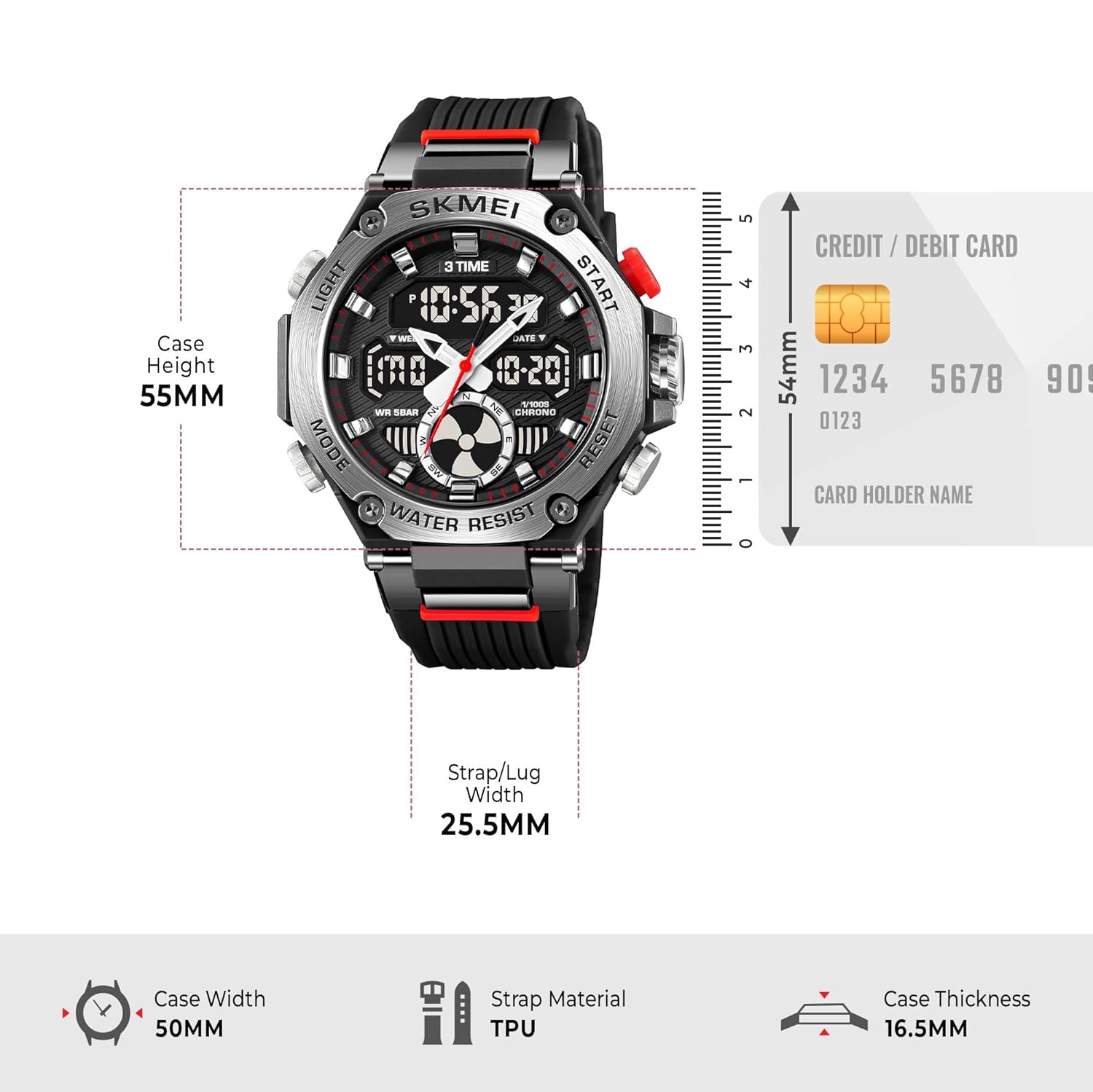
Image 6.1: Dimensional diagram of the watch, detailing case width, strap width, and case thickness.
7. Warranty and Support
7.1 Warranty Information
This SKMEI watch comes with a 9-month Manufacturer Warranty from the date of purchase. This warranty covers manufacturing defects under normal use. Please retain your proof of purchase for warranty claims.
7.2 Customer Support
For any service-related inquiries, feedback, or warranty claims, please contact the SKMEI India Helpline:
- Helpline Number: 1800-889-6251
- Operating Hours: Monday to Saturday, 9:00 AM to 6:00 PM (IST)