
MAYILON MY2600C
MAYILON MY2600C 600A AC Clamp Meter Instruction Manual
Model: MY2600C | Brand: MAYILON
1. Introduction
This instruction manual provides detailed information on the safe and effective use of the MAYILON MY2600C 600A AC Clamp Meter. This True RMS digital multimeter is designed for precise measurements in various electrical applications, including automotive, home, and industrial electrical troubleshooting. Please read this manual thoroughly before operation and retain it for future reference.
2. Safety Information
WARNING: To avoid electric shock or personal injury, please read and understand all safety information before using this product.
- Always adhere to local and national safety codes.
- Do not use the meter if it appears damaged or if the insulation on the test leads is compromised.
- Ensure the function switch is in the correct position for the measurement being performed.
- Do not exceed the maximum input values for any function. This meter is certified to IEC 61010-1, CAT III 600V safety standard.
- Use caution when working with voltages above 30V AC RMS, 42V peak, or 60V DC. These voltages pose a shock hazard.
- Always disconnect power to the circuit before making resistance, continuity, or capacitance measurements.
- The Non-Contact Voltage (NCV) function is a safety feature but should not be used as the sole method to determine the presence of voltage. Always verify with direct contact measurements.
3. Package Contents
Upon opening the package, please verify that all items listed below are present and undamaged:
- MAYILON MY2600C Clamp Meter
- Test Leads (1 pair)
- K-Type Thermocouple Temperature Probe
- AAA Batteries (2 included)
- Instruction Manual (this document)
- Carrying Pouch

Image: Contents of the MAYILON MY2600C Clamp Meter package, including the meter, test leads, temperature probe, batteries, and carrying pouch.
4. Product Features
- Accurate Measurements: True RMS Digital clamp meter offers precise measurements of 4V~600V AC/DC voltage, 1A~600A AC current, capacitance, resistance, temperature, diode, continuity, and NCV.
- NCV Function: Non-contact voltage detection for checking insulated wires and socket boxes without direct contact.
- Safe and Reliable: Certified to IEC 61010-1, CAT III 600V safety standard, and FCC certification. Features stable and reliable capacitance detection.
- Temperature Measurement: K-Type Thermocouple for measuring temperatures from -40°F to 1832°F (-40°C to 1000°C).
- Enhanced Visibility: Built-in digital flashlight and LCD backlight for working in dimly lit areas.
- Ergonomic Design: Compact size, full-range overload protection circuit, low battery indicator, and intelligent IC double integral A/D converter for comfortable and easy handling.
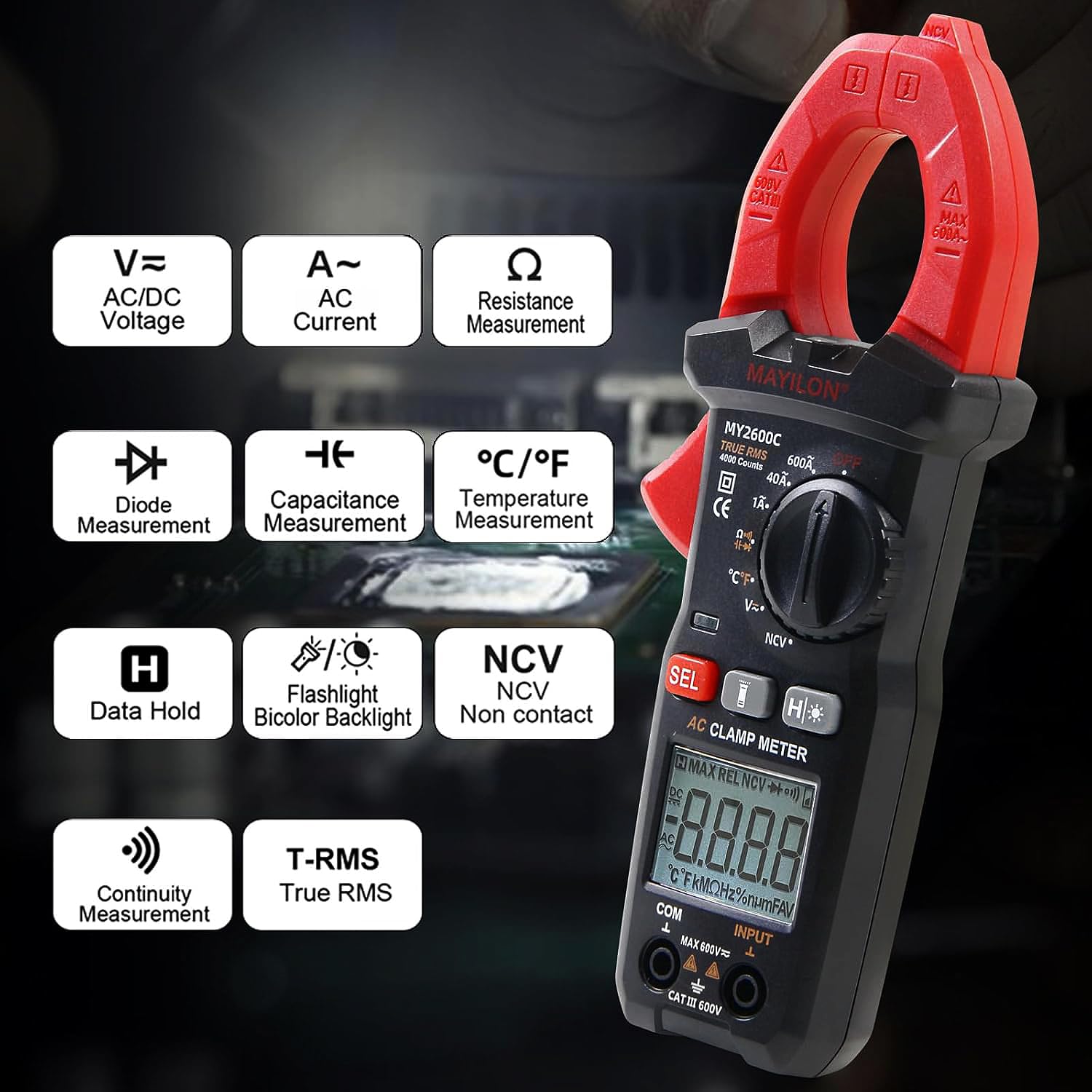
Image: Overview of the MAYILON MY2600C's functions, including AC/DC Voltage, AC Current, Resistance, Diode, Capacitance, Temperature, Data Hold, Flashlight, Bicolor Backlight, NCV, Continuity, and True RMS.
5. Component Identification
Familiarize yourself with the different parts of your MAYILON MY2600C Clamp Meter:

Image: Labeled diagram of the MY2600C Clamp Meter, showing the NCV Sensor Probe, Jaw Assembly, Clamp Body Light, Safety Barrier, Lever for Jaw Opening/Closing, Measuring Functions Range Selector, Data Hold button, Backlight button, Flashlight, Warning Light, SEL button, LCD, COM Terminal, and Input Terminal.
- NCV Sensor Probe: Detects non-contact voltage.
- Jaw Assembly: Opens to clamp around conductors for current measurement.
- Clamp Body Light: Illuminates the area around the clamp.
- Safety Barrier: Prevents accidental contact with live parts.
- Lever for Jaw Opening/Closing: Used to open and close the clamp jaws.
- Measuring Functions Range Selector: Rotary switch to select desired measurement function.
- Data Hold (H*): Freezes the current reading on the display.
- Backlight (H*): Activates the LCD backlight. (Often combined with Data Hold button for short/long press).
- Flashlight: Provides illumination for dark work areas.
- Warning Light: Indicates NCV detection or other warnings.
- SEL Button: Selects sub-functions within a rotary switch position (e.g., AC/DC, Diode/Continuity/Capacitance).
- LCD: Digital display for readings.
- COM Terminal: Common (negative) input for test leads.
- Input Terminal: Positive input for test leads.
6. Setup
6.1 Battery Installation
The MY2600C requires two AAA batteries (included). To install or replace batteries:
- Ensure the meter is turned OFF.
- Locate the battery compartment on the back of the meter.
- Use a screwdriver to open the battery cover.
- Insert the two AAA batteries, observing the correct polarity (+/-) as indicated inside the compartment.
- Replace the battery cover and secure it with the screw.
6.2 Connecting Test Leads
For most measurements (voltage, resistance, continuity, diode, capacitance, temperature), test leads are required.
- Insert the black test lead into the COM (common) input jack.
- Insert the red test lead into the INPUT (positive) input jack.
Ensure connections are firm before taking any measurements.
7. Operating Instructions
This section details how to perform various measurements with your MY2600C Clamp Meter.
7.1 AC/DC Voltage Measurement
To measure AC or DC voltage:
- Set the rotary switch to the V~ (AC Voltage) or V= (DC Voltage) position.
- Connect the test leads in parallel to the circuit or component being measured.
- Read the voltage value on the LCD.

Image: The MY2600C Clamp Meter measuring AC/DC Voltage with test leads connected.
7.2 AC Current Measurement (Clamp)
To measure AC current using the clamp:
- Set the rotary switch to the 600A~ or 40A~ (AC Current) position.
- Press the jaw lever to open the clamp.
- Enclose only one conductor of the circuit within the clamp jaws. Ensure the jaws are fully closed.
- Read the current value on the LCD.
Image: The MY2600C Clamp Meter measuring AC Current by clamping around a single conductor.
7.3 Resistance Measurement
To measure resistance:
- Turn off power to the circuit or component.
- Set the rotary switch to the Ω (Resistance) position.
- Connect the test leads across the component.
- Read the resistance value on the LCD.
Image: The MY2600C Clamp Meter measuring resistance of a component with test leads.
Video: Demonstration of resistance measurement using the MAYILON MY2600C Clamp Meter.
7.4 Diode Test
To test a diode:
- Turn off power to the circuit.
- Set the rotary switch to the Ω position, then press the SEL button until the diode symbol (→|) appears on the display.
- Connect the red test lead to the anode and the black test lead to the cathode of the diode.
- Read the forward voltage drop on the LCD. Reverse the leads; the display should show "OL" (Open Line) for a good diode.
Image: The MY2600C Clamp Meter performing a diode test with test leads connected across a diode.
Video: Demonstration of diode testing using the MAYILON MY2600C Clamp Meter.
7.5 Continuity Test
To check for continuity:
- Turn off power to the circuit.
- Set the rotary switch to the Ω position, then press the SEL button until the continuity symbol ()))) appears on the display.
- Connect the test leads across the component or circuit path.
- If continuity exists (resistance below approximately 50Ω), the meter will beep continuously and display the resistance value. If open, it will show "OL".
Image: The MY2600C Clamp Meter performing a continuity test, indicating a closed circuit.
Video: Demonstration of continuity testing using the MAYILON MY2600C Clamp Meter.
7.6 Capacitance Measurement
To measure capacitance:
- Turn off power to the circuit and discharge the capacitor completely before testing.
- Set the rotary switch to the Ω position, then press the SEL button until the capacitance symbol (-||-) appears on the display.
- Connect the test leads across the capacitor terminals.
- Read the capacitance value on the LCD.
Image: The MY2600C Clamp Meter measuring capacitance of a component with test leads.
Video: Demonstration of capacitance measurement using the MAYILON MY2600C Clamp Meter.
7.7 Non-Contact Voltage (NCV) Detection
To use the NCV function:
- Set the rotary switch to the NCV position.
- Move the NCV sensor probe (top of the clamp jaw) close to the conductor or outlet you want to test.
- The meter will emit an audible beep and the warning light will flash if AC voltage is detected. The intensity of the beeps and flashes indicates the strength of the detected voltage.

Image: The MY2600C Clamp Meter detecting non-contact voltage near an electrical outlet, indicated by a red warning light.
7.8 Temperature Measurement
To measure temperature:
- Set the rotary switch to the °C/°F position.
- Connect the K-Type thermocouple to the input jacks, observing polarity.
- Place the tip of the thermocouple on or in the object whose temperature you wish to measure.
- Read the temperature on the LCD. Press the SEL button to switch between Celsius (°C) and Fahrenheit (°F).

Image: The MY2600C Clamp Meter measuring the temperature of water using the K-Type thermocouple.
7.9 Data Hold, Backlight, and Flashlight
- Data Hold (H*): Press the H* button briefly to freeze the current reading on the display. Press again to release.
- Backlight (H*): Press and hold the H* button for approximately 2 seconds to turn the LCD backlight ON or OFF.
- Flashlight: The flashlight is typically activated by a dedicated button or a long press of a specific function button (refer to component identification for exact location).

Image: The MY2600C Clamp Meter with its display backlight illuminated and the integrated flashlight active, showing improved visibility in low-light conditions.
8. Maintenance
8.1 Cleaning
Wipe the case with a damp cloth and mild detergent. Do not use abrasives or solvents. Keep the terminals free from dirt and moisture.
8.2 Battery Replacement
When the low battery indicator appears on the display, replace the batteries as described in the Setup section (6.1 Battery Installation) to ensure accurate readings.
8.3 Storage
If the meter is not to be used for an extended period, remove the batteries to prevent leakage and damage to the device. Store the meter in a cool, dry place, away from direct sunlight and extreme temperatures.
9. Troubleshooting
If you encounter issues with your MY2600C Clamp Meter, refer to the following common problems and solutions:
| Problem | Possible Cause | Solution |
|---|---|---|
| Meter does not turn on | Dead or incorrectly installed batteries | Replace batteries, ensuring correct polarity. |
| "OL" displayed (Open Line) | Measurement range exceeded, open circuit, or incorrect function selected. | Select a higher range if available, check circuit continuity, or ensure correct function is selected. |
| Inaccurate readings | Low battery, external interference, or incorrect connection. | Replace batteries, move away from strong electromagnetic fields, ensure test leads are firmly connected. |
| No NCV detection | No AC voltage present, or sensor not close enough to the source. | Verify power is present, move sensor closer to the conductor. |
10. Specifications
| Parameter | Value |
|---|---|
| Product Dimensions | 8.27 x 3.62 x 2.05 inches; 12.31 ounces |
| Item Model Number | MY2600C |
| Batteries | 2 AAA batteries (included) |
| Manufacturer | MAYILON |
| Power Source | Battery Powered |
| Style | AC Current (4000 Counts) |
| Color | Orange |
| Safety Rating | CAT III 600V |
| AC/DC Voltage Range | 4V ~ 600V |
| AC Current Range | 1A ~ 600A |
| Temperature Range | -40°F to 1832°F (-40°C to 1000°C) |
11. Warranty and Support
MAYILON products are manufactured to high-quality standards. For information regarding warranty coverage, technical support, or service, please refer to the warranty card included with your product or contact MAYILON customer service directly through their official website or the retailer where the product was purchased. Please have your model number (MY2600C) and purchase date available when contacting support.
Related documentsMY2600C


Ask a question about this manual
Ask about setup, troubleshooting, compatibility, parts, safety, or missing instructions. Manuals+ will review the question and use this page’s manual context to help answer it.