
1. Introduction
This manual provides essential information for the installation, operation, and maintenance of the BTJCRLEB Central Air Conditioning Multi-line Wire Controller, model DB98-31638A MWR-WH01. This controller is designed to be compatible with Samsung air conditioning systems, offering precise temperature control and efficient operation. Please read this manual thoroughly before installation and use to ensure proper function and safety.
2. Safety Information
Important Safety Instructions:
- Always disconnect power to the air conditioning unit before installing or servicing the controller.
- Installation should be performed by a qualified and licensed HVAC technician or electrician to prevent electrical shock or damage to the system.
- Ensure all wiring connections are secure and comply with local electrical codes.
- Do not expose the controller to water or excessive moisture.
- Do not attempt to repair or modify the controller yourself. Contact qualified personnel for service.
3. Package Contents
Verify that all items are present in the package:
- 1 x BTJCRLEB Central Air Conditioning Wire Controller (Model MWR-WH01C)

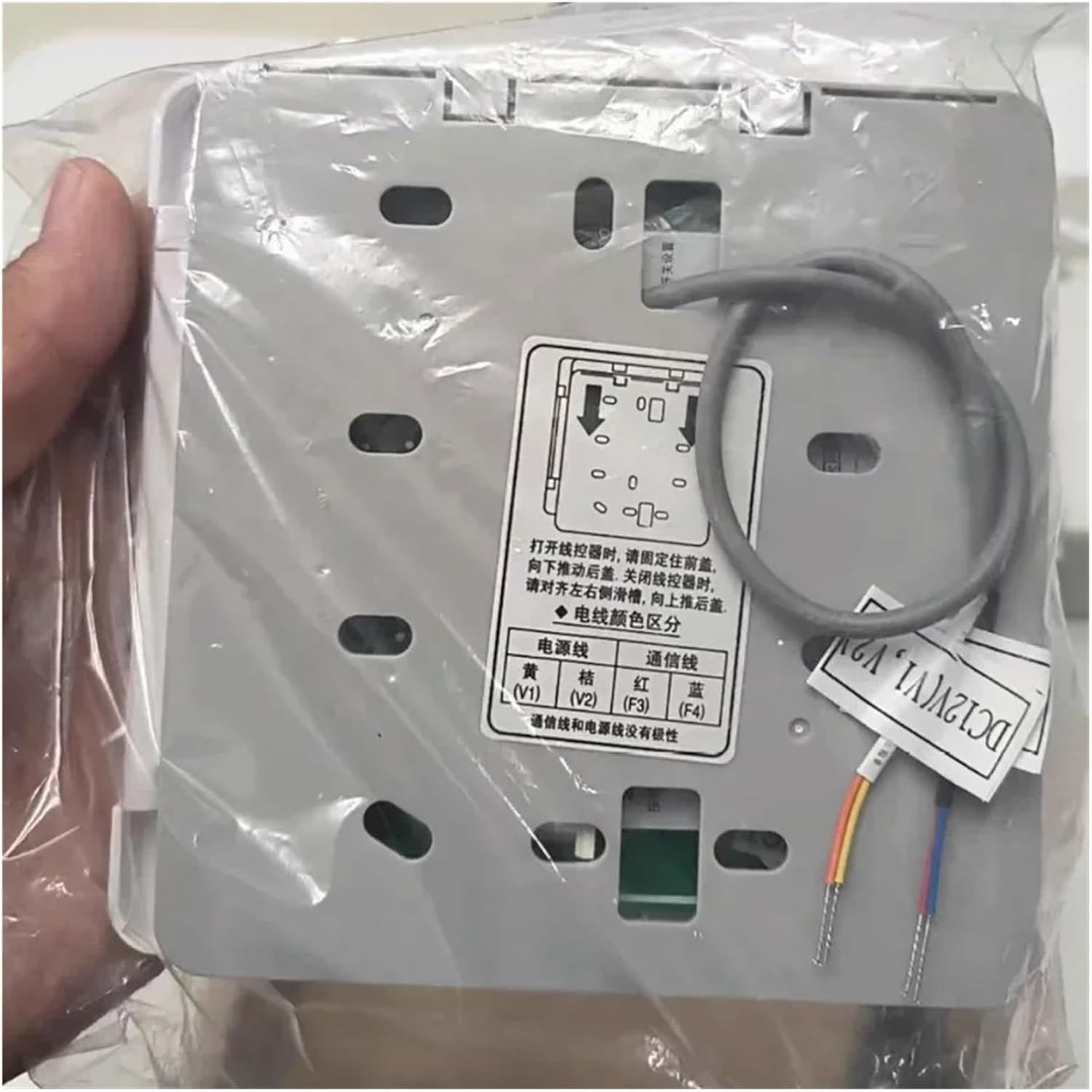
Image showing the BTJCRLEB Central Air Conditioning Wire Controller, model MWR-WH01C, sealed in its protective plastic packaging.

Image of the product box, indicating "MADE IN CHINA" and the model number "MWR-WH01C".
4. Setup and Installation
The controller connects to your central air conditioning system via a multi-line wire. Follow these steps for proper installation:
- Power Disconnection: Before beginning, ensure the main power supply to the air conditioning unit is completely turned off at the circuit breaker.
- Access Wiring: Carefully open the controller's rear cover to access the wiring terminals. The cover typically slides to the right and then lifts upwards.
- Wire Connections: Connect the corresponding wires from your air conditioning system to the terminals on the controller. Refer to the wiring diagram below and your AC unit's manual for specific connections. The communication line and power line are non-polar.
- Secure Wiring: Ensure all wires are securely fastened to their respective terminals.
- Mounting: Mount the controller in a suitable location, typically on an interior wall, away from direct sunlight, drafts, or heat sources that could affect temperature readings.
- Power Restoration: Once installation is complete and verified, restore power to the air conditioning unit.
Wiring Diagram
| Controller Terminal | Wire Color (Example) | Function |
|---|---|---|
| V1 | Yellow | Power Line |
| V2 | Brown | Power Line |
| F3 | Red | Communication Line |
| F4 | Blue | Communication Line |

Image showing the rear of the BTJCRLEB wire controller, detailing the wiring terminals. The cover can be opened by sliding it to the right and lifting upwards. Wiring connections are labeled: Yellow (V1), Brown (V2), Red (F3), Blue (F4). The diagram indicates that the communication line and power line are non-polar.
5. Operating Instructions
Once installed and powered on, the controller allows you to manage your air conditioning system. The display and buttons provide intuitive control.
Close-up view of the BTJCRLEB wire controller's front display. The display shows indicators for 'Run' and 'Stop', and 'Temperature'. Up and down arrow buttons are visible for temperature adjustment. The unit also features a speaker icon, likely for audible feedback.
- Power On/Off: Use the designated button (often labeled "运行" for Run and "停止" for Stop) to turn the air conditioning system on or off.
- Temperature Adjustment: Use the Up (△) and Down (▽) arrow buttons to increase or decrease the desired room temperature. The current temperature setting will be displayed.
- Mode Selection: (If applicable) Some controllers may have buttons for selecting operating modes such as Cool, Heat, Fan, or Auto. Refer to the specific icons on your controller.
- Fan Speed: (If applicable) Buttons may be present to adjust the fan speed (e.g., Low, Medium, High, Auto).
The controller continuously monitors room temperature, adjusting the air conditioning operation to maintain your set temperature, contributing to energy efficiency.
6. Maintenance
Regular maintenance helps ensure the longevity and optimal performance of your wire controller.
- Cleaning: Gently wipe the surface of the controller with a soft, dry cloth. For stubborn marks, a slightly damp cloth can be used, followed by a dry cloth.
- Avoid Chemicals: Do not use abrasive cleaners, solvents, or strong chemical solutions, as these can damage the display or casing.
- Inspection: Periodically check the controller for any visible damage or loose connections. If any issues are found, contact a qualified technician.
7. Troubleshooting
If you encounter issues with your wire controller, consider the following common problems and solutions:
- Controller Not Responding / No Display:
- Check if the main power supply to the air conditioning unit is on.
- Verify that all wiring connections to the controller are secure.
- Ensure the controller is properly seated in its mounting.
- Inaccurate Temperature Readings / Lagging Adjustment:
- Ensure the controller is not exposed to direct sunlight, drafts, or heat sources that could interfere with its temperature sensor.
- Confirm the controller is correctly configured for your system (if applicable).
- Air Conditioner Operating Disordered / High Energy Consumption:
- This could indicate a communication issue between the controller and the AC unit. Check wiring.
- A faulty controller can cause inefficient operation. If other troubleshooting steps fail, professional diagnosis may be required.
- Frequent Crashes / Garbled Errors on Display:
- Power cycle the air conditioning system (turn off at breaker, wait 30 seconds, turn back on).
- If the issue persists, there may be an internal fault with the controller or a communication problem with the AC unit. Professional service is recommended.
For complex issues or if troubleshooting steps do not resolve the problem, it is recommended to contact a qualified HVAC technician.
8. Specifications
| Brand | BTJCRLEB |
| Model Number | DB98-31638A MWR-WH01 |
| ASIN | B0DRSJZPWB |
| Package Dimensions | 1.18 x 0.79 x 0.39 inches |
| Item Weight | 1.76 ounces (approx. 50 grams) |
| Compatibility | Samsung Central Air Conditioning Systems (DB98-31638A MWR-WH01) |
9. Warranty Information
This product typically comes with a standard manufacturer's warranty. For specific details regarding warranty duration, coverage, and claims process, please refer to the documentation provided with your purchase or contact the seller directly. Keep your proof of purchase for warranty purposes.
10. Customer Support
Should you require technical assistance, have questions about installation, or need further support, please contact your point of purchase. You may also refer to the official website of the manufacturer, BTJCRLEB, for additional resources or contact information.