1. Introduction
This manual provides detailed instructions for the assembly, operation, and maintenance of your knoworld 5-Drawer Dresser. Designed for modern living spaces, this dresser combines ample storage with convenient features like integrated LED lighting and a built-in power outlet. Please read all instructions carefully before beginning assembly or use.
2. Product Features
- Integrated LED Lighting: Equipped with multi-color RGB LED light strips, adjustable in color and brightness via a button or a dedicated mobile application. Creates a stylish, floating visual effect.
- Built-in Charging Station: Features 2 AC power outlets (125V/12A) and 2 USB ports (5V/2A) for convenient charging of electronic devices directly on the dresser top.
- Ample Storage: Five spacious drawers provide significant storage capacity for clothing, linens, and other personal items. A generously sized top surface offers additional display or storage space.
- Premium Construction: Constructed from durable, scratch-resistant MDF with a clean white finish. Drawers operate smoothly on ball-bearing slides and feature elegant gold metal handles.
- Versatile Design: Its modern aesthetic and practical features make it suitable for various rooms, including bedrooms, living rooms, hallways, and entryways.
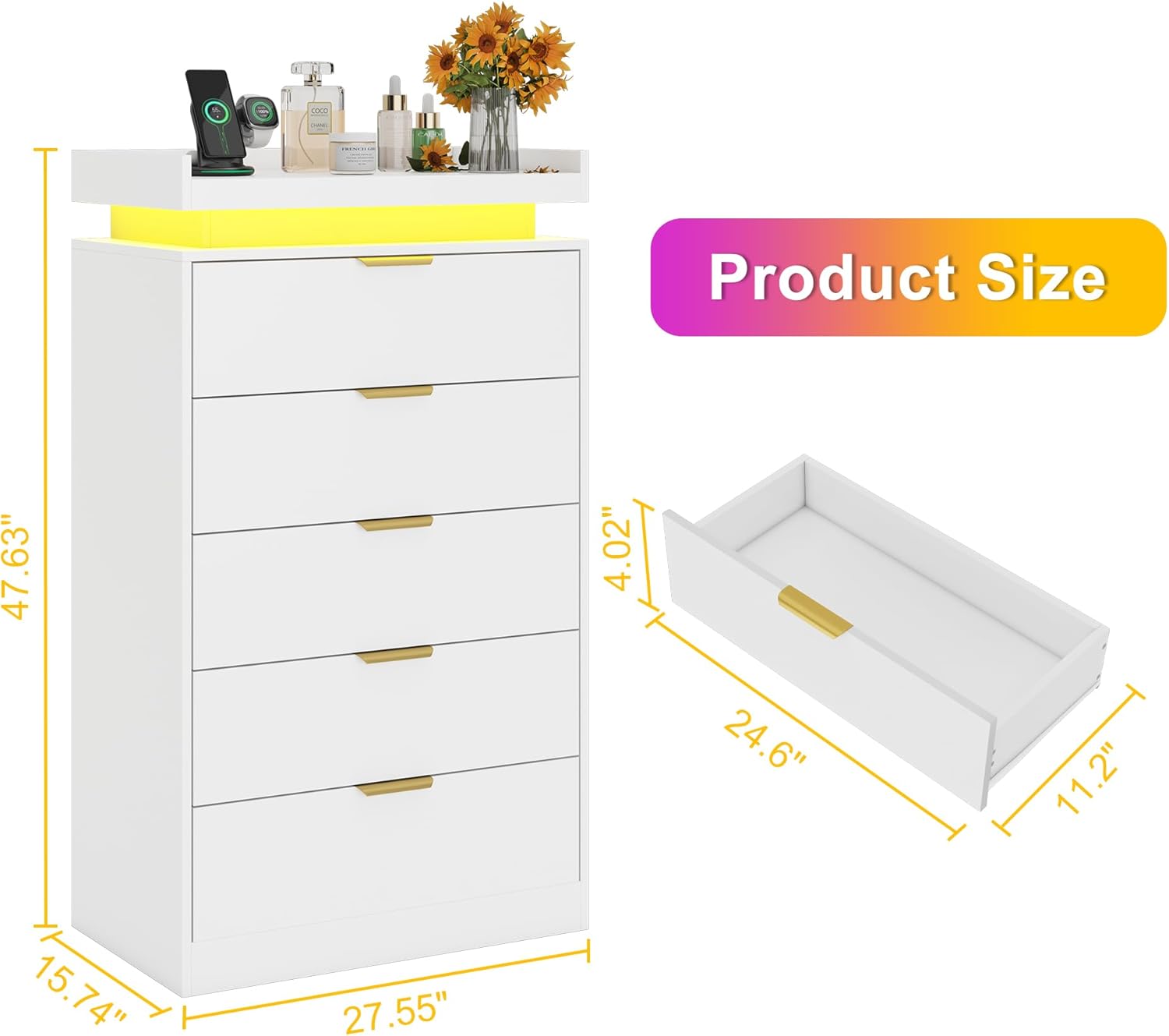
Image: The knoworld 5-Drawer Dresser with its LED lights illuminated, showcasing items placed on its top surface.
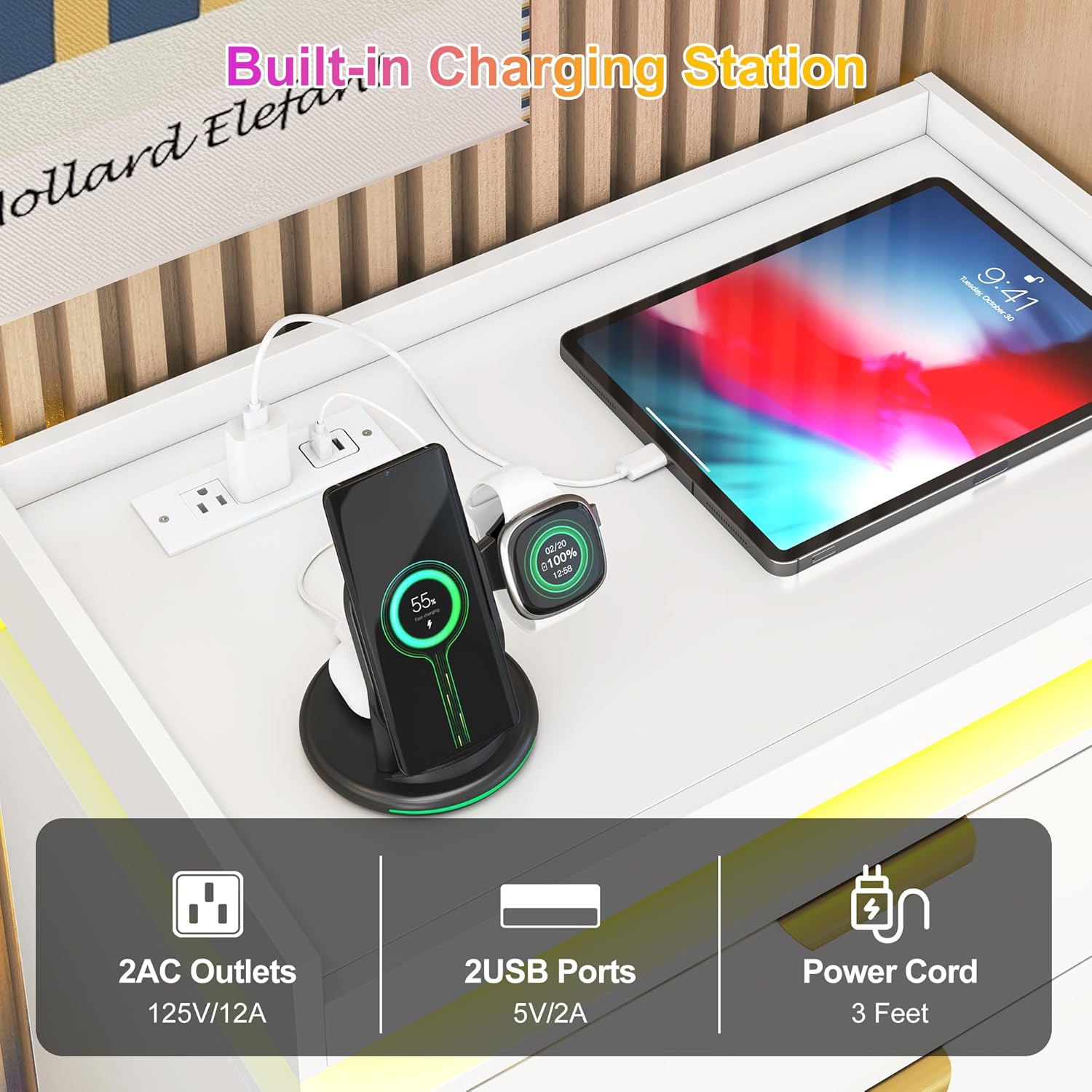
Image: A detailed view of the integrated charging station, featuring two AC outlets and two USB ports, with charging cables connected.
3. Specifications
| Attribute | Detail |
|---|---|
| Brand | knoworld |
| Model Name/Number | I870100425A1 |
| Product Dimensions (D x W x H) | 15.75"D x 27.55"W x 47.63"H |
| Color | White |
| Material | Wood (MDF) |
| Finish Type | Painted |
| Number of Drawers | 5 |
| Item Weight | 73.6 pounds |
| Assembly Required | Yes |

Image: Detailed product dimensions for the knoworld 5-Drawer Dresser.
4. Setup and Assembly
Before you begin, ensure all parts and hardware are present. Refer to the included assembly guide for detailed step-by-step instructions. It is recommended to assemble the dresser on a soft, clean surface to prevent scratches.
4.1 Assembly Video Guide
Video: A comprehensive guide demonstrating the assembly process and key features of the knoworld 5-Drawer Dresser.
4.2 Important Assembly Tips
- Identify all components and hardware using the provided parts list before starting.
- Use a screwdriver for assembly. An electric drill with adjustable torque can speed up the process but use caution to avoid overtightening screws.
- Ensure all connections are secure but do not overtighten screws to prevent damage to the wood.
- For stability, attach the anti-tipping device to a wall stud as per the instructions.
5. Operating Instructions
5.1 LED Lighting System
The integrated RGB LED light strips offer customizable illumination for your room. You can control the lights using the inline button controller or a dedicated mobile application.
- Button Control: Use the physical button on the LED strip cable to cycle through various colors, lighting modes (e.g., static, fade, flash), and adjust brightness.
- App Control: Download the recommended mobile application (refer to the LED light instructions included in your package for QR code or app name). The app allows for more precise color selection, custom lighting scenes, music synchronization, and timer functions.

Image: Control your dresser's LED lights using the intuitive mobile application, offering a wide range of colors and effects.
5.2 Charging Station
The built-in charging station provides convenient access to power for your electronic devices.
- Plug the dresser's main power cord into a standard wall outlet.
- Use the 2 AC outlets for standard electrical devices (e.g., lamps, laptops).
- Use the 2 USB ports to charge smartphones, tablets, and other USB-powered devices.
- Ensure devices are compatible with the charging station's specifications (125V/12A for AC, 5V/2A for USB).
6. Maintenance
- Cleaning: Wipe surfaces with a soft, damp cloth. Avoid harsh chemicals or abrasive cleaners that may damage the finish.
- Drawer Slides: Periodically check drawer slides for smooth operation. If needed, a small amount of silicone lubricant can be applied to the slides.
- Hardware: Occasionally check all screws and fasteners to ensure they remain tight. Retighten if necessary.
- LED Lights: If LED lights malfunction, check the power connection and ensure the controller is properly connected.

Image: Key structural features of the dresser, including stable base, smooth rails, anti-tipping device, and metal handles.
7. Troubleshooting
| Problem | Possible Cause | Solution |
|---|---|---|
| LED lights not turning on. | Power cable disconnected; faulty LED strip/controller. | Ensure the power cable is securely plugged into the wall and the LED controller. Check for any visible damage to the LED strip. |
| Drawers are stiff or not sliding smoothly. | Misaligned drawer slides; debris in slides; loose screws. | Check that drawer slides are correctly aligned and free of obstructions. Tighten any loose screws on the slides or drawer box. Apply silicone lubricant if necessary. |
| Charging station not working. | Dresser not plugged in; device incompatibility; faulty outlet/USB port. | Verify the dresser's main power cord is plugged into a live wall outlet. Test with a different device. If issues persist, contact customer support. |
| Dresser feels unstable. | Uneven floor; loose assembly; anti-tipping device not installed. | Ensure the dresser is on a level surface. Retighten all assembly screws. Install the anti-tipping device as instructed. |
8. Warranty and Support
knoworld products are designed for quality and durability. For specific warranty information, please refer to the warranty card included with your purchase or visit the official knoworld website. If you encounter any issues or require assistance, please contact knoworld customer support. They are available to help with any questions or concerns regarding your dresser.