
1. Introduction
Thank you for choosing the 4 EVER WINNER Farmhouse Corner Entertainment Center. This versatile TV cabinet is designed to fit snugly into corner spaces, offering both aesthetic appeal with its farmhouse style and practical storage solutions. It features integrated LED lighting for enhanced ambiance and adjustable shelving to accommodate various items. This manual provides essential information for assembly, operation, maintenance, and troubleshooting to ensure optimal use and longevity of your product.
2. Safety Information
- Read all instructions carefully before assembly and use.
- Keep all small parts and packaging materials away from children and pets to prevent choking hazards.
- Assemble the unit on a soft, clean surface to prevent scratches.
- Ensure all connections are secure before placing any items on the entertainment center.
- Do not overload shelves or the top surface. Refer to specifications for weight limits.
- Use only the provided hardware for assembly.
- If the LED lights malfunction, disconnect power immediately and contact support.
- Avoid exposing the unit to excessive moisture or direct sunlight.
3. Package Contents
Please verify that all components are present before beginning assembly. If any parts are missing or damaged, contact customer support.
- Main cabinet panels (top, bottom, sides, back)
- Barn doors (2)
- Adjustable shelves (multiple)
- Wooden gourd feet (5)
- Door handles and hardware
- LED lighting strip with remote control/app connectivity module
- Assembly hardware (screws, dowels, cam locks, etc.)
- Instruction manual
4. Product Overview
Familiarize yourself with the key features and components of your new entertainment center.
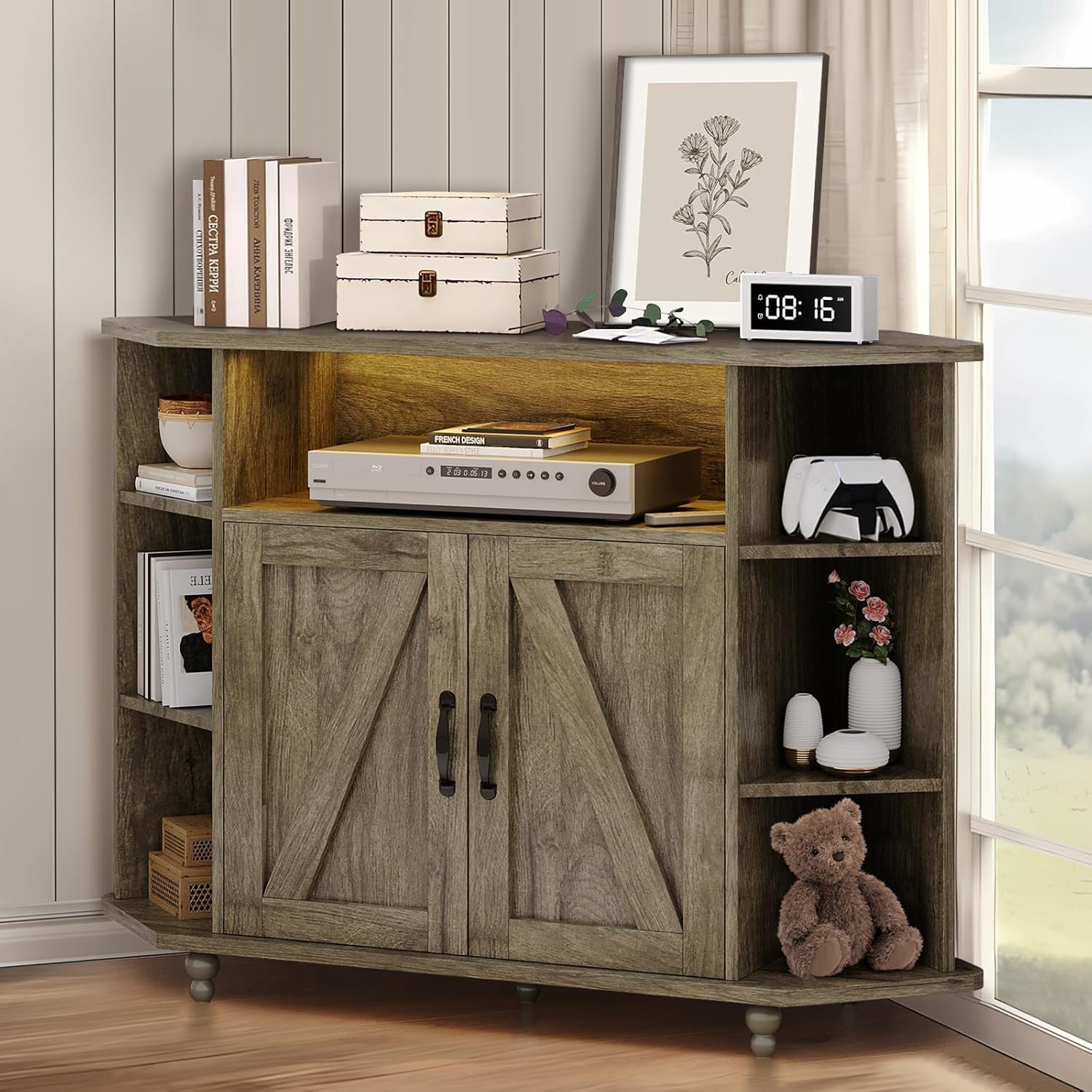
Figure 4.1: Overall view of the entertainment center, showcasing its corner design and storage capabilities.
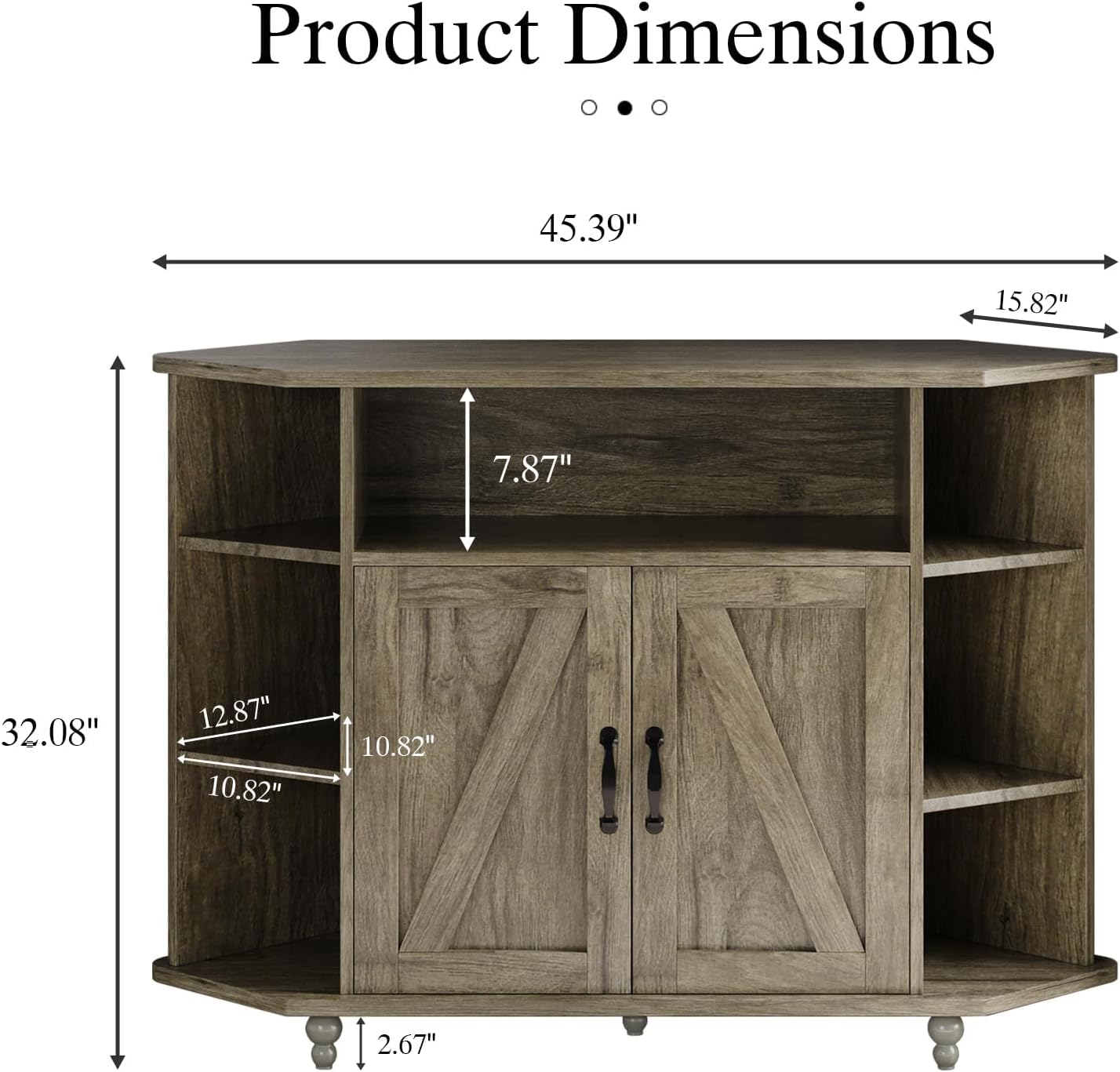
Figure 4.2: Detailed product dimensions, indicating the overall size and internal shelf measurements.

Figure 4.3: The integrated LED lighting system, offering customizable colors, modes, speed, and brightness, controllable via remote or smartphone app.

Figure 4.4: Key structural and functional details: sturdy wooden gourd legs for stability, integrated cable management holes to keep wires tidy, and adjustable shelves for flexible storage configurations.

Figure 4.5: The distinctive farmhouse barn doors, which slide to conceal or reveal the central storage compartment.
5. Setup and Assembly
Assembly is required for this product. Please follow the step-by-step instructions provided in the separate assembly guide included in your package. Ensure you have adequate space and the necessary tools (typically a screwdriver) before starting.
- Unpack and Identify Parts: Lay out all components and hardware. Compare them with the parts list in the assembly guide to ensure nothing is missing.
- Assemble Main Frame: Follow the guide to connect the top, bottom, and side panels using the provided cam locks and dowels.
- Install Shelves: Insert shelf pins into the desired holes and place the adjustable shelves.
- Attach Barn Doors: Secure the barn door tracks and hang the doors according to the instructions. Install handles.
- Install LED Lighting: Adhere the LED strip to the designated area (usually under the top shelf or within the central compartment). Connect the power supply and control module.
- Attach Feet: Secure the wooden gourd feet to the base of the unit.
- Final Check: Ensure all screws are tightened and the unit is stable before use.
For detailed visual instructions, refer to the included assembly manual.
6. Operating Instructions
6.1 LED Lighting System
The integrated LED lighting system offers various customization options to enhance your viewing experience and room ambiance.
- Power On/Off: Use the power button on the remote control or within the dedicated smartphone app.
- Color Selection: Choose from 20 available colors using the color palette on the remote or app.
- Dynamic Modes: Select from 19 dynamic modes (e.g., fade, jump, strobe) to create different lighting effects.
- Speed Adjustment: Adjust the speed of dynamic modes across 10 levels.
- Brightness Control: Modify the brightness of the lights across 5 levels to suit your preference.
- App Control: Download the specified app (refer to LED light module instructions) to control the lights from your smartphone, often offering more precise control and additional features.
6.2 Adjustable Shelving
The side shelves are adjustable, allowing you to customize the storage space for items of different heights.
- To Adjust: Carefully remove any items from the shelf. Lift the shelf slightly and pull it out.
- Relocate Pins: Remove the shelf pins from their current holes and reinsert them into the desired new holes, ensuring they are level.
- Reinsert Shelf: Place the shelf back onto the pins, ensuring it is securely seated.
6.3 Cable Management
Utilize the pre-drilled cable management holes on the back panel to route and organize your electronic device cables, keeping the area tidy and preventing tangles.
7. Maintenance
- Cleaning: Wipe the surfaces with a soft, damp cloth. Avoid using harsh chemicals or abrasive cleaners, as they may damage the finish.
- Dusting: Regularly dust the unit to prevent buildup.
- Hardware Check: Periodically check all screws and connections to ensure they remain tight. Retighten if necessary.
- LED Care: Do not attempt to repair or modify the LED strip. If it malfunctions, contact customer support.
8. Troubleshooting
| Problem | Possible Cause | Solution |
|---|---|---|
| Unit is wobbly/unstable. | Loose hardware; uneven floor. | Ensure all assembly screws are tightened. Check if the floor is level; use furniture pads if needed. |
| LED lights not working. | Power disconnected; remote battery dead; faulty LED strip/module. | Check power connection. Replace remote battery. If still not working, contact customer support. |
| Doors do not slide smoothly. | Track obstruction; misaligned doors. | Check tracks for debris. Ensure doors are correctly hung and aligned on the track. |
| Scratches on surface. | Rough handling; abrasive cleaning. | Use furniture polish or touch-up pens for minor scratches. Always use soft cloths for cleaning. |
9. Specifications
| Feature | Detail |
|---|---|
| Brand | 4 EVER WINNER |
| Model Number | FTS1120 |
| Product Dimensions (L x W x H) | 115.06 x 39.88 x 81.28 cm (45.3 x 15.7 x 32 inches) |
| Item Weight | 27.99 kg (61.7 lbs) |
| Material | Wood (Particle Board) |
| Color | Grey |
| Style | Farmhouse |
| Assembly Required | Yes |
| LED Light Features | 20 Colors, 19 Dynamic Modes, 10 Speed Modes, 5 Brightness Modes, App Control |
| Compatibility | Fits TVs up to 55 inches |
10. Warranty and Support
For warranty information or technical support, please refer to the contact details provided with your purchase documentation or visit the official 4 EVER WINNER website. Please have your model number (FTS1120) and purchase date ready when contacting support.
We are committed to providing high-quality products and excellent customer service. If you encounter any issues or have questions, do not hesitate to reach out.