
1. Introduction and Overview
The Big Dipper 150W Moving Head Beam Light (LB150) is a professional stage lighting fixture designed to create dynamic visual effects for various events. It features a powerful 150W LED light source, versatile control modes, and a wide range of color and gobo options.
Key features include:
- Professional 150W LED Beam: Equipped with a 150W COB LED source (10,000K White) for a sharp, bright beam.
- Multiple Control Modes: Supports DMX512, Sound-Active, Auto, and Master-Slave modes.
- Dynamic 12 Colors & 12 Gobos: Offers a spectrum of 12 vibrant colors and 12 precise gobo patterns for diverse effects.
- Ultra-Smooth Movement: Features 540° Pan and 270° Tilt movement with a 16-bit scanning system for silent and precise operation. Includes automatic error correction and reset.
- Plug-and-Play Setup: Designed for easy installation and operation.
- Reliable Performance: Built with overheat protection, a replaceable fuse, and an IP20 rating for indoor use.
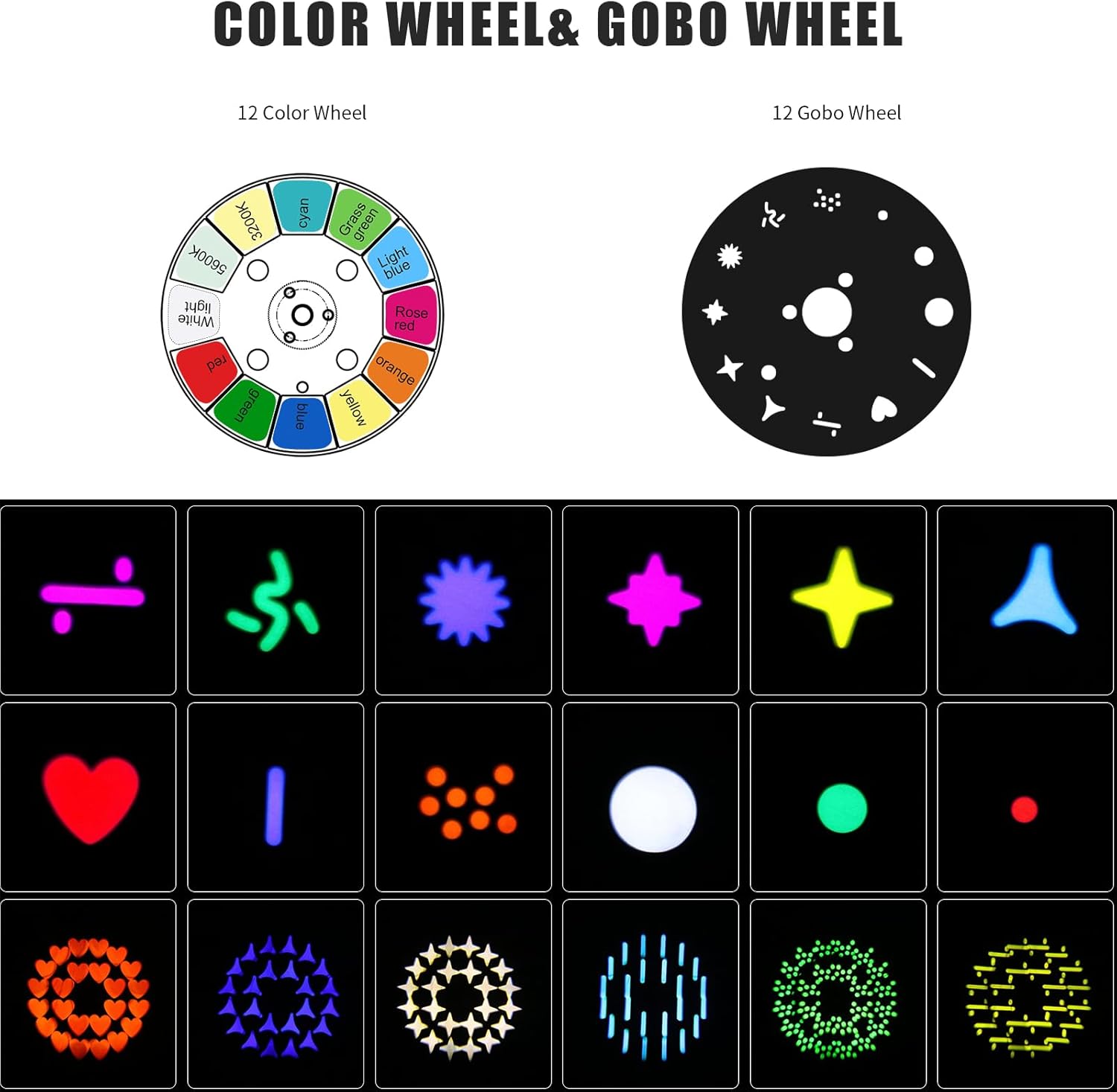
Image 1.1: The Big Dipper 150W Moving Head Beam Light (LB150) in operation, showcasing its powerful beam and vibrant colors.

Image 1.2: Visual representation of key product features including 12 Gobos, 12 Colors, Lightweight design, Easy Installation, LED Light Source, RGBW, Auto mode, Sound mode, DMX512, and Master-Slave functionality.
2. Setup and Installation
The LB150 Moving Head Beam Light is designed for straightforward setup. Ensure all components are present before beginning installation.
2.1 Unpacking and Contents
Carefully unpack the device and check for any damage. The package should contain the following items:
- Moving Head Light (LB150)
- Safety Rope
- Power Cable
- Light Hook Plate
- Instruction Manual (this document)

Image 2.1: Contents of the product package, including the moving head light, safety rope, power cable, light hook plate, and instruction manual.
2.2 Physical Connections
The rear panel of the LB150 features various ports for power and control. Familiarize yourself with these connections:
- DMX IN: For connecting a DMX controller.
- DMX OUT: For daisy-chaining to other DMX fixtures.
- POWER IN: For connecting the main power cable.
- POWER OUT: For daisy-chaining power to other units (check power limits).
- FUSE: Replaceable fuse for circuit protection.

Image 2.2: Front and back views of the LB150, highlighting the LED display, control buttons (Menu, Down, OK, Up), DMX In/Out, Power In/Out, and Fuse.
2.3 Mounting
The compact design allows for flexible placement. It can be mounted on a truss, stand, or placed on the floor. Always use the provided safety rope for overhead installations to prevent accidental falls.

Image 2.3: Two LB150 moving head lights, demonstrating potential multi-unit setup.
3. Operating Modes
The LB150 offers four primary control modes to suit various application needs.
3.1 DMX512 Mode
For precise professional control, connect the LB150 to a DMX512 controller. This mode allows for detailed manipulation of pan, tilt, color, gobo, strobe, and dimmer functions. Refer to the DMX channel chart (not provided in this manual, typically found in a separate DMX guide or appendix) for specific channel assignments.
Video 3.1: Demonstration of the 150W Moving Head Light with DMX Control, showcasing various light movements and color changes.
3.2 Sound-Active Mode
In Sound-Active mode, the light reacts to ambient sound, creating dynamic effects synchronized with music. This mode is ideal for parties and events where a DMX controller is not used.
Video 3.2: A 40-second video demonstrating the 150W moving head stage light's capabilities, including various gobo and color changes, likely in sound-active or auto mode.
3.3 Auto Mode
Auto mode provides pre-programmed light shows for hands-free operation. The light cycles through various patterns, colors, and movements automatically.
Video 3.3: A 23-second video showcasing the 150W Moving Head Stage Light Beam Light in action, demonstrating its automatic light patterns and movements.
3.4 Master-Slave Mode
Connect multiple LB150 units to synchronize their effects. One unit acts as the master, controlling all other slave units. This allows for coordinated light shows without a DMX controller.
Video 3.4: An 18-second video demonstrating the 150W Moving Head Stage Light, likely showing synchronized movements in a multi-unit setup or various auto modes.
Video 3.5: A 30-second video showcasing the Moving Head Stage Light's spot and gobo effects, demonstrating its versatility for various lighting designs.
3.5 Color and Gobo Wheels
The LB150 features independent color and gobo wheels to create a wide array of visual effects.
- Color Wheel: 12 vibrant colors plus white, allowing for smooth color changes and split colors.
- Gobo Wheel: 12 distinct gobo patterns for projecting shapes and textures.

Image 3.1: Diagram illustrating the 12-color wheel and 12-gobo wheel, along with examples of projected gobo patterns.

Image 3.2: Examples of various beam and gobo effects created by the LB150 light, demonstrating color changes and pattern projections.

Image 3.3: Illustration of the LB150's 540° X-axis (Pan) and 270° Y-axis (Tilt) movement capabilities.
4. Maintenance
Regular maintenance ensures the longevity and optimal performance of your LB150 Moving Head Beam Light.
- Cleaning: Periodically clean the lens and exterior with a soft, dry cloth. Avoid using harsh chemicals or abrasive materials.
- Fan Vents: Ensure the cooling fan vents are clear of dust and debris to maintain proper airflow and prevent overheating.
- Fuse Replacement: The unit features a replaceable fuse. If the light does not power on, check and replace the fuse if necessary, ensuring to use a fuse of the correct rating.
- Storage: When not in use, store the light in a dry, dust-free environment.
5. Troubleshooting
If you encounter issues with your LB150, refer to the following common troubleshooting steps:
- No Power:
- Check the power cable connection to both the unit and the power outlet.
- Verify the power outlet is functional.
- Inspect and replace the fuse if blown.
- No Light Output:
- Ensure the unit is powered on and not in standby mode.
- Check DMX settings if in DMX mode; ensure dimmer channels are open.
- No Movement / Erratic Movement:
- Check DMX connections and address settings.
- If in DMX mode, verify pan/tilt channels are correctly configured on the controller.
- Perform a motor calibration or reset function if available in the unit's menu (refer to the unit's display for menu options).
- Sound-Active Mode Not Responding:
- Ensure the microphone is not obstructed.
- Increase the sensitivity setting if available.
- Ensure sufficient sound levels are present near the unit.
For persistent issues, contact customer support.
6. Specifications
Detailed technical specifications for the Big Dipper 150W Moving Head Beam Light (LB150).
| Feature | Detail |
|---|---|
| Model Number | LB150 (LM0740D) |
| Light Source Type | Light Emitting Diode (LED) |
| Light Source Wattage | 150 Watts |
| Color | Black |
| Material | Aluminum |
| Product Dimensions | 6.67"L x 9.29"W x 11.5"H |
| Item Weight | 24.8 pounds (approx. 11.26 kg) |
| Mounting Type | Floor Mount (also suitable for truss/stand) |
| Bulb Features | Color-changing, Gobo projection, Sound-activated, DMX512 mode compatible |
| Pan Movement | 540° |
| Tilt Movement | 270° |
| IP Rating | IP20 (for indoor use) |

Image 6.1: Diagram showing the dimensions (length, width, height) and weight of the LB150 Moving Head Beam Light.

Image 6.2: Chart illustrating the beam distance and corresponding Lux (Fc) measurements at various distances (0M, 3M, 5M) for the LB150 light.
7. Warranty and Support
The Big Dipper 150W Moving Head Beam Light (LB150) comes with a 1-year warranty, ensuring peace of mind regarding product quality and performance.
For any questions, technical assistance, or warranty claims, please contact Big Dipper customer service. Have your model number (LB150) and purchase information ready for faster service.