
Introduction
This instruction manual provides essential information for the safe and effective use of your Technical Precision replacement bulb, model AX-LT7X-5. This bulb is specifically designed as a replacement for MAC Allister 18V rechargeable torches. Please read this manual thoroughly before installation and retain it for future reference.
Product Overview
The Technical Precision AX-LT7X-5 is a high-quality replacement bulb intended to restore the illumination function of your MAC Allister 18V rechargeable torch. It features an 18-volt, 11-watt design with a flanged base for secure and reliable connection.
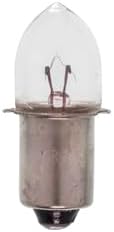
This image displays the Technical Precision replacement bulb, featuring a clear glass housing, visible filament, and a metal flanged base designed for secure installation in compatible torch models.
Safety Information
- Always ensure the torch is switched off and the battery pack is removed before attempting to replace the bulb.
- Allow the old bulb to cool completely before handling, as it may be hot.
- Handle the new bulb by its base to avoid touching the glass, which can reduce bulb life due to oils from your skin.
- Do not use this bulb in applications other than specified (MAC Allister 18V rechargeable torches).
- Keep bulbs out of reach of children.
Setup: Bulb Installation
Follow these steps to replace the bulb in your MAC Allister 18V rechargeable torch:
- Prepare the Torch: Ensure the torch is turned off and disconnect the battery pack from the torch.
- Access the Bulb: Depending on your specific MAC Allister torch model, you may need to unscrew the torch head or open a compartment to access the existing bulb. Refer to your original torch manual if unsure.
- Remove Old Bulb: Carefully grasp the old bulb by its base and gently pull or twist it out of its socket. Dispose of the old bulb responsibly.
- Insert New Bulb: Align the flanged base of the new Technical Precision AX-LT7X-5 bulb with the socket. Gently push and/or twist the bulb into place until it is seated firmly and securely. Do not force the bulb.
- Reassemble and Test: Reassemble the torch head or compartment. Reconnect the battery pack and test the torch to ensure the new bulb illuminates correctly.
Operating
Once the replacement bulb is correctly installed, operate your MAC Allister 18V rechargeable torch as you normally would. The new bulb will provide the intended illumination. Refer to your original torch manual for specific operating instructions for the torch itself.
Maintenance
- Cleaning: If the glass of the bulb becomes dirty, gently wipe it with a clean, dry, lint-free cloth. Avoid using abrasive cleaners or excessive moisture.
- Storage: Store spare bulbs in their original packaging in a cool, dry place to protect them from damage.
- Inspection: Periodically inspect the bulb and its connections for any signs of wear or damage.
Troubleshooting
| Problem | Possible Cause | Solution |
|---|---|---|
| Bulb does not light up |
|
|
| Bulb flickers |
|
|
Specifications
| Feature | Detail |
|---|---|
| Brand | Technical Precision |
| Model Name | 18V RECHARGEABLE TORCH-AX-LT7X-5 |
| Voltage | 18 Volts |
| Wattage | 11 Watts |
| Bulb Base | Flanged |
| Included Components | Replacement Part |
| Batteries Required | No (for the bulb itself) |
Warranty and Support
For warranty information or technical support regarding your Technical Precision replacement bulb, please contact the seller or manufacturer directly. Keep your purchase receipt as proof of purchase.