1. Introduction
Welcome to the user manual for your Monster Airmars XKT28 Duel Mode Wireless Earbuds. This guide provides detailed instructions on how to set up, operate, maintain, and troubleshoot your earbuds to ensure optimal performance and longevity. Please read this manual carefully before using your device.
Package Contents
- Monster Airmars XKT28 Wireless Earbuds (Left and Right)
- Charging Case
- USB Charging Cable
- User Manual
- Ear Tips (various sizes)
2. Product Overview
The Monster Airmars XKT28 earbuds are designed for a superior audio experience, featuring advanced Bluetooth connectivity, noise cancellation, and a durable, waterproof design. The compact charging case provides convenient storage and on-the-go charging.

Figure 2.1: The Monster Airmars XKT28 Wireless Earbuds securely placed within their open charging case. The earbuds are black with grey ear tips, and a small blue LED indicator light is visible on the front of the charging case, indicating its status.
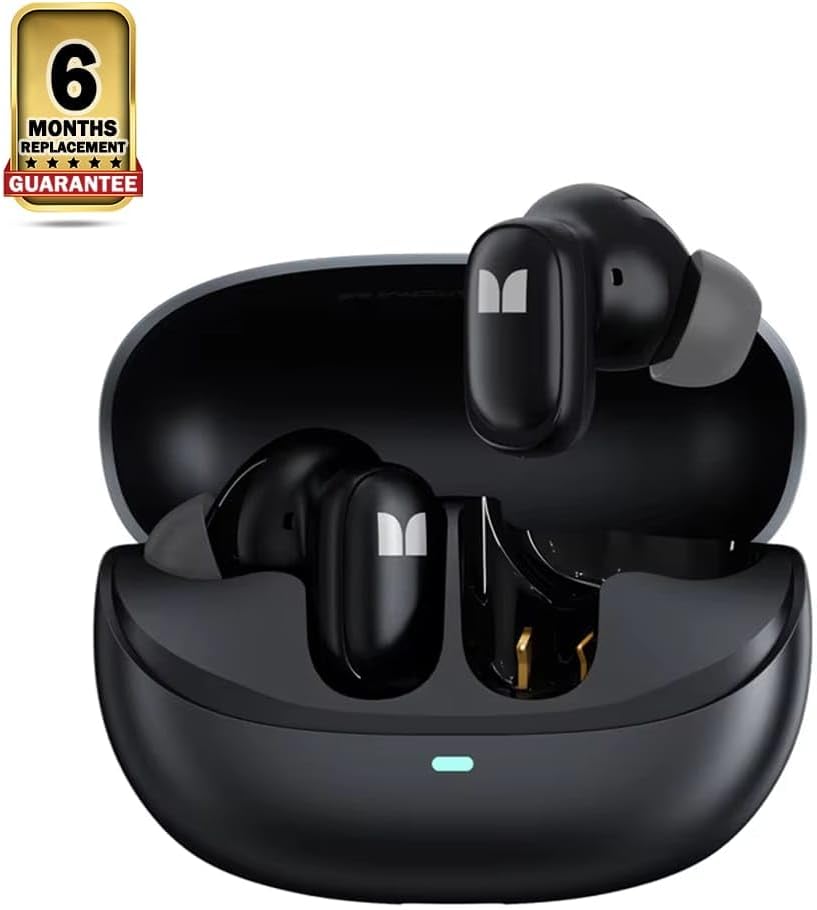
Figure 2.2: The Monster Airmars XKT28 Wireless Earbuds resting in their open charging case. This image highlights the product's appearance and includes a '6 Months Replacement Guarantee' badge, signifying product assurance.
Key Features
- Active Noise Cancellation (ANC): Block out external distractions and immerse yourself in your music with advanced ANC technology that reduces ambient noise for a more focused listening experience.
- 5.4 Hi-Fi Sound: Enjoy crisp, clear audio with 5.4 Hi-Fi sound quality that delivers rich bass, detailed mids, and sparkling highs for an immersive listening experience.
- HD Call: Stay connected with crystal-clear HD call quality, ensuring that your conversations are clear and distortion-free even in noisy environments.
- Duel Mode: Optimized for both mobile use and gaming sessions.
- Waterproof Design: Provides added durability and protection against moisture.
3. Setup
3.1 Charging the Earbuds and Case
Before first use, fully charge the earbuds and the charging case.
- Place the earbuds into the charging case, ensuring they are correctly seated.
- Connect the USB charging cable to the charging port on the case and the other end to a USB power adapter (not included) or a computer's USB port.
- The indicator light on the case will show charging status. A full charge is indicated when the light changes or turns off (refer to specific LED behavior in future updates if available).
3.2 Pairing with a Device
Follow these steps to pair your earbuds with your smartphone or other Bluetooth-enabled device:
- Ensure the earbuds are charged and placed inside the charging case.
- Open the charging case. The earbuds will automatically enter pairing mode, and an indicator light on the earbuds or case may flash.
- On your device, go to Bluetooth settings and turn Bluetooth on.
- Search for available devices. Select "Monster Airmars XKT28" (or similar name) from the list.
- Once connected, a voice prompt will confirm successful pairing, and the indicator light will stop flashing.
- If pairing fails, place the earbuds back in the case, close the lid, wait a few seconds, and then repeat the process.
4. Operating Instructions
4.1 Power On/Off
- Power On: Open the charging case, and the earbuds will automatically power on and connect to the last paired device.
- Power Off: Place the earbuds back into the charging case and close the lid. They will automatically disconnect and power off.
4.2 Music Playback Controls
The earbuds feature touch-sensitive controls for easy management of your audio:
- Play/Pause: Single tap on either earbud.
- Next Track: Double tap on the right earbud.
- Previous Track: Double tap on the left earbud.
- Volume Up: Triple tap on the right earbud.
- Volume Down: Triple tap on the left earbud.
4.3 Call Management
- Answer/End Call: Single tap on either earbud during an incoming call.
- Reject Call: Press and hold either earbud for 2 seconds during an incoming call.
4.4 Duel Mode Functionality
The Monster Airmars XKT28 earbuds support a Duel Mode, optimizing performance for either music listening or gaming. To switch between modes:
- Switch Mode: Press and hold the touch area on the left earbud for 2 seconds to toggle between Music Mode and Gaming Mode. A voice prompt will confirm the mode change.
- Gaming Mode typically offers lower latency for a more synchronized audio-visual experience.
4.5 Active Noise Cancellation (ANC)
To activate or deactivate the Active Noise Cancellation feature:
- Toggle ANC: Press and hold the touch area on the right earbud for 2 seconds to cycle through ANC On, Transparency Mode (if available), and ANC Off. A voice prompt will indicate the current mode.
5. Care and Maintenance
Proper care will extend the life of your earbuds:
- Cleaning: Regularly clean the earbuds and charging case with a soft, dry, lint-free cloth. Do not use harsh chemicals or abrasive materials.
- Ear Tips: Remove ear tips and clean them with mild soap and water if necessary. Ensure they are completely dry before reattaching.
- Storage: When not in use, always store the earbuds in their charging case to protect them and keep them charged.
- Battery Care: To preserve battery life, avoid fully discharging the earbuds and case frequently. Charge them regularly, even if not in constant use.
- Water Resistance: The earbuds are designed to be waterproof. However, avoid prolonged submersion in water and ensure the charging port is dry before charging.
6. Troubleshooting
If you encounter any issues with your earbuds, refer to the table below for common problems and their solutions:
| Problem | Solution |
|---|---|
| Earbuds do not power on. | Ensure the earbuds and charging case are fully charged. Place earbuds in case, close lid, then open again. |
| Cannot pair with device. |
|
| No sound or low volume. |
|
| Earbuds disconnect frequently. |
|
| Charging case not charging. |
|
7. Product Specifications
| Feature | Detail |
|---|---|
| Brand | Generic |
| Model Number | XKT32 |
| Colour | Black |
| Ear Placement | In Ear |
| Form Factor | In Ear |
| Impedance | 150 Ohm |
| Package Dimensions | 16 x 10.5 x 4 cm |
| Item Weight | 185 g |
| Country of Origin | China |
| First Available Date | 27 December 2024 |
8. Warranty and Support
8.1 Warranty Information
This product comes with a 6-month replacement guarantee, as indicated by the manufacturer. For specific terms and conditions of the warranty, please refer to the documentation provided at the time of purchase or contact your retailer. This warranty typically covers manufacturing defects and material faults under normal use.
8.2 Customer Support
If you require further assistance or encounter issues not covered in this manual, please contact the seller or manufacturer's customer support. Provide your product model number (XKT32) and a detailed description of the issue for faster service.


