
1. Product Overview
This manual provides essential information for the safe and effective use of your TrustCell CS-WRX352PW replacement Li-ion battery. This battery is designed for compatibility with various Pattfield PE-20 series power tools, including PE-20 MSB, PE-20 AGB, PE-20 CSB, PE-20 DSB, PE-20 HDB, PE-20 IDB, PE-20 JSB, PE-20 MTB, PE-20 PSB, and PE-20 RHB models.
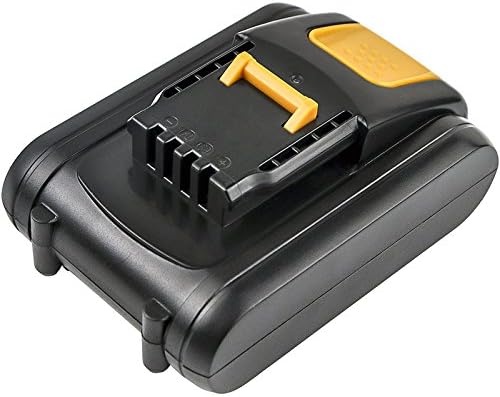
Figure 1: Top-down view of the TrustCell replacement battery, showing the connection interface.
2. Specifications
| Battery Type | Li-ion |
| Voltage | 20V |
| Capacity | 2000mAh |
| Energy Rate | 40Wh |
| Model Number | CS-WRX352PW |
| Dimensions (L x W x H) | 2.94 x 1.81 x 4.31 inches (74.70 x 46.00 x 109.50 mm) |
| Certifications | ISO9001, RoHS, CE, UN38.3, MSDS |
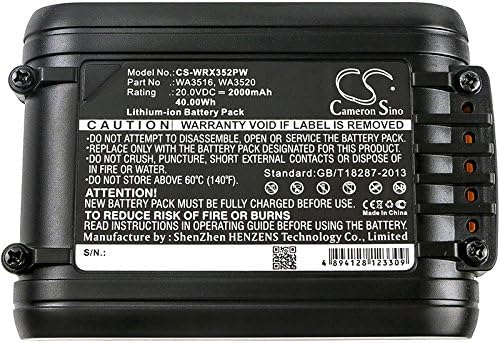
Figure 2: Detailed view of the battery label, displaying specifications and important warnings.
3. Setup and Initial Use
3.1 Initial Charging
For optimal performance, a new battery should undergo 2 to 3 complete charge and discharge cycles before regular use. This process helps to calibrate the battery's capacity and extend its overall lifespan.
3.2 Installation
When installing the battery into your Pattfield PE-20 series power tool, ensure the connector is properly aligned and securely seated. A firm click usually indicates correct installation. Do not force the battery into place if it does not fit easily.

Figure 3: Bottom view of the battery, highlighting the connection terminals for proper installation.
4. Operating Guidelines
4.1 Charging
Always use a compatible charger designed for Li-ion batteries. Using low-quality or incompatible third-party chargers can significantly shorten the battery's life and may pose safety risks. Monitor the charging process and disconnect the battery once fully charged.
4.2 Usage
Operate your power tool within its recommended parameters. Avoid completely draining the battery frequently, as this can reduce its lifespan. For best results, recharge the battery before it is fully depleted.
5. Maintenance and Storage
5.1 Cleaning
Keep the battery terminals clean and free from dust and debris. Use a dry, soft cloth to wipe the battery. Do not use liquids or abrasive cleaners.
5.2 Storage
If storing the battery for an extended period, ensure it is partially charged (around 50-60% capacity). Store the battery in a cool, dry place, away from direct sunlight and extreme temperatures. Avoid storing above 60°C (140°F).
6. Safety Precautions
- Do not disassemble the battery pack. Unauthorized disassembly can lead to electric shock, fire, or explosion.
- Do not dispose of in fire or water. Exposure to fire or water can cause the battery to explode or leak hazardous substances.
- Do not store above 60°C (140°F). High temperatures can damage the battery and pose a fire risk.
- Do not crush, puncture, or short circuit the battery. Physical damage can lead to internal short circuits and overheating.
- Keep the battery out of reach of children.
- If the battery shows signs of damage, leakage, or overheating, discontinue use immediately and dispose of it properly according to local regulations.
7. Troubleshooting
7.1 Battery Not Charging
- Ensure the charger is properly connected to a power source and the battery.
- Verify that the charger is compatible with Li-ion 20V batteries.
- Check for any visible damage to the battery or charger terminals.
- Allow the battery to cool down if it is hot from recent use, as some chargers have temperature protection.
7.2 Reduced Run Time
- Ensure the battery has completed 2-3 full charge/discharge cycles for optimal performance.
- Avoid operating the tool in extreme temperatures, which can affect battery efficiency.
- The battery may be nearing the end of its service life.
7.3 Battery Not Fitting in Tool
- Double-check the compatibility with your specific Pattfield PE-20 series model.
- Ensure there are no obstructions in the battery compartment of the tool.
- Align the battery correctly with the tool's interface before attempting to insert it.
8. Warranty and Support
This TrustCell battery comes with a 1-year warranty for refund or replacement. We are committed to providing prompt after-sales service 24 hours a day, 7 days a week.
If you encounter any problems or have questions regarding your battery, please do not hesitate to contact us via email. Our support team will respond within 24 hours to assist you.