
Introduction
This user manual provides essential information for the safe and effective use of your TrustCell replacement battery, model CS-ECH311BL, part number 0401BA000311. Please read this manual thoroughly before installation and use to ensure optimal performance and longevity of the battery.
Product Overview and Specifications
The TrustCell replacement battery is designed to provide reliable power for compatible devices, specifically ELCA Alpi, EVO, Mago-EVO, MITO-Vetta, and Vetta models. It is a high-quality Li-Polymer battery manufactured to precise specifications.
Key Features:
- Exact specifications as the original battery.
- Strict spec detection and use testing for safety and durability.
- Built-in protection against overcharge, over-discharge, over-voltage, and short circuit.
- Certified with ISO9001, RoHS, CE, UN38.3, and MSDS.
Technical Specifications:
| Model No. | CS-ECH311BL |
| Part No. | 0401BA000311 |
| Battery Type | Li-Polymer |
| Capacity | 1250mAh |
| Voltage | 3.7V |
| Energy Rate | 4.63Wh |
| Dimensions (L x W x H) | 59.70 x 37.10 x 6.30 mm (2.35 x 1.46 x 0.25 inches) |
| Gross Weight | 47.0g (1.66 ounces) |
| UPC/EAN | 4894128126966 |
Setup and Installation
Before installing the new battery, please ensure your device is powered off and disconnected from any power source. Refer to your device's original manual for specific battery compartment access instructions.
- Compatibility Check: Carefully verify that the model number of your device and the part number of your original battery match the specifications of this replacement battery (Model No: CS-ECH311BL, Part No: 0401BA000311).
- Prepare Device: Power off your device and open the battery compartment.
- Remove Old Battery: Gently remove the old battery from the compartment.
- Insert New Battery: Carefully insert the TrustCell replacement battery into the compartment, ensuring correct orientation.
- Connect Securely: Be sure the battery connector is properly and firmly connected to your device's port.

Image: Close-up view of the battery's connector, highlighting the three-pin white connector and its attached red, white, and black wires. This connector must be securely plugged into the device.
- Close Compartment: Close the battery compartment securely.
- Initial Charge: A new battery will achieve its best performance after 2 or 3 complete cycles of charge and discharge. Fully charge the battery before initial use.
Operating Instructions
Once installed, the battery operates as the primary power source for your compatible device. The following points are important for optimal operation:
- First Use: Ensure the new battery pack is fully charged before its first use.
- Charging Cycles: For best performance and battery longevity, allow the battery to undergo 2 to 3 complete charge and discharge cycles initially.
- Charging Equipment: Always use the original or a high-quality, compatible charger provided with your device. Do not use low-quality third-party adapter chargers, as this can shorten the battery's life and pose safety risks.
- Regular Use: Use your device as normal. The battery's intelligent protection circuit will manage charging and discharging safely.
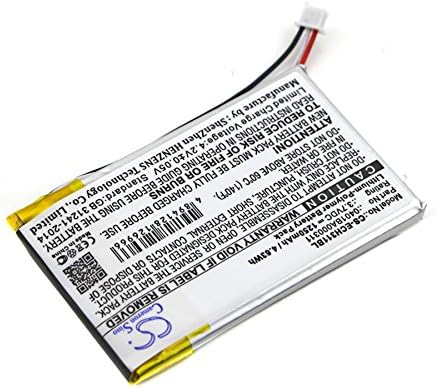
Image: The TrustCell replacement battery, illustrating its overall design and the attached wiring. This image represents the product as it would appear before installation.
Maintenance
Proper maintenance can extend the life of your battery. Follow these guidelines:
- Regular Charging: Avoid completely draining the battery frequently. It is best to recharge before it reaches critically low levels.
- Storage: If storing the battery for an extended period, store it in a cool, dry place at approximately 50% charge. Do not store above 60℃ (140℉).
- Cleaning: Keep the battery contacts clean. Use a dry, soft cloth to wipe them if necessary.
- Avoid Extreme Temperatures: Do not expose the battery to extreme heat or cold, as this can degrade performance and lifespan.
Troubleshooting
If you encounter issues with your battery, consider the following common solutions:
- Battery Not Charging:
- Ensure the battery connector is securely plugged into the device.
- Verify that the charger and power outlet are functioning correctly.
- Try a different compatible charger if available.
- Short Battery Life:
- Ensure the battery has completed 2-3 full charge/discharge cycles.
- Avoid using low-quality third-party chargers.
- Check for excessive background processes or high power consumption by the device.
- Device Not Powering On:
- Confirm the battery is correctly installed and fully charged.
- Check if the device itself has other issues unrelated to the battery.
If problems persist, please refer to the "Warranty and Support" section for contact information.
Safety Precautions and Cautions
Failure to follow these safety instructions can result in fire, electric shock, injury, or damage to the battery or device.
- Do NOT Disassemble: Do not attempt to disassemble, open, or service the battery pack. This will void the warranty and can be dangerous.
- Do NOT Crush or Puncture: Do not crush, puncture, short external contacts, or dispose of in fire or water.
- Temperature Limits: Do not store above 60℃ (140℉). Avoid exposing the battery to direct sunlight or extreme heat sources.
- Water Exposure: Do not expose the battery to water or other liquids.
- Charging: Only use chargers specified for this type of battery. Overcharging or using incompatible chargers can cause damage or fire.
- Handling: Handle the battery with care. Avoid dropping it or subjecting it to strong impacts.
- Children: Keep batteries out of reach of children.
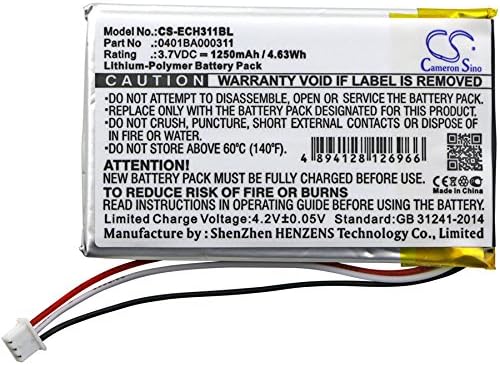
Image: Detailed view of the battery's information label, clearly displaying the model number, part number, voltage, capacity, and critical safety warnings regarding disassembly, crushing, and temperature limits.
Disposal Information
This product contains a Lithium-Polymer battery and should not be disposed of with general household waste. Please dispose of the battery responsibly at a designated recycling facility. Follow local regulations for battery disposal to protect the environment.
Warranty and Support
TrustCell provides a comprehensive warranty and dedicated customer support for this product.
- Warranty Period: We offer a refund or replacement for 1 year from the date of purchase.
- Customer Service: For any questions, concerns, or support needs, please contact us via email. Our customer service team is available 24/7 and aims to reply within 24 hours.
- Contact: Refer to your purchase documentation or the seller's contact information for email support.