
Introduction
This manual provides essential instructions for the TollCor 7500mAh/18.0V Li-ion replacement battery, model CS-MKT185PH. This battery is designed as a high-capacity replacement for various Makita 18V power tools. Please read this manual thoroughly before initial use to ensure safe and optimal performance.
Important Safety Instructions
Failure to follow these safety instructions may result in fire, electric shock, or injury.
- DO NOT ATTEMPT TO DISASSEMBLE, OPEN OR SERVICE THE BATTERY PACK.
- REPLACE ONLY WITH THE BATTERY PACK DESIGNATED FOR THIS PRODUCT.
- DO NOT CRUSH, PUNCTURE, SHORT EXTERNAL CONTACTS OR DISPOSE OF IN FIRE OR WATER.
- DO NOT STORE ABOVE 60°C (140°F).
- NEW BATTERY PACK MUST BE FULLY CHARGED BEFORE USE.
- TO REDUCE RISK OF FIRE OR BURNS, READ INSTRUCTIONS IN THE OPERATING GUIDE BEFORE USING THE BATTERY.

Image: Close-up of the battery's informational label, detailing model number, part numbers, rating, and critical safety warnings. This label is crucial for identifying the battery and understanding its safe handling requirements.
Product Overview
The TollCor CS-MKT185PH is a high-capacity 18.0V Li-ion battery designed to power a range of Makita 18V cordless tools. It offers a capacity of 7500mAh (135Wh) for extended run times.

Image: The TollCor 7500mAh/18.0V Li-ion replacement battery, showcasing its design and connection interface. This is the primary product being described.
Compatible Part Numbers:
- 194309-1
- 197265-04
- 197265-4
- 197422-4
- BL1415
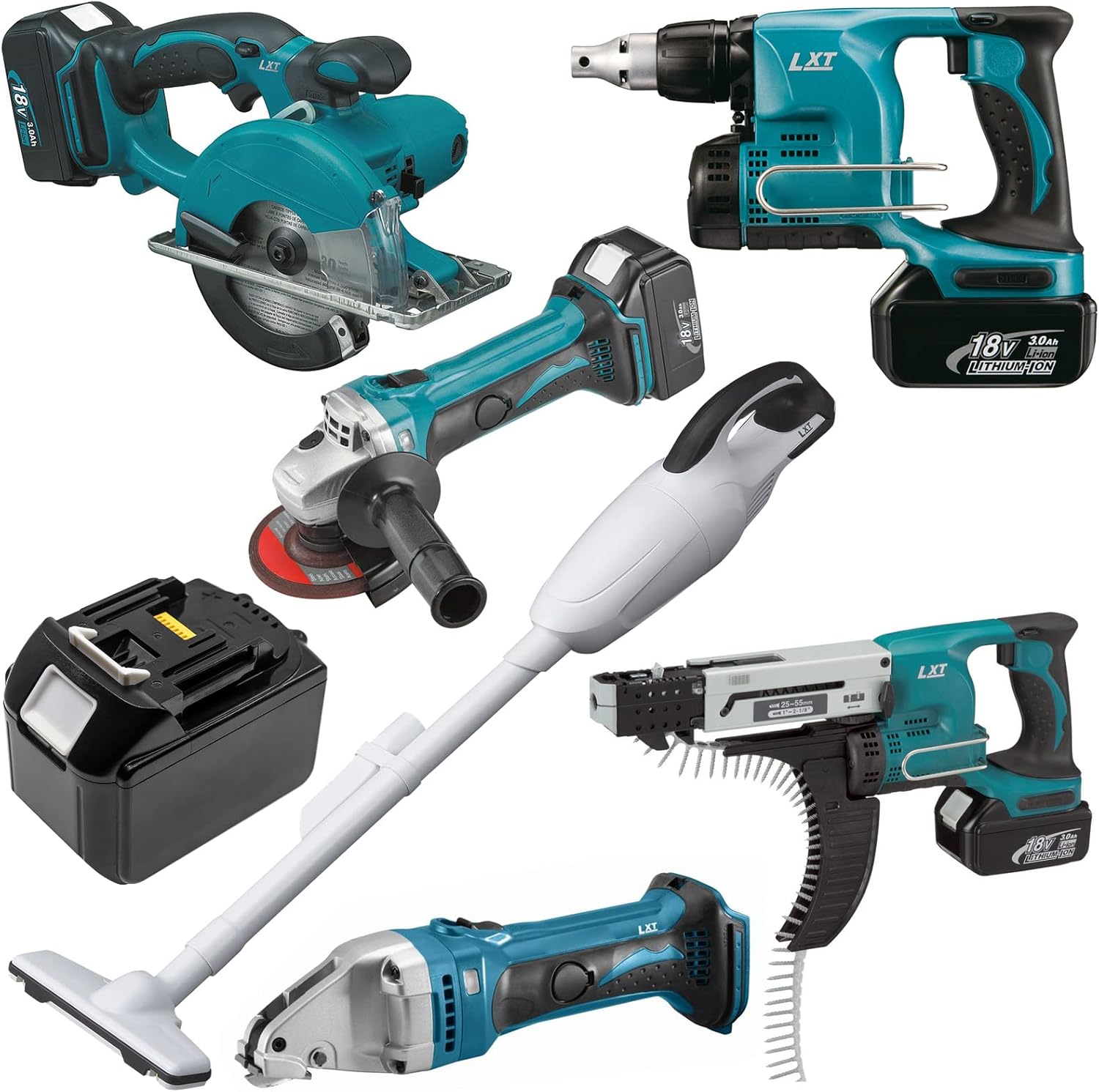
Image: The TollCor replacement battery displayed alongside several Makita 18V power tools, illustrating its broad compatibility with the Makita LXT system. Tools include a circular saw, impact driver, angle grinder, vacuum, and drywall screwdriver.
Setup
- Initial Charge: Fully charge the new battery before its first use. Use a compatible Makita 18V Li-ion battery charger.
- Installation: Align the battery with the battery slot on your Makita 18V power tool. Slide the battery into the tool until it clicks securely into place. Ensure it is firmly seated to prevent accidental detachment during operation.
- Removal: To remove the battery, press the release button(s) on the battery pack and slide it out of the tool.
Operating Instructions
- Battery Level: Check the battery charge indicator on the battery pack or your power tool before starting work.
- Optimal Performance: For best results and maximum run time, use a fully charged battery.
- Tool Compatibility: This battery is designed for Makita 18V LXT series tools. Refer to your tool's manual for specific battery requirements.
- Storage During Use: If the tool will not be used for a short period, it is generally safe to leave the battery installed. For longer periods of inactivity, remove the battery.
Maintenance
- Cleaning: Keep the battery terminals clean and free of dirt or debris. Use a dry cloth to wipe them if necessary. Do not use liquids or solvents.
- Storage: Store the battery in a cool, dry place, away from direct sunlight, moisture, and extreme temperatures (below 0°C/32°F or above 40°C/104°F).
- Long-Term Storage: For extended storage, it is recommended to store the battery at approximately 50% charge. Avoid storing fully discharged or fully charged batteries for prolonged periods to maximize battery life.
- Disposal: Dispose of depleted batteries responsibly according to local regulations. Do not dispose of in household waste or fire.
Troubleshooting
- Battery Not Charging:
- Ensure the charger is properly plugged into a working power outlet.
- Check for any obstructions or dirt on the battery and charger terminals.
- Try re-inserting the battery into the charger.
- If possible, test with another compatible battery or charger to isolate the issue.
- Tool Not Powering On:
- Verify the battery is fully charged and securely inserted into the tool.
- Check the tool's power switch and other controls for proper function.
- Ensure the tool itself is not faulty.
- Reduced Run Time:
- Confirm the battery is fully charged before use.
- Battery capacity naturally degrades over time and with use. If the battery is old, it may be nearing the end of its service life.
- Operating tools under heavy load will consume battery power faster.
Specifications
| Model Number | CS-MKT185PH |
| Battery Type | Li-ion |
| Voltage | 18.0V |
| Capacity | 7500mAh (135Wh) |
| Dimensions | 2.95 x 3.41 x 4.57 inches (75 x 86.6 x 116 mm) |
| Item Weight | 2.32 pounds (1053.5g) |
| Manufacturer | TollCor |
Warranty and Support
This TollCor replacement battery comes with the following assurances:
- 30-Day Money Back Guarantee: If you are not satisfied with your purchase, you may return it within 30 days for a full refund.
- 365-Day Warranty: The battery is covered by a 365-day warranty against manufacturing defects.
- Customer Support: For any questions, concerns, or support needs, please contact us through the platform where you made your purchase. We aim to provide timely feedback and assistance.