
TrustCell CS-IPH530SL
TrustCell Replacement Battery User Manual
Model: CS-IPH530SL
Introduction
This manual provides essential information for the safe and effective use of your TrustCell replacement battery. Designed for compatibility with various Apple devices, this high-quality Lithium Polymer battery ensures reliable performance. Please read this manual thoroughly before installation and use.
This battery is compatible with original part numbers: 616-0652, 616-0719, 616-0720, 616-0722, 616-0728.
Product Specifications
| Specification | Detail |
|---|---|
| Battery Type | Lithium Polymer |
| Capacity | 1700 mAh |
| Voltage | 3.8 VDC |
| Energy Rate | 6.46 Wh |
| Model Number | CS-IPH530SL |
| Dimensions (L x W x H) | 91 x 32.90 x 4.50 mm (approx.) |
| Weight | 63 g |
| Certifications | ISO9001, RoHS, CE, UN38.3, MSDS |
| Safety Protections | Overcharge, Over-discharge, Over-voltage, Short-circuit |

Image: Top view of the TrustCell CS-IPH530SL replacement battery, showing its model number, capacity, voltage, and part number.
Setup and Installation
Before installing the new battery, ensure your device is powered off and disconnected from any power source. Battery replacement in electronic devices often requires specific tools and technical knowledge. If you are unsure about the installation process, it is highly recommended to seek professional assistance.
Important Considerations Before Installation:
- Device Compatibility: Carefully verify your device's model number and the original battery's part number to confirm compatibility with this TrustCell battery.
- Static Electricity: Take precautions against static electricity, which can damage electronic components. Use an anti-static wrist strap if available.
- Connector Alignment: During installation, ensure the battery connector is properly aligned and securely connected to your device's motherboard. Improper connection can lead to malfunction or damage.
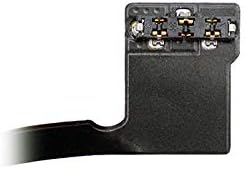
Image: Close-up view of the battery connector, highlighting the contact pins for proper device connection.
Operating and Initial Use
After successful installation, your new TrustCell battery is ready for use. To achieve optimal performance and extend battery life, follow these guidelines:
- Initial Charging Cycles: A new battery will reach its best performance after 2 to 3 complete charge and discharge cycles. Fully charge the battery, then use the device until the battery is nearly depleted, and repeat this process a few times.
- Charging Practices: Always use a high-quality, compatible charger for your device. Avoid using low-quality third-party chargers, as they can shorten the battery's lifespan and potentially damage your device.
- Regular Use: For best results, use your device regularly. Avoid leaving the battery fully charged or fully discharged for extended periods.
Maintenance
Proper maintenance can significantly extend the life and performance of your TrustCell battery:
- Temperature Control: Avoid exposing the battery to extreme temperatures, both hot and cold. High temperatures can degrade battery capacity, while very low temperatures can temporarily reduce performance.
- Storage: If storing the device or battery for an extended period, ensure the battery is charged to about 50-60%. Store it in a cool, dry place.
- Avoid Deep Discharges: While initial calibration requires full discharge, try to avoid regularly letting the battery drain completely to 0%.
- Clean Contacts: Periodically check and gently clean the battery contacts if accessible, ensuring good conductivity.
Troubleshooting
If you encounter issues with your TrustCell battery, consider the following common solutions:
- Battery Not Charging:
- Ensure the charger and charging cable are functioning correctly.
- Check that the battery connector is securely seated in the device.
- Try restarting your device.
- Poor Battery Life:
- Perform 2-3 full charge/discharge cycles to calibrate the new battery.
- Check for background apps or settings on your device that might be consuming excessive power.
- Ensure you are using a quality charger.
- Device Not Powering On:
- Verify the battery is fully charged.
- Re-check the battery connection inside the device.
- Confirm the battery is compatible with your specific device model.
If problems persist after attempting these steps, please contact TrustCell customer support for further assistance.
Safety Precautions
To prevent injury, damage to your device, or battery failure, always adhere to the following safety guidelines:
- Do NOT Disassemble: Never attempt to disassemble, puncture, or modify the battery. This can lead to short circuits, fire, or explosion.
- Avoid Extreme Conditions: Do not expose the battery to fire, water, or temperatures exceeding 60°C (140°F).
- Proper Disposal: Do not dispose of the battery in household waste. Lithium-ion batteries must be recycled properly. Consult your local regulations for battery recycling.
- Handle with Care: Avoid dropping the battery or subjecting it to strong impacts.
- Keep Away from Children: Store the battery out of reach of children.
Warranty and Support
TrustCell stands behind the quality of its products. This battery comes with a 1-year refund or replacement warranty from the date of purchase.
For any questions, concerns, or technical support, please do not hesitate to contact our customer service team. We offer 24/7 fast after-sales service and aim to respond to all inquiries within 24 hours.
Contact Information: Please refer to the contact details provided with your purchase or on the official TrustCell website.