
1. Important Safety Information
Please read and understand all safety instructions before using this product. Failure to follow these instructions may result in fire, electric shock, explosion, or other hazards.
- Do not disassemble the battery pack. Disassembly can lead to internal short circuits, overheating, or leakage.
- Do not dispose of in fire or water. Exposure to high temperatures or water can cause the battery to explode or leak.
- Do not store above 60°C (140°F). High temperatures can degrade battery performance and pose a safety risk.
- Do not crush, puncture, or short external contacts. This can cause internal damage and lead to overheating or fire.
- Replace only with the battery pack designated for your device. Using an incompatible battery may cause damage or safety hazards.
- Warranty is void if the label is removed. The product label contains important identification and safety information.
2. Product Overview
The TrustCell CS-PLC511SL is a high-quality Li-MnO2 (Lithium Manganese Dioxide) replacement battery designed for various Allen Bradley PLC systems. This battery provides reliable power with a capacity of 2200mAh and a nominal voltage of 3.0V.
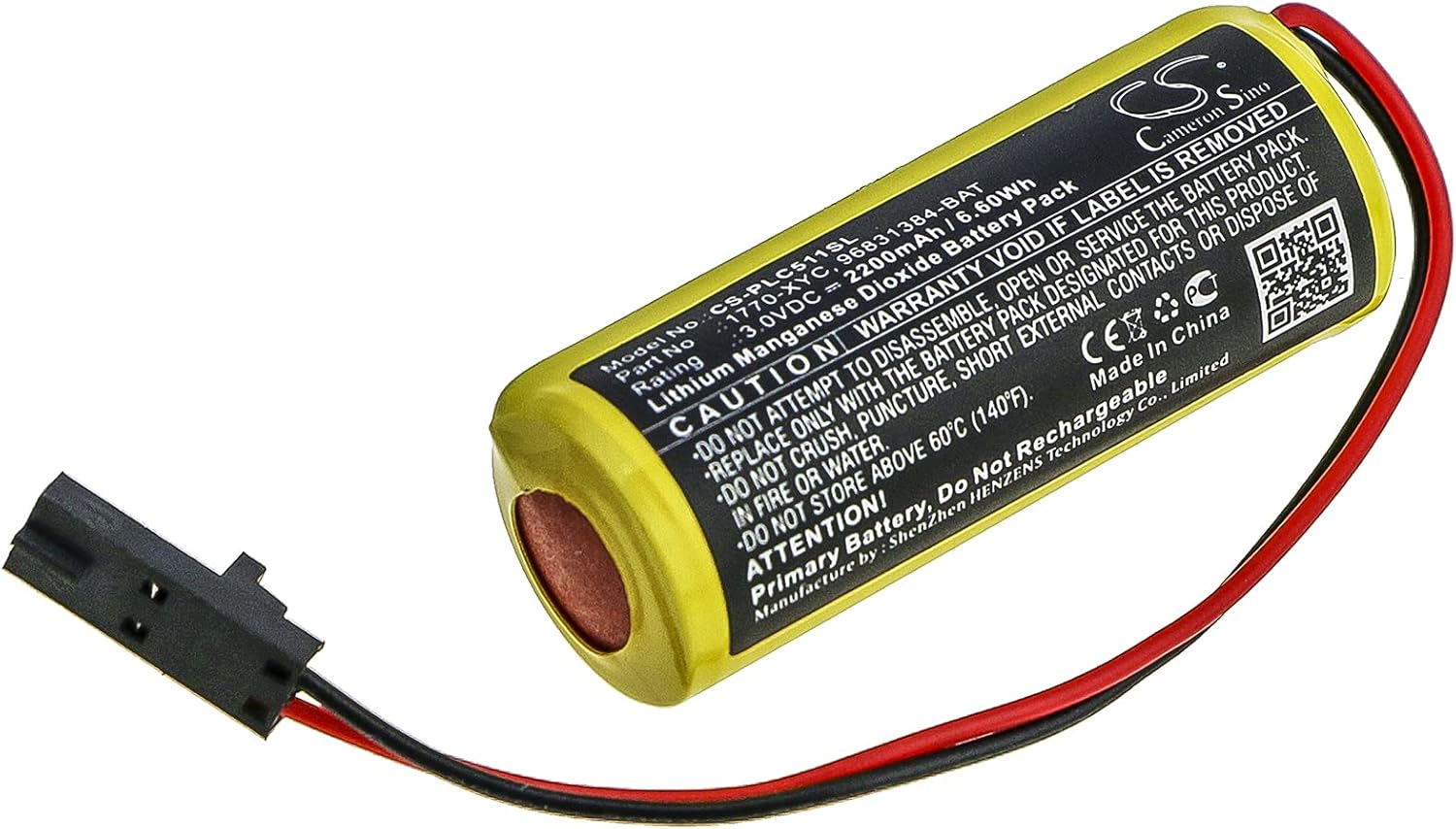
Image 2.1: TrustCell CS-PLC511SL replacement battery, showing the yellow battery cell and the black two-pin connector with red and black wires.
Key Features:
- Compatibility: Designed to replace part numbers 1770-XYC, 1770-XYC/A, 9556902-LITH, and 96831384-BAT. Compatible with Allen Bradley 1771-DMC1, 1771-DMC4, 1785-L11B, 1785-L16B, 1785-L20B, and 1785-L20BK systems.
- Specifications: Li-MnO2 chemistry, 3.0V voltage, 2200mAh capacity, 6.60Wh energy rating.
- Safety Features: Built-in protection against overcharge, over-discharge, over-voltage, and short circuits to ensure safe and durable operation.
- Certifications: ISO9001, RoHS, CE, UN38.3, and MSDS certified for quality and safety.
3. Setup and Installation
Before installing the new battery, ensure your device is powered off and disconnected from any power source. Refer to your device's specific manual for detailed battery replacement procedures.
- Identify the old battery: Locate the existing battery in your device. Note its orientation and how it is connected.
- Disconnect the old battery: Carefully disconnect the old battery's connector from the device's port. Avoid pulling on the wires.
- Remove the old battery: Gently remove the old battery from its compartment.
- Prepare the new battery: Ensure the new TrustCell CS-PLC511SL battery is free from any visible damage.
- Connect the new battery: Align the connector of the new battery with the corresponding port on your device. Push firmly but gently until the connector is securely seated. Ensure the red wire connects to the positive terminal and the black wire to the negative terminal, if applicable to your device's connector design.
- Secure the new battery: Place the new battery into the compartment, ensuring it fits snugly and does not obstruct any other components.
- Power on the device: Reconnect your device to its power source and power it on to verify proper operation.


Image 3.1: Close-up views of the two-pin battery connector, showing the red and black wires.
Important Note: A new battery will achieve its best performance after 2 or 3 complete cycles of charge and discharge. For this specific Li-MnO2 battery, which is a primary (non-rechargeable) battery, this refers to the initial stabilization period within the device.
4. Operating Instructions
This TrustCell battery is a primary (non-rechargeable) lithium manganese dioxide battery designed to provide stable power to compatible Allen Bradley PLC systems. It is intended for continuous use until its capacity is depleted.
- Non-Rechargeable: This battery is explicitly designed as a primary battery and must not be recharged. Attempting to recharge a non-rechargeable battery can lead to overheating, leakage, or explosion.
- Device Compatibility: Ensure the battery is used only with devices specified in the compatibility list (Allen Bradley 1771-DMC1, 1771-DMC4, 1785-L11B, 1785-L16B, 1785-L20B, 1785-L20BK).
- Power Monitoring: Monitor your device's battery indicator (if available) to determine when replacement is necessary.
- Adapter Charger: If your device uses an external power adapter, avoid using low-quality third-party chargers, as this can negatively impact the device's overall lifespan and potentially the battery's performance.
5. Maintenance and Storage
Proper maintenance and storage can help ensure the longevity and safe operation of your battery.
- Storage Temperature: Store unused batteries in a cool, dry place, ideally between 10°C and 25°C (50°F and 77°F). Do not store above 60°C (140°F).
- Avoid Extreme Conditions: Do not expose the battery to direct sunlight, high humidity, or extreme temperatures (hot or cold).
- Keep Dry: Prevent the battery from coming into contact with water or other liquids.
- Proper Disposal: When the battery reaches the end of its life, dispose of it according to local regulations for lithium batteries. Do not dispose of in household waste or fire.
- Handling: Handle the battery carefully. Avoid dropping it or subjecting it to strong impacts.
6. Troubleshooting
If you encounter issues with your new battery, consider the following troubleshooting steps:
- Device Not Powering On:
- Ensure the battery connector is securely and correctly plugged into the device.
- Verify that the battery is the correct model for your device.
- Check if the device itself has other power-related issues (e.g., power switch, internal fuse).
- Short Battery Life:
- Confirm the battery is genuinely new and not an old stock item.
- Ensure the operating environment temperature is within the recommended range.
- Verify that the device is not drawing excessive power due to a fault.
- Physical Damage:
- If the battery appears swollen, leaking, or damaged, discontinue use immediately and dispose of it safely. Do not attempt to use a damaged battery.
If problems persist after following these steps, please contact customer support for further assistance.
7. Specifications
| Model Number | CS-PLC511SL |
| Brand | TrustCell |
| Battery Type | Li-MnO2 (Lithium Manganese Dioxide) |
| Voltage | 3.0V |
| Capacity | 2200mAh |
| Energy Rating | 6.60Wh |
| Dimensions (L x W x H) | 45.70 x 18.30 x 17.00 mm (approx. 1.8 x 0.72 x 0.67 inches) |
| Gross Weight | 49.4g |
| Compatible Part Numbers | 1770-XYC, 1770-XYC/A, 9556902-LITH, 96831384-BAT |
| Compatible Devices | Allen Bradley 1771-DMC1, 1771-DMC4, 1785-L11B, 1785-L16B, 1785-L20B, 1785-L20BK |
| Certifications | ISO9001, RoHS, CE, UN38.3, MSDS |
8. Warranty and Support
TrustCell stands behind the quality of its products.
- Warranty: This product comes with a 1-year warranty for refund or replacement.
- Customer Support: For any questions, concerns, or issues, please contact our customer service team. We offer 24/7 prompt after-sales service.
- Contact: Refer to your purchase documentation or the seller's contact information for details on how to reach support.