
TrustCell CS-MVS500VX
TrustCell Replacement Battery for Flyco FC9601, FC9602 Robot Vacuum (Model CS-MVS500VX) Instruction Manual
Model: CS-MVS500VX | Brand: TrustCell
Introduction
This manual provides essential instructions for the safe and effective use of your TrustCell CS-MVS500VX replacement battery. This battery is designed for compatibility with Flyco FC9601 and FC9602 robot vacuum models. Please read this manual thoroughly before installation and use to ensure optimal performance and longevity of your battery.
Important Safety Instructions
Failure to follow these safety instructions may result in fire, electric shock, or other injury or damage.
- Do not disassemble: Attempting to disassemble the battery can cause damage and void the warranty.
- Do not dispose of in fire or water: Exposure to fire or water can cause the battery to explode or leak.
- Do not store above 60 ℃ (140 ℉): High temperatures can degrade battery performance and pose a safety risk.
- Do not crush, puncture, or expose to external contacts: Physical damage can lead to internal short circuits and hazards.
- Replace only with the battery pack designated for this product: Using an incorrect battery can cause damage to the device.
Setup and Installation
- Prepare the Device: Ensure your Flyco FC9601 or FC9602 robot vacuum is powered off and unplugged from its charging base before beginning installation.
- Locate Battery Compartment: Refer to your robot vacuum's original manual to locate and open the battery compartment. This is typically on the underside of the device.
- Remove Old Battery: Carefully disconnect the old battery's connector from the device's port. Remove the old battery from the compartment.
- Install New Battery: Insert the TrustCell CS-MVS500VX replacement battery into the compartment. Ensure the battery is oriented correctly.
- Connect Battery: Securely connect the battery's connector to the device's port. Ensure it is properly seated.

Image Description: A close-up view of the white plastic connector on the battery, showing the red and black wires. This illustrates the connection point for the robot vacuum.
- Close Compartment: Close the battery compartment cover and secure it according to your vacuum's design.
- Initial Charge: Place the robot vacuum on its charging base to begin the initial charge. A new battery will achieve its best performance after 2 or 3 complete cycles of charge and discharge.
Important: When installing, be sure the connector has been properly connected to your device.
Operating Instructions
The TrustCell CS-MVS500VX battery is designed for seamless integration with your Flyco FC9601 or FC9602 robot vacuum. Once installed, the vacuum's charging system will manage the battery's power.
Charging
- Always use the original charging base and power adapter provided with your Flyco robot vacuum.
- A new battery will achieve its best performance after 2 or 3 complete cycles of charge and discharge. Allow the battery to fully charge, then allow the vacuum to run until the battery is depleted, and repeat this process a few times.
- Avoid using low-quality third-party adapter chargers, as this can shorten the battery's lifespan.

Image Description: The TrustCell replacement battery is shown alongside a red Flyco robot vacuum cleaner, illustrating the product's intended use.
Battery Maintenance
Proper maintenance can extend the life of your TrustCell replacement battery:
- Regular Use: For optimal battery health, use your robot vacuum regularly.
- Storage: If storing the battery for an extended period, ensure it is charged to approximately 50-70% and stored in a cool, dry place, away from direct sunlight and extreme temperatures.
- Temperature: Avoid exposing the battery to temperatures above 60 ℃ (140 ℉) or below freezing.
- Cleaning: Keep the battery and its contacts clean and dry. Use a soft, dry cloth to wipe away any dust or debris.
Troubleshooting
If you encounter issues with your TrustCell replacement battery, consider the following:
- Battery Not Charging:
- Ensure the battery connector is securely plugged into the robot vacuum.
- Verify that the robot vacuum is properly seated on its charging base and the base is receiving power.
- Confirm that you are using the original charging adapter for your robot vacuum.
- Shortened Run Time:
- Perform 2-3 full charge/discharge cycles to calibrate the new battery.
- Ensure the battery is fully charged before each use.
- Check for any obstructions in the vacuum that might be causing it to work harder and drain the battery faster.
- Vacuum Not Powering On:
- Confirm the battery is correctly installed and connected.
- Ensure the battery has sufficient charge.
- If the issue persists, the problem might be with the robot vacuum itself, not the battery.
If these steps do not resolve the issue, please refer to the "Support and Contact" section for further assistance.
Product Specifications
| Model Number | CS-MVS500VX |
| Part Number | LI-026418 |
| Battery Type | Lithium-Ion (Li-ion) |
| Voltage | 14.8V |
| Capacity | 2600mAh |
| Energy Rate | 38.48Wh |
| Dimensions | 69.40 x 37.30 x 37.30 mm (2.73 x 1.47 x 1.47 inches) |
| Weight | Approximately 260g (9.2 ounces) |
| Certifications | ISO9001, RoHS, CE, UN38.3, MSDS |
| Compatibility | Flyco FC9601, FC9602 Robot Vacuum |
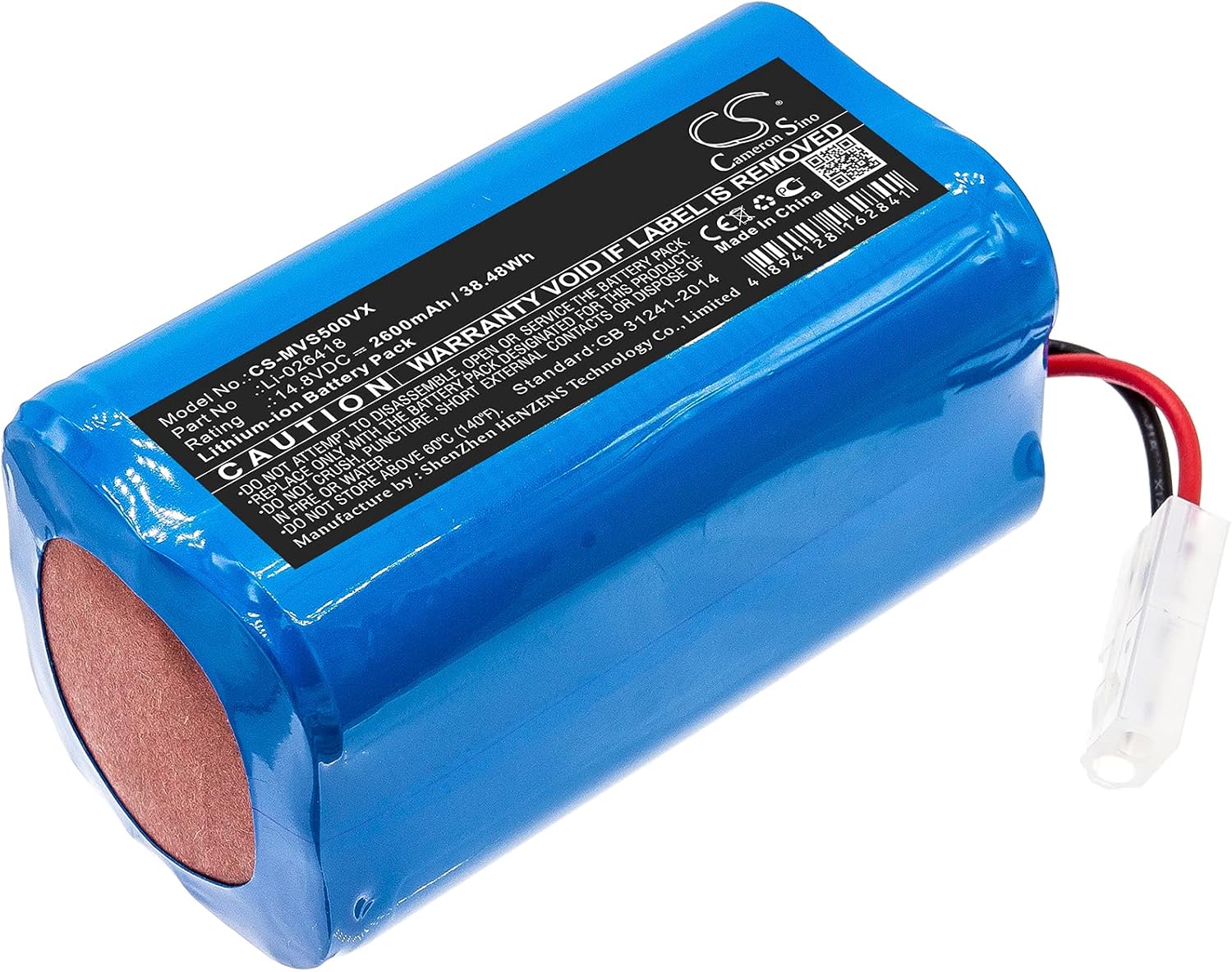
Image Description: A clear view of the TrustCell CS-MVS500VX replacement battery, highlighting its label with model number, voltage, capacity, and safety warnings. This image provides visual confirmation of the product's specifications.
Warranty and Support
Warranty Information
This TrustCell replacement battery comes with a 1-year refund or replacement warranty from the date of purchase. This warranty covers manufacturing defects and performance issues under normal use.
The warranty is void if the battery has been disassembled, exposed to fire or water, stored improperly, or used with non-compatible devices or chargers.
Support and Contact
If you have any questions, concerns, or require assistance with your TrustCell CS-MVS500VX battery, please contact our customer support team.
We offer 24/7 prompt after-sales service. You can reach us via email, and we commit to replying within 24 hours.
For more information about TrustCell products, you may visit the manufacturer's website: www.cameronsino.com